
1. Introduction
This manual provides detailed instructions for the assembly, operation, and maintenance of your WLIVE 58-Inch Fireplace TV Stand with LED Lights. Please read this manual thoroughly before assembly and use to ensure safe and correct operation. Keep this manual for future reference.
2. Important Safety Information
Please observe the following safety precautions to prevent injury or damage to the product:
- Ensure all components are present and undamaged before assembly. Do not proceed with assembly if any parts are missing or damaged.
- Assembly should be performed on a soft, clean surface to prevent scratches.
- Do not overtighten screws during assembly, as this may damage the material.
- Keep children and pets away from the assembly area.
- The electric fireplace unit must be connected to a grounded electrical outlet. Do not use extension cords or power strips.
- Do not block the air vents of the electric fireplace. Maintain adequate clearance around the unit for proper ventilation.
- Never leave the electric fireplace unattended while operating.
- Do not place flammable materials near the fireplace unit.
- The TV stand has a maximum load capacity of 150 pounds for the top surface. Do not exceed this weight.
- Always unplug the fireplace unit before cleaning or performing any maintenance.
3. Package Contents
Your WLIVE Fireplace TV Stand is shipped in two separate packages, which may arrive on different days. Please verify all parts are received before beginning assembly.
- Package 1: TV Stand Components (wood panels, hardware, glass shelves, LED strips)
- Package 2: 18-inch Electric Fireplace Unit
Refer to the included parts list in each package for a complete inventory of components and hardware.
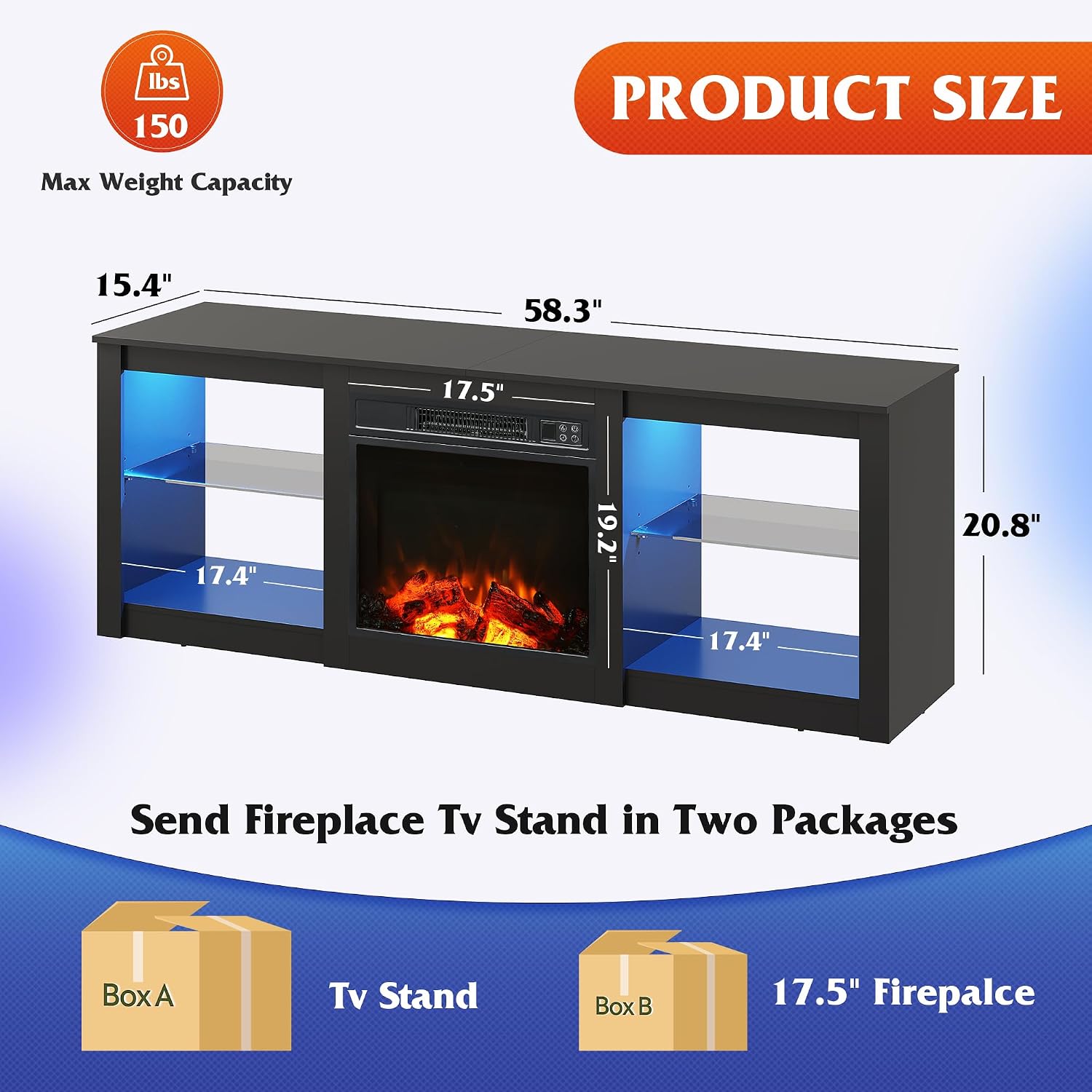
Image: The WLIVE Fireplace TV Stand is delivered in two distinct packages: one for the TV stand components and another for the 18-inch electric fireplace unit.
4. Assembly Instructions
Assembly of the WLIVE Fireplace TV Stand is designed to be straightforward. Follow the comprehensive step-by-step instructions provided in the packaging. All necessary accessories and tools are included.
- Unpack Components: Carefully remove all parts from both packages. Lay them out on a soft, clean surface to prevent scratches.
- Identify Parts: Match each component with the corresponding labels in the instruction manual.
- Assemble TV Stand Frame: Follow the diagrams to connect the main panels of the TV stand using the provided hardware. Ensure all connections are secure but do not overtighten.
- Install Glass Shelves: Insert the tempered glass shelves into the designated slots. The shelves are adjustable to three different height levels.
- Integrate Electric Fireplace: Once the main TV stand structure is complete, carefully slide the 18-inch electric fireplace unit into its central compartment. Ensure it fits securely.
- Attach LED Lights: Apply the LED light strips to the designated areas within the open storage compartments. Connect them according to the instructions.
- Final Checks: Verify that all screws are tightened, and the stand is stable.

Image: The adjustable glass shelves can be positioned at three different heights to accommodate various items.
5. Operating Instructions
5.1 Electric Fireplace Operation
The 18-inch electric fireplace unit provides realistic 3D flame effects and heating functionality. It can be operated via the control panel on the unit or the included remote control.
- Power On/Off: Press the power button on the unit or remote to turn the fireplace on or off.
- Flame Brightness: Adjust the flame effect brightness through 5 levels using the dedicated button on the control panel or remote.
- Heat Settings: Select between 2 heat settings to warm rooms up to 108 square feet. The heater operates at 1200W.
- Timer Function: Set an auto-off timer for 0.5 to 7.5 hours. The unit will automatically shut off after the set duration.
- Overheat Protection: The fireplace is equipped with an overheat protection system that will automatically shut off the unit if it becomes too hot, ensuring safety.
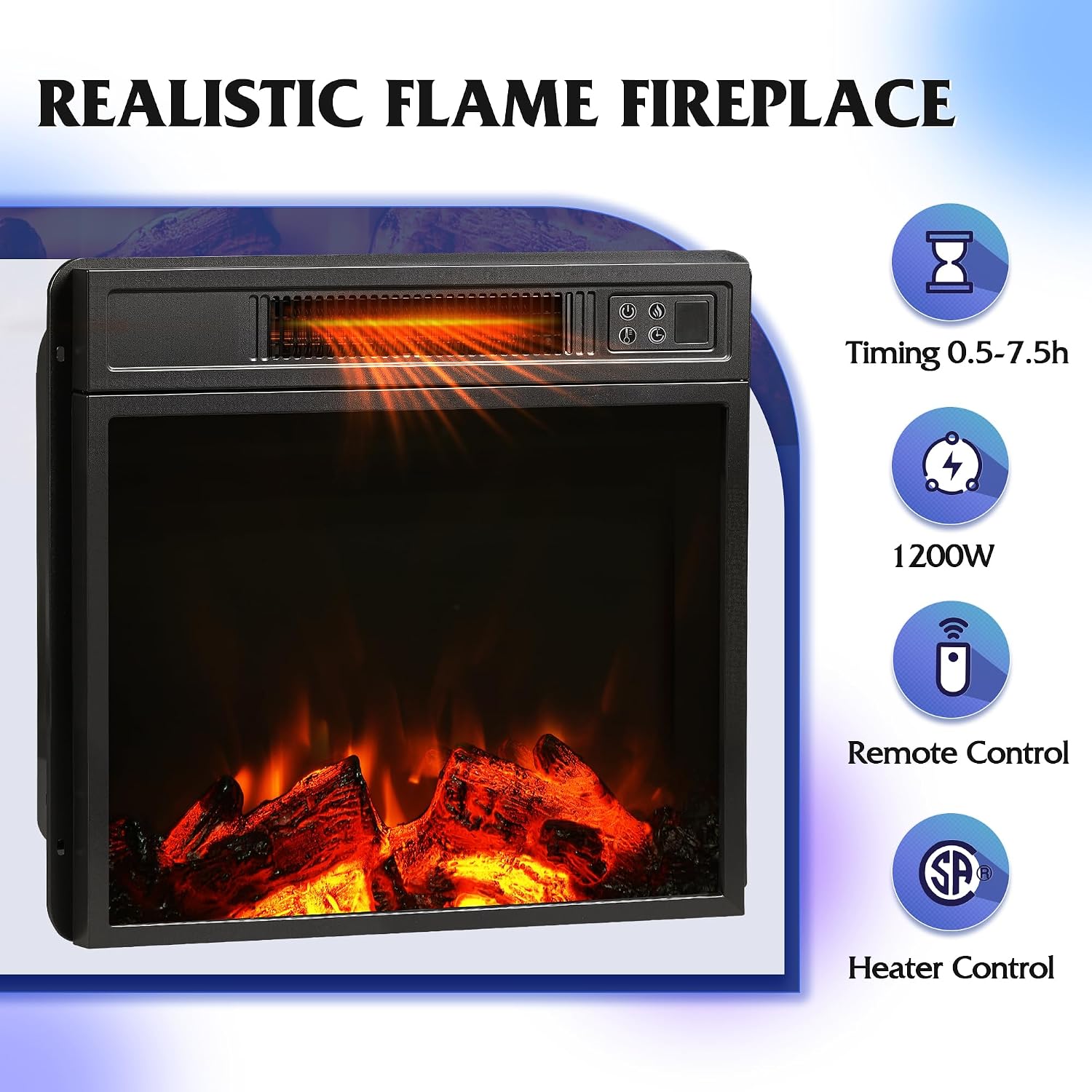
Image: The electric fireplace features a control panel and remote for adjusting flame brightness, heat settings, and timer.
5.2 LED Lights Operation
The integrated RGB LED lights can be customized to enhance your viewing or gaming experience. They are controlled by a dedicated remote control.
- Power On/Off: Use the LED remote control to turn the lights on or off.
- Color Selection: Choose from 7 main colors and various RGB combinations to set the desired mood.
- Brightness Adjustment: Adjust the brightness of the LED lights using the remote.

Image: The RGB LED lights offer 7 main colors and are controlled by a remote for customizable ambiance.
6. Maintenance
Regular maintenance will help prolong the life and appearance of your TV stand.
- Cleaning the Stand: Wipe surfaces with a soft, damp cloth. Avoid abrasive cleaners or harsh chemicals that could damage the finish. The open design facilitates easy cleaning.
- Cleaning the Fireplace: Ensure the fireplace unit is unplugged and cool before cleaning. Wipe the exterior with a soft, damp cloth. Do not spray liquids directly into the unit.
- Glass Shelves: Clean tempered glass shelves with a glass cleaner and a soft cloth.
- LED Remote Battery: The LED remote control may require a battery (not always included). Replace with the specified battery type when needed.
7. Troubleshooting
If you encounter issues with your WLIVE Fireplace TV Stand, refer to the following common problems and solutions:
| Problem | Possible Cause | Solution |
|---|---|---|
| Fireplace does not turn on. | Not plugged in; power switch off; circuit breaker tripped. | Ensure the unit is securely plugged into a grounded outlet. Check the main power switch on the unit. Reset the circuit breaker if necessary. |
| No heat from fireplace. | Heat function not activated; overheat protection engaged. | Activate the heat function using the control panel or remote. If overheat protection is engaged, unplug the unit, wait 10-15 minutes, and plug it back in. Ensure vents are not blocked. |
| LED lights are not working or flashing erratically. | Remote battery depleted; loose connection; remote interference. | Replace the battery in the LED remote control. Check that the LED strips are securely connected. Ensure no obstructions between the remote and the receiver. |
| Missing parts during assembly. | Packaging error; parts overlooked. | Carefully re-check all packaging materials. If parts are genuinely missing, contact WLIVE customer support for assistance. |
| Assembly instructions are unclear. | Misinterpretation of diagrams. | Review the diagrams and text carefully. If still unclear, search for assembly videos online or contact customer support. |
8. Specifications
| Feature | Detail |
|---|---|
| Brand | WLIVE |
| Model Number | ADSG055BL |
| Product Dimensions (L x W x H) | 58.31 x 15.47 x 22.32 inches |
| Item Weight | 52.6 pounds |
| Material | Wood, Tempered Glass |
| Color | Black |
| Maximum TV Size Supported | Up to 65 inches |
| Top Shelf Load Capacity | 150 pounds |
| Electric Fireplace Size | 18 inches |
| Fireplace Heat Output | 1200W (2 heat settings) |
| Fireplace Heating Area | Up to 108 square feet |
| Fireplace Timer | 0.5 - 7.5 hours |
| LED Lights | RGB, Remote Controlled, 7 Main Colors |

Image: The TV stand is designed to accommodate televisions up to 65 inches in size.

Image: The construction features a sturdy structure, waterproof elements, and tempered glass for durability.
9. Warranty and Customer Support
WLIVE products are designed for quality and durability. For specific warranty details, please refer to the documentation included with your purchase or visit the official WLIVE website.
If you have any questions, require assistance with assembly, or need to report missing/damaged parts, please contact WLIVE customer support. Contact information can typically be found on the WLIVE brand store page or within your product packaging.
Online Support: Visit the WLIVE Store on Amazon
10. Video Resources
No official product videos from the seller were found in the provided product data. For visual guides or additional information, please check the WLIVE brand store or product page on Amazon for any available videos.