
Introduction
Thank you for choosing the CTOLITY 200W Portable Foldable Solar Panel. This manual provides essential information for the safe and efficient operation of your solar panel. Designed for outdoor use, this high-efficiency solar panel offers a reliable power source for various portable power stations, making it ideal for camping, RV trips, emergency backup, and other off-grid applications.
Safety Information
- Do not attempt to modify or disassemble the solar panel.
- Avoid exposing the solar panel to fire or extreme heat.
- Keep the solar panel away from water and moisture during storage, although it is designed to be water-resistant during operation.
- Handle the solar panel with care to prevent damage to the solar cells.
- Ensure all connections are secure before use.
- Keep out of reach of children.
What's in the Box
The CTOLITY 200W Portable Foldable Solar Panel package includes:
- 1 x CTOLITY 200W Foldable Solar Panel
- 1 x User Manual
- 1 x MC4 Wiring Harness with various adapters (XT60, 5525, Anderson)

Image: Contents of the CTOLITY 200W Solar Panel kit.
Product Overview
The CTOLITY 200W Portable Foldable Solar Panel is engineered for high performance and convenience. Key features include:
- High Efficiency: Equipped with monocrystalline silicon cells, achieving up to 23.7% conversion efficiency.
- Wide Compatibility: Features MC4, XT60, 5525, and Anderson output ports for compatibility with most solar generators.
- Adjustable Kickstands: Four integrated kickstands allow for quick setup and multi-angle adjustment to optimize sunlight capture.
- Compact & Portable: Weighs 17.6 lbs (8 kg) and folds to a compact size of 23.2" x 22.2" x 2", with a sturdy handle for easy transport.
- Durable & Weatherproof: ETFE coating provides IP65 waterproof and dustproof protection, ensuring longevity in various outdoor conditions.

Image: Solar panel construction and efficiency.

Image: Multiple output ports and wide compatibility.
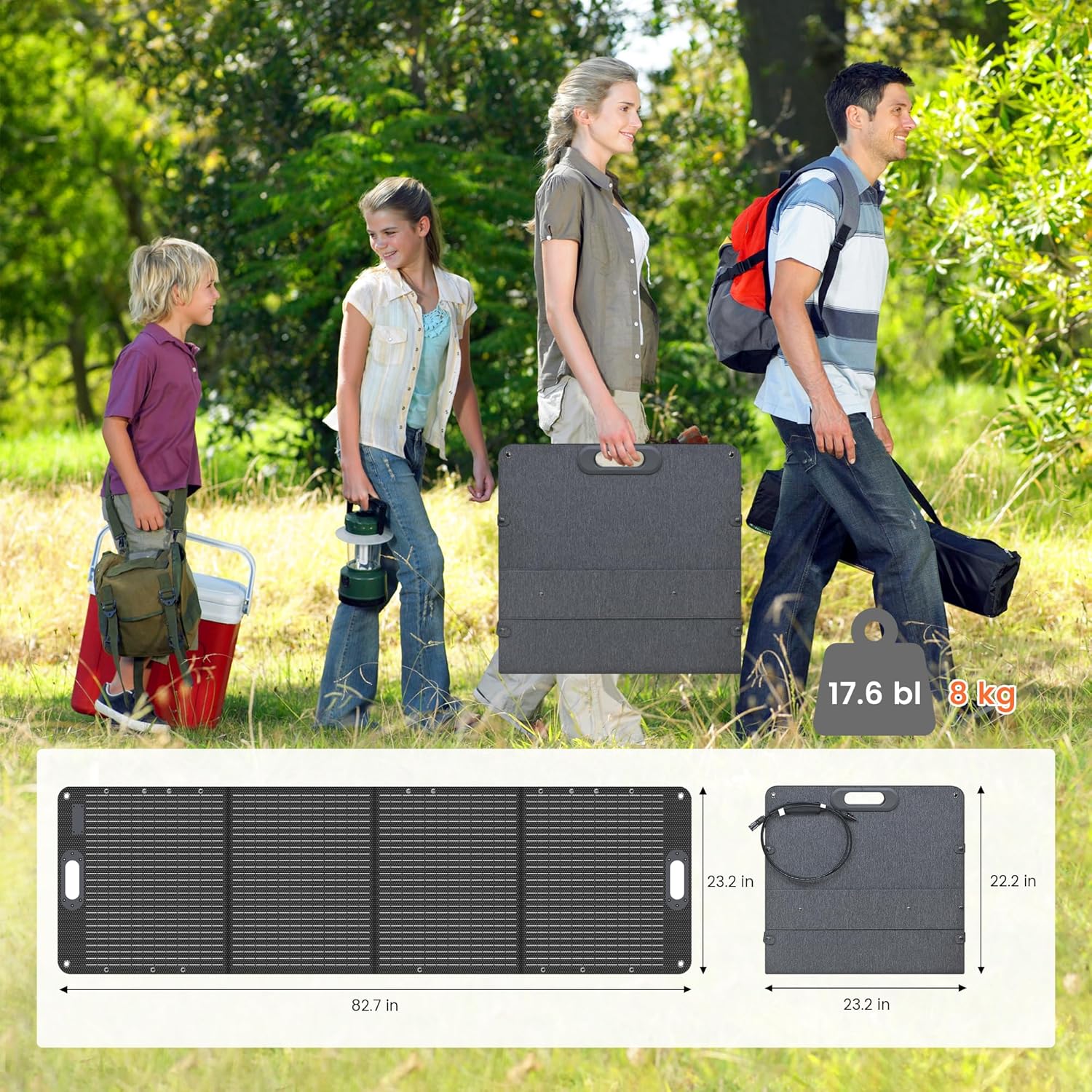
Image: Folded and unfolded dimensions, emphasizing portability.
Setup Instructions
- Unfold the Solar Panel: Place the folded solar panel on a flat surface. Gently unfold the panels until they are fully extended.
- Deploy Kickstands: Locate the four adjustable kickstands on the back of the panel. Extend them and adjust the angle to face the sun directly. Optimal angle adjustment can increase energy capture by over 23%.
- Connect to Power Station:
- Identify the appropriate connector for your power station (MC4, XT60, 5525, or Anderson).
- Connect the MC4 wiring harness to the solar panel's output ports.
- Attach the correct adapter from the wiring harness to your power station's input port.
- Verify Charging: Once connected, your power station should indicate that it is receiving a charge. Adjust the panel's angle as needed throughout the day to maximize solar input.
Video: Demonstrates unfolding the CTOLITY 200W solar panel and connecting it to a portable power station for charging.

Image: CTOLITY 200W solar panel connected to a power station.
Operating Tips
- For best results, position the solar panel in direct sunlight, free from shadows.
- Adjust the angle of the kickstands periodically to follow the sun's path throughout the day.
- Avoid placing the panel flat on the ground, except during peak sun hours (noon), as this can reduce efficiency.
- Ensure proper ventilation around the power station during charging.

Image: Portable solar panel in use.
Maintenance
- Cleaning: Regularly wipe the surface of the solar panel with a soft, damp cloth to remove dust, dirt, or debris. Do not use harsh chemicals or abrasive materials.
- Storage: When not in use, fold the solar panel and store it in a dry, cool place away from direct sunlight and extreme temperatures.
- Inspection: Periodically check cables and connectors for any signs of wear or damage. Replace any damaged components immediately.
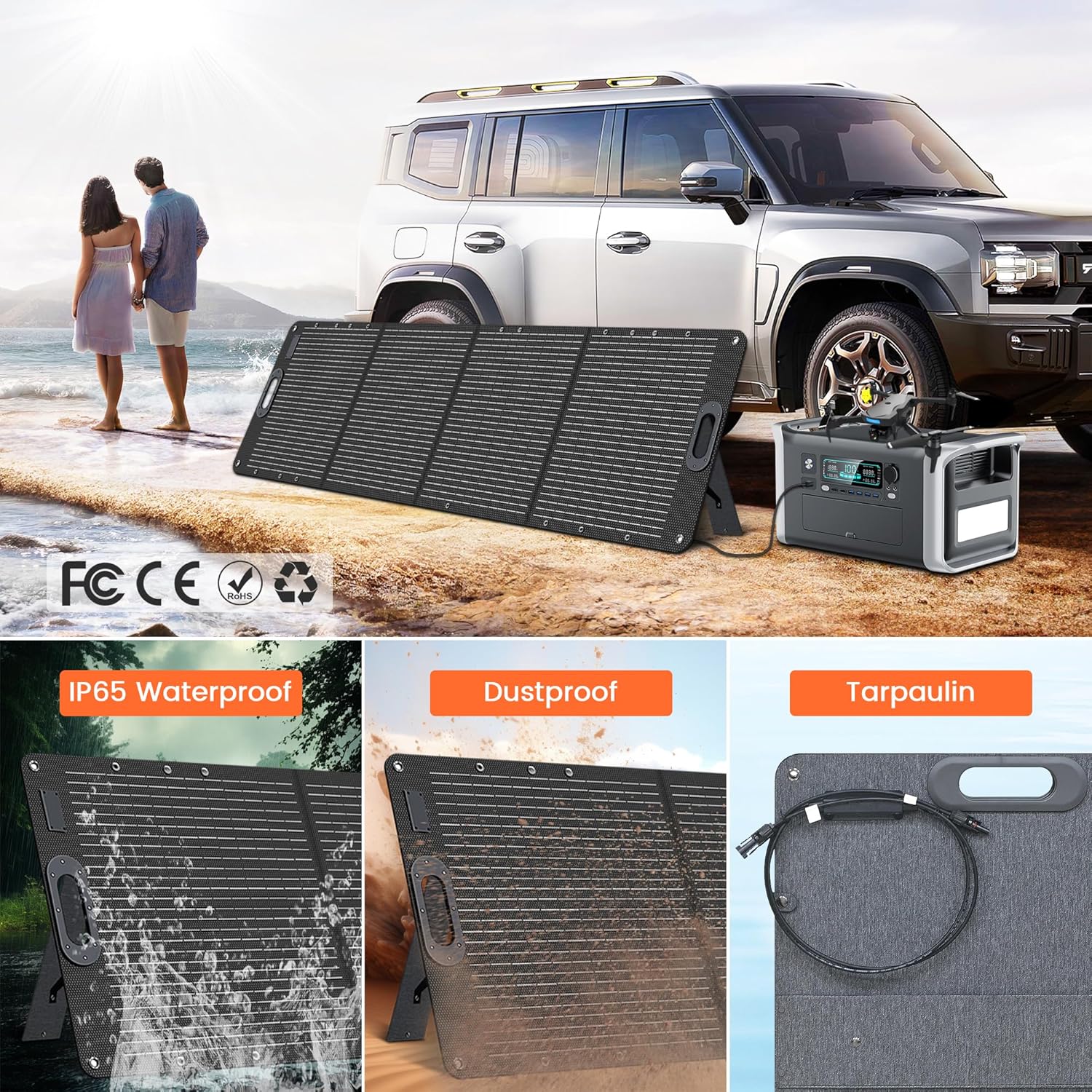
Image: Solar panel durability and weather resistance.
Troubleshooting
| Problem | Possible Cause | Solution |
|---|---|---|
| No power output from solar panel. | Panel not in direct sunlight; obstructed by shadows; dirty surface; loose connection; damaged cable. | Reposition panel in direct sunlight; clear obstructions; clean panel surface; check and secure all connections; inspect cables for damage. |
| Low power output. | Insufficient sunlight (cloudy day, early morning/late afternoon); incorrect panel angle; partial shading; dirty surface. | Wait for stronger sunlight; adjust panel angle to face the sun directly; ensure no shadows fall on the panel; clean panel surface. |
| Panel not charging power station. | Incompatible connector; power station input issue; panel not producing enough power. | Ensure correct adapter is used; check power station manual for solar input requirements; verify panel output as per "Low power output" solutions. |
Specifications
| Feature | Detail |
|---|---|
| Brand | CTOLITY |
| Model Number | SPC200W |
| Maximum Power | 200 Watts |
| Cell Type | Monocrystalline Silicon |
| Conversion Efficiency | Up to 23.7% |
| Output Voltage | 20 Volts |
| Amperage Capacity | 9.8 Amps |
| Connector Type | MC4, XT60, 5525, Anderson |
| Folded Dimensions (L x W x H) | 23.2" x 22.2" x 2" |
| Product Dimensions (L x W x H) | 24"L x 1.4"W x 25"H (unfolded, approximate) |
| Weight | 17.6 lbs (8 kg) |
| Waterproof Rating | IP65 |
Warranty and Support
CTOLITY products are designed for reliability and performance. For specific warranty details and customer support, please refer to the warranty card included with your product or visit the official CTOLITY website. Our customer service team is available to assist with any questions or concerns regarding your solar panel.
