
1. Product Overview
The Quad Lock Action Camera Adapter Kit (Small) provides a secure and versatile mounting solution for GoPro, action cameras, and compatible lights. This kit includes a medium base bar clamp, a small dual pivot arm, and a compact lever head, designed for flexible positioning and reliable attachment in various environments.
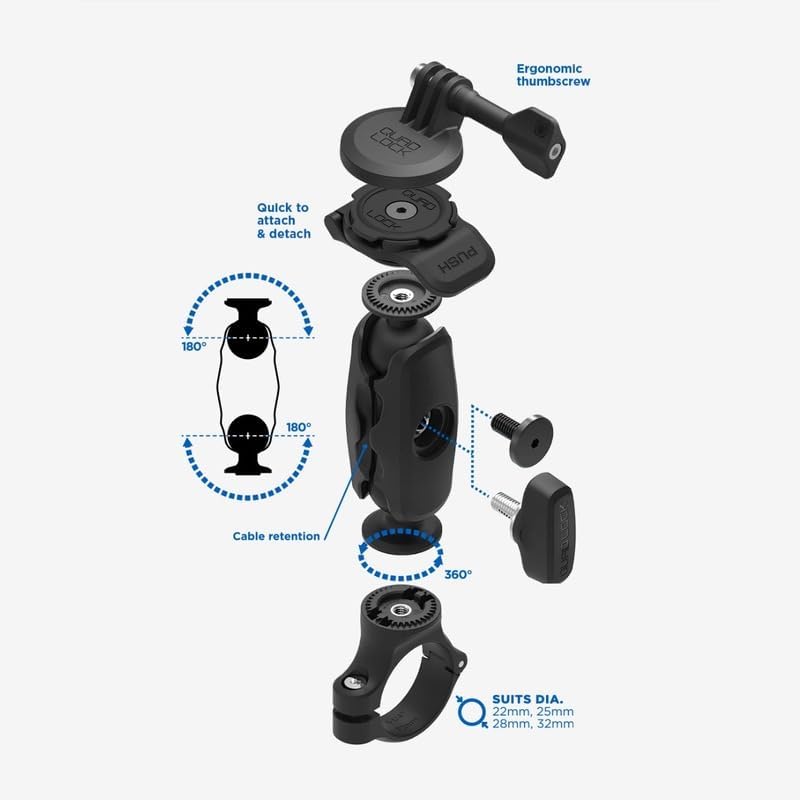
Image 1.1: Exploded view of the Quad Lock Action Camera Adapter Kit components, showing the lever head, dual pivot arm, and bar clamp.
2. What's Included
Your Quad Lock Action Camera Adapter Kit (Small) package contains the following components:
- 1 x Short Lever Head (Black): Made from durable nylon and stainless steel aluminum, featuring a patented dual-stage locking mechanism. Dimensions: 13.9mm high, 52mm wide.
- 1 x Dual Pivot Arm (Small): Constructed from tough glass-filled nylon, providing 360° x 180° rotation. Length: 51mm. Includes cable management grooves.
- 1 x Medium Bar Clamp: Designed to fit bar diameters of 22mm (7/8"), 25mm (1"), 28mm (1-1/8"), and 32mm (1-1/4"). Spacers are included for various bar sizes.

Image 2.1: Visual representation of the components included in the kit: a lever head, a dual pivot arm, and a bar clamp.
3. Setup Instructions
- Install the Medium Bar Clamp: Select the appropriate spacers for your bar diameter (22mm, 25mm, 28mm, or 32mm). Position the bar clamp on your desired bar and secure it firmly using the provided hardware. Ensure the clamp provides a stable and durable grip.
- Attach the Dual Pivot Arm: Connect the Dual Pivot Arm to the installed bar clamp. The arm allows for 360° x 180° rotation, offering flexibility in camera positioning. If applicable, route any cables through the integrated cable management grooves for a clean setup.
- Connect the Short Lever Head: Attach the Short Lever Head to the Dual Pivot Arm. This head is designed for quick and secure attachment of your action camera.
- Mount Your Action Camera: Align your GoPro, action camera, or compatible light (with a maximum base width of 65mm) with the lever head. Twist the camera until it locks securely into place.
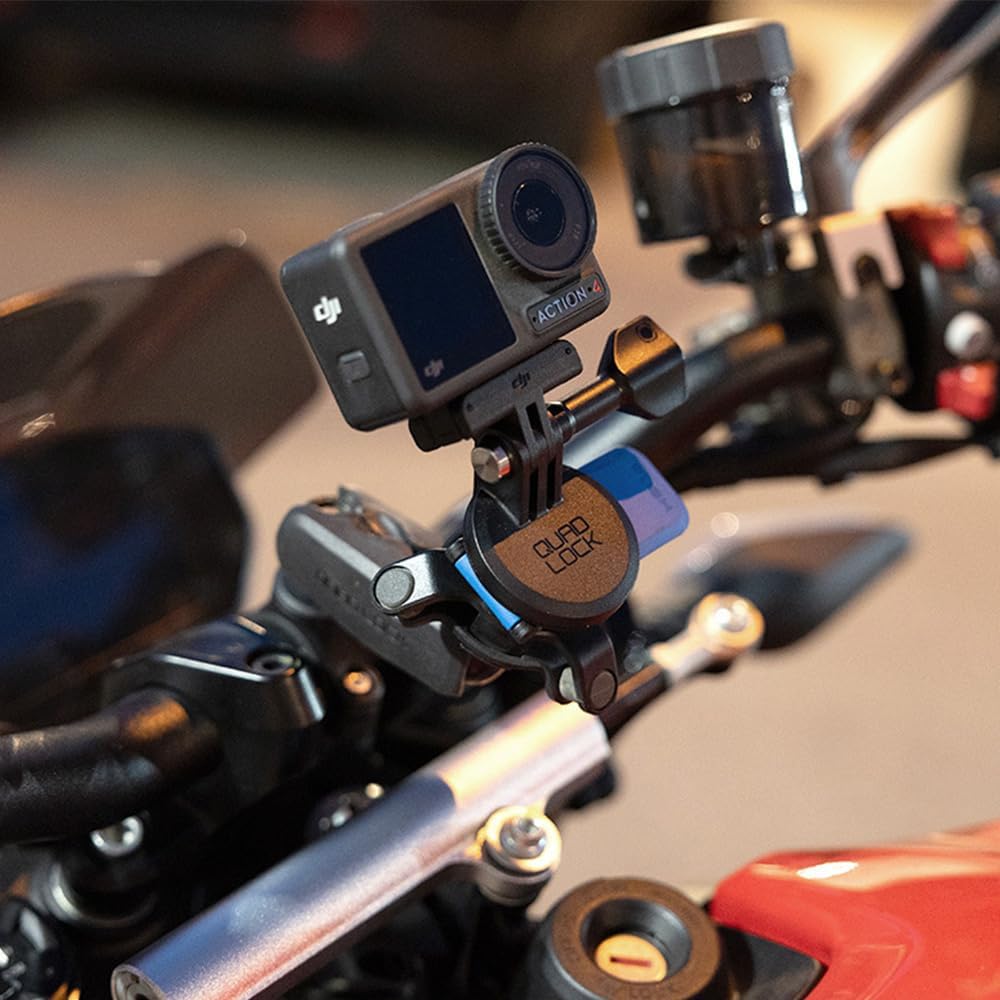
Image 3.1: The Quad Lock Action Camera Adapter Kit securely mounted on a motorcycle handlebar, holding an action camera.
4. Operating Instructions
- Attaching Your Device: To attach your action camera or compatible device, align the device with the lever head and twist it clockwise until you hear and feel a secure click. The patented dual-stage lock ensures your device is firmly held.
- Detaching Your Device: To detach, press down on the blue lever located on the side of the mount, then twist the device counter-clockwise to release it.
- Adjusting Position: The Dual Pivot Arm allows for 360° rotation and 180° tilt. Loosen the ergonomic thumbscrew to adjust the angle and orientation of your camera. Once the desired position is achieved, tighten the thumbscrew firmly to secure it.

Image 4.1: The Quad Lock Action Camera Adapter Kit mounted on a vehicle's rear rack, providing a stable platform for an action camera.
5. Maintenance
- Regular Inspection: Periodically inspect all components of the kit for any signs of wear, damage, or loose connections. Pay close attention to the bar clamp, pivot arm, and lever head.
- Tightness Check: Before each use, ensure all screws and the bar clamp are securely tightened to prevent movement or detachment during operation.
- Cleaning: Clean the mount with a soft, damp cloth. Avoid using abrasive cleaners, solvents, or harsh chemicals, as these can damage the materials.
- Storage: When not in use for extended periods, store the kit in a clean, dry place away from direct sunlight and extreme temperatures.
6. Troubleshooting
- Issue: Camera feels loose or unstable after mounting.
Solution: Verify that the bar clamp is securely fastened to the bar and that the appropriate spacers were used. Ensure the ergonomic thumbscrew on the Dual Pivot Arm is fully tightened. Confirm that the action camera is properly locked into the lever head with an audible click. - Issue: Difficulty attaching or detaching the action camera.
Solution: Ensure the blue release lever on the mount is fully depressed when attempting to detach the camera. Check for any debris or obstructions in the locking mechanism that might prevent smooth operation. Apply minimal force; the mechanism should operate smoothly. - Issue: Mount rotates or shifts on the bar.
Solution: Re-tighten the bar clamp. If the issue persists, ensure you are using the correct size spacers for your bar diameter. Over-tightening can damage the clamp or bar; ensure it is snug but not excessively tight.
7. Specifications
| Model Number | QLK-BCM-DPS-SLBK-ACA |
| Brand | Quad Lock |
| Compatible Devices | GoPro, Action Cameras, Compatible Lights (max 65mm base width) |
| Mounting Type | Medium Bars |
| Bar Clamp Compatibility | 22mm (7/8"), 25mm (1"), 28mm (1-1/8"), 32mm (1-1/4") diameters |
| Special Features | Adjustable, Rotatable, Tilt Head |
| Materials | Nylon, Stainless Steel Aluminum (Lever Head); Glass-filled Nylon (Dual Pivot Arm); Polycarbonate, Stainless Steel (General) |
| Color | Black |
| Contents | Base, Arm, Head |

Image 7.1: Diagram illustrating key technical specifications and dimensions of the kit components.
8. Warranty and Support
For detailed warranty information and customer support, please refer to the official Quad Lock website or contact their customer service directly. Keep your purchase receipt for warranty claims.
Official Website: www.quadlockcase.com