
1. Introduction
The NEISEMOVI XY-Y50L is a high-performance stereo dual-channel digital power amplifier module designed for audio enthusiasts and DIY projects. Featuring Bluetooth 5.1 connectivity and the TPA3116D2 chip, it delivers 50W+50W output, providing clear and powerful sound. This manual will guide you through the installation, operation, and maintenance of your amplifier.
2. Package Contents
Please verify that all items listed below are included in your package:
- XY-Y50L Amplifier Module
- Infrared Remote Control
- Small Screwdriver
- DC Power Connector
- Mounting Hardware (screws, standoffs)
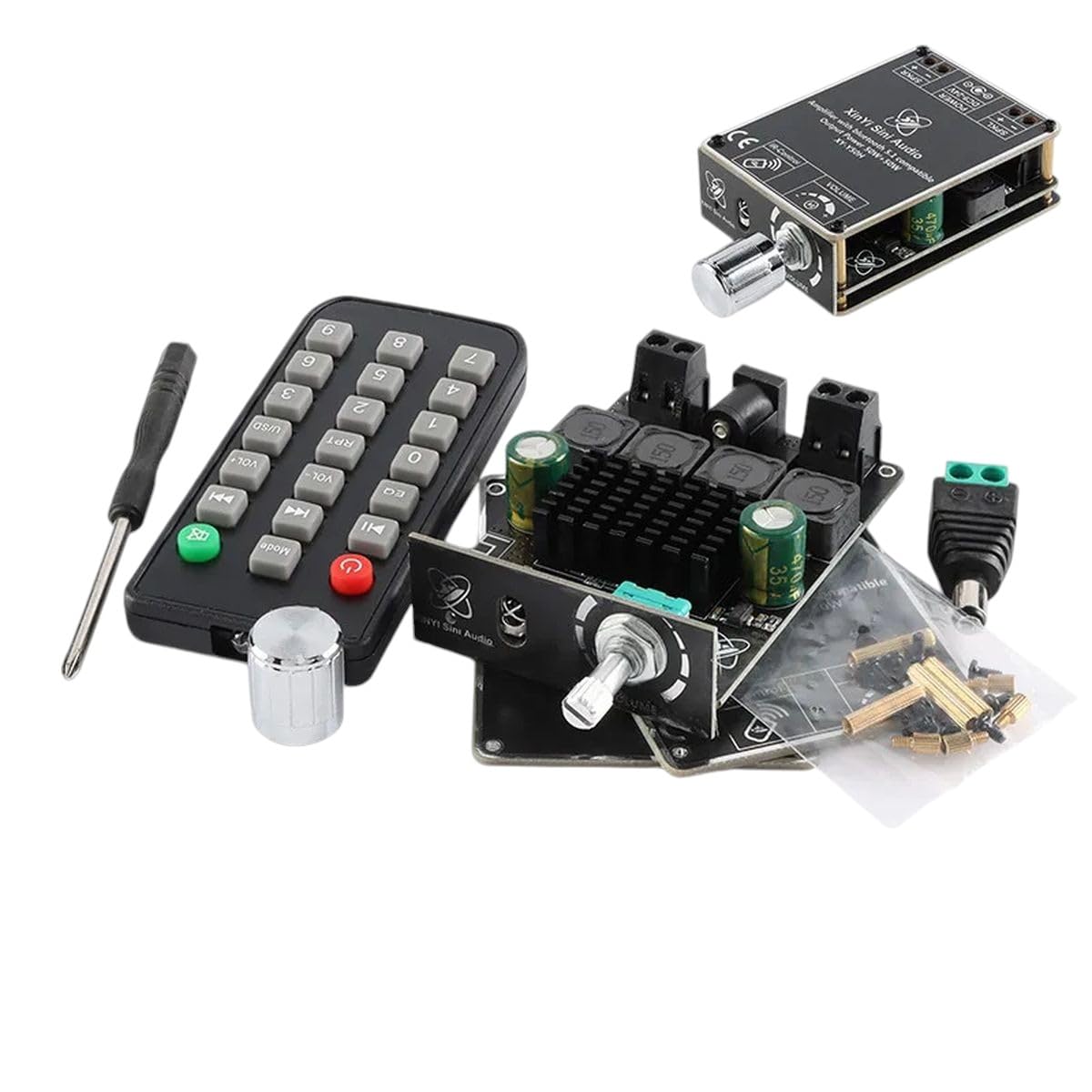
Figure 2.1: All components included with the XY-Y50L amplifier: the main amplifier board with heatsink and various components, a black infrared remote control, a small screwdriver, a green and black power connector, and a small bag of screws and standoffs for mounting.
3. Product Features
- High-Quality Audio: Utilizes the TPA3116D2 digital amplifier chip for clear and powerful sound reproduction.
- Dual Channel Output: Provides 50W + 50W stereo output for a balanced audio experience.
- Bluetooth 5.1 Connectivity: Seamless wireless audio streaming from compatible devices.
- Infrared Remote Control: Convenient control over volume, input, and playback functions.
- Compact Design: Ideal for integration into various audio projects and setups.
4. Safety Information
Please read and understand all safety instructions before operating this device. Failure to do so may result in injury or damage to the product.
- Power Supply: Use only a compatible DC power supply within the specified voltage range (refer to Specifications section). Incorrect voltage can damage the amplifier.
- Ventilation: Ensure adequate ventilation around the amplifier module to prevent overheating. Do not cover the heatsink.
- Moisture: Keep the device away from water, moisture, and high humidity.
- Static Electricity: Handle the module by its edges to avoid static discharge, which can damage electronic components.
- Children: Keep out of reach of children. Small parts may pose a choking hazard.
- Professional Installation: If you are unsure about wiring or electrical connections, seek assistance from a qualified professional.
5. Setup
5.1. Connections Overview
Before connecting, ensure the power supply is disconnected. Refer to the diagram below for typical connections:
- DC Power Input: Connect your DC power supply to the designated power input terminal. Observe polarity (+ and -).
- Speaker Outputs: Connect your passive speakers to the left and right speaker output terminals. Ensure correct polarity for optimal sound.
- Audio Input: The amplifier primarily uses Bluetooth for audio input. No separate analog input is typically available on this model.
5.2. Mounting
Use the provided mounting hardware (screws and standoffs) to secure the amplifier module in a stable and well-ventilated enclosure or surface. Ensure no metal parts of the module come into contact with conductive surfaces, which could cause a short circuit.
6. Operating Instructions
6.1. Powering On/Off
Connect the DC power supply to the amplifier. The module will power on automatically. To power off, disconnect the DC power supply.
6.2. Bluetooth Pairing
- Ensure the amplifier is powered on.
- On your Bluetooth-enabled device (smartphone, tablet, computer), enable Bluetooth and search for available devices.
- Locate and select "XY-Y50L" (or similar name) from the list of devices.
- Once paired, a confirmation sound may be heard from the speakers, and your device will show a connected status.
6.3. Volume Control
Volume can be adjusted using the rotary knob on the amplifier module or via the VOL+ / VOL- buttons on the infrared remote control.
6.4. Remote Control Functions
The infrared remote control provides convenient access to various functions:
- Power Button: Toggles standby mode.
- VOL+ / VOL-: Increases or decreases volume.
- Previous / Next Track: Skips to the previous or next song (Bluetooth mode).
- Play/Pause: Toggles playback (Bluetooth mode).
- EQ: Cycles through equalizer presets (if available).
- Mode: Switches between input modes (if multiple inputs are supported).
- Mute: Mutes or unmutes the audio output.
7. Maintenance
Proper maintenance ensures the longevity and optimal performance of your amplifier.
- Cleaning: Use a soft, dry cloth to clean the amplifier module. Do not use liquid cleaners or solvents.
- Dust: Periodically remove dust from the heatsink and components to maintain proper cooling.
- Storage: When not in use for extended periods, store the amplifier in a cool, dry place, away from direct sunlight and extreme temperatures.
8. Troubleshooting
If you encounter issues with your XY-Y50L amplifier, refer to the following common problems and solutions:
| Problem | Possible Cause | Solution |
|---|---|---|
| No power | Incorrect power supply voltage or polarity; loose connection. | Verify power supply voltage matches specifications. Check power cable connections and polarity. |
| No sound | Speakers not connected; incorrect speaker polarity; amplifier not paired via Bluetooth; volume too low. | Ensure speakers are correctly connected. Check Bluetooth pairing. Increase volume. |
| Bluetooth connection unstable | Device too far from amplifier; interference; low battery on source device. | Move source device closer to amplifier. Avoid obstacles. Recharge source device. Try re-pairing. |
| Distorted sound | Volume too high; incorrect speaker impedance; faulty audio source. | Reduce volume. Ensure speakers match amplifier's impedance range. Test with a different audio source. |
9. Specifications
- Model: XY-Y50L
- Amplifier Chip: TPA3116D2
- Output Power: 50W + 50W (Stereo Dual Channel)
- Bluetooth Version: 5.1
- Input Voltage: DC 5V-24V (Recommended 12V-24V for full power)
- Control: On-board rotary knob, Infrared Remote Control
- Dimensions: (Refer to product images for approximate size)
10. Warranty and Support
This product comes with a standard manufacturer's warranty. For specific warranty terms and conditions, please refer to the product packaging or contact your retailer. For technical support, troubleshooting assistance, or inquiries about replacement parts, please contact NEISEMOVI customer service through the platform where you purchased the product or visit the official NEISEMOVI website for contact information.