1. Introduction
This instruction manual provides detailed guidance for the setup, operation, and maintenance of your ZdalaMit NF606UD replacement remote control. This remote is designed to be compatible with various Emerson LCD TV models, offering a direct replacement without the need for complex programming.
2. Package Contents
- 1x ZdalaMit NF606UD Replacement Remote Control
- Note: Batteries and additional manuals are not included.
3. Setup
3.1 Battery Installation
- Locate the battery compartment on the back of the remote control.
- Slide the battery compartment cover downwards or in the direction indicated by an arrow to open it.
- Insert two (2) 1.5V AAA alkaline batteries, ensuring the positive (+) and negative (-) terminals align correctly with the markings inside the compartment.
- Replace the battery compartment cover by sliding it back into position until it clicks securely.
Important: This remote control is pre-programmed and does not require additional setup or coding for compatible Emerson LCD TV models. Once batteries are installed, it is ready for immediate use.

Figure 1: Front view of the ZdalaMit NF606UD remote control, showing all buttons and layout.
4. Operating the Remote Control
The NF606UD remote control provides full functionality for your compatible Emerson LCD TV. Point the remote directly at the TV's infrared sensor for optimal performance.
4.1 Key Functions Overview
- POWER (Red Button): Turns the TV on or off.
- Number Buttons (0-9): Directly select channels.
- CH (Channel Up/Down): Navigates through channels sequentially.
- VOL (Volume Up/Down): Adjusts the audio volume.
- MUTE: Silences or restores the TV audio.
- INPUT SELECT: Cycles through available input sources (HDMI, AV, Component, etc.).
- MENU: Accesses the TV's main menu.
- Navigation Buttons (Up, Down, Left, Right, ENTER): Used to navigate menus and confirm selections.
- TOP MENU: Accesses the top-level menu.
- PICTURE: Adjusts picture settings.
- AUDIO: Adjusts audio settings.
- SLEEP: Sets a sleep timer for the TV.
- MODE: Changes picture or sound modes.
- RETURN: Returns to the previous menu or channel.
- Media Control Buttons (PLAY, PAUSE, STOP, REW, FF): Controls media playback if supported by the TV.

Figure 2: Angled view of the remote control, highlighting the ergonomic design and button placement.
5. Maintenance
5.1 Battery Replacement
Replace batteries when the remote's response becomes sluggish or stops working. Always replace both batteries simultaneously with new 1.5V AAA alkaline batteries. Do not mix old and new batteries, or different types of batteries.
5.2 Cleaning
To clean the remote control, gently wipe its surface with a soft, dry cloth. For stubborn dirt, slightly dampen the cloth with water or a mild, non-abrasive cleaner. Avoid using harsh chemicals or excessive moisture, which can damage the remote.
5.3 Storage
Store the remote control in a cool, dry place away from direct sunlight, extreme temperatures, and high humidity. If the remote will not be used for an extended period, it is advisable to remove the batteries to prevent leakage and potential damage.
6. Troubleshooting
| Problem | Possible Cause | Solution |
|---|---|---|
| Remote control is not working. |
|
|
| Buttons are unresponsive or delayed. |
|
|
| Remote controls some functions but not others. |
|
|
7. Specifications
- Model: NF606UD
- Brand: ZdalaMit
- Power Supply: 2 x 1.5V AAA Alkaline Batteries (not included)
- Product Dimensions: 7.94 x 2.18 x 0.55 inches (approximately)
- Item Weight: 1.41 ounces (approximately, without batteries)
- Color: Black
- Special Feature: Pre-Programmed (no setup required)
- Compatible Devices: Television
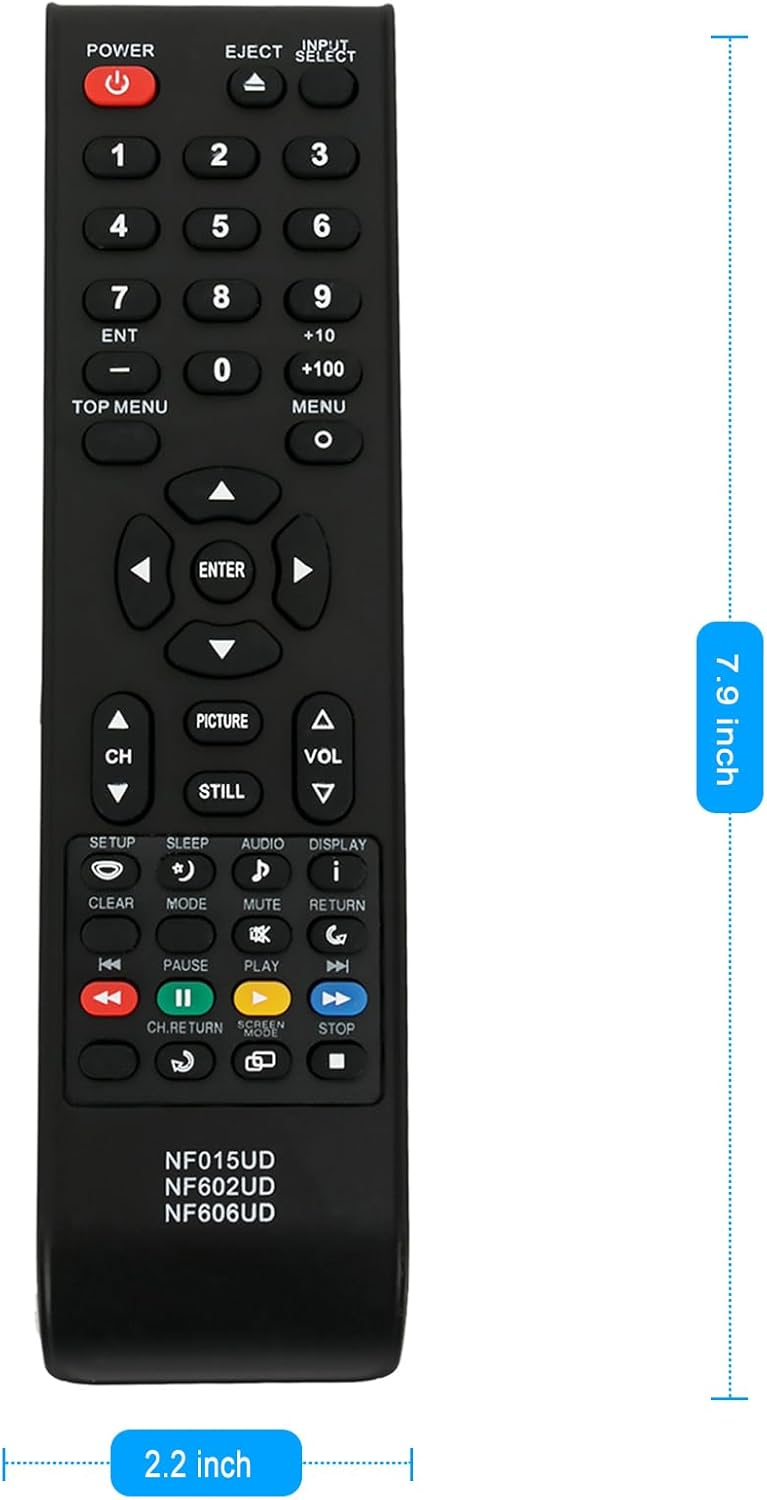
Figure 3: Dimensions of the ZdalaMit NF606UD remote control.
8. Compatible Emerson LCD TV Models
This ZdalaMit NF606UD replacement remote control is compatible with the following Emerson LCD TV models:
- LC195EM9
- LC195EM9B
- ELC320EM9
- LC195EM92
- BLC320EM9
- BLC320EM9A
- BLC320EM9B
- LC195EM9E
- LE40M600
9. Warranty and Support
For information regarding warranty coverage or technical support, please refer to the original purchase documentation or contact the seller directly. As this is a replacement remote control, specific warranty terms may be provided by the retailer or the ZdalaMit brand.


