
1. Introduction
The AITECAC Airvent T4-12F is a quiet register booster fan designed to enhance airflow from existing HVAC systems through wall and floor registers. This device helps to improve heating and cooling efficiency in specific areas by actively drawing air from the ductwork and distributing it into the room. It features an LCD control panel and a remote control for precise fan speed and setting adjustments.
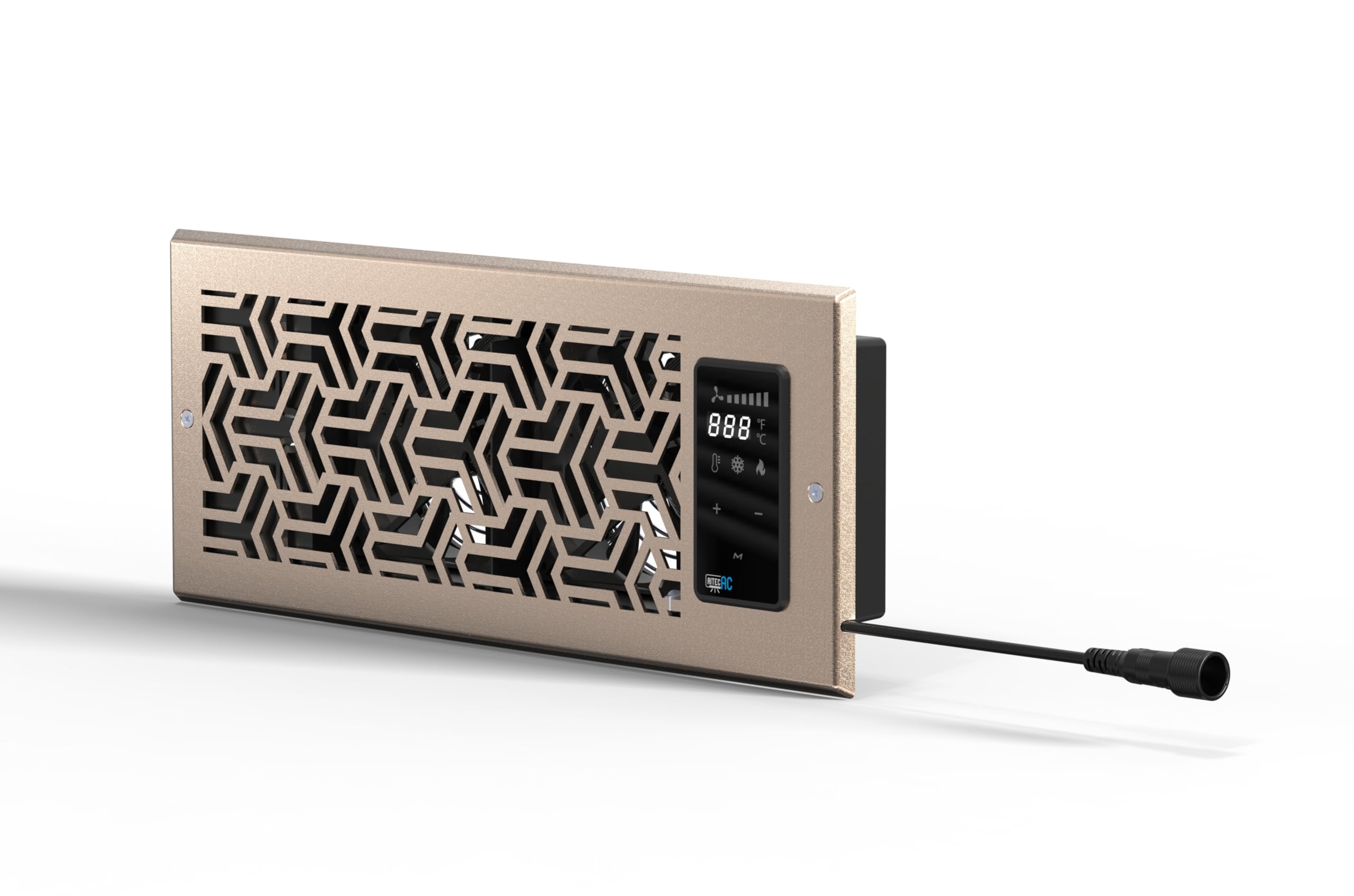
Figure 1: Front view of the AITECAC Airvent T4-12F Quiet Register Booster Fan. This image shows the overall design of the booster fan, which is intended to fit into standard register openings.
2. Safety Information
Please read all safety instructions before operating the device to prevent injury or damage.
- Ensure the power source matches the voltage requirements specified on the product label (115 Volts).
- Do not immerse the fan unit or power cord in water or other liquids.
- Keep fingers and other objects away from the fan blades during operation.
- Do not operate the fan with a damaged cord or plug. Contact customer support for replacement.
- This product is intended for indoor use only. Do not expose to rain or moisture.
- Unplug the unit from the power outlet before cleaning or performing any maintenance.
- Ensure the register opening is clear of obstructions before installation.
3. Package Contents
Verify that all items are present in the package:
- AITECAC Airvent T4-12F Register Booster Fan Unit
- Power Cord
- Remote Control (if included with your specific model)
- User Manual (this document)
4. Setup and Installation
Follow these steps to install your AITECAC Airvent T4-12F booster fan:
- Prepare the Register Opening: Ensure the existing register opening is clean and free of debris. The fan is designed for 4" x 10" register holes.
- Insert the Fan Unit: Carefully place the booster fan unit into the register opening. The unit should fit snugly.
- Secure the Unit: The unit is designed to be floor-mounted. Ensure it is stable and does not wobble. Some models may include adjustable clips or screws for a more secure fit; refer to specific packaging if applicable.
- Connect Power: Plug the power cord into the fan unit's power input port. Then, plug the other end of the power cord into a standard 115V AC electrical outlet.
- Initial Power On: The unit should power on, and the LCD control panel will illuminate.

Figure 2: Rear view of the AITECAC Airvent T4-12F booster fan, highlighting the two fan units and the power input connector. The model number and power specifications are visible on the label, indicating proper orientation for installation.
5. Operating Instructions
The Airvent T4-12F can be operated using its integrated LCD control panel or the included remote control.
5.1. LCD Control Panel
The LCD panel provides direct access to all fan settings. Use the buttons adjacent to the screen to:
- Power On/Off: Press the power button to turn the unit on or off.
- Adjust Fan Speed: Use the '+' and '-' buttons to increase or decrease the fan speed. Multiple speed settings are available.
- Mode Selection: Cycle through different operating modes (e.g., continuous, temperature-controlled) if available.
- Timer Settings: Set a timer for automatic shutdown.
5.2. Remote Control
The remote control duplicates the functions of the LCD control panel, allowing for convenient adjustments from a distance. Ensure the remote has fresh batteries and is pointed towards the fan unit for optimal response.
6. Maintenance
Regular maintenance ensures optimal performance and longevity of your booster fan.
- Cleaning: Disconnect the power before cleaning. Use a soft, dry cloth to wipe down the exterior of the unit. For the fan blades, use a soft brush or compressed air to remove dust accumulation. Do not use abrasive cleaners or solvents.
- Filter (if applicable): Some models may include a removable filter. If present, clean or replace it according to the instructions provided with the filter.
- Storage: If storing the unit for an extended period, unplug it, clean it thoroughly, and store it in a cool, dry place.
7. Troubleshooting
Refer to the table below for common issues and their solutions.
| Problem | Possible Cause | Solution |
|---|---|---|
| Fan does not turn on. | No power, loose connection, or unit is off. | Ensure power cord is securely plugged into both the unit and the outlet. Check if the outlet is functional. Press the power button on the unit or remote. |
| Weak airflow. | Low fan speed setting, blocked intake/exhaust, or dirty fan blades. | Increase fan speed setting. Check for obstructions in the register or around the fan. Clean fan blades as per maintenance instructions. |
| Unusual noise during operation. | Loose components, debris in fan, or fan motor issue. | Disconnect power and inspect for any loose parts or debris. Remove any foreign objects. If noise persists, contact customer support. |
| Remote control not working. | Dead batteries, obstruction, or out of range. | Replace remote control batteries. Ensure no obstructions between remote and unit. Operate within recommended range. |
8. Specifications
Technical details for the AITECAC Airvent T4-12F booster fan:
| Brand | AITECAC |
| Model Name | Airvent T4-12F |
| Model Number | Airvent T4-12F |
| Color | White |
| Electric Fan Design | Exhaust Fan |
| Power Source | DC (via AC adapter) |
| Product Dimensions (D x W x H) | 1.97"D x 13.79"W x 5.52"H |
| Room Type | Living Room (Recommended) |
| Mounting Type | Floor Mount |
| Wattage | 50 watts |
| Voltage | 115 Volts |
| Included Components | Cord |
9. Warranty and Support
AITECAC products are manufactured to high-quality standards. For warranty information, technical support, or service inquiries, please refer to the contact details provided with your purchase documentation or visit the official AITECAC website. Please have your model number (Airvent T4-12F) and purchase date ready when contacting support.
For further assistance, you may visit the AITECAC Store on Amazon.