
Introduction
Thank you for choosing the Bestier 63" LED Fireplace TV Stand. This manual provides essential information for the safe assembly, operation, and maintenance of your new entertainment center. Please read these instructions thoroughly before beginning assembly or use to ensure proper function and longevity of the product.
Safety Information
Adhering to safety guidelines is crucial for preventing injury and damage. Keep this manual for future reference.
- Electrical Safety: The electric fireplace is CSA/ELT certified, ensuring safe operation. Always plug the unit into a grounded outlet. Do not overload electrical circuits. Keep flammable materials at least 3 feet (0.9 meters) away from the front of the fireplace.
- Furniture Stability: This TV stand is designed to support TVs up to 70 inches and a maximum weight of 264 lbs (120 kg) on the top surface. Ensure the stand is placed on a level surface. Do not allow children to climb on the unit.
- Overheat Protection: The electric fireplace includes overheat protection. If the heater overheats, it will automatically shut off. Unplug the unit and allow it to cool before restarting.
- Child Safety: The fireplace features a child lock function. Keep the remote control out of reach of children.
- Material Safety: The product is constructed from CARB P2 grade particle board, meeting national standards for reduced formaldehyde emissions.

Figure 1: Electric Fireplace Safety Features
Package Contents
Before assembly, verify that all components are present and undamaged. If any parts are missing or damaged, please contact Bestier customer support.
- TV Stand Components (various panels and hardware)
- Electric Fireplace Insert
- Remote Control for Fireplace and LED Lights
- Assembly Instruction Manual
- Hardware Pack (screws, dowels, cam locks, etc.)
Assembly Instructions
Assembly is designed to be straightforward. Follow the included detailed instruction manual and use the provided hardware. It is recommended to assemble the unit with two people.
- Preparation: Clear a spacious area for assembly. Lay out all parts and hardware. Keep children and pets away from the assembly area.
- Follow the Manual: Refer to the separate, detailed assembly manual included in your package for step-by-step instructions and diagrams.
- Important Tip for Panels: Pay close attention to the orientation of panels, especially panels 5 and 6. Ensure they are flipped to the correct side (often the back side) during assembly to avoid misalignment.
- Hardware: Use all screws and fasteners as indicated. Do not overtighten screws.
- Cable Management: Utilize the integrated cable management holes to keep wires organized and out of sight.
- Adjustable Shelves: The glass shelves are adjustable to three different levels to accommodate various items.

Figure 2: Storage Features and Cable Management
Operating Instructions
Electric Fireplace Operation
The 36-inch electric fireplace provides warmth and ambiance. It can heat areas up to 1000 square feet.
- Power On/Off: Use the power button on the unit or the remote control to turn the fireplace on or off.
- Temperature Control: Adjust the heating temperature from 62°F to 92°F (17°C to 33°C) using the controls on the unit or the remote.
- Flame Colors: Select from 7 different flame colors to match your mood or decor.
- Flame Brightness: Adjust the flame brightness through 5 levels.
- Flame Speed: Control the speed of the flame effect with 5 available settings.
- Flame-Only Mode: The fireplace can operate in a flame-only mode, providing ambiance without heat.
- Timer Function: Set the operational timer from 0.5 hours to 9 hours.
- Remote Control: The included remote controls all fireplace functions. Ensure the remote has working batteries and is pointed towards the unit.
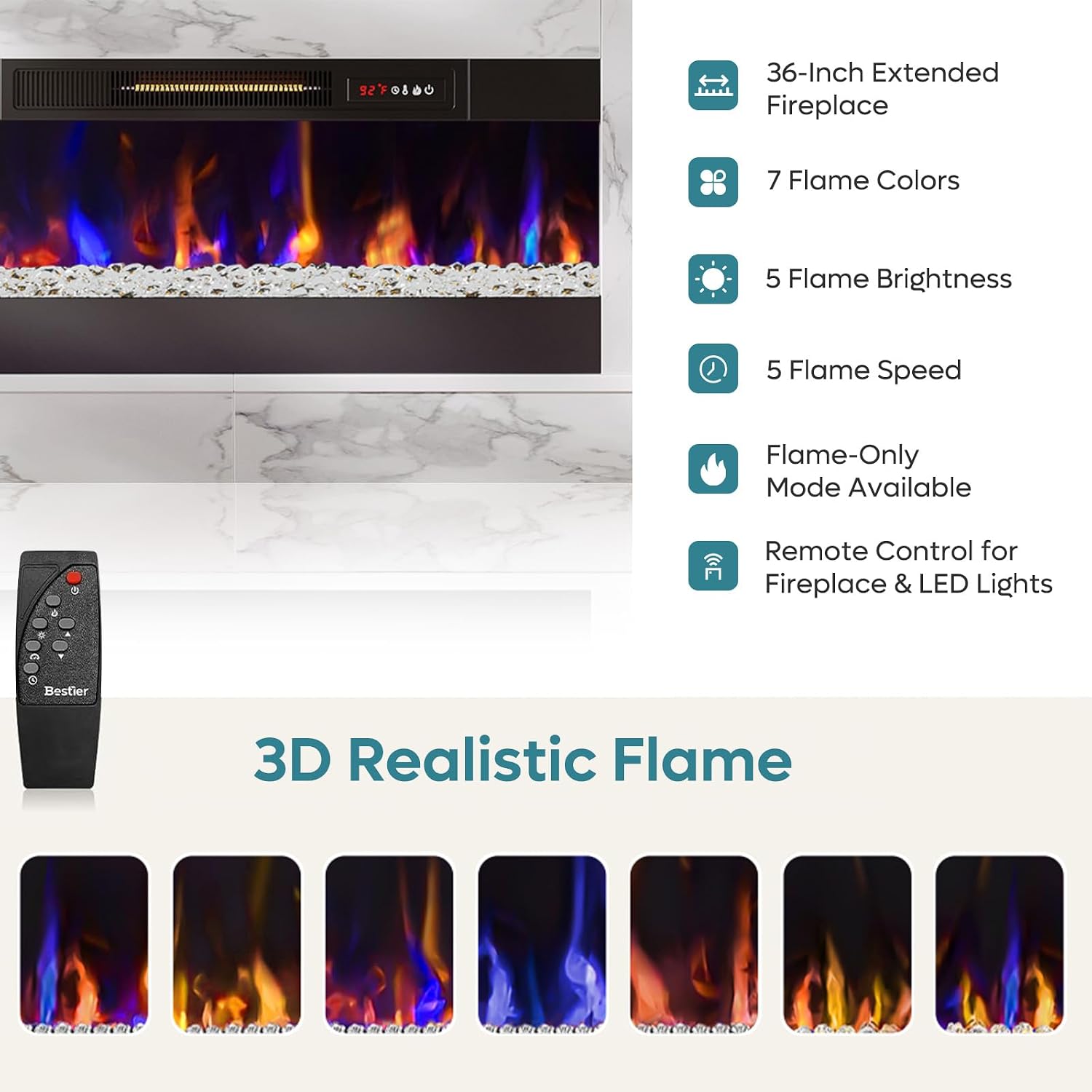
Figure 3: Fireplace Flame Options and Remote Control
LED Lighting Operation
The integrated LED lighting enhances the aesthetic of your TV stand.
- Color Selection: Choose from 7 main LED colors.
- Dynamic Modes: Explore 18 dynamic lighting modes for various atmospheres.
- Remote Control: The same remote control used for the fireplace also manages the LED lighting functions, with a range of up to 20 feet.

Figure 4: Dynamic LED Lighting Features
Product Overview Video
Video 1: Bestier Tall LED Fireplace TV Stand for TVs up to 70". This video demonstrates the key features and overall design of the TV stand and its integrated electric fireplace.
Maintenance
Regular maintenance helps preserve the appearance and function of your TV stand.
- Cleaning the Stand: Wipe surfaces with a soft, damp cloth. Avoid harsh chemicals or abrasive cleaners that could damage the engineered wood finish.
- Cleaning the Fireplace: Ensure the fireplace is turned off and unplugged before cleaning. Wipe the glass front with a soft, lint-free cloth. Do not spray cleaners directly onto the unit.
- Electrical Components: Periodically check the power cord for any damage. Do not attempt to service the electrical components yourself.
Troubleshooting
If you encounter issues with your Bestier TV stand or electric fireplace, refer to the following common solutions:
- Fireplace Not Turning On:
- Ensure the power cord is securely plugged into a functional outlet.
- Check if the circuit breaker has tripped.
- Verify the unit has not overheated and activated the safety shut-off. Unplug and allow to cool for 15-20 minutes before trying again.
- Heater Unit Turns On By Itself or Controls Not Responding:
- This indicates a potential issue with the fireplace unit's internal controls. Unplug the unit immediately.
- Ensure the remote control batteries are fresh and correctly inserted.
- If the issue persists after checking power and remote, contact Bestier customer support for assistance. Do not attempt to repair the fireplace unit yourself.
- LED Lights Not Working:
- Check the power connection to the LED strip.
- Ensure the remote control batteries are functional.
- Try cycling the power to the unit.
- Assembly Difficulties:
- Re-examine the assembly manual diagrams carefully, especially for panel orientation.
- Ensure all cam locks and screws are properly aligned and tightened.
- If you are stuck on a particular step, review the corresponding diagram and text instructions.
For any issues not covered here, or if troubleshooting steps do not resolve the problem, please contact Bestier customer support.
Specifications

Figure 5: Product Dimensions
| Brand | Bestier |
| Model Name | L104216FP |
| Product Dimensions | 11.77"D x 62.99"W x 35.24"H (29.9cm D x 160cm W x 89.5cm H) |
| Item Weight | 118 pounds (53.5 kg) |
| Material | Engineered Wood |
| Finish Type | Lacquered |
| Color | White Marble |
| Power Source | Corded Electric |
| Heating Coverage | Up to 1000 sq ft |
| Temperature Range | 62°F - 92°F (17°C - 33°C) |
| Maximum Compatible TV Size | 70 inches |
| Installation Type | Freestanding |
Warranty and Support
Bestier is committed to providing quality products and customer satisfaction. If you encounter any product issues or require assistance, please do not hesitate to contact our customer support team.
- Customer Service: Bestier offers lifetime customer service to address any concerns and provide satisfactory solutions.
- Contact Information: Refer to the contact details provided in your product packaging or visit the official Bestier website for support.

Figure 6: Bestier Customer Support


