
1. Introduction
Thank you for choosing the SMAEL 8109 Digital Watch. This manual provides detailed instructions on how to set up, operate, and maintain your watch. Please read this manual carefully to ensure proper use and to fully utilize all features of your new timepiece.
2. Product Overview
The SMAEL 8109 is a robust digital and analog watch designed for outdoor and sport activities. It features a durable ABS case, a comfortable TPU band, and a clear Plexiglass dial window. The watch combines a precise quartz movement for analog timekeeping with an electronic movement for digital functions, including a chronograph and luminous display.
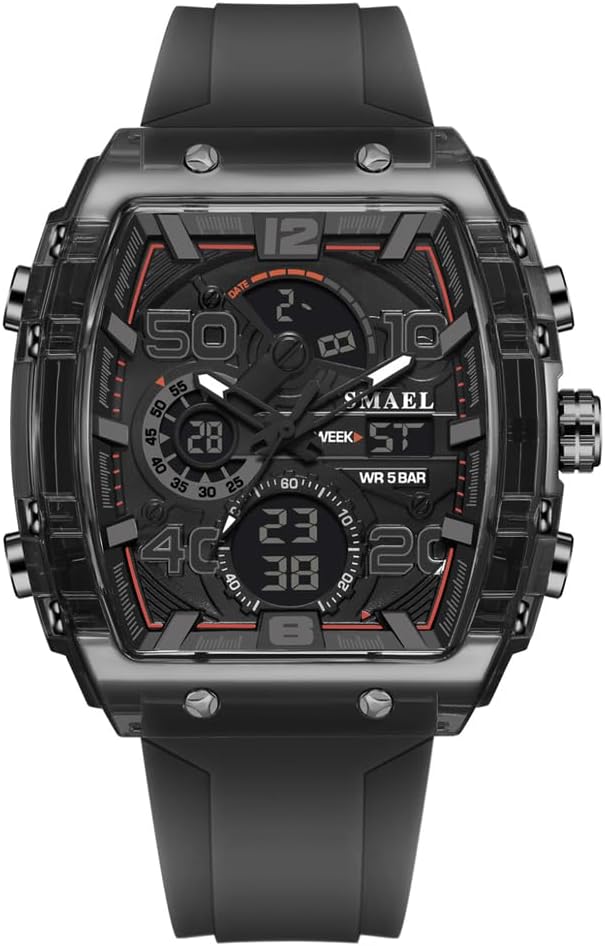
Figure 2.1: Front view of the SMAEL 8109 digital watch, showcasing its rectangular black case, digital and analog displays, and multiple function buttons.

Figure 2.2: An angled view of the SMAEL 8109 digital watch, highlighting its robust case design and side buttons.
3. Setup
3.1 Initial Inspection
Upon unpacking, inspect the watch for any visible damage. Remove any protective films from the watch face or case back.
3.2 Setting Time and Date
Your SMAEL 8109 watch features both analog and digital time displays. The analog hands are typically set via the crown on the side, while the digital display is set using the push buttons.
- Setting Analog Time: Pull out the crown (usually located on the right side) to the first or second click position (depending on the model). Rotate the crown to adjust the hour and minute hands. Once set, push the crown back in to secure the time.
- Setting Digital Time and Date:
- Press the MODE button (often bottom-left) repeatedly until the time setting mode is displayed (usually indicated by flashing digits).
- Use the ADJUST button (often top-left) to select the digit or setting you wish to change (e.g., hours, minutes, year, month, day).
- Use the START/RESET button (often top-right or bottom-right) to increase the value of the flashing digit.
- Once all settings are correct, press the MODE button again to exit the setting mode.
3.3 Setting Alarm
To set the alarm, navigate to the alarm mode using the MODE button. Follow a similar procedure as setting the digital time, using the ADJUST and START/RESET buttons to set the desired alarm time. Press MODE to confirm.
4. Operating Instructions
4.1 Button Functions
Your watch typically has four buttons, usually labeled A, B, C, D or with icons, located around the watch case. Their functions generally are:
- Button A (Top-Left): Often used for ADJUST or selecting settings.
- Button B (Top-Right): Often used for START/RESET in chronograph mode or increasing values during setting.
- Button C (Bottom-Left): The MODE button, used to cycle through different functions (Time, Date, Alarm, Chronograph).
- Button D (Bottom-Right): Often used for LIGHT or switching between 12/24-hour format.
4.2 Mode Switching
Press the MODE button (Button C) to cycle through the available modes:
- Time Display (main screen)
- Chronograph (Stopwatch)
- Alarm Setting
- Date Display
4.3 Using the Chronograph (Stopwatch)
- Navigate to the Chronograph mode using the MODE button.
- Press the START/RESET button (Button B) to start the stopwatch.
- Press START/RESET again to pause the stopwatch.
- To resume, press START/RESET again.
- To reset the stopwatch to zero, ensure it is paused, then press the ADJUST button (Button A).
4.4 Using the Luminous Backlight
To illuminate the digital display in low-light conditions, press the LIGHT button (often Button D). The backlight will typically stay on for a few seconds.
4.5 Water Resistance Guidelines
Your SMAEL 8109 watch has a water resistance depth of 5 Bar (50 meters), making it suitable for daily use, showering, and swimming in shallow water. Important: Do not press any buttons while the watch is submerged in water, as this can compromise the water resistance and lead to water ingress. Avoid hot water exposure.
5. Maintenance
5.1 Cleaning
Wipe the watch case and band regularly with a soft, damp cloth. For stubborn dirt, a mild soap solution can be used, followed by rinsing with clean water and drying thoroughly. Avoid using harsh chemicals or abrasive materials.
5.2 Battery Care
The watch uses a combination of quartz and electronic movements, each powered by a battery. When the digital display dims or the analog hands stop, it indicates a low battery. Battery replacement should be performed by a qualified watch technician to ensure proper sealing and water resistance.
5.3 Storage
When not in use, store your watch in a cool, dry place away from direct sunlight, extreme temperatures, and strong magnetic fields. Keep it away from chemicals and solvents.
6. Troubleshooting
- Digital Display is Blank: Check if the battery is low. If the watch is new, ensure any protective battery tabs have been removed.
- Incorrect Time/Date: Refer to Section 3.2 for instructions on how to set the time and date.
- Buttons Unresponsive: Ensure the watch is not in a locked mode (if applicable) or that no buttons are stuck. If submerged, remove from water and allow to dry completely before attempting to use buttons.
- Water Inside Watch: If you notice condensation or water inside the watch, stop using it immediately and take it to a professional watch repair service. This indicates a breach in water resistance.
7. Specifications
| Feature | Specification |
|---|---|
| Brand Name | SMAEL |
| Model Number | 8109 |
| Style | Sport |
| Case Shape | Barrel shape |
| Gender | Men |
| Movement | Quartz + Electronic |
| Item Type | Digital Wristwatches |
| Band Material Type | TPU |
| Case Material | ABS |
| Dial Window Material Type | Plexiglass |
| Band Width | 2.2 cm |
| Dial Diameter | 5 cm |
| Water Resistance Depth | 5 Bar (50 meters) |
| Clasp Type | Needle Buckle |
| Origin | Mainland China |
| Certification | CE |
8. Warranty Information
For specific warranty details regarding your SMAEL 8109 watch, please refer to the documentation provided at the time of purchase or contact the seller directly. Warranty terms typically cover manufacturing defects but may not cover damage resulting from improper use, accidents, or unauthorized repairs.
9. Customer Support
If you encounter any issues not covered in this manual or require further assistance, please contact the retailer or the official SMAEL customer support channel. Provide your model number (8109) and a detailed description of the issue for efficient service.


