
Introduction
This manual provides detailed instructions for the safe and efficient use of your BAOFENG UV-13 Charger Base. Please read this manual thoroughly before use to ensure proper operation and to prevent damage to the charger or your devices.
The BAOFENG UV-13 Charger Base is designed to provide reliable USB charging for compatible two-way radios, ensuring your devices are always ready for use. It features advanced protection mechanisms for enhanced safety.
Package Contents
Each package includes the following items:
- 2 x Battery Charger Desktop of USB Adapter

Image: Two BAOFENG UV-13 USB Charger Bases, each with an integrated USB cable, ready for connection. This image illustrates the quantity and primary components included in the package.
Compatibility
This charger base is designed for perfect compatibility with your original battery and a variety of radio models. Compatible models include:
- BAOFENG UV-13
- BAOFENG UV-13 Pro
- TYT UV-88
- TYT UV-99
- P15UV
- K5M
- UV-999

Image: The BAOFENG UV-13 Charger Base shown alongside several compatible two-way radio models, including various BAOFENG UV-13 and UV-999 series radios, illustrating the broad compatibility of the charging dock.
Setup and Operation
1. Connecting the Charger
- Connect the USB cable from the charger base to a compatible USB power source (e.g., a USB wall adapter, computer USB port, or power bank). Ensure the power source provides stable DC 8.4V output.
- Place the charger base on a stable, flat surface.
2. Charging Your Radio
- Carefully insert your compatible two-way radio (with its battery attached) into the charging slot of the charger base. Ensure the radio makes proper contact with the charging terminals.
- Observe the LED indicator on the charger base.
LED Indicator Status:
- Red Light: Indicates that the battery is currently charging.
- Green Light: Indicates that the battery is fully charged.
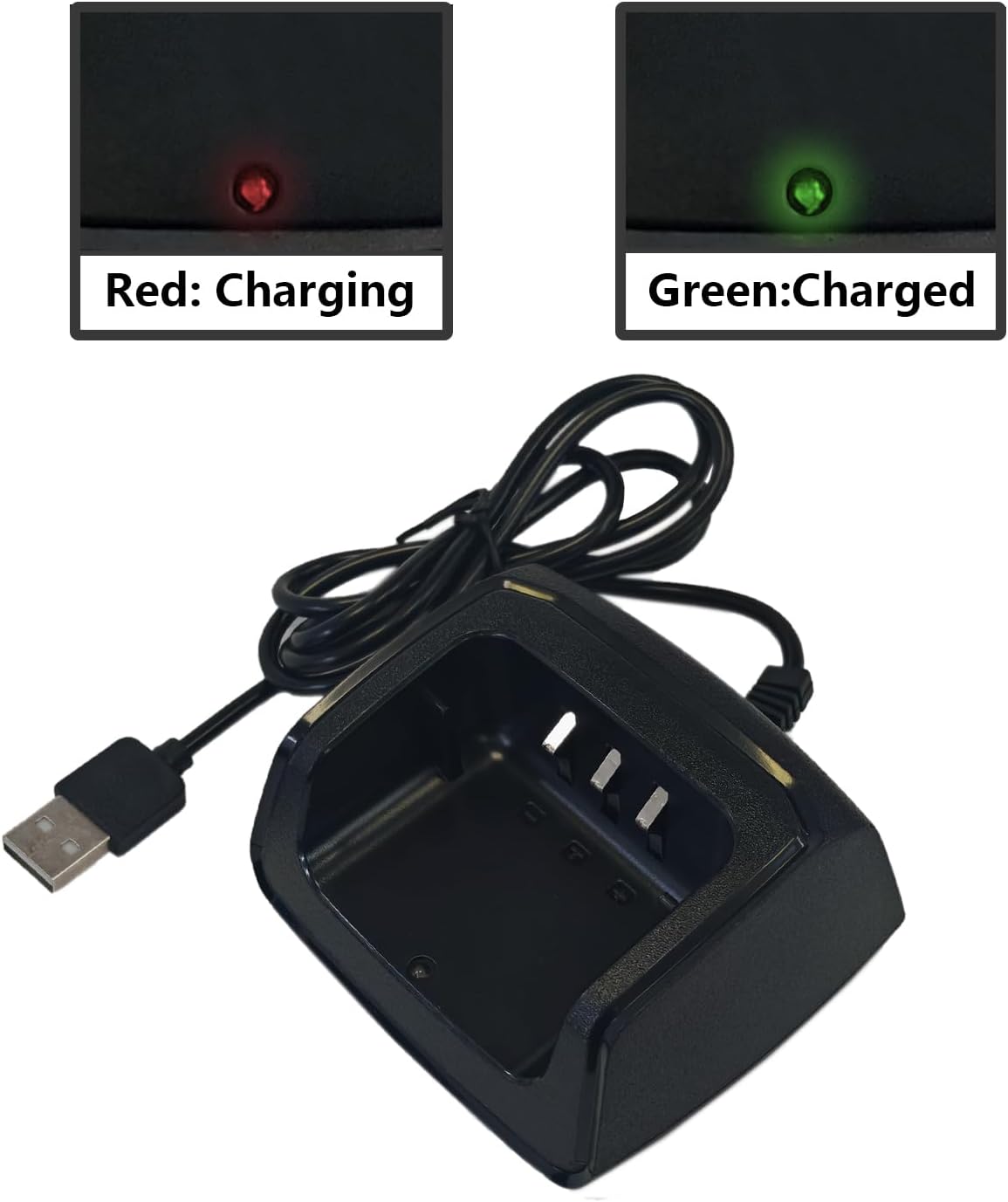
Image: A close-up view of the charger base demonstrating the LED indicator. One panel shows a red light, signifying "Charging," while the other shows a green light, signifying "Charged," providing clear visual cues for charging status.

Image: A BAOFENG two-way radio securely seated in the charging base, illustrating the correct way to dock the radio for charging. The USB cable is visible, connected to the base.
Safety and Protection Features
The BAOFENG UV-13 Charger Base is equipped with advanced protection features to ensure the safety and longevity of your devices and the charger itself:
- Low Heat Dissipation: Designed to operate efficiently with minimal heat generation.
- Overcurrent Protection: Prevents damage from excessive current flow.
- Over-temperature Protection: Safeguards against overheating.
- Short-circuit Protection: Protects against electrical shorts.
- High Voltage Protection: Shields the device from voltage spikes.

Image: A visual representation highlighting the safety features of the charger, including Overcharger Protection, Temperature Protection, Overcurrent Protection, Short-circuit Protection, and High Voltage Protection, displayed next to a radio in the charging dock.
Maintenance
- Keep the charger base clean and free from dust and debris. Use a soft, dry cloth for cleaning.
- Avoid exposing the charger to extreme temperatures, humidity, or direct sunlight.
- Do not disassemble the charger base. Any repairs should be performed by qualified personnel.
- Ensure the charging terminals are clean and free of corrosion for optimal contact.
Troubleshooting
Issue: Radio not charging.
- Check Power Source: Ensure the USB power source is active and providing sufficient power. Try a different USB port or adapter.
- Check Connections: Verify that the USB cable is securely connected to both the charger base and the power source.
- Radio Placement: Ensure the radio is correctly seated in the charging slot and making firm contact with the charging terminals.
- Battery Condition: Confirm that the radio's battery is properly installed and not damaged.
- Compatibility: Double-check that your radio model is listed as compatible with this charger.
Issue: LED indicator not lighting up.
- Power Supply: Confirm the charger is receiving power from the USB source.
- Charger Fault: If all connections are secure and power is present, the charger itself may be faulty.
Specifications
| Product Dimensions | 4.37 x 6.5 x 2.28 inches (11.1 x 16.5 x 5.8 cm) |
| Item Weight | 8.3 ounces (0.24 kg) |
| Input Voltage | 8.4 Volts (DC) |
| Color | Black |
| Manufacturer | BAOFENG |
| Country of Origin | China |
| ASIN | B0DNVR211H |
| First Available Date | November 23, 2024 |
Image: A general view of the BAOFENG UV-13 Charger Base. Detailed dimensions are provided in the table above.
Warranty and Support
For warranty information or technical support, please refer to the contact details provided by your retailer or visit the official BAOFENG website. Keep your purchase receipt as proof of purchase for any warranty claims.
For further assistance, you may contact the seller directly through the platform where the product was purchased.