
Tronsmart Tronsmart Sounfii Q20S
Tronsmart Q20S Hybrid Active Noise Cancelling Headphones User Manual
Model: Tronsmart Sounfii Q20S
Introduction
Thank you for choosing the Tronsmart Q20S Hybrid Active Noise Cancelling Headphones. This manual provides detailed instructions on how to set up, operate, and maintain your headphones to ensure optimal performance and longevity. Please read this manual thoroughly before using the product.
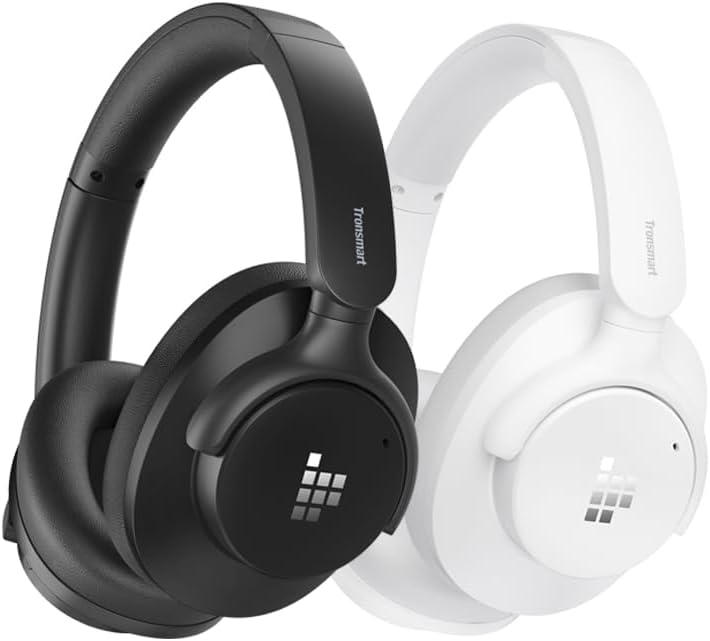
Image: Tronsmart Q20S headphones in black and white, showcasing their sleek design.
Package Contents
Please check the package contents upon unboxing:
- Tronsmart Q20S Hybrid Active Noise Cancelling Headphones
- USB-C Charging Cable
- 3.5mm Audio Cable
- User Manual
- Carrying Pouch (if included)
Product Overview
Familiarize yourself with the various components and controls of your Tronsmart Q20S headphones.
- Power Button: Used to power on/off the headphones and activate pairing mode.
- Volume Up/Next Track Button: Increases volume with a short press, skips to next track with a long press.
- Volume Down/Previous Track Button: Decreases volume with a short press, goes to previous track with a long press.
- ANC Button: Toggles Active Noise Cancellation on/off.
- USB-C Charging Port: For charging the headphones.
- 3.5mm Audio Jack: For wired connection.
- Microphone: For hands-free calling.
- LED Indicator: Displays power, charging, and pairing status.
Setup
Charging the Headphones
Before first use, fully charge your headphones. A full charge takes approximately 2.5 hours.
- Connect the USB-C charging cable to the charging port on the headphones.
- Connect the other end of the cable to a USB power adapter (not included) or a computer's USB port.
- The LED indicator will show red during charging and turn off when fully charged.
A 10-minute quick charge provides approximately 8 hours of playback.

Image: Visual representation of the Tronsmart Q20S headphones' extended battery life, highlighting 60 hours of playtime and 2.5 hours charge time.
Bluetooth Pairing
- Ensure the headphones are turned off.
- Press and hold the Power button for approximately 3-5 seconds until the LED indicator flashes blue and red alternately, indicating pairing mode.
- On your device (smartphone, tablet, laptop), enable Bluetooth and search for new devices.
- Select "Tronsmart Sounfii Q20S" from the list of available devices.
- Once connected, the LED indicator will flash blue slowly.
The headphones support dual-connections, allowing you to connect to two devices simultaneously.
Operating Instructions
Power On/Off
- Power On: Press and hold the Power button for 2 seconds.
- Power Off: Press and hold the Power button for 3 seconds.
Music Playback
- Play/Pause: Short press the Power button.
- Volume Up: Short press the Volume Up button.
- Volume Down: Short press the Volume Down button.
- Next Track: Long press the Volume Up button.
- Previous Track: Long press the Volume Down button.

Image: A close-up of the headphone's driver, emphasizing its Hi-Res Audio capabilities for a rich and detailed listening experience.
Active Noise Cancellation (ANC)
The Tronsmart Q20S features Hybrid Active Noise Cancellation to reduce environmental noise by up to 90%.
- Toggle ANC: Short press the ANC button to turn ANC on or off.

Image: Side profile of the Tronsmart Q20S headphone, illustrating the Hybrid Active Noise Cancellation feature that reduces external noise.
Phone Calls
Manage calls with the built-in microphone and ENC technology for clear communication.
- Answer/End Call: Short press the Power button.
- Reject Call: Long press the Power button for 2 seconds.
- Activate Voice Assistant: Double press the Power button.

Image: A person wearing Tronsmart Q20S headphones while engaged in a phone call, demonstrating the crystal clear hands-free calling feature.
Wired Mode
Connect the headphones to devices without Bluetooth using the 3.5mm audio cable.
- Insert one end of the 3.5mm audio cable into the headphone's audio jack.
- Insert the other end into your device's 3.5mm audio output.
- In wired mode, Bluetooth and ANC functions may be limited or unavailable depending on power status.
Custom EQ via App
Customize your audio experience using the Tronsmart app.
- Download the Tronsmart app from your device's app store.
- Connect your Q20S headphones to your device via Bluetooth.
- Open the app and follow the instructions to access and adjust EQ settings.

Image: A user interacting with the Tronsmart app on a smartphone to customize the equalizer settings for their Q20S headphones.
Comfort and Portability
The Tronsmart Q20S headphones are designed for all-day comfort and easy portability.
- Ergonomic Design: Made from soft leather material with carefully designed ear cup angles and headband curves for even pressure distribution.
- Lightweight: Weighing approximately 249g for extended wear without discomfort.
- Swiveling Earpads: 90° swiveling earpads allow for flat storage and easy carrying.

Image: A person comfortably wearing the Tronsmart Q20S headphones, highlighting their lightweight design and soft earcups for unrivaled comfort.

Image: A person with the Tronsmart Q20S headphones resting around their neck, demonstrating the 90° swiveling earpads for easy portability.
Maintenance
Proper maintenance ensures the longevity and performance of your headphones.
- Clean the earcups and headband regularly with a soft, dry cloth.
- Avoid using abrasive cleaners or solvents.
- Store the headphones in the provided carrying pouch when not in use to protect them from dust and scratches.
- Keep the headphones away from extreme temperatures, humidity, and direct sunlight.
- Do not expose the headphones to water or other liquids.
Troubleshooting
| Problem | Possible Cause | Solution |
|---|---|---|
| Headphones won't turn on. | Low battery. | Charge the headphones fully. |
| Cannot pair with device. | Headphones not in pairing mode; Bluetooth off on device; device too far. | Ensure headphones are in pairing mode (flashing blue/red). Turn on Bluetooth on your device. Move headphones closer to the device (within 10 meters). |
| No sound or low volume. | Volume too low; incorrect audio source; headphones not connected. | Increase volume on headphones and device. Check if headphones are properly connected (Bluetooth or wired). |
| ANC not working effectively. | ANC not activated; very high-frequency noise. | Ensure ANC is toggled on. ANC is most effective for low and mid-frequency noises. |
Specifications
| Feature | Detail |
|---|---|
| Model Name | Tronsmart Sounfii Q20S |
| Connectivity Technology | Wireless (Bluetooth), Wired (3.5mm Jack) |
| Wireless Communication Technology | Bluetooth 5.0 |
| Noise Control | Hybrid Active Noise Cancellation |
| Audio Driver Type | Dynamic Driver |
| Frequency Range | 20 Hz - 40 kHz (Hi-Res Audio Certified) |
| Battery Life | Up to 60 hours (ANC off), 40 hours (ANC on) |
| Charging Time | Approx. 2.5 hours (10 min charge for 8 hours playtime) |
| Material | Leather (earcups) |
| Weight | Approx. 249g |
| Compatible Devices | Desktops, Gaming Consoles, Laptops, Tablets, Telephones |
Warranty and Support
Tronsmart products come with a standard warranty. For detailed warranty information, please refer to the warranty card included in your package or visit the official Tronsmart website.
If you encounter any issues or have questions regarding your Tronsmart Q20S headphones, please contact Tronsmart Customer Support:
- Website: www.tronsmart.com
- Email: Refer to the official website for support email.
- Online Support: Check the Tronsmart app or website for live chat options.
Please have your product model and purchase details ready when contacting support.
Safety Information
- Do not disassemble or modify the headphones.
- Avoid prolonged exposure to high volume levels to prevent hearing damage.
- Do not use the headphones while driving or in situations where awareness of surroundings is critical.
- Keep out of reach of children.
- Dispose of the product responsibly according to local regulations.
Ask a question about this manual
Ask about setup, troubleshooting, compatibility, parts, safety, or missing instructions. Manuals+ will review the question and use this page’s manual context to help answer it.