
Srliya AR8406
AR8406 Portable Dissolved Oxygen Meter User Manual
Model: AR8406 | Brand: Srliya
1. Introduction
The Srliya AR8406 is a portable, high-precision digital dissolved oxygen meter designed for accurate measurement of dissolved oxygen and temperature in various water environments. Equipped with an intelligent imported chip and a large LCD backlight display, it offers fast, precise readings and user-friendly operation. This device is suitable for experimental scientific research, wastewater treatment, domestic water quality monitoring, aquatic planting, aquaculture, and medical fields.
2. Safety Information
- Always handle the device with care to prevent damage.
- Do not expose the meter or probe to extreme temperatures, direct sunlight, or corrosive liquids.
- Ensure the battery compartment is sealed properly after battery installation to prevent water ingress.
- Do not attempt to disassemble or modify the device, as this will void the warranty and may cause damage.
- Keep the device out of reach of children.
- Dispose of batteries according to local regulations.
3. Product Overview
3.1 Components
The AR8406 Dissolved Oxygen Meter typically includes the main meter unit, a dissolved oxygen probe, and various accessories for calibration and maintenance.
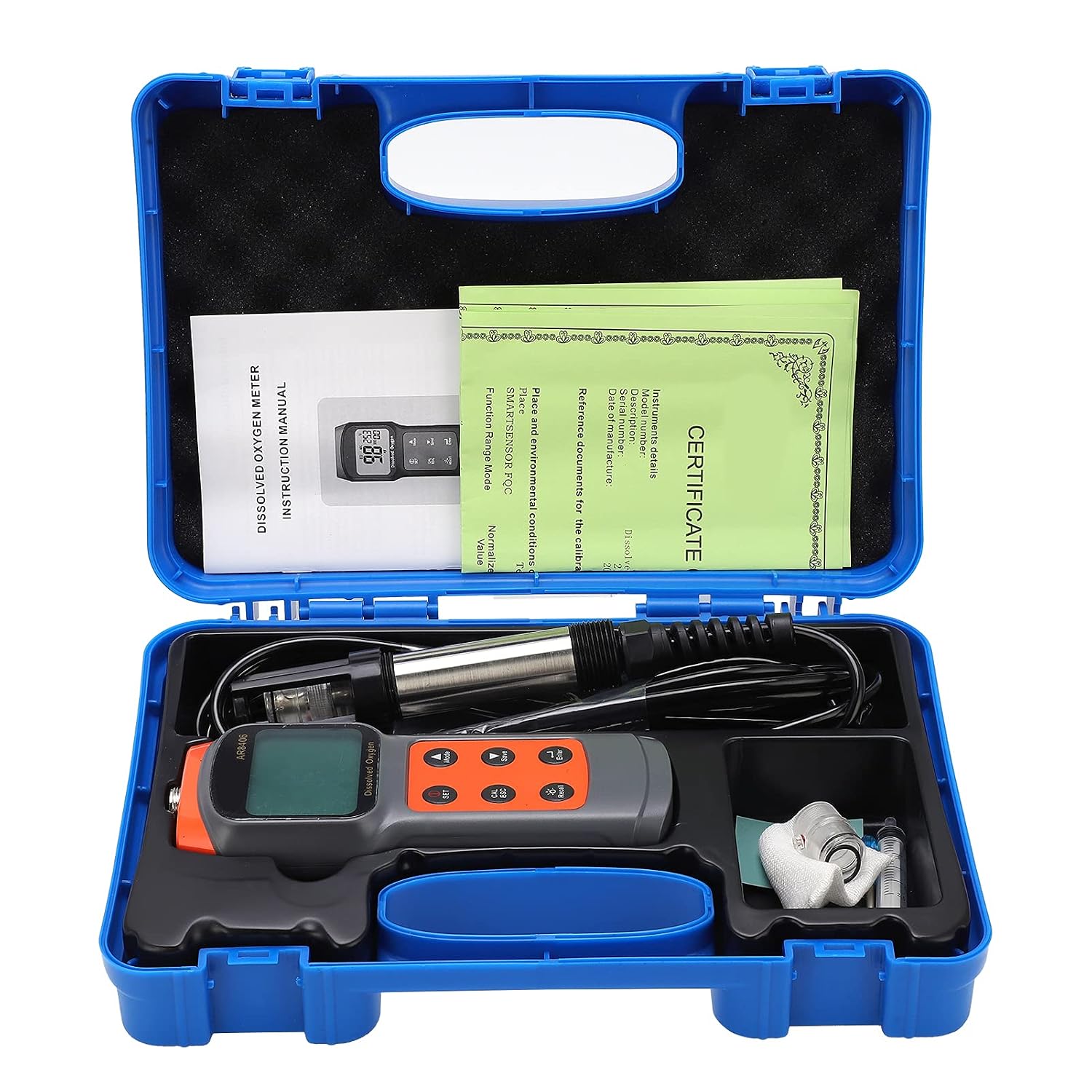
Figure 3.1: Complete set of AR8406 Dissolved Oxygen Meter components.
3.2 Device Layout and Controls
The meter features a large LCD display and intuitive button controls for easy operation.

Figure 3.2: Front view of the AR8406 Dissolved Oxygen Meter.

Figure 3.3: Detailed view of the LCD display.
- SET Button: Short press to switch functions, long press to enter setup mode.
- CAL/ESC Button: Long press in measurement mode to enter calibration mode setup; short press to exit setup mode.
- Recall Button: Short press to turn backlight on/off; long press to view saved data. Use up/down keys to navigate recorded data.
- Enter Button: Confirms selections or actions.
- Mode Button: Switches between different measurement modes or parameters.
- Save Button: Saves current measurement data.
4. Setup
4.1 Battery Installation
- Locate the battery compartment on the back of the meter.
- Open the battery compartment cover.
- Insert four (4) 1.5V AAA batteries, ensuring correct polarity (+/-).
- Close the battery compartment cover securely.
4.2 Probe Connection
- Carefully align the dissolved oxygen probe connector with the port on the meter.
- Gently push and twist the connector until it is firmly secured. Do not overtighten.
- Ensure the probe cap is removed before taking measurements. The probe features an anti-collision cap for protection during storage.

Figure 4.1: Meter with probe attached.
5. Operating Instructions
5.1 Power On/Off
Press the power button (usually integrated with the SET button or a dedicated power button) to turn the device on. The device will automatically power off after one hour of inactivity to conserve battery life.
5.2 Taking a Measurement
- Ensure the probe is clean and properly connected.
- Immerse the probe into the water sample to be tested. Ensure the sensor part of the probe is fully submerged.
- Allow a few moments for the reading to stabilize on the LCD display.
- Read the dissolved oxygen and temperature values displayed.
5.3 Unit Switching
The device supports switching between Celsius (°C) and Fahrenheit (°F) for temperature readings. Refer to the manual's specific instructions for the 'SET' button or 'Mode' button to toggle temperature units.
5.4 Data Recording and Recall
The meter can manually record up to 99 groups of data.
- To Save Data: Press the Save button briefly to store the current measurement.
- To Recall Data: Long press the Recall button to enter the data viewing mode. Use the up and down keys (often integrated with other buttons) to scroll through the recorded data. Press CAL/ESC to exit the record display mode.
5.5 Backlight Control
Short press the Recall button to toggle the LCD backlight on or off, improving visibility in various lighting conditions.
6. Calibration
The AR8406 supports air-saturated dissolved oxygen correction for calibration.
- Ensure the probe is clean and dry.
- Long press the CAL/ESC key in measurement mode to enter the calibration mode setup.
- Follow the on-screen prompts to perform the air-saturated dissolved oxygen correction. This typically involves exposing the probe to air and confirming the reading.
- Once calibration is complete, the meter will indicate success. Press CAL/ESC to exit calibration mode.
7. Maintenance
- Cleaning the Probe: After each use, rinse the probe with distilled water to remove any residue. Do not use abrasive materials or strong chemicals.
- Storage: Store the meter and probe in a cool, dry place, away from direct sunlight and extreme temperatures. Always replace the protective cap on the probe when not in use.
- Battery Replacement: Replace batteries when the low battery indicator appears on the display. Ensure to use new, high-quality AAA batteries.
- Regular Calibration: Calibrate the device regularly, especially if readings appear inconsistent or after prolonged storage, to ensure accuracy.
8. Troubleshooting
| Problem | Possible Cause | Solution |
|---|---|---|
| Meter does not power on | Dead or incorrectly installed batteries | Check battery polarity; replace with new AAA batteries. |
| Inaccurate readings | Probe dirty or damaged; calibration needed; interference | Clean the probe; perform calibration; ensure no strong electromagnetic interference. |
| Display is dim or flickering | Low battery; backlight issue | Replace batteries; check backlight setting. |
| Cannot save data | Memory full; incorrect operation | Check if memory is full (though 99 groups is substantial); ensure correct button press for saving. |
| Probe not recognized | Loose connection; damaged probe | Ensure probe is securely connected; inspect probe for visible damage. |
9. Specifications
| Parameter | Value |
|---|---|
| Model | AR8406 |
| Material | ASBS |
| Battery | 4 x 1.5V AAA (not included) |
| Dissolved Oxygen Correction | Air saturated dissolved oxygen correction |
| Temperature Measurement Range | -5.0~60.0℃ |
| Temperature Resolution | 0.1℃ |
| Temperature Accuracy | ±0.5℃ |
| Temperature Unit Switch | ℃/℉ |
| Data Record Capacity | Manually record 99 groups |
| Salinity Compensation | 0~42ppt |
| Altitude Compensation | 0~3500m |
| Temperature Compensation | Automatic Temperature Compensation (ATC) |
| Automatic Power Off | After one hour of inactivity |
| Package Dimensions | 31 x 21 x 8 cm |
| Item Weight | 1.03 kg |
| Country of Origin | China |
10. Warranty and Support
For warranty information and technical support, please refer to the documentation provided with your purchase or contact the manufacturer directly. Keep your purchase receipt as proof of purchase for any warranty claims.
Ask a question about this manual
Ask about setup, troubleshooting, compatibility, parts, safety, or missing instructions. Manuals+ will review the question and use this page’s manual context to help answer it.