
Srliya RuoShui 500N
RuoShui 500N Digital Force Dynamometer User Manual
Model: RuoShui 500N | Brand: Srliya
Important Safety Information
Please read these instructions carefully before using the RuoShui 500N Digital Force Dynamometer. Strictly adhere to all safety rules, cautions, and warnings provided in this manual to ensure safe and proper operation.
- Operate the device in an environment free from corrosive substances.
- Avoid operating the device in areas with strong electromagnetic interference.
- Ensure the power supply specifications match the device requirements.
- Do not attempt to disassemble or modify the device, as this may void the warranty and pose safety risks.
Product Overview
The RuoShui 500N Digital Force Dynamometer is a portable, handheld device designed for precise force measurement. It features a clear LCD backlight screen for easy data reading and simple button operation. The ergonomic metal shell ensures durability and wear resistance. This dynamometer is equipped with a high-sensitivity sensor for fast and accurate measurements, supporting capacities from 2.2 ounces to 110 pounds (500N).
Key Features:
- LCD Display: Large, easy-to-read LCD with backlight for clear data visibility.
- High Sensitivity Sensor: Ensures fast and accurate measurements.
- Multiple Units: Selectable units including LB, kg, and N.
- Peak Hold Function: Captures and displays the maximum force measured.
- Zero Function: Allows for tare or zeroing of measurements.
- Overload Warning: Display flashes to indicate an overload condition.
- Low Battery Indicator: Alerts when the NI-MH battery is low.
- Automatic Shutdown: Powers off after 10 minutes of inactivity to conserve battery.
- Rechargeable Battery: Powered by a 3.7V lithium battery with up to 15 hours of working time.
Package Contents
Verify that all items listed below are present in your package:
- 1 x Digital Force Meter (RuoShui 500N Dynamometer)
- 1 x Power Adapter (US Plug)
- 6 x Measurement Accessories (various hooks and tips)
- 1 Pack x Mounting Screws
- 1 x User Manual

Figure 1: The RuoShui 500N Digital Force Dynamometer shown with its power adapter and various measurement accessories, including hooks and tips, and mounting screws.
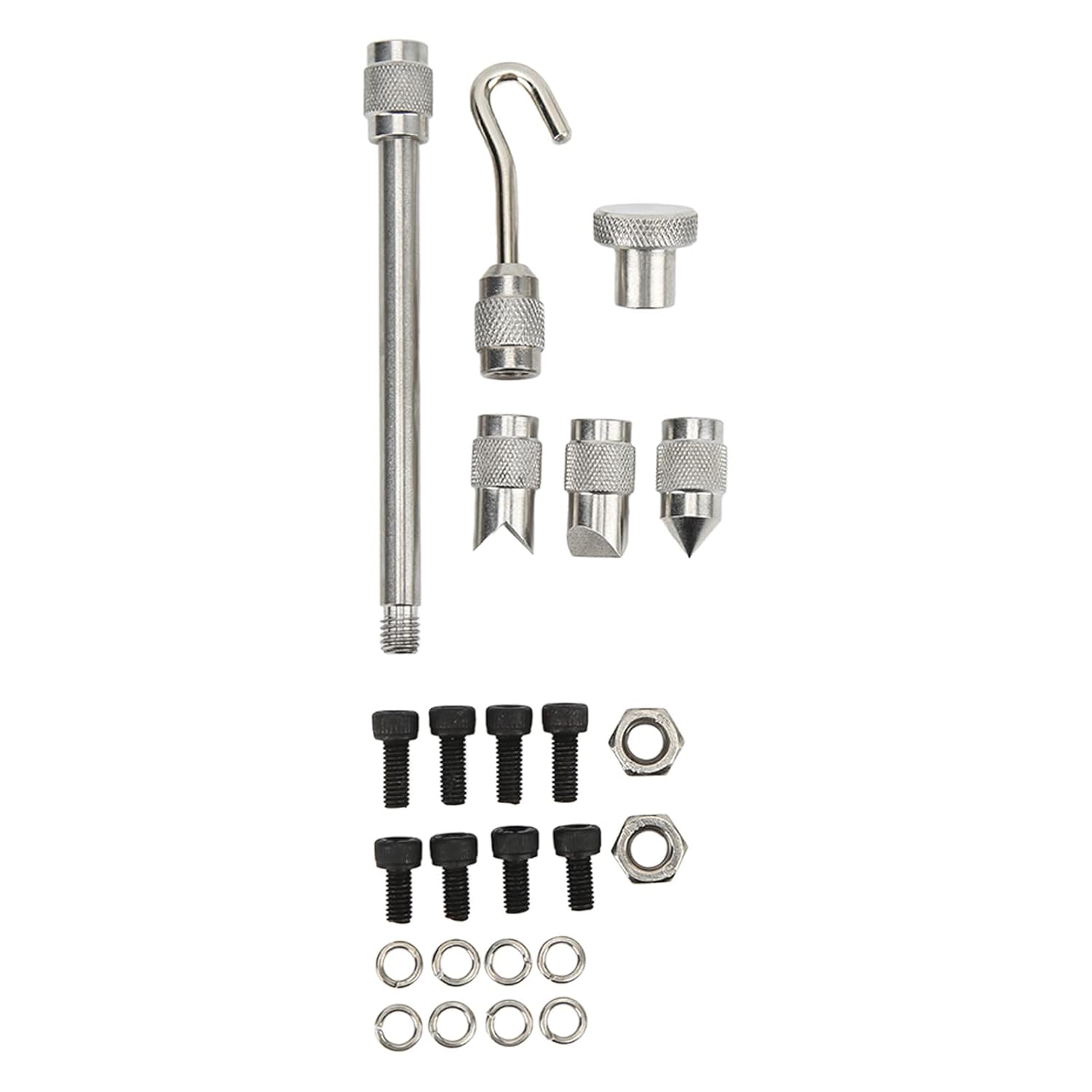
Figure 2: A detailed view of the six measurement accessories, including a long extension rod, a hook, a flat tip, a conical tip, and two chisel tips, along with mounting screws and washers.
Setup
1. Charging the Battery:
Before first use, fully charge the internal 3.7V rechargeable lithium battery. Connect the provided US plug adapter to the DC 5V 1000mA input port on the side of the dynamometer and plug it into a standard power outlet. Charging typically takes 4-6 hours. The battery life is rated for ≥300 charge cycles.

Figure 3: Side view of the dynamometer, highlighting the 5V 1A charging port for connecting the power adapter.
2. Attaching Accessories:
Select the appropriate measurement accessory (hook, flat tip, conical tip, etc.) for your application. Screw the accessory securely onto the threaded shaft located at the top of the dynamometer.
Operating Instructions
1. Power On/Off:
- Press the OFF/ON button to power on the device.
- Press and hold the OFF/ON button to power off the device.
- The device will automatically shut down after 10 minutes of idle operation.

Figure 4: Front view displaying the LCD screen and control buttons (OFF/ON, UNIT, ZERO, SET), and back view showing the serial number and mounting points.
2. LCD Display Indicators:
The LCD screen displays various information during measurement:
- Measurement Unit: Displays the selected unit (N, kg, or Lb).
- Tension/Compression Sign: Indicates the direction of the applied force.
- Battery Sign: Shows the current battery level. A flashing sign indicates a low battery.
- Overload Warning: The display will flash if the applied force exceeds the maximum load value (500N, 50kg, or 110Lb). Immediately reduce the load to prevent damage.

Figure 5: The dynamometer's front panel showing the LCD screen displaying a force reading of "500" in Newtons (N).
3. Unit Selection:
Press the UNIT button to cycle through the available measurement units: Newtons (N), kilograms (kg), and pounds (Lb).
4. Zero Function (Tare):
Press the ZERO button to reset the current reading to zero. This is useful for taring out the weight of an attached fixture or for starting a new measurement from a baseline.
5. Peak Hold Function:
The device features a peak hold function. When activated (typically by pressing SET or a similar button, refer to the on-screen indicators), it will capture and display the maximum force applied during a measurement cycle. This value will remain on the screen until a higher peak is detected or the function is reset.
6. Alarm for Upper/Lower Value:
The dynamometer supports setting upper and lower force limits. If the measured force exceeds these limits, an alarm will sound (or a visual indicator will appear). Refer to the SET menu for configuring these alarm values. (Specific steps for setting alarm values are not detailed in the provided data, consult the included paper manual for advanced settings).
Maintenance
- Cleaning: Wipe the device with a soft, dry cloth. Do not use abrasive cleaners or solvents.
- Storage: Store the dynamometer in a dry, cool place, away from direct sunlight and corrosive environments.
- Battery Care: Recharge the battery regularly, even if not in use, to maintain its lifespan. Avoid fully discharging the battery for extended periods.
- Calibration: For professional applications requiring certified accuracy, periodic calibration by a qualified service center is recommended.
Troubleshooting
1. Low Battery Indicator:
If the battery sign on the LCD flashes, it indicates that the NI-MH battery is low. Connect the device to the power adapter and charge it immediately.
2. Overload Warning:
If the display flashes, it signifies that the applied force has exceeded the maximum load capacity of the dynamometer. Immediately remove the load to prevent damage to the sensor. Continuous overloading can permanently damage the device.
3. Device Not Powering On:
- Ensure the battery is sufficiently charged.
- Verify that the power button is pressed correctly.
- If the device still does not power on after charging, contact customer support.
Specifications
| Parameter | Value |
|---|---|
| Item Type | Force Gauge |
| Material | Plastic |
| Model | RuoShui 500N |
| Maximum Load Value | 500N, 50kg, 110Lb |
| Resolution | 0.1N, 0.01KG, 0.01Lb |
| Accuracy | ±0.5% |
| Acceleration Setting | √ (Default Value 9.800) |
| Backlight | √ |
| Zero Function | √ |
| Peak Hold | √ |
| Alarm for Upper/Lower Value | √ |
| Low Battery Indicator | √ |
| Auto Off | 10 Minutes of Idle |
| Working Conditions | No Focus Around, No Corrosiveness |
| Power Supply | 3.7V Rechargeable Lithium Battery, 850mAh (Built-In) |
| Charging Time | 4-6 Hours |
| Battery Life | ≥300 Times (Charge Cycles) |
| Output (Adapter) | DC 5V 1000mA |
| Item Weight | 656 g |
| Parcel Dimensions | 23 x 16 x 6 cm |
| Manufacturer | Srliya |
| Item Model Number | Srliya8w1ex3sn9p-11 |
Warranty and Support
For warranty information, technical support, or service inquiries, please refer to the contact information provided with your purchase documentation or visit the official Srliya website. Keep your purchase receipt as proof of purchase for warranty claims.
Ask a question about this manual
Ask about setup, troubleshooting, compatibility, parts, safety, or missing instructions. Manuals+ will review the question and use this page’s manual context to help answer it.