
1. Introduction
This manual provides essential information for the proper installation, operation, and maintenance of the Linear HAE00077 LDCO Control Board. This genuine Linear replacement part is designed for use with Linear LDCO800 and LDCO801 garage door openers and is BBU (Battery Backup Unit) compatible. It replaces the older HAE00061 model, ensuring continued reliable performance of your garage door opener system.
2. Safety Information
WARNING: Electrical shock hazard. Disconnect power before installation or servicing.
- Always disconnect electrical power to the garage door opener before attempting any installation, repair, or maintenance.
- Installation should be performed by a qualified technician or an individual with a thorough understanding of electrical systems and garage door opener mechanics.
- Wear appropriate personal protective equipment, including safety glasses and gloves.
- Ensure all wiring connections are secure and comply with local electrical codes.
- Keep hands and loose clothing away from moving parts of the garage door opener.
3. Package Contents
- 1 x Linear HAE00077 LDCO Control Board
4. Setup and Installation
The Linear HAE00077 control board is a direct replacement for the original board in compatible Linear LDCO800 and LDCO801 garage door openers. Follow these general steps for installation. Refer to your specific garage door opener's manual for detailed wiring diagrams and instructions.
- Disconnect Power: Ensure the garage door opener is completely disconnected from its power source at the circuit breaker or by unplugging it.
- Access Control Board: Carefully open the garage door opener housing to access the existing control board.
- Document Connections: Before disconnecting any wires, take clear photos or make a detailed diagram of all wire connections to the old control board. This is crucial for correct re-connection.
- Remove Old Board: Disconnect all wires and mounting screws holding the old control board in place. Carefully remove the old board.
- Install New Board: Position the new Linear HAE00077 control board in the housing and secure it with the mounting screws.
- Reconnect Wiring: Using your photos or diagram, carefully reconnect all wires to the corresponding terminals on the new HAE00077 control board. Ensure all connections are firm and correct.
- Close Housing: Once all connections are verified, carefully close and secure the garage door opener housing.
- Restore Power and Test: Restore power to the garage door opener. Follow the instructions in your garage door opener manual to reprogram remotes, keypads, and set limits if necessary. Test the opener's functionality thoroughly, including safety features.
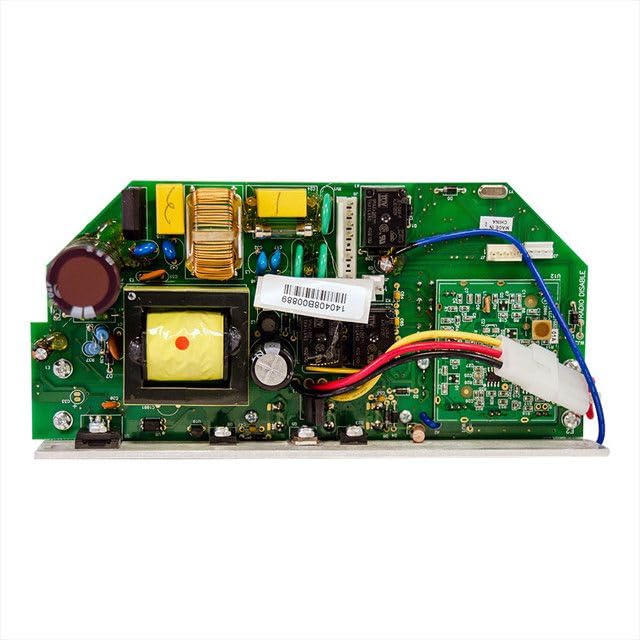
Image 1: The Linear HAE00077 LDCO Control Board. This image shows the circuit board with various connectors and components, illustrating its compact design for integration into compatible garage door opener units.
5. Operation
The Linear HAE00077 LDCO Control Board is an internal component that facilitates the core functions of your Linear LDCO800 or LDCO801 garage door opener. Once correctly installed, the control board enables the opener to respond to commands from remote controls, wall stations, and keypads, manage motor functions, and integrate with safety sensors and battery backup units (BBU). Its operation is seamless and integrated into the overall functionality of the garage door opener system.
6. Maintenance
The HAE00077 control board itself requires minimal maintenance. However, regular inspection of the garage door opener system is recommended.
- Visual Inspection: Periodically inspect the control board for any signs of damage, loose connections, or debris.
- Cleanliness: Ensure the area around the control board within the opener housing remains clean and free of dust or insects, which can interfere with electronic components.
- Connection Checks: If experiencing intermittent issues, ensure all wire connections to the control board are secure.
Always disconnect power before performing any inspection or cleaning inside the opener housing.
7. Troubleshooting
If your garage door opener is not functioning correctly after installing the HAE00077 control board, consider the following troubleshooting steps:
- No Power: Verify that the garage door opener is receiving power. Check the circuit breaker and ensure the unit is plugged in securely.
- Incorrect Wiring: Double-check all wire connections to the control board against your diagram or photos. Incorrect wiring is a common cause of malfunction.
- Remote/Keypad Issues: If remotes or keypads are not working, ensure they are properly programmed to the new control board. Refer to your garage door opener's manual for programming instructions.
- Safety Sensor Alignment: Ensure the safety sensors at the bottom of the garage door track are properly aligned and free of obstructions. Misaligned sensors will prevent the door from closing.
- Limit Settings: If the door is not opening or closing fully, the travel limits may need to be reset. Consult your opener's manual.
- Professional Assistance: If issues persist after basic troubleshooting, it is recommended to contact a qualified garage door technician or Linear customer support.
8. Specifications
| Manufacturer | Linear |
| Model Number | HAE00077 |
| Product Dimensions | 7 x 3 x 1 inches |
| Included Components | Control Board |
| Compatibility | Linear LDCO800, LDCO801 Garage Door Openers |
| Replaces | HAE00061 |
9. Warranty and Support
For information regarding the warranty of your Linear HAE00077 LDCO Control Board, please refer to the documentation provided with your original Linear garage door opener or contact Linear customer support directly. For technical assistance or further inquiries, please visit the official Linear website or consult your local authorized Linear dealer.
