
1. Introduction
Thank you for purchasing the RAF R.8676 Portable Rechargeable Vacuum Cleaner. This manual provides essential information for the safe and efficient use of your new appliance. Please read these instructions thoroughly before first use and retain them for future reference.
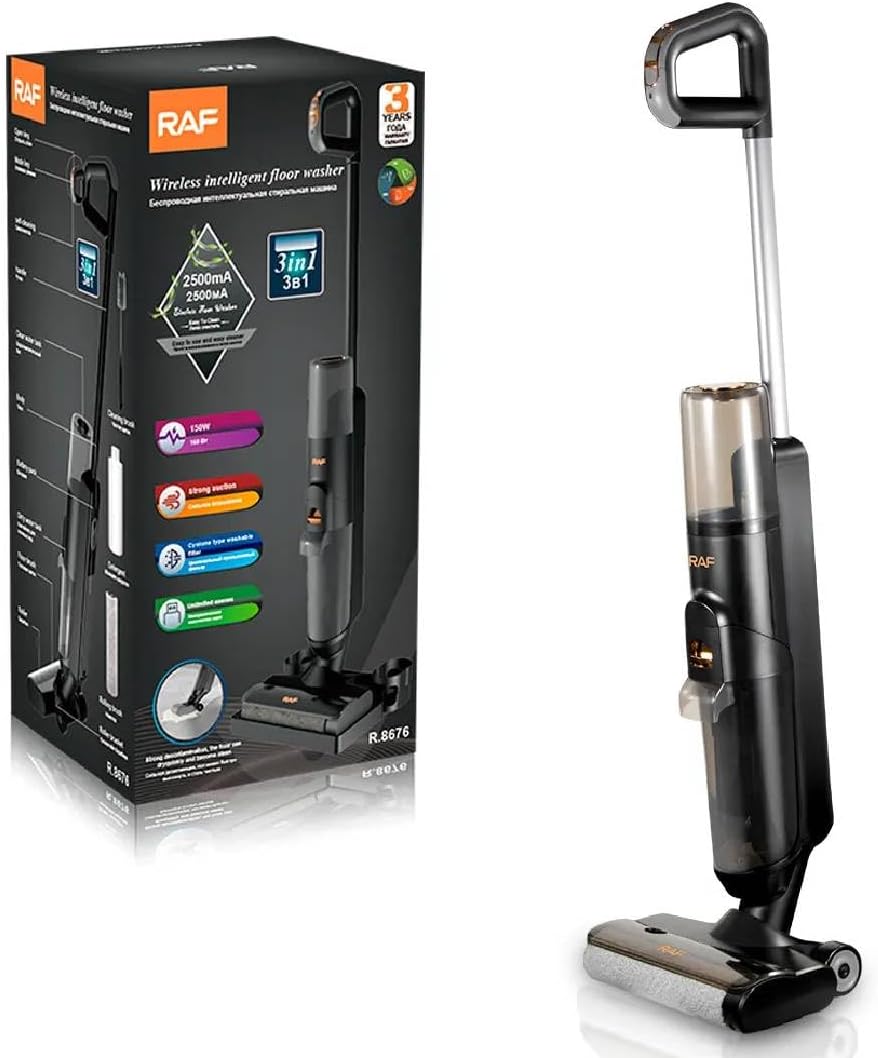
Figure 1: RAF R.8676 Portable Rechargeable Vacuum Cleaner and its retail packaging, highlighting key features like 150W power and 2500mA battery.
2. Important Safety Instructions
Always follow basic safety precautions when using electrical appliances to reduce the risk of fire, electric shock, or injury.
- Read all instructions before using the appliance.
- Do not use outdoors or on wet surfaces.
- Do not allow to be used as a toy. Close attention is necessary when used by or near children.
- Use only as described in this manual. Use only manufacturer's recommended attachments.
- Do not use with a damaged cord or plug. If appliance is not working as it should, has been dropped, damaged, left outdoors, or dropped into water, return it to a service center.
- Do not pull or carry by cord, use cord as a handle, close a door on cord, or pull cord around sharp edges or corners. Do not run appliance over cord. Keep cord away from heated surfaces.
- Do not unplug by pulling on cord. To unplug, grasp the plug, not the cord.
- Do not handle plug or appliance with wet hands.
- Do not put any object into openings. Do not use with any opening blocked; keep free of dust, lint, hair, and anything that may reduce airflow.
- Keep hair, loose clothing, fingers, and all parts of body away from openings and moving parts.
- Do not pick up anything that is burning or smoking, such as cigarettes, matches, or hot ashes.
- Do not use to pick up flammable or combustible liquids, such as gasoline, or use in areas where they may be present.
- Do not pick up toxic material, such as chlorine bleach, ammonia, or drain cleaner.
- Do not use without dust bag and/or filters in place.
- Turn off all controls before unplugging.
- Use extra care when cleaning on stairs.
- Do not charge the unit outdoors.
- Use only the charger supplied by the manufacturer to recharge.
- Store the appliance indoors after use to prevent damage.
3. Package Contents
Carefully unpack your RAF R.8676 vacuum cleaner and check that all items are present and in good condition. If any items are missing or damaged, contact your retailer.
- RAF R.8676 Main Unit (Portable Rechargeable Vacuum Cleaner)
- Handle Assembly
- Charging Base / Storage Dock
- Power Adapter / Charger
- Cleaning Brush
- Detergent Bottle
- Rolling Brush (pre-installed or separate)
- User Manual (this document)

Figure 2: The RAF R.8676 vacuum cleaner shown with its various accessories, including a cleaning brush, detergent bottle, and rolling brush, along with overall dimensions.
4. Product Overview
Familiarize yourself with the components of your RAF R.8676 vacuum cleaner before use.
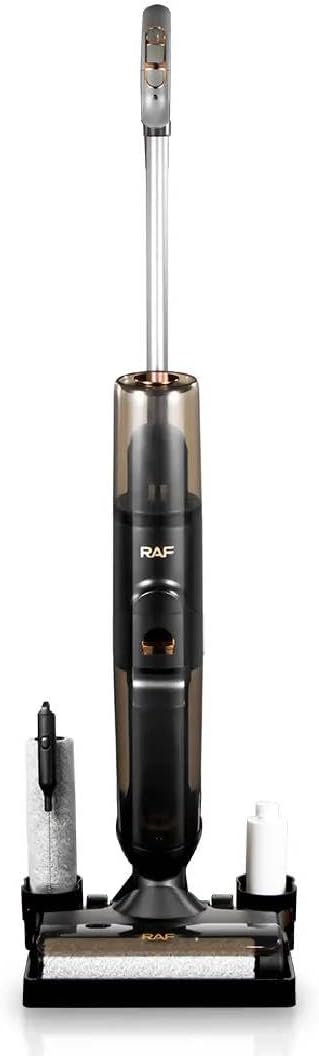
Figure 3: Side view of the RAF R.8676 vacuum cleaner, illustrating its sleek design and compact form factor.

Figure 4: Back view of the RAF R.8676 vacuum cleaner, showing the rear casing and handle attachment point.
Main Components:
- Handle: Ergonomically designed for comfortable grip and control.
- Main Body: Contains the motor, battery, and dust/water tanks.
- Dust/Water Tank: Transparent tank for collecting debris and dirty water.
- Power Button: Located on the handle for easy access.
- Floor Head: Features a rolling brush for effective cleaning of various floor types.
- Charging Port: For connecting the power adapter.
- Filter System: Includes a washable cyclone filter for efficient dust separation.
5. Setup and Charging
5.1 Assembly
- Insert the handle assembly into the main body of the vacuum cleaner until it clicks securely into place.
- Ensure the dust/water tank is correctly seated and locked.
- Place the vacuum cleaner onto its charging base/storage dock.
5.2 Initial Charging
Before first use, fully charge the vacuum cleaner. This typically takes several hours.
- Connect the power adapter to the charging port on the vacuum cleaner or its charging base.
- Plug the adapter into a suitable wall outlet.
- The charging indicator light will illuminate (refer to the specific light behavior in your product's quick start guide if available) to show that charging is in progress.
- Once fully charged, the indicator light may change color or turn off. Disconnect the charger.
Note: The vacuum cleaner is equipped with a 2500mA battery. Only use the provided charger to prevent damage.
6. Operating Instructions
6.1 Powering On/Off
- To turn on the vacuum cleaner, press the Power button located on the handle.
- To turn off, press the Power button again.
6.2 Vacuuming
- Ensure the dust/water tank is empty before starting.
- For wet cleaning, fill the clean water tank with water and, if desired, a small amount of suitable floor cleaning solution (use the provided detergent bottle for measurement).
- Turn on the vacuum cleaner. The 150W motor provides strong suction for effective cleaning.
- Move the floor head slowly over the surface to be cleaned. The rolling brush will agitate debris and the suction will collect it.
- Empty the dirty water tank and clean the filter after each use, especially after wet cleaning.
This appliance is designed for multiple uses, including dry vacuuming and wet floor washing, making it suitable for various household cleaning tasks.
7. Maintenance
Regular maintenance ensures optimal performance and extends the lifespan of your vacuum cleaner.
7.1 Emptying and Cleaning the Dust/Water Tank
- Turn off the vacuum cleaner and disconnect it from the charger.
- Remove the dust/water tank from the main unit.
- Empty the contents into a waste bin or drain.
- Rinse the tank thoroughly with clean water. Allow it to air dry completely before reattaching.
7.2 Cleaning the Filter
The RAF R.8676 features a washable cyclone filter. Clean the filter regularly to maintain suction power.
- Remove the filter assembly from the dust/water tank.
- Tap the filter gently over a waste bin to remove loose dust.
- Rinse the filter under running water until the water runs clear. Do not use detergents.
- Allow the filter to air dry completely for at least 24 hours before reinserting it. Do not use a hairdryer or other heating devices.
7.3 Cleaning the Rolling Brush
- Turn off the vacuum cleaner.
- Carefully remove the rolling brush from the floor head (refer to diagrams in the quick start guide if available for specific removal instructions).
- Use the provided cleaning brush or scissors to remove any tangled hair, threads, or debris from the rolling brush.
- Rinse the rolling brush with water if necessary and allow it to air dry completely before reinserting.
8. Troubleshooting
If you encounter issues with your vacuum cleaner, refer to the following common problems and solutions.
| Problem | Possible Cause | Solution |
|---|---|---|
| Vacuum cleaner does not turn on. | Battery is depleted. Power button not pressed correctly. | Charge the battery fully. Press the power button firmly. |
| Low suction power. | Dust/water tank is full. Filter is clogged. Rolling brush is obstructed. | Empty and clean the dust/water tank. Clean or replace the filter. Remove debris from the rolling brush. |
| Water leakage during wet cleaning. | Dust/water tank not properly installed. Tank seal is damaged. | Ensure the tank is securely locked in place. Contact customer support for assistance. |
| Vacuum cleaner stops unexpectedly. | Battery is low. Overheating protection activated. | Recharge the battery. Turn off the unit and allow it to cool down for at least 30 minutes before resuming use. |
9. Specifications
| Feature | Detail |
|---|---|
| Brand | RAF |
| Model Number | R.8676 |
| Power | 150 Watt |
| Battery Capacity | 2500 mA |
| Special Features | Portable, Rechargeable, Multi-use (3-in-1: vacuum, wash, dry) |
| Product Dimensions (L x W x H) | 32.5 x 30.5 x 65 cm (Assembled height approx. 107cm) |
| Item Weight | 4.82 Kilograms |
| Included Components | Cleaning Brush, Detergent Bottle, Rolling Brush (Note: Product specifications also list "Vacuum Bag") |
| Filter Type | Washable Cyclone Filter |
Note: Specifications are subject to change without prior notice for product improvement.
10. Warranty and Support
For warranty information and customer support, please refer to the warranty card included with your purchase or contact your retailer. Keep your proof of purchase for any warranty claims.