
Introduction
This manual provides essential information for setting up, operating, and maintaining your Texas Instruments TI-84 Plus CE Graphing Calculator. Designed for students from middle school through college, this calculator is a powerful tool for mathematics, science, and finance courses. It features a high-resolution color display, built-in applications, and a slim, lightweight design for portability.
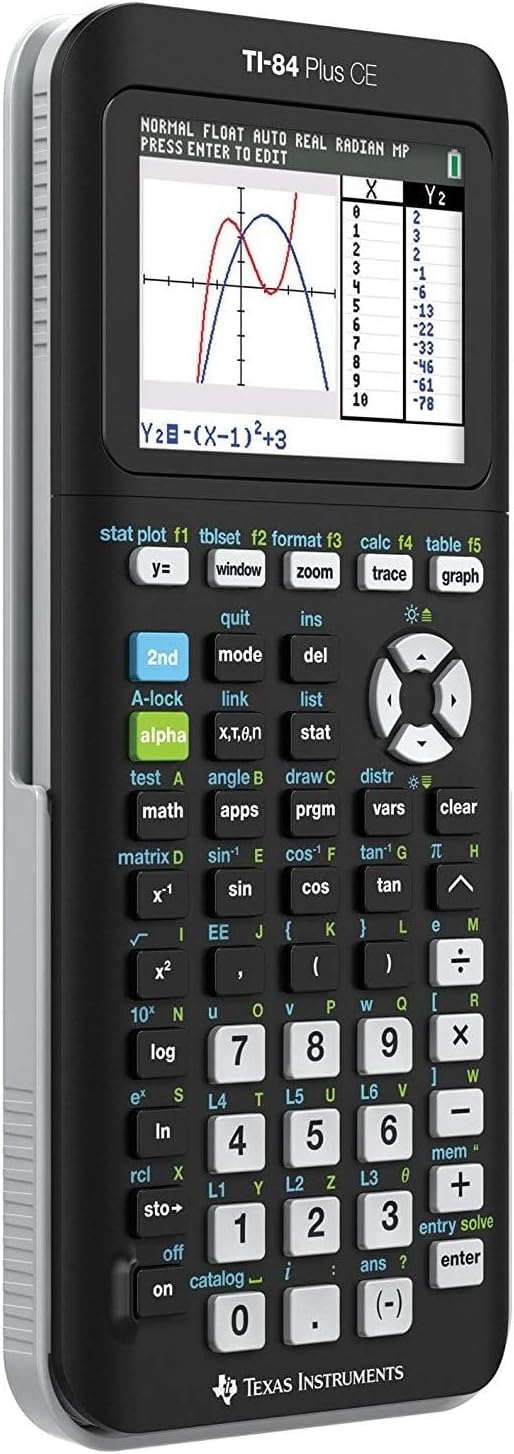
Figure 1: Front view of the TI-84 Plus CE Graphing Calculator displaying a graph.
Initial Setup
Charging the Calculator
The TI-84 Plus CE comes with a rechargeable Lithium Ion battery. Before first use, ensure the calculator is fully charged. Connect the calculator to a computer or wall adapter using the provided USB cable. The charging indicator light will illuminate.

Figure 2: Side view highlighting the USB port for charging and data transfer.
Powering On/Off
To turn on the calculator, press the ON button. To turn it off, press 2nd then OFF.
Bundle Contents
Your purchase includes the Texas Instruments TI-84 Plus CE Graphing Calculator and a Signature Series Power Bundle. This bundle typically contains a portable power bank and charging accessories to keep your calculator powered on the go.

Figure 3: The Signature Series Power Bundle for your calculator.
Operating Instructions
Basic Calculations
Input numbers and operations using the keypad. Press ENTER to execute a calculation. Use the arrow keys to navigate the input line and previous entries.
Graphing Functions
The TI-84 Plus CE allows you to define, save, graph, and analyze up to 10 graphing functions simultaneously. It supports 10 rectangular functions, 6 parametric expressions, 6 polar expressions, and 3 recursively defined sequences. Utilize the Y= button to enter equations, WINDOW to set graph parameters, and GRAPH to display the plot. Explore and analyze graphs with 17 interactive zoom features. The split-screen feature enables faster connections between equations, data, and graphs.
Built-in Applications
Enhance your learning with a variety of pre-loaded applications. These include tools like Inequality Graphing, Polynomial Root Finder & Simultaneous Equation Solver, Conic Graphing, CellSheet, Periodic Table, and Probability Simulation. Access these applications via the APPS button.
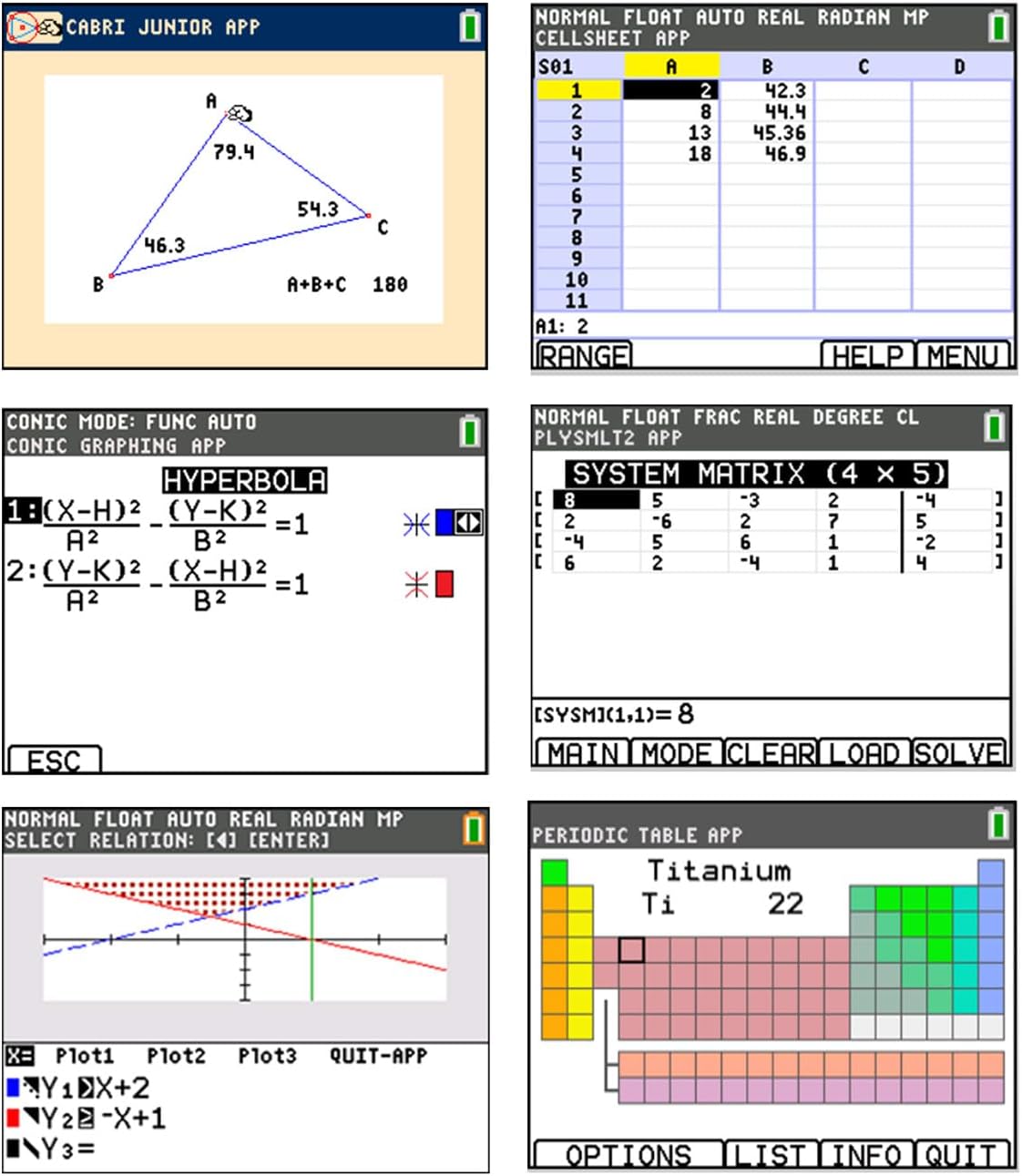
Figure 4: Examples of built-in applications on the TI-84 Plus CE.
Display and Navigation
The calculator features a 320 x 240 pixel full-color backlit display, making complex concepts and graphs clear and easy to visualize. Navigate menus and graphs using the directional pad and select options with the ENTER button.
Product Overview Video
Video 1: An official overview of the Texas Instruments TI-84 Plus CE Graphing Calculator, demonstrating its features and functionality.
Care and Maintenance
Cleaning
To clean the calculator, use a soft, dry cloth. Do not use liquid cleaners or solvents, as they may damage the device. Keep the screen free from dust and smudges for optimal visibility.
Battery Care
The integrated Lithium Ion battery is designed for long life. For best performance, avoid fully discharging the battery frequently. Recharge the calculator regularly using the provided USB cable. If storing the calculator for an extended period, ensure it has a partial charge.
Storage
Always use the impact-resistant slide case when transporting or storing the calculator to protect the screen and keypad from damage.
Troubleshooting
Calculator Does Not Turn On
- Ensure the battery is charged. Connect the calculator to a power source using the USB cable and allow it to charge for at least 30 minutes.
- Press the ON button firmly.
- If the issue persists, perform a soft reset by pressing the RESET button on the back of the calculator (if available, consult the full manual for location).
Screen is Blank or Dim
- Adjust the display contrast by pressing 2nd then the UP or DOWN arrow keys.
- Ensure the battery is charged.
Unexpected Behavior or Errors
- Try clearing the calculator's memory (consult the full manual for specific steps, as this will erase data).
- Ensure the operating system is up to date. Connect to a computer and use the TI Connect software to check for updates.
Product Specifications
| Feature | Detail |
|---|---|
| Product Dimensions | 7.5 x 3.42 x 0.8 inches |
| Item Weight | 7 ounces |
| Item Model Number | TI-84 Plus CE Power Bundle |
| Batteries | 1 Lithium Ion battery required (included) |
| Calculator Type | Graphing |
| Power Source | Battery Powered |
| Color | Black |
Warranty and Support
Warranty Information
For specific warranty details regarding your Texas Instruments TI-84 Plus CE Graphing Calculator, please refer to the warranty card included with your product or contact the manufacturer directly. Warranty terms typically cover defects in materials and workmanship under normal use.
Customer Support
If you require further assistance, technical support, or have questions not covered in this manual, please visit the official Texas Instruments support website or contact their customer service department. Contact information can usually be found on the manufacturer's website or product packaging.
