
1. Introduction
This manual provides essential information for the proper setup and operation of your ECONTROLLY VXX3351 replacement remote control. This remote is designed to function as a direct replacement for various Pioneer Blu-ray Disc and DVD player models, requiring no programming or pairing.
Compatible Pioneer Blu-ray Disc and DVD Player Models:
- BDP-330, BDP-120, BDP-333, BDP-121
- BDP-31FD, BDP-33FD, BDP-LX53, BDP-43FD
- BDP-150, BDP-51FD, BDP-52FD
- VXX3386, VXX3379
2. Product Overview
The ECONTROLLY VXX3351 is an infrared remote control designed for ease of use with compatible Pioneer Blu-ray and DVD players. It features a standard layout for common functions such as power, disc navigation, volume control, and playback operations.
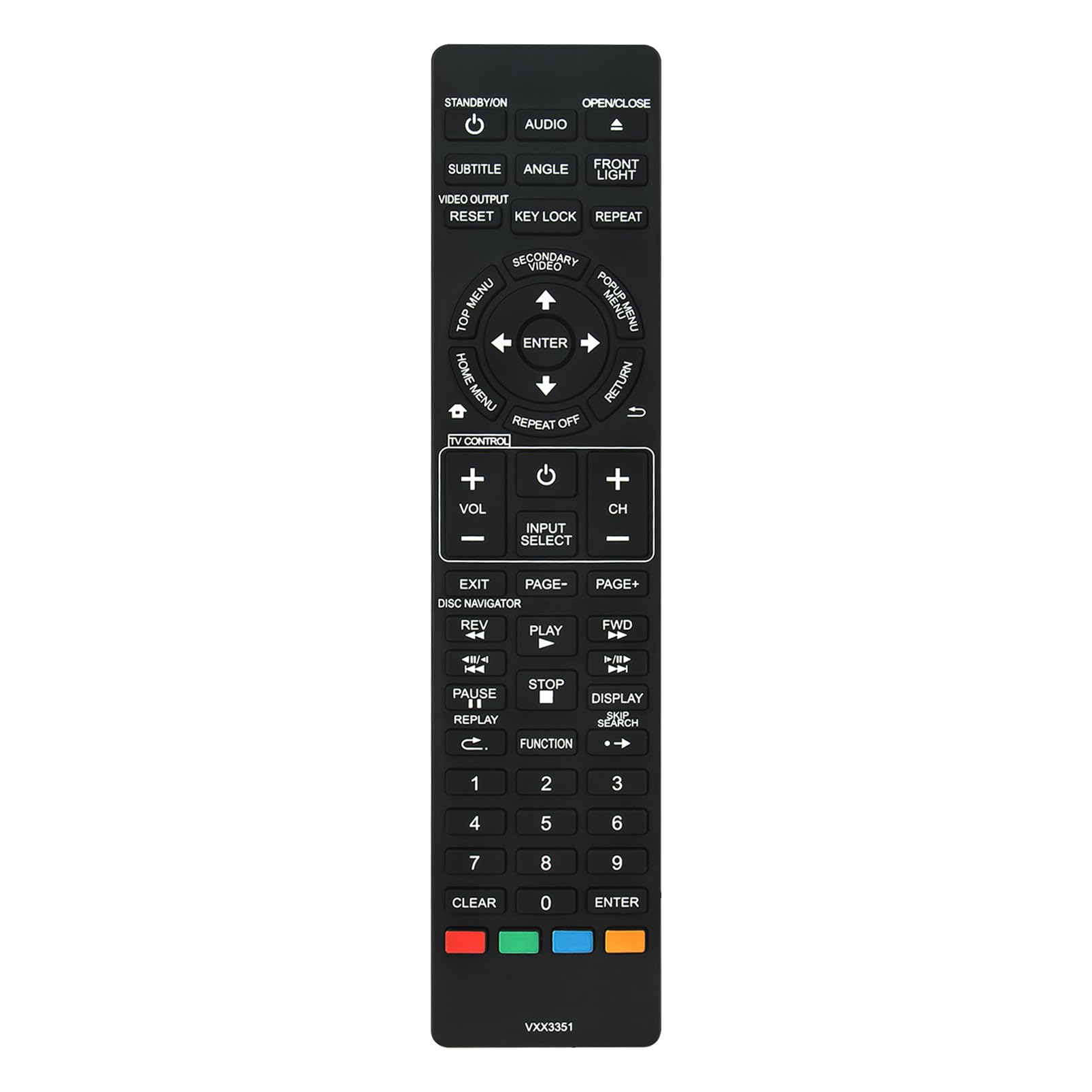
Image: The ECONTROLLY VXX3351 replacement remote (left) shown alongside an original Pioneer remote (right), illustrating their functional similarity and compatibility.

Image: Front view of the VXX3351 remote control, highlighting the button layout for various functions.

Image: Angled view of the VXX3351 remote, providing a clearer perspective of the button arrangement and overall shape.
3. Setup
3.1 Battery Installation
To begin using your remote control, you must install two AAA alkaline batteries.
- Locate the battery compartment on the back of the remote control.
- Slide the battery compartment cover downwards and remove it.
- Insert two new 1.5V AAA alkaline batteries, ensuring the positive (+) and negative (-) terminals match the diagrams inside the compartment.
- Replace the battery compartment cover by sliding it back into place until it clicks securely.

Image: The back of the VXX3351 remote with the battery cover removed, illustrating the correct orientation for AAA battery insertion.
No programming or pairing is required for this remote control. Once batteries are installed, it is ready for use with compatible Pioneer Blu-ray Disc and DVD players.
4. Operating Instructions
Point the remote control directly at your Pioneer Blu-ray Disc or DVD player. Ensure there are no obstructions between the remote and the player's infrared sensor.
4.1 Basic Functions
- STANDBY/ON: Powers the player on or off.
- OPEN/CLOSE: Opens or closes the disc tray.
- AUDIO: Selects audio tracks.
- SUBTITLE: Selects subtitle languages.
- ANGLE: Changes viewing angles (if available on disc).
- FRONT LIGHT: Controls the front panel light (if applicable).
- VIDEO OUTPUT: Adjusts video output settings.
- RESET: Resets player settings.
- KEY LOCK: Locks certain functions.
- REPEAT: Repeats playback.
- TOP MENU / HOME MENU: Accesses the disc's top menu or player's home menu.
- DIRECTIONAL BUTTONS (UP, DOWN, LEFT, RIGHT) & ENTER: Navigates menus and confirms selections.
- RETURN: Returns to the previous menu or screen.
- TV CONTROL (VOL+, VOL-, CH+, CH-): Basic TV volume and channel control (functionality may vary depending on TV compatibility).
- INPUT SELECT: Changes input source on the TV.
- EXIT: Exits current menu or function.
- DISPLAY: Shows on-screen display information.
- DISC NAVIGATOR: Accesses disc navigation features.
- PLAY, PAUSE, STOP, REV, FWD: Standard playback controls.
- NUMBER BUTTONS (0-9): Direct track/chapter selection or input.
5. Troubleshooting
If the remote control does not function as expected, please refer to the following common issues and solutions:
- Remote not responding:
- Ensure the batteries are inserted correctly with the correct polarity (+/-).
- Replace old batteries with new 1.5V AAA alkaline batteries.
- Check for any obstructions between the remote control and the infrared sensor on your Pioneer player.
- Ensure you are within the effective range and pointing the remote directly at the player.
- Specific buttons not working:
- Verify that the function you are trying to use is supported by your specific Pioneer player model.
- Some functions may require the disc to be playing or a specific menu to be active.
6. Specifications
| Feature | Specification |
|---|---|
| Model Number | VXX3351 |
| Brand | ECONTROLLY |
| Compatible Devices | Pioneer Blu-ray Disc / DVD Players |
| Power Source | 2 x 1.5V AAA Alkaline Batteries (not included) |
| Color | Black |
| Product Dimensions | 5.91 x 1.57 x 0.59 inches (approx.) |
| Item Weight | 3.2 ounces (approx.) |
7. Warranty and Support
For any issues or questions regarding your ECONTROLLY VXX3351 replacement remote control, please contact the seller or manufacturer directly through your purchase platform. Please retain your proof of purchase for any warranty claims.
