
llano CM2-SE-LP-E17
llano 20W LP-E17 Dual-Slot Battery Charger Instruction Manual
Model: CM2-SE-LP-E17
1. Product Overview
The llano 20W LP-E17 Dual-Slot Battery Charger is designed for efficient and safe charging of Canon LP-E17 camera batteries. It features simultaneous dual-slot charging, LED indicators for charge status, and a durable aluminum construction.
- Ultra-Fast PD 20W Dual-Slot Charging: Charges two LP-E17 batteries simultaneously, completing a full charge in approximately 3 hours. Supports various power sources including wall adapters, car chargers, and power banks via USB-C.
- 100% Decoded Compatibility: Ensures full compatibility with Canon and third-party LP-E17 batteries, supporting in-camera power display without firmware errors.
- Independent LED Charge Indicators: Each slot features 4-stage LED indicators (25%/50%/75%/100%) for real-time battery status monitoring.
- CNC Aluminum Build: Constructed from premium CNC-machined aluminum for enhanced durability, rapid heat dissipation, and a sleek design.
- Advanced 8-Layer Safety System: Incorporates multiple safety protections against overcharging, overheating, overcurrent, short circuits, and voltage fluctuations.

Image: The llano 20W LP-E17 Dual-Slot Battery Charger, showcasing its compact design and LED indicators.
2. Package Contents
Verify that all items are present in the package:
- 1 x llano 20W Dual-Slot Battery Charger
- 1 x USB-C Charging Cable
- 1 x User Manual (this document)

Image: The llano 20W LP-E17 Battery Charger, USB-C cable, and user manual as included in the package.
3. Setup and Operation
3.1 Connecting the Charger
- Connect the provided USB-C charging cable to the "PD IN" port on the llano charger.
- Connect the other end of the USB-C cable to a compatible power source (e.g., a 20W PD wall adapter, car charger, or power bank).
- The LED indicators on the charger will briefly illuminate, indicating it is powered on.
Video: Demonstrates connecting the USB-C cable to the llano charger and inserting batteries. This video highlights the charger's features and ease of use.
3.2 Inserting Batteries
- Identify the two charging slots labeled "CH1" and "CH2".
- Carefully insert one or two LP-E17 batteries into the slots. Ensure the battery contacts align correctly with the charger's pins. Note that the orientation for each slot may be different.
- Once a battery is correctly inserted, its corresponding LED indicators will light up, showing the current charge level and charging status. A blinking lightning bolt icon indicates active charging.
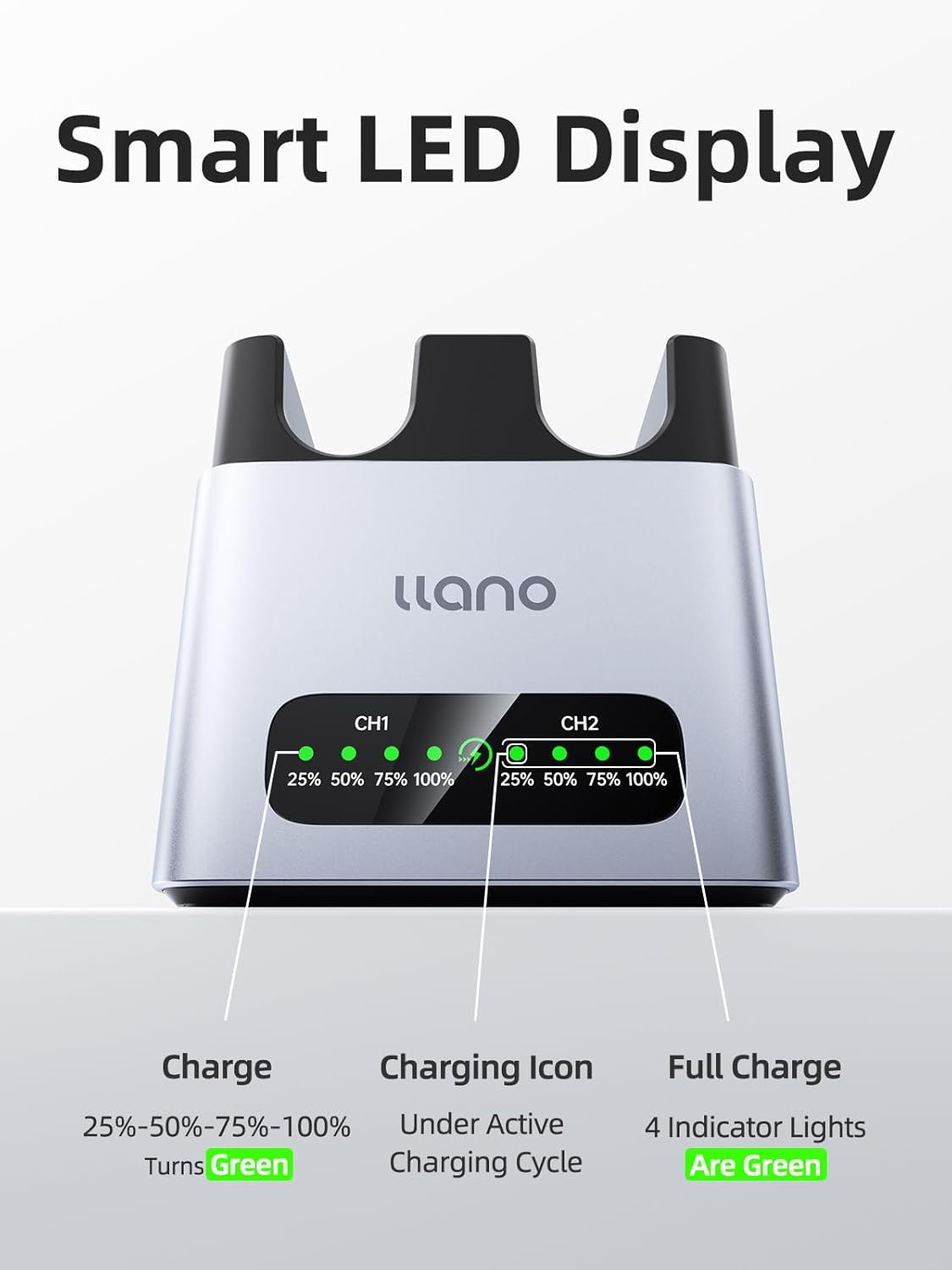
Image: The llano charger with two LP-E17 batteries inserted, showing the LED charge indicators.
3.3 Understanding LED Indicators
Each charging channel (CH1 and CH2) has four LED lights indicating the battery's charge status:
- 25% / 50% / 75% / 100% LEDs: These lights illuminate progressively to show the battery's charge level.
- Blinking Lightning Bolt Icon: Indicates that the battery in that slot is actively charging.
- All Four LEDs Solid Green: The battery is fully charged.

Image: Close-up of the llano charger's LED display, illustrating the charge status indicators.
4. Compatibility
The llano LP-E17 battery charger is fully compatible with original Canon LP-E17 batteries and most third-party LP-E17 batteries. It supports in-camera power display for the following Canon camera models:
- Canon EOS R50, R8, R10, R100, RP
- Canon EOS T6i, T7i, T8i, T6S
- Canon EOS SL2, SL3
- Canon EOS M3, M5, M6
- Canon EOS 77D, 200D, 250D, 750D, 760D, 800D, 8000D

Image: Visual representation of the llano charger's compatibility with various Canon camera models.
5. Safety Features
The llano charger is equipped with an advanced 8-layer safety system to protect your batteries and the charger itself:
- Overcharging Protection
- Overheating Protection
- Overcurrent Protection
- Short Circuit Protection
- Voltage Fluctuation Protection
- Real-time Temperature Monitoring
- Real-time Power Monitoring
- Durable CNC Aluminum for Heat Dissipation

Image: An internal view highlighting the safety components and heat dissipation design of the llano charger.
6. Specifications
| Model Number | CM2-SE-LP-E17 |
| Input | USB-C (PD 20W recommended) |
| Output Voltage | 7.2 Volts |
| Charging Time | Approx. 3 hours for two LP-E17 batteries (with 20W PD input) |
| Product Dimensions | 2.7 x 2.5 x 1.9 inches (6.86 x 6.35 x 4.83 cm) |
| Item Weight | 3.53 ounces (100 grams) |
| Material | CNC-machined Aluminum |
7. Maintenance
- Keep the charger clean and free from dust and debris. Use a soft, dry cloth for cleaning.
- Avoid exposing the charger to extreme temperatures, humidity, or direct sunlight.
- Do not attempt to disassemble or repair the charger yourself. Contact customer service for assistance.
- Store the charger in a cool, dry place when not in use.
8. Troubleshooting
| Problem | Possible Cause | Solution |
|---|---|---|
| Charger not powering on. | No power supply or faulty cable/adapter. | Ensure the USB-C cable is securely connected to both the charger and a working power source. Try a different USB-C cable or power adapter. |
| Battery not charging. | Incorrect battery insertion or faulty battery. | Re-insert the battery, ensuring correct orientation and firm contact with the pins. Try charging a different battery to rule out a faulty battery. |
| Slow charging speed. | Low power input from adapter. | Ensure you are using a 20W Power Delivery (PD) compatible USB-C power adapter for optimal charging speed. |
| LED indicators not clear. | Environmental lighting or visual obstruction. | Ensure the charger is in a well-lit area and there are no obstructions covering the LED display. |
9. Warranty and Support
llano provides 24-hour customer service and lifetime support for this product. If you have any questions, concerns, or require assistance, please contact llano customer service.
For further assistance, please refer to the contact information provided on the llano official website or your purchase platform.
Ask a question about this manual
Ask about setup, troubleshooting, compatibility, parts, safety, or missing instructions. Manuals+ will review the question and use this page’s manual context to help answer it.