1. Introduction
Thank you for choosing the UGREEN 100W 6-Port GaN USB C Charging Station. This device is designed to provide efficient and simultaneous charging for multiple electronic devices, utilizing advanced GaN technology for a compact and powerful solution. Please read this manual carefully before use to ensure proper operation and safety.

Image: The UGREEN 100W 6-Port GaN USB C Charging Station, highlighting its 4 USB-C and 2 USB-A ports and 100W total output.
2. Product Features
- 6-in-1 Fast Charging Hub: Equipped with 4 USB-C ports and 2 USB-A ports, allowing simultaneous fast charging for up to 6 devices.
- 100W Total Output: Delivers a maximum total output of 100W, capable of providing up to 65W from a single USB-C port for laptops and other high-power devices.
- Next-Gen GaN Technology: Utilizes advanced Gallium Nitride (GaN) chips for a smaller, lighter design, enhanced charging efficiency, and reduced heat generation.
- Smart Power Distribution: Intelligently allocates power across connected devices to optimize charging speed and ensure all devices receive appropriate power.
- Compact and Versatile Design: Features a vertical port layout to save desk space and includes an AC extension cord for flexible placement in various environments.

Image: A visual comparison illustrating how the vertical port layout of the UGREEN charging station saves space compared to traditional horizontal designs.
3. Package Contents
Please check the package for the following items:
- UGREEN 100W 6-Port GaN USB C Charging Station (Model X765)
- AC Extension Cord
- Instruction Manual
4. Setup Instructions
Follow these steps to set up your charging station:
- Connect the AC Extension Cord: Insert one end of the provided AC extension cord into the power input port on the back of the charging station.
- Connect to Power Outlet: Plug the other end of the AC extension cord into a standard wall power outlet (100-240V).
- Connect Devices: Use appropriate USB-C or USB-A charging cables (not included) to connect your devices to the available ports on the charging station.
The charging station is now ready for use. The intelligent power distribution system will automatically detect and deliver optimal power to your connected devices.

Image: A visual representation of how the UGREEN charging station helps maintain a tidy workspace by consolidating multiple chargers into one device.
5. Operating Instructions
The UGREEN 100W Charging Station operates automatically once connected to power and devices. It features smart power distribution to ensure efficient charging.
5.1 Charging Devices
- Connect your devices using compatible USB-C or USB-A cables.
- The charging station will automatically detect the connected devices and begin charging.
- For optimal fast charging, ensure your cables and devices support the required power delivery protocols.
5.2 Smart Power Distribution
The charging station intelligently distributes its total 100W output across the 6 ports. The maximum output for individual ports and combinations is as follows:
- USB-C1/C2: Up to 65W individually.
- USB-C3/C4: Up to 35W individually.
- USB-A1/A2: Up to 22.5W individually.
When multiple devices are connected, the power is dynamically allocated. For example:
- If USB-C1 and USB-C2 are both used, power may be distributed as 45W/20W or 20W/45W depending on device requirements.
- If USB-C1, USB-C2, and USB-C3 are used, power might be 45W/20W/35W or other combinations.
- The total output will not exceed 100W. Refer to the detailed power distribution diagrams for specific scenarios.

Image: Diagram illustrating the maximum power output when only one port is in use (e.g., USB-C1/C2 at 65W, USB-C3/C4 at 35W, USB-A1/A2 at 22.5W).
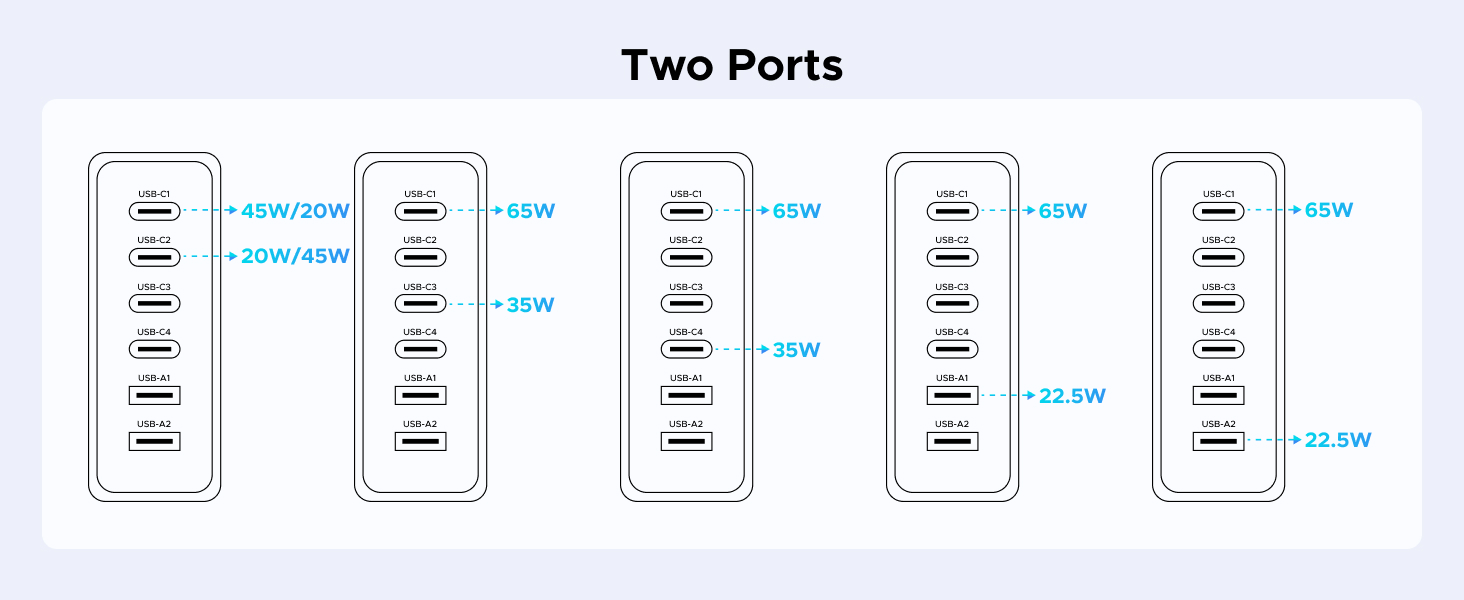
Image: Diagram illustrating various power distribution scenarios when two ports are simultaneously in use.

Image: Diagram illustrating various power distribution scenarios when three ports are simultaneously in use.

Image: Diagram illustrating various power distribution scenarios when four or five ports are simultaneously in use.

Image: Diagram illustrating various power distribution scenarios when all six ports are simultaneously in use.
6. Safety Information
To ensure safe operation and prolong the lifespan of your charging station, please observe the following:
- Over-Voltage Protection: The device is equipped with protection against excessive voltage input.
- Over-Temperature Protection: Built-in thermal management prevents overheating during operation.
- Over-Current Protection: Safeguards against excessive current flow to connected devices.
- Over-Charge Protection: Prevents devices from being overcharged, protecting battery health.
- Do not expose the charging station to water, moisture, or extreme temperatures.
- Avoid dropping or subjecting the device to strong impacts.
- Do not attempt to disassemble, repair, or modify the charging station. Contact customer support if service is required.
- Use only the provided AC extension cord and compatible charging cables.

Image: Visual representation of the multiple safety protections integrated into the UGREEN charging station, including over-voltage, over-temperature, over-current, and over-charge protection.
7. Maintenance
Proper maintenance helps ensure the longevity and performance of your charging station:
- Cleaning: Disconnect the charging station from the power outlet before cleaning. Use a soft, dry cloth to wipe the surface. Do not use liquid cleaners or aerosols.
- Storage: When not in use for extended periods, store the device in a cool, dry place away from direct sunlight and extreme temperatures.
- Cable Management: Avoid bending or crimping the AC extension cord or charging cables excessively to prevent damage.
8. Troubleshooting
If you encounter issues with your charging station, refer to the following common problems and solutions:
| Problem | Possible Cause | Solution |
|---|---|---|
| Device not charging | No power to the charging station; Faulty cable; Device not compatible; Port malfunction. | Ensure the charging station is properly plugged into a live power outlet. Try a different charging cable. Verify device compatibility. Try a different port. |
| Slow charging speed | Cable not supporting fast charging; Device not supporting fast charging; Too many high-power devices connected; High ambient temperature. | Use a high-quality cable that supports fast charging. Ensure your device supports fast charging protocols. Disconnect some devices to allow higher power to critical devices. Ensure adequate ventilation. |
| Charging station feels warm | Normal operation under heavy load; Poor ventilation. | It is normal for the charger to generate some heat during operation, especially when charging multiple devices. Ensure the device is placed in a well-ventilated area. If it becomes excessively hot, disconnect from power and devices, then contact support. |
9. Specifications
| Model Number | X765 |
| Total USB Ports | 6 (4x USB-C, 2x USB-A) |
| Total Wattage Output | 100W Max |
| Input Voltage | 100-240V |
| Max Output per USB-C Port (C1/C2) | 65W |
| Max Output per USB-C Port (C3/C4) | 35W |
| Max Output per USB-A Port (A1/A2) | 22.5W |
| Special Feature | Fast Charging, GaN Technology, Smart Power Distribution |
| Color | Dark Gray |
| Item Weight | 1.1 pounds (approx. 0.5 kg) |
| Package Dimensions | 5.94 x 3.98 x 1.65 inches (approx. 15.1 x 10.1 x 4.2 cm) |
| Compatible Devices | Laptops (MacBook Pro/Air, Dell XPS, HP Spectre, Lenovo Yoga, Microsoft Surface), Tablets (iPad Pro/Air/Mini, Samsung Galaxy Tab), Phones (iPhone series, Samsung Galaxy series, Google Pixel series, Sony Xperia, Motorola, OnePlus), Smartwatches (Apple Watch), Earbuds (AirPods), Gaming Consoles (Nintendo Switch). |
10. Warranty and Support
UGREEN products come with a standard warranty. For detailed warranty information, please refer to the official UGREEN website or the warranty card included with your purchase.
10.1 Customer Support
If you have any questions, require technical assistance, or need to report an issue, please contact UGREEN customer support through the following channels:
- Official Website: www.ugreen.com
- Email Support: Refer to the contact section on the official website.
- Online Chat: Available on the official website during business hours.
Please have your product model number (X765) and purchase details ready when contacting support.