
1. Introduction
The VOLTCRAFT PMM 3005-20 is a versatile 2-in-1 device, combining a digital multimeter (DMM) with an adjustable power supply. It is designed for precise electrical measurements and providing stable power to external circuits. This manual provides essential information for safe and effective operation of your device.
2. Safety Instructions
Read and understand all safety information before using the device. Failure to follow these instructions may result in electric shock, fire, or damage to the device.
- This device complies with CAT II 600 V safety standards. Always adhere to these ratings.
- Do not exceed the maximum input ratings for any measurement function.
- Ensure proper grounding of the device.
- The device features built-in overvoltage, overcurrent, and short-circuit protection for enhanced safety.
- An intelligent, temperature-controlled fan prevents overheating during operation. Ensure ventilation openings are not blocked.
- Only use specified fuses for replacement. Refer to the rear panel for the correct fuse rating.
- Disconnect the device from all power sources before performing any maintenance or servicing.
3. Product Overview
3.1 Front Panel
The front panel provides the user interface for both the multimeter and power supply functions.

This image shows the front panel of the VOLTCRAFT PMM 3005-20, highlighting the 2.8-inch TFT LCD display, function buttons (V, I, Ω/OVP, ⇆/OCP, DISP, Mode), On/Off button, rotary encoder, input terminals (VΩHz, A, COM), output terminals (+, -), and a 5V 1A USB port.
3.2 Rear Panel
The rear panel contains the main power input and communication port.

This image displays the rear panel of the VOLTCRAFT PMM 3005-20, showing the AC power input socket, main power switch, fuse compartment, and the USB communication port for PC connection.
3.3 Included Components
The package contains the following items:
- VOLTCRAFT PMM 3005-20 Digital Multimeter and Power Supply unit
- USB cable
- Power cable
- Test lead pair (red and black)
- Spare 250 V fuse
- Software CD (for USB communication)
- User Manual (this document)
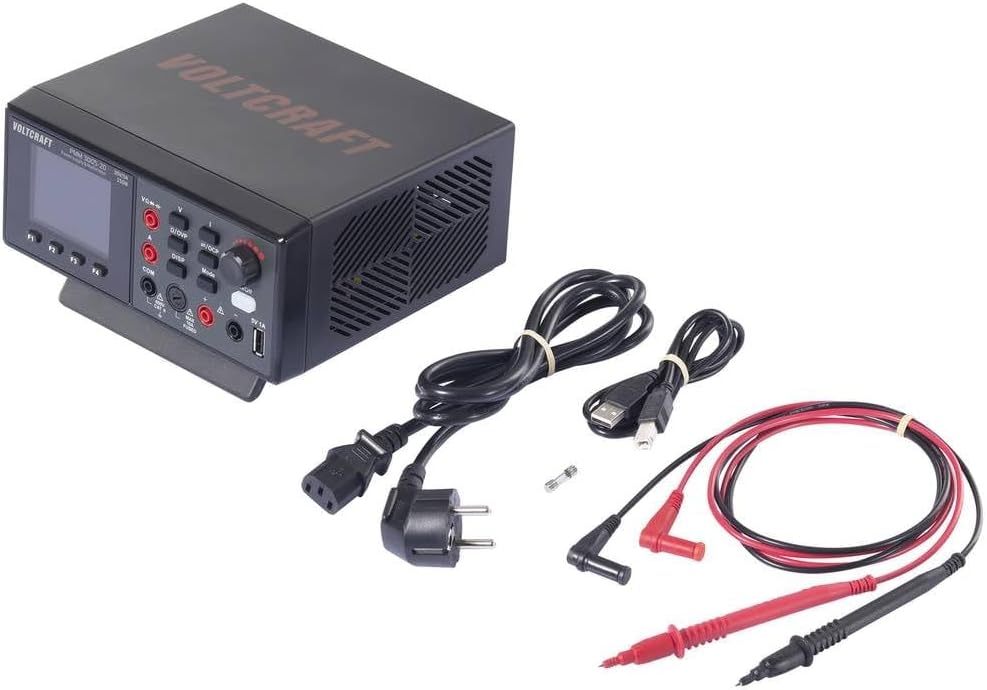
This image shows the VOLTCRAFT PMM 3005-20 unit along with its accessories: power cable, USB cable, test leads, and a spare fuse.
4. Setup
- Connect the power cable to the AC input on the rear panel and plug it into a suitable power outlet (200-240 V AC, 50/60 Hz).
- (Optional) For PC communication, connect the USB cable from the device's rear USB port to your computer. Install the provided software from the CD.
- Turn on the main power switch located on the rear panel.
- Press the front panel 'On/Off' button to power on the device.
5. Operating Instructions
5.1 Power Supply Mode
- Connect the load to the output terminals (+ and -) using appropriate cables.
- Use the rotary encoder to adjust the desired output voltage (0-30 V) and current limit (0-5 A). The display shows 'Set' values.
- Press the 'Mode' button to switch between voltage and current adjustment.
- The display shows real-time output voltage and current.
- The device provides a maximum power output of 150 W.
- The front panel also features a 5V 1A USB output for charging or powering small devices.
5.2 Multimeter Mode
- Connect the test leads to the appropriate input terminals (VΩHz for voltage/resistance/capacitance, A for current, COM for common).
- Press the 'V', 'I', 'Ω/OVP', or '⇆/OCP' buttons to select the desired measurement function (DC/AC Voltage, DC/AC Current, Resistance, Capacitance).
- The 2.8-inch TFT LCD display provides clear readings with 20000 counts resolution (10 mV/1 mA).
- Observe the measurement results on the display.
5.3 USB Communication (SCPI)
The device supports SCPI commands for remote control and data logging via the USB interface. Refer to the software CD and detailed programming manual for specific commands and setup.
6. Maintenance
6.1 Cleaning
Disconnect the device from all power sources before cleaning. Use a soft, damp cloth. Do not use abrasive cleaners or solvents.
6.2 Fuse Replacement
If the device does not power on or experiences a power-related issue, the fuse may need replacement.
- Disconnect the power cable from the device.
- Locate the fuse holder on the rear panel.
- Open the fuse holder and replace the blown fuse with a new 250 V fuse of the correct rating (e.g., F3A).
- Close the fuse holder securely.
7. Troubleshooting
- Device does not power on: Check the power cable connection. Ensure the rear power switch is ON. Check and replace the fuse if necessary.
- No output from power supply: Ensure the output is enabled (if applicable, check front panel controls). Verify voltage and current limits are set correctly. Check for short circuits in the load.
- Incorrect multimeter readings: Ensure test leads are connected to the correct terminals for the selected function. Verify the measurement range is appropriate.
- Overheating: Ensure ventilation openings are not blocked. The intelligent fan should activate to prevent overheating.
8. Specifications
| Feature | Value |
|---|---|
| Model | PMM 3005-20 (VC-15445415) |
| Type | Digital Multimeter & Power Supply (2-in-1) |
| Display | 2.8-inch TFT LCD, 20000 counts |
| Safety Rating | CAT II 600 V |
| Power Supply Output Voltage | 0-30 V DC |
| Power Supply Output Current | 0-5 A DC |
| Max Power Output | 150 W |
| Voltage Resolution | 10 mV |
| Current Resolution | 1 mA |
| Multimeter Functions | DC/AC Voltage, DC/AC Current, Resistance, Capacitance |
| Communication | USB (SCPI compatible) |
| Input Power | 200-240 V AC, 50/60 Hz |
| Dimensions (L x W x H) | 18.5 x 20 x 9.2 cm |
| Weight | 1.2 kg |
| Included Components | Unit, USB cable, Power cable, Test leads, Spare fuse, Software CD, Manual |
9. Warranty and Support
This VOLTCRAFT product is designed for reliability and performance. Spare parts availability in the EU is guaranteed for 1 year from the date of purchase.
For technical support, troubleshooting assistance, or warranty claims, please contact your VOLTCRAFT dealer or authorized service center. Keep your purchase receipt as proof of purchase.


