
1. Introduction
This manual provides detailed instructions for the proper use, setup, and maintenance of your Caliber Scientific Calculator, Model 297208. Designed for students, engineers, and professionals, this calculator offers 240 functions for a wide range of mathematical and scientific calculations.
Please read this manual thoroughly before using the calculator to ensure optimal performance and longevity.
2. Safety Information
- Keep the calculator away from extreme temperatures, direct sunlight, and high humidity.
- Avoid dropping the calculator or subjecting it to strong impacts.
- Do not attempt to disassemble or modify the calculator. This will void the warranty.
- Use only the specified battery type. Incorrect battery usage may cause leakage or explosion.
- Battery Warning: Keep batteries away from children and pets. Batteries may be harmful if swallowed. Should a child or pet swallow a battery, seek medical assistance immediately.
3. Package Contents
Upon opening your Caliber Scientific Calculator package, please verify that all items are present and in good condition:
- Caliber Scientific Calculator (Model 297208)
- Protective Hard Sliding Cover
- One AG10 Button Cell Battery (pre-installed or included separately)
- User Manual (this document)

Image 1: Caliber Scientific Calculator in retail packaging, showing key features.
4. Setup
4.1. Power Source
The Caliber Scientific Calculator operates on dual power sources: solar power and battery power. The solar panel provides power in well-lit environments, while the battery ensures operation in low-light conditions.
4.2. Battery Installation/Replacement
Your calculator includes one AG10 button cell battery. If battery replacement is needed:
- Ensure the calculator is turned off.
- Locate the battery compartment on the back of the calculator.
- Using a small screwdriver, carefully open the battery compartment cover.
- Remove the old battery and insert a new AG10 button cell battery, ensuring the correct polarity (+/-).
- Replace the battery compartment cover and secure it with the screw.
Note: Some models may require a AAA battery. Refer to the specific markings on your calculator's battery compartment if different from AG10.
5. Key Functions Overview
The calculator features a 10-digit LCD display and 240 functions. Familiarize yourself with the key layout:
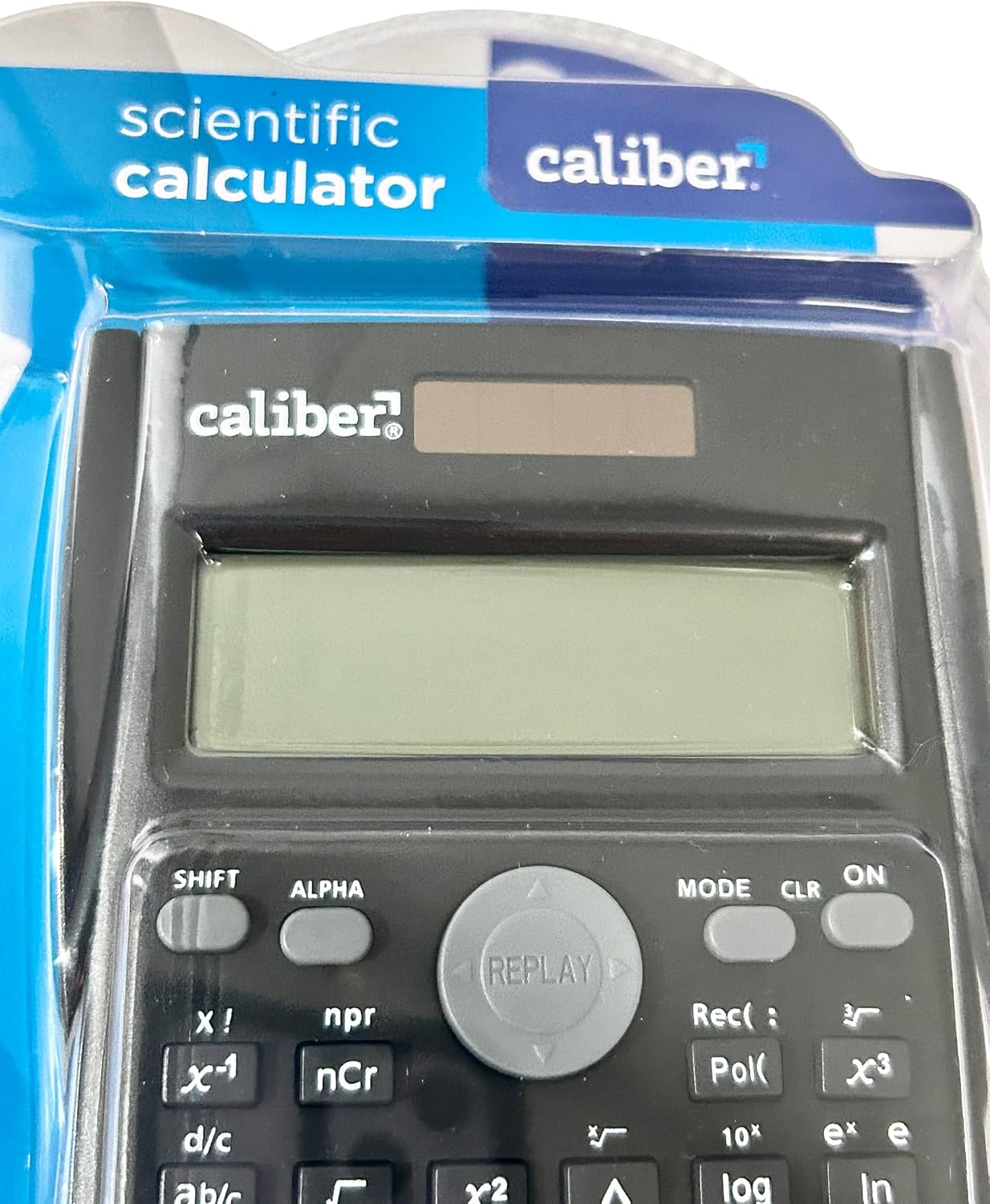
Image 2: Close-up of the calculator's display and key layout.
- Display: 10-digit LCD for clear viewing of inputs and results.
- ON/OFF: Power on/off the calculator.
- SHIFT: Accesses secondary functions printed above the keys (typically in yellow or orange).
- ALPHA: Accesses alpha characters and variables (typically in red or green).
- MODE: Changes calculation modes (e.g., COMP, STAT, EQN).
- CLR: Clears memory or settings.
- DEL: Deletes the last entered digit.
- AC: Clears all entries and resets the calculation.
- Arrow Keys: Navigate through entries and results.
- = (Equals): Executes the calculation.
6. Operating Instructions
6.1. Basic Calculations
To perform basic arithmetic operations:
- Press the ON key to turn on the calculator.
- Enter the first number.
- Press the desired operation key (+, -, ×, ÷).
- Enter the second number.
- Press the = key to display the result.
6.2. Advanced Functions
The calculator supports 240 functions, including trigonometric, logarithmic, statistical, and more. To access secondary functions (printed above keys), press the SHIFT key before the desired function key.
- Trigonometric Functions: sin, cos, tan and their inverse functions (SHIFT + sin⁻¹, etc.).
- Logarithmic Functions: log (base 10), ln (natural logarithm).
- Power and Root Functions: x², √, xʸ.
- Memory Functions: Use STO (Store) and RCL (Recall) to save and retrieve values.
- Statistical Calculations: Enter MODE and select STAT mode for statistical computations.
For detailed instructions on specific functions, refer to the comprehensive instructions enclosed with your product (if applicable) or consult online resources for scientific calculator usage.
7. Maintenance
7.1. Cleaning
To clean your calculator:
- Wipe the exterior with a soft, dry cloth.
- For stubborn dirt, slightly dampen the cloth with water and mild soap, then wipe dry immediately.
- Do not use abrasive cleaners, solvents, or alcohol, as these can damage the casing or display.
7.2. Storage
When not in use, store the calculator in a cool, dry place, away from direct sunlight and extreme temperatures. Always use the protective hard sliding cover to prevent damage to the keys and display.

Image 3: Packaging detail showing features including the hard sliding cover and dual power.
8. Troubleshooting
| Problem | Possible Cause | Solution |
|---|---|---|
| Calculator does not turn on. | Insufficient light for solar power, or dead battery. | Move to a brighter area or replace the AG10 button cell battery. |
| Display shows "ERROR". | Mathematical error (e.g., division by zero, invalid input). | Press AC to clear the error and re-enter the calculation correctly. |
| Incorrect calculation results. | Incorrect mode selected, or input error. | Check the current mode (MODE key) and ensure correct data entry. Clear all memory (SHIFT + CLR) if necessary. |
9. Specifications
| Model Number | 297208 |
| Brand | Caliber |
| Display Type | 10-Digit LCD |
| Number of Functions | 240 |
| Calculator Type | Engineering/Scientific |
| Power Source | Dual Power (Solar & Battery) |
| Battery Type | 1 x AG10 Button Cell (included) or 1 x AAA (may vary by model) |
| Screen Size | 3 inches |
| Dimensions (L x W) | 6" x 3" |
| Enclosure Material | Plastic |
| UPC | 050428205495 |
10. Warranty and Support
10.1. Warranty Information
This product is subject to a return policy. For details regarding returns, exchanges, or warranty claims, please refer to the retailer's return policy where the product was purchased.
10.2. Customer Support
For further assistance, technical support, or inquiries not covered in this manual, please contact Caliber customer service through their official website or the retailer from whom you purchased the product.