Introduction
The Samsung Galaxy S24 FE 5G combines flagship-level performance with premium features, making it the ultimate smartphone for multitaskers, photographers, and tech enthusiasts. Its 6.7-inch Dynamic AMOLED 2X display delivers stunning Full HD+ visuals, a smooth 120Hz adaptive refresh rate, and HDR10+ support, ensuring an immersive viewing experience for streaming, gaming, and everyday use. Powered by the advanced 10-core Exynos 2400e processor, it excels in multitasking and gaming with efficient power consumption. Built for durability, the Galaxy S24 FE features Gorilla Glass Victus+ protection, an aluminum frame, and IP68 water and dust resistance, allowing you to use it confidently in any environment.
Key Features
- GSM Factory Unlocked, 6.7" Dynamic AMOLED 2X FHD+, 120Hz Adaptive Refresh Rate, 1900nits Peak brightness, 1080x2340px, 4700mAh Battery, Android 14, One UI 6.1
- 256GB, 8GB RAM, No SD Card Slot, Exynos 2400e (4nm), 10-core CPU, Xclipse 940 GPU, Bluetooth 5.3
- Rear Camera: 50MP, f/1.8 (wide) + 12MP, f/2.2 (ultrawide) + 8MP, f/2.4 (telephoto), 3x Optical Zoom, Front Camera: 10MP, f/2.4
- GLOBAL 4G LTE Bands, 5G: 1/2/3/5/7/8/12/20/25/26/28/38/40/41/66/75/77/78 SA/NSA/Sub6 - Dual SIM (SIM1+SIM 2/SIM1+eSIM/ Dual eSIM)
- International Model – Global Connectivity – Plug & Play with an active SIM on AT&T, Verizon, T-Mobile, and most U.S. carriers.
Setup Guide
1. Unboxing and Initial Setup
Upon unboxing your Samsung Galaxy S24 FE 5G, you will find the device, a USB-C to USB-C cable, a Quick Start Guide, and a SIM ejector tool. No SD card expansion is available.
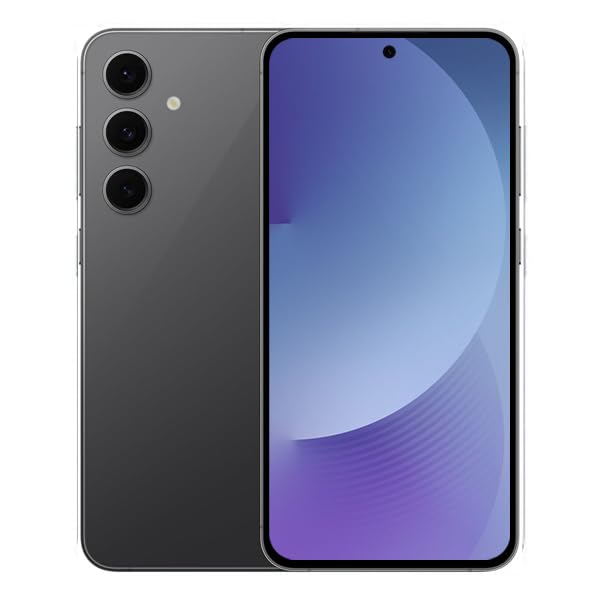
The Samsung Galaxy S24 FE 5G in Black, showcasing its sleek design and triple camera setup on the rear.
2. Inserting SIM Card
Locate the SIM tray on the side of the device. Use the provided SIM ejector tool to open the tray. Insert your Nano-SIM card(s) into the tray. The device supports Dual SIM (SIM1 + SIM2 / SIM1 + eSIM / Dual eSIM). Gently push the tray back into the slot until it clicks into place.
3. Powering On and Initial Configuration
Press and hold the Power/Lock button until the Samsung logo appears. Follow the on-screen prompts to select your language, connect to Wi-Fi, set up your Google account, and configure security features like fingerprint recognition.
Operating Instructions
1. Navigation and User Interface
The Samsung Galaxy S24 FE 5G runs on Android 14 with One UI 6.1. Navigate using gestures or the traditional navigation bar. Swipe up from the bottom to access the app drawer, swipe down from the top for quick settings and notifications.
2. Display Features
The 6.7-inch Dynamic AMOLED 2X display offers a 120Hz adaptive refresh rate for smooth scrolling and an immersive viewing experience. Adjust brightness, dark mode, and Eye Comfort Shield settings in the Display menu.
3. Camera Usage
The device features a triple rear camera system (50MP main, 12MP ultrawide, 8MP telephoto with 3x optical zoom) and a 10MP front camera. Open the Camera app to access various modes like Photo, Portrait, Video, and More. Tap the shutter button to capture photos or start/stop video recording. Pinch to zoom or select predefined zoom levels.
4. Connectivity
The Galaxy S24 FE 5G supports 5G, 4G LTE, Bluetooth 5.3, and Wi-Fi. Access connectivity settings from the Quick Settings panel or the Settings app to manage Wi-Fi networks, Bluetooth devices, and mobile data options.
Battery Management
The 4700mAh battery provides ample power for daily use. To optimize battery life, enable power-saving modes, reduce screen brightness, and close unused apps. The device supports fast charging and wireless charging for convenient power-ups.
Specifications
| Feature | Specification |
|---|---|
| Brand | Samsung |
| Operating System | Android 14, One UI 6.1 |
| RAM Memory Installed Size | 8 GB |
| CPU Model | Exynos 2400e (4nm), 10-core |
| Memory Storage Capacity | 256 GB |
| Screen Size | 6.7 Inches Dynamic AMOLED 2X |
| Resolution | 1080 x 2340 (FHD+) |
| Refresh Rate | 120 Hz |
| Rear Facing Camera Photo Sensor Resolution | 50 MP (Main), 12 MP (Ultrawide), 8 MP (Telephoto) |
| Front Photo Sensor Resolution | 10 MP |
| Battery Capacity | 4700 Milliamp Hours |
| Connectivity Technology | 5G, 4G LTE, Bluetooth 5.3, Wi-Fi |
| SIM Card Slot Count | Dual SIM (Physical + eSIM) |
| Water Resistance Level | Waterproof (IP68) |
| Item Weight | 213 Grams |
| Item Dimensions | 6.38 x 3.04 x 0.31 inches |
Troubleshooting
1. Device Not Responding
If your device is unresponsive, press and hold the Power/Lock button and Volume Down button simultaneously for about 7-10 seconds to force restart.
2. Network Connectivity Issues
Check if Airplane Mode is off. Restart your device. Verify your SIM card is correctly inserted. Contact your carrier if issues persist.
3. Battery Draining Quickly
Review battery usage in Settings to identify power-hungry apps. Reduce screen brightness and refresh rate. Enable power-saving mode. Close background apps.
Warranty and Support
This is an International Model without a Domestic Warranty. The device is covered by the Seller's Return Policy. For further assistance, please refer to the Quick Start Guide or contact the seller directly.
For more information, visit the Samsung Store.


