
Durablow TR1001, TR1003
Durablow TR1001 On/Off Remote Bundle with TR1003 Gas Fireplace Remote with LCD Screen & Thermostat & Timer User Manual
Brand: Durablow
Models: TR1001, TR1003
Introduction
This user manual provides comprehensive instructions for the Durablow TR1001 On/Off Remote Bundle with TR1003 Gas Fireplace Remote with LCD Screen & Thermostat & Timer. This bundle is designed to upgrade your gas fireplace with convenient wireless remote control capabilities. It includes two distinct remote control kits: the TR1001 for simple On/Off operation and the TR1003 for advanced thermostat and timer functions. These battery-powered kits offer wireless control for various gas heating appliances, including fireplaces, fire pits, and stoves.
Important Safety Information
- Professional Installation: Installation must be performed by a qualified technician to ensure proper and safe operation.
- Disconnect Power: Always disconnect power to the appliance before servicing or installing the remote control system.
- Receiver Placement: The receiver box should be kept away from temperatures exceeding 130°F (54°C) to prevent damage.
- Not a Power Supply: This bundle is a switch designed to connect to a millivolt valve, an electric spark ignition module, or to replace a wall switch. It is NOT a power supply unit.
- Legal Disclaimer: Brand names and model numbers mentioned for cross-reference are properties of their respective owners.
Product Components
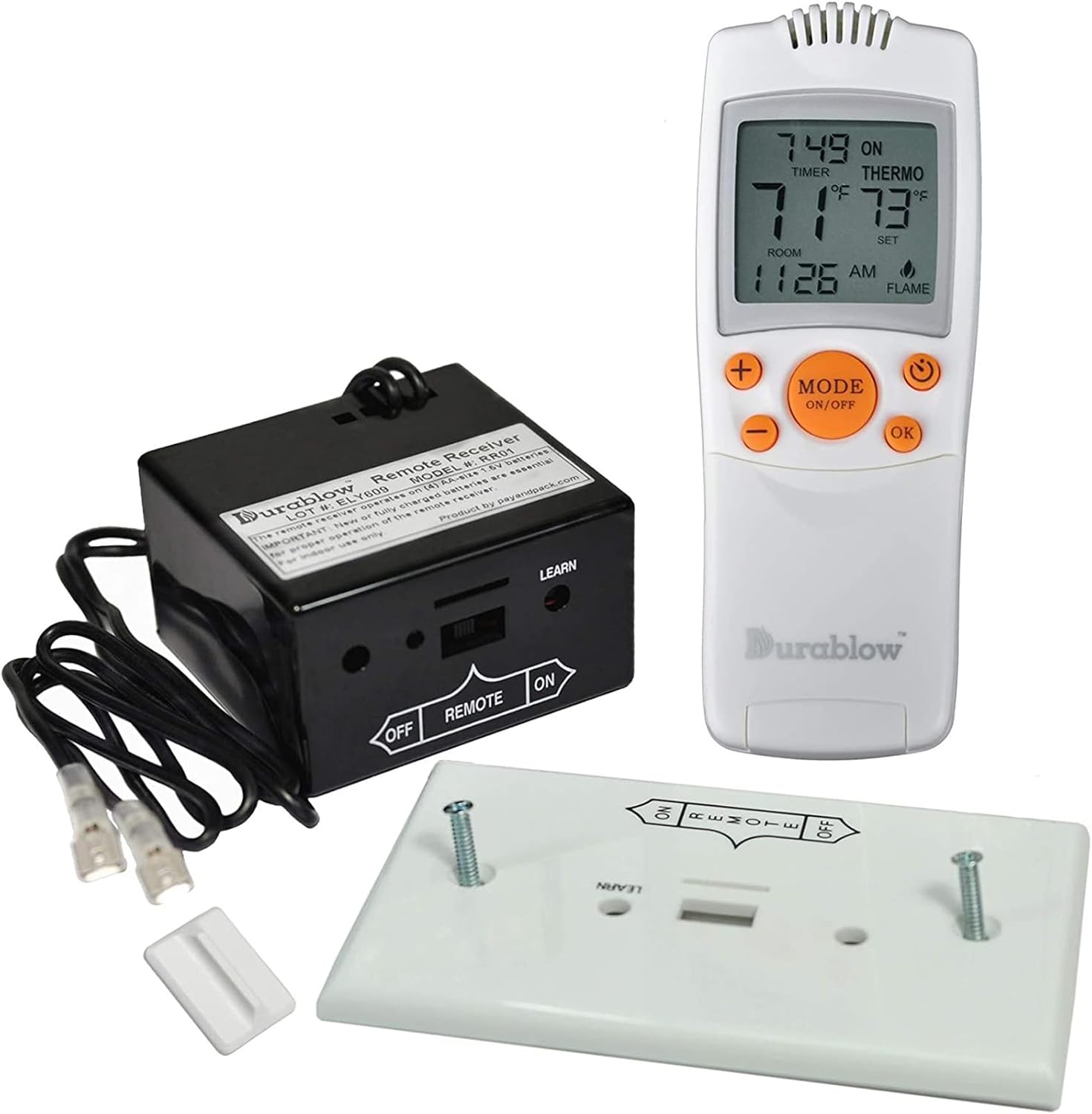
Each Durablow remote control kit includes the following components:
- Remote Transmitter (TR1001 or TR1003)
- Receiver Box
- Wall Mount Cover
- Screws for mounting
- Slide Switch
- Wires with Connectors
- User Manuals (this document covers both)
Note: Transmitter requires 2 x 1.5V AAA batteries; Receiver requires 4 x AA batteries. Batteries are not included.


Setup and Installation
Receiver Box Installation
The receiver box is the central component that communicates with your fireplace. Its dimensions are approximately 2.6" (L) x 2.4" (W) x 1.54" (H). Ensure the installation location is away from excessive heat (below 130°F).
The receiver features a LEARN function and comes with an 18-inch wire with connectors for easy attachment to your gas millivolt valve or electric spark ignition module. It includes a snap-on wall plate for mounting.
Wiring Diagrams
Refer to the following diagrams for correct wiring connections based on your fireplace system.


Battery Installation
- Transmitter: Open the battery compartment on the back of the remote transmitter and insert 2 x 1.5V AAA batteries, observing polarity.
- Receiver: Open the battery compartment on the receiver box and insert 4 x AA batteries, observing polarity.
Ensure all batteries are new and correctly oriented for optimal performance.
Operating Instructions
Durablow TR1001 On/Off Remote
The TR1001 remote provides straightforward manual control for your fireplace.
- Press the ON button to turn the fireplace on.
- Press the OFF button to turn the fireplace off.

Durablow TR1003 Thermostat & Timer Remote
The TR1003 remote offers advanced features including a thermostat and timer, displayed on its LCD screen.


Thermostat Function
The thermostat feature allows the fireplace to turn ON/OFF automatically based on room temperature. You can set the temperature swing to 1°F, 2°F, or 3°F.
- Press the MODE button to cycle through operating modes (e.g., ON, OFF, THERMO).
- In THERMO mode, use the + and - buttons to set your desired temperature.
- The fireplace will activate or deactivate to maintain the set temperature within the chosen swing range.
Timer Function
The timer allows you to set a duration for the fireplace to operate, ranging from 15 minutes to 9 hours.
- While in an active mode, press the TIMER button (often indicated by a clock icon) to activate the timer.
- Use the + and - buttons to adjust the desired operating time.
- The fireplace will turn off automatically once the set time expires.
Learning Function (Pairing Remote with Receiver)
To pair a remote transmitter with its receiver:
- Ensure the receiver has fresh batteries installed.
- Locate the "LEARN" button on the receiver box.
- Press and hold the "LEARN" button on the receiver until you hear a beep or see an indicator light flash (refer to receiver for specific indication).
- Within a few seconds, press any button on the remote transmitter (e.g., ON or MODE).
- The receiver should respond with another beep or light flash, indicating successful pairing.
- Test the remote to ensure proper communication with the fireplace.
Maintenance
Battery Replacement
Replace batteries in both the transmitter and receiver when the remote's range decreases, or the LCD screen on the TR1003 becomes dim. Always use new batteries of the specified type (AAA for transmitter, AA for receiver) and dispose of old batteries responsibly.
Cleaning
Wipe the remote transmitters and receiver box with a soft, dry cloth. Do not use abrasive cleaners or immerse the devices in water.
Troubleshooting
| Problem | Possible Cause | Solution |
|---|---|---|
| Remote not responding / Fireplace not turning ON/OFF |
|
|
| TR1003 LCD screen is dim or blank | Low or dead batteries in the TR1003 transmitter. | Replace the 2 x AAA batteries in the TR1003 transmitter. |
| Fireplace turns ON/OFF unexpectedly (TR1003) | Thermostat temperature swing setting is too narrow or room temperature fluctuations. | Adjust the temperature swing setting (1°F, 2°F, or 3°F) on the TR1003 remote to a wider range if desired. |
Specifications
- Brand: Durablow
- Models: TR1001, TR1003
- Compatible Devices: Gas Fireplace, Gas Fire Pit, Gas Stove
- Connectivity Technology: Radio Frequency (RF)
- Controller Type: Button Control
- TR1001 Remote Functions: On/Off
- TR1003 Remote Functions: On/Off, Thermostat (1°F, 2°F, 3°F swing), Timer (15 min - 9 hours)
- TR1003 Display: LCD Screen
- Operating Range: Approximately 20 feet (non-directional RF)
- Transmitter Battery (TR1001 & TR1003): 2 x 1.5V AAA batteries (not included)
- Receiver Battery: 4 x AA batteries (not included)
- Receiver Box Dimensions: 2.6" (L) x 2.4" (W) x 1.54" (H)
- FCC Approved: Yes
Warranty and Support
For warranty information or technical support, please refer to the product packaging or contact Durablow customer service directly. Ensure you have your product model numbers (TR1001, TR1003) and purchase details available when seeking support.
You can visit the official Durablow store for more information: Durablow Store on Amazon
Related documentsTR1001, TR1003


Ask a question about this manual
Ask about setup, troubleshooting, compatibility, parts, safety, or missing instructions. Manuals+ will review the question and use this page’s manual context to help answer it.