
Introduction
Thank you for choosing the King Lucky B900 Hybrid Active Noise Cancelling Headphones. This manual provides essential information for setting up, operating, maintaining, and troubleshooting your new headphones. Please read it thoroughly to ensure optimal performance and longevity of your device.
Setup
1. Unboxing
Carefully remove all components from the packaging. Ensure all items listed below are present:
- King Lucky B900 Over-Ear Headphones
- High-fidelity audio cable (3.5mm)
- Type-C Charging Cable
- User Manual

Image: King Lucky B900 headphones displayed with their included accessories: a 3.5mm audio cable, a Type-C charging cable, and the user manual.
2. Charging the Headphones
Before first use, fully charge your headphones. Connect the provided Type-C charging cable to the charging port on the headphones and the other end to a USB power source. A full charge takes approximately 2 hours.
Image: The King Lucky B900 headphones are shown with a glowing charging icon, symbolizing their extended battery life.
Video: A demonstration of the King Lucky B900 headphones, highlighting their long battery life and charging capabilities.
3. Bluetooth Pairing
To pair your headphones with a device:
- Ensure the headphones are charged and powered off.
- Press and hold the power button for a few seconds until the indicator light flashes, indicating pairing mode.
- On your device (smartphone, tablet, laptop), enable Bluetooth and search for "B900".
- Select "B900" from the list of available devices to connect. The indicator light will turn solid when successfully paired.
4. Wearing the Headphones
Adjust the headband for a comfortable and secure fit. The ear cushions are designed to create an acoustic seal for optimal sound and noise cancellation.

Image: A person is shown wearing the King Lucky B900 headphones, illustrating their comfortable and ergonomic design for extended use.
Operating Instructions
1. Controls Overview
The headphones feature intuitive buttons for easy control of audio playback, calls, and noise cancellation modes.
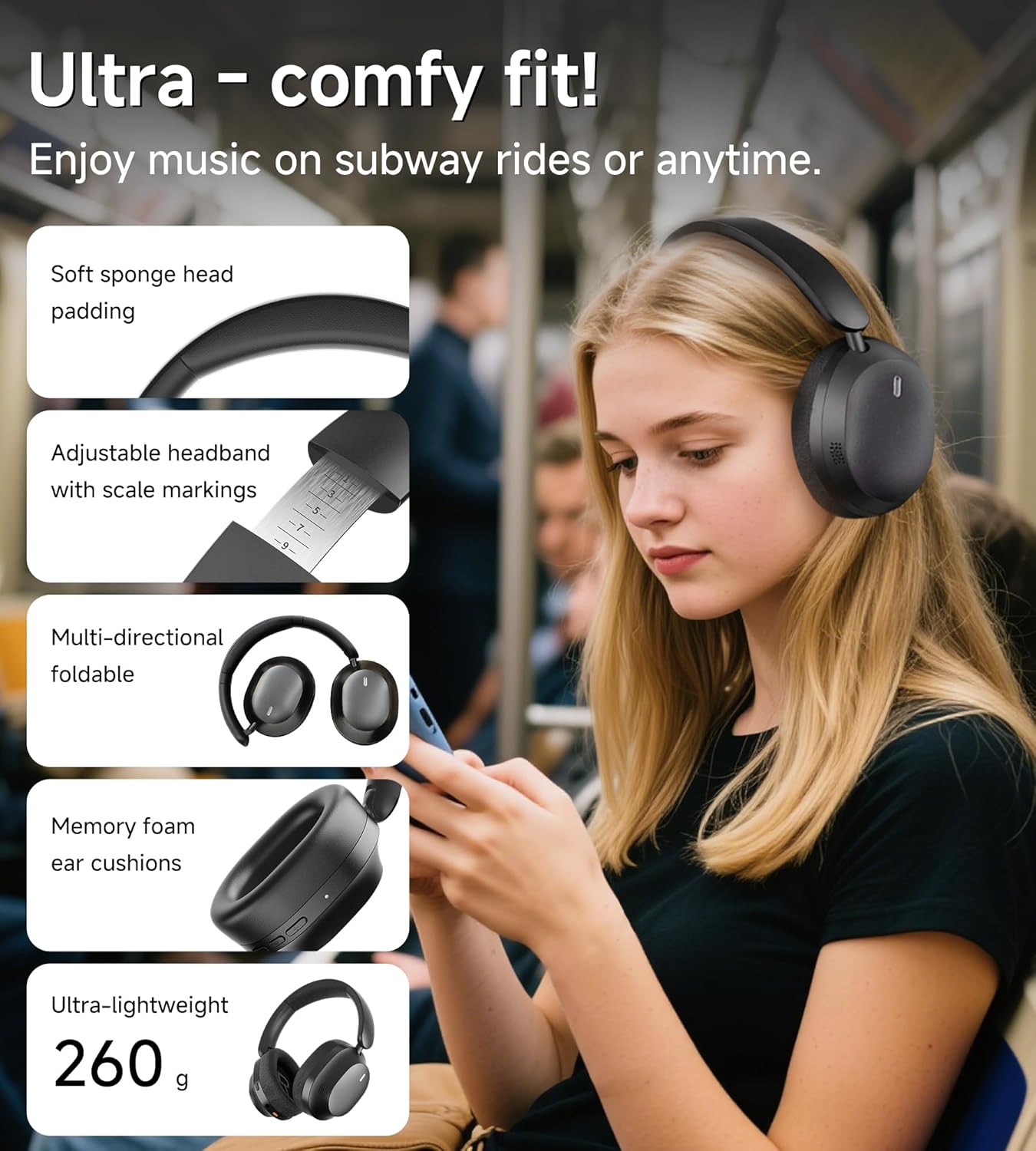
Image: A detailed view of the King Lucky B900 headphone's right earcup, highlighting the power, volume up/down, and ANC control buttons.
2. Active Noise Cancellation (ANC) & Transparency Mode
The B900 headphones utilize hybrid ANC technology to reduce ambient noise. Press the dedicated ANC button to cycle through modes:
- ANC On: Blocks out up to 90% of external noise, ideal for travel or noisy environments.
- Transparency Mode: Allows ambient sounds to pass through, enabling awareness of your surroundings without removing headphones.
- ANC Off: Standard audio mode.

Image: A graph demonstrating the noise cancellation capabilities of the King Lucky B900 headphones, showing significant reduction in airplane and car noise compared to other products.
Video: A short demonstration showcasing the noise-canceling performance of the King Lucky B900 over-ear headphones.
3. Multi-Device Connectivity
The headphones support Bluetooth multi-point connection, allowing you to connect to two devices simultaneously. This enables seamless switching between audio sources, such as a laptop for work and a smartphone for calls, without re-pairing.

Image: An illustration depicting the King Lucky B900 headphones connected to both a laptop and a smartphone, demonstrating its multi-device connectivity feature.
4. Sound Quality
Equipped with 40mm dynamic drivers, the B900 headphones deliver Hi-Res Audio with deep bass, clear mids, and crisp highs, providing an immersive listening experience for music, movies, and gaming.
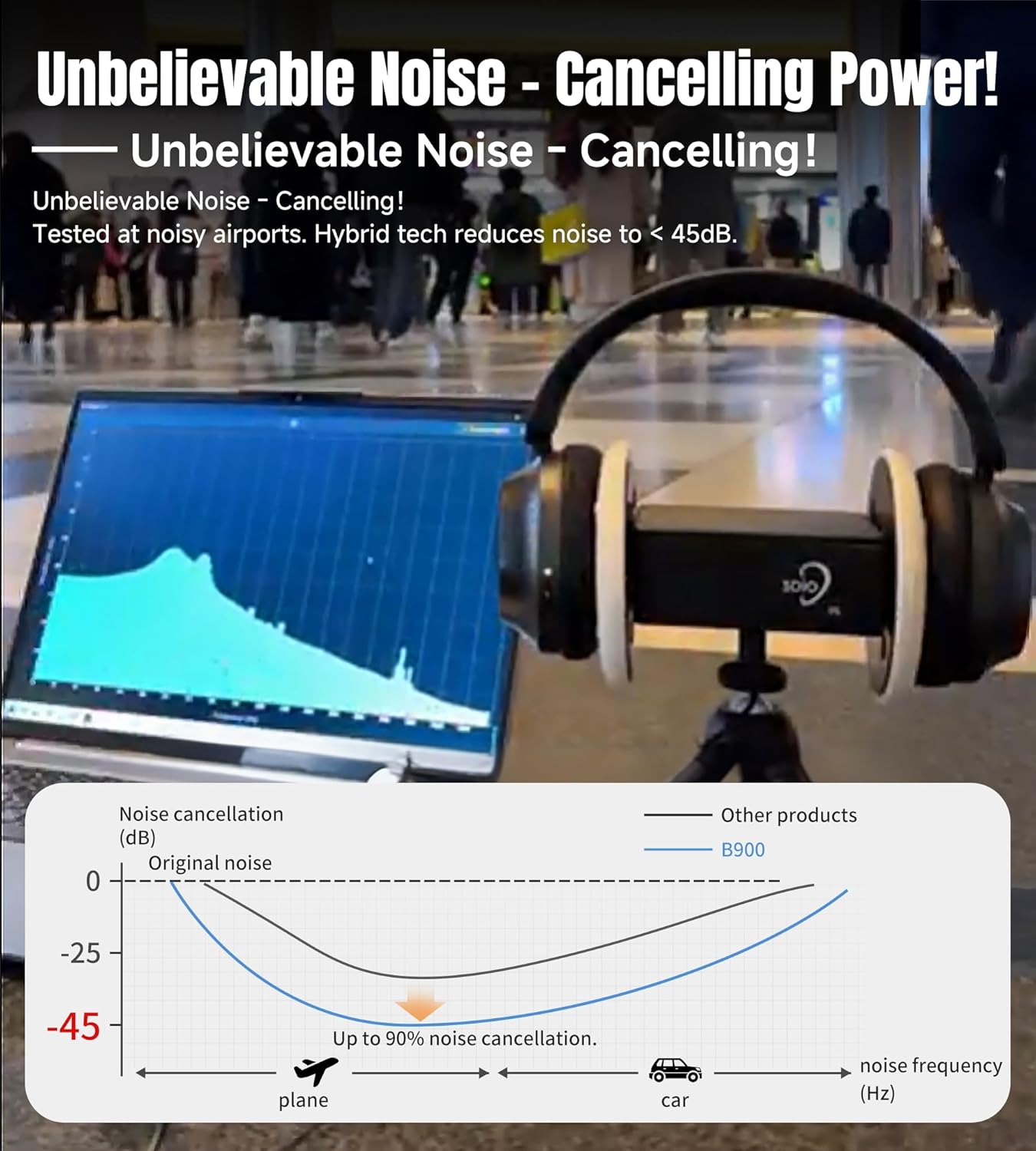
Image: The King Lucky B900 headphones in their black finish, highlighting their overall design and comfortable over-ear fit.
Maintenance
1. Cleaning
Regularly clean the ear cushions and headband with a soft, dry cloth. Avoid using harsh chemicals or abrasive materials, as these can damage the finish. For deeper cleaning, a slightly damp cloth can be used, ensuring no moisture enters the speaker grilles or charging ports.
2. Storage
When not in use, store the headphones in a cool, dry place away from direct sunlight and extreme temperatures. The foldable design allows for compact storage, protecting them from damage.

Image: The King Lucky B900 headphones are shown in a folded configuration, illustrating their portability and ease of storage.
Troubleshooting
- No Power: Ensure the headphones are fully charged. Connect to a power source and check the charging indicator.
- Cannot Pair: Make sure the headphones are in pairing mode (flashing indicator light). Ensure Bluetooth is enabled on your device and it is within range (typically 10 meters). Try restarting both the headphones and your device.
- No Sound: Check the volume levels on both the headphones and your connected device. Ensure the headphones are correctly paired. If using the audio cable, ensure it is securely connected to both the headphones and the audio source.
- ANC Not Working Effectively: Ensure the ear cushions form a good seal around your ears. Check that ANC mode is activated.
Specifications
| Model Name | B900 |
| Brand | King Lucky |
| Connectivity Technology | Wireless (Bluetooth 5.4) |
| Noise Control | Hybrid Active Noise Cancellation |
| Audio Driver Type | Dynamic Driver (40mm) |
| Battery Life | Up to 30 hours (24 hours with ANC on) |
| Charging Time | 2 Hours |
| Item Weight | 0.56 Kilograms (1.23 pounds) |
| Material | Leather, Metal, Plastic, Rubber |
| Color | Black |
Warranty and Support
King Lucky products come with a standard manufacturer's warranty. For detailed warranty information, product support, or service inquiries, please refer to the contact information provided in the packaging or visit the official King Lucky website.
Online Support: Visit the King Lucky Store on Amazon