
Effireli YK-RC43140
Contents
Effireli RC43140 Replacement Remote Control User Manual
Model: YK-RC43140
Brand: Effireli
Introduction
This manual provides comprehensive instructions for the Effireli RC43140 Replacement Remote Control. Designed for ease of use, this remote requires no programming or setup; simply point it at your compatible Hitachi TV and begin operation. It serves as a direct replacement for your original remote, ensuring seamless control over your television's functions.
Product Overview
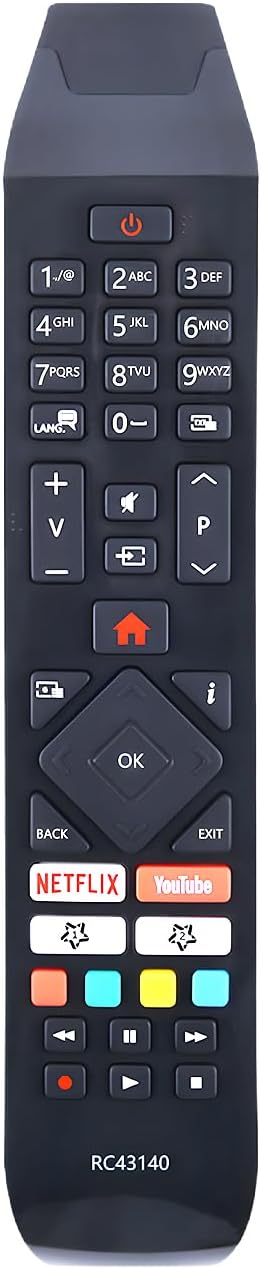
An image showing the Effireli RC43140 replacement remote control. The remote is black with grey buttons, featuring a standard layout including a numeric keypad, volume and channel controls, navigation buttons, and dedicated buttons for Netflix and YouTube.
Key Features:
- No Programming Required: Ready to use right out of the box.
- Direct Replacement: Functions identically to your original remote.
- Dedicated App Buttons: Quick access to popular streaming services like Netflix and YouTube.
- Standard TV Controls: Includes power, volume, channel, navigation, and playback functions.
Setup
Inserting Batteries:
- Locate the battery compartment on the back of the remote control.
- Slide the battery cover downwards or in the direction indicated by an arrow to open it.
- Insert two AAA batteries (not included), ensuring the positive (+) and negative (-) terminals align correctly with the markings inside the compartment.
- Replace the battery cover by sliding it back into position until it clicks securely.
Initial Use:
Once batteries are inserted, the remote control is ready for immediate use. Point the remote directly at your Hitachi TV and press any button to confirm functionality. No additional pairing or programming steps are required.
Operating Instructions
The RC43140 remote control provides intuitive access to all standard television functions. Ensure a clear line of sight between the remote's infrared emitter and your TV's IR receiver for optimal performance.
Button Functions:
- Power Button (⏻): Turns the TV on or off.
- Numeric Keypad (0-9): Used for direct channel input.
- Volume Up/Down (+/-): Adjusts the TV's volume level.
- Channel Up/Down (P^/Pv): Changes TV channels.
- Mute Button (🔇): Mutes or unmutes the TV's audio.
- Home Button (⌂): Accesses the TV's main menu or smart TV home screen.
- Navigation Buttons (Up, Down, Left, Right): Used to navigate menus and selections.
- OK Button: Confirms selections in menus.
- Back Button: Returns to the previous screen or menu.
- Exit Button: Exits the current menu or application.
- Netflix Button: Launches the Netflix application directly.
- YouTube Button: Launches the YouTube application directly.
- Playback Controls (Play, Pause, Stop, Rewind, Fast Forward, Record): Controls media playback functions.
Compatible Models
This replacement remote control is compatible with a wide range of Hitachi TV models, including but not limited to:
- 49HK6500
- 49HL7000
- 49HL8000
- 55HK6000
- 55HK6500
- 55HL7000
- 55HL9000G
- 65HL7000
- 65HL8000
- 55HL8000
- 49HE4000
- 43HL8000
- 43HK6001
- 43HE4000
- 40HE4001
- 32HE4500K
- 55HL8000K
- HL7000HL70
- 55HK600000
- 43HL8000K
- 43F501HK6000
- 32HE4500
- 24HE2001
- 24HE2000
- 32HE2000
- 32HE4000
- 40HE4000
- 43HK6000
- 43HK6500
- 49HK6000
- 49HK6001
Note: If your specific model number is not listed above, or if your original remote control appears significantly different, please contact the seller directly to confirm compatibility before purchase or for assistance.
Troubleshooting
Common Issues and Solutions:
- Remote is not responding:
- Ensure batteries are inserted correctly with the correct polarity (+/-).
- Replace old or depleted batteries with new ones.
- Check for any obstructions between the remote and the TV's IR receiver.
- Ensure you are within the effective range of the TV's IR receiver.
- Specific buttons are not working:
- This may indicate a faulty button. If other buttons work, try pressing the non-responsive button firmly.
- Ensure the remote is clean and free of debris around the buttons.
- TV does not turn on/off with the remote:
- Verify that the TV is plugged into a power source and is not in a power-saving mode that prevents IR wake-up.
- Confirm the remote is pointed directly at the TV's IR sensor.
If troubleshooting steps do not resolve the issue, please refer to the "Warranty and Support" section for further assistance.
Specifications
| Brand | Effireli |
| Model Number | YK-RC43140 |
| Connectivity Technology | Infrared |
| Compatible Devices | Television (Hitachi TVs) |
| Special Feature | No programming required |
| Batteries Required | Yes (AAA, not included) |
Maintenance
Cleaning the Remote:
- Use a soft, dry cloth to wipe the surface of the remote control.
- For stubborn dirt, slightly dampen the cloth with water or a mild, non-abrasive cleaner. Avoid excessive moisture.
- Do not use harsh chemicals, abrasive cleaners, or solvents, as these can damage the remote's finish or internal components.
Battery Care:
- Replace batteries when the remote's performance degrades or it stops responding.
- Remove batteries if the remote will not be used for an extended period to prevent leakage and potential damage.
- Dispose of used batteries responsibly according to local regulations.
Warranty and Support
Warranty Information:
This Effireli RC43140 Replacement Remote Control comes with a 12-month warranty covering manufacturing defects. This warranty ensures that your remote control is free from defects in materials and workmanship under normal use during the warranty period.
Return Policy:
A 30-day money-back guarantee is offered. Returns and exchanges are accepted within this period for any reason, and within the 12-month warranty period for manufacturing defects.
Customer Support:
For any questions, concerns, or issues not covered in this manual, or to confirm compatibility for unlisted models, please contact the seller or manufacturer directly. Provide your product model number (YK-RC43140) and a detailed description of the issue for prompt assistance.
You can typically find seller contact information on your purchase receipt or through the platform where the product was acquired.
Ask a question about this manual
Ask about setup, troubleshooting, compatibility, parts, safety, or missing instructions. Manuals+ will review the question and use this page’s manual context to help answer it.