
MENDUNER MENDUNERo9b2d5rhkw-11
Contents
MENDUNER M75 Translation Earbuds User Manual
Model: MENDUNERo9b2d5rhkw-11
Introduction
Thank you for choosing the MENDUNER M75 On-Ear Translation Earbuds. This device is designed to facilitate real-time communication across language barriers, supporting a wide range of languages and accents. It also functions as a high-quality music earbud, compatible with Android devices. Please read this manual carefully to ensure proper use and optimal performance of your new translation earbuds.

Figure 1: M75 Translation Earbuds highlighting key features.
The M75 earbuds offer support for 144 languages, are designed for comfortable wear during various activities including sports, and feature 360-degree no sound leakage for clear audio. They provide fast translation, support multiple device connections, and allow for music playback.
Product Overview
The M75 Translation Earbuds consist of two on-ear earbuds and a portable charging case. The earbuds feature touch controls for various functions.

Figure 2: M75 Earbuds and Charging Case.
This image displays the M75 translation earbuds alongside their open charging case, illustrating how the earbuds are stored and charged. The design emphasizes portability and ease of access.
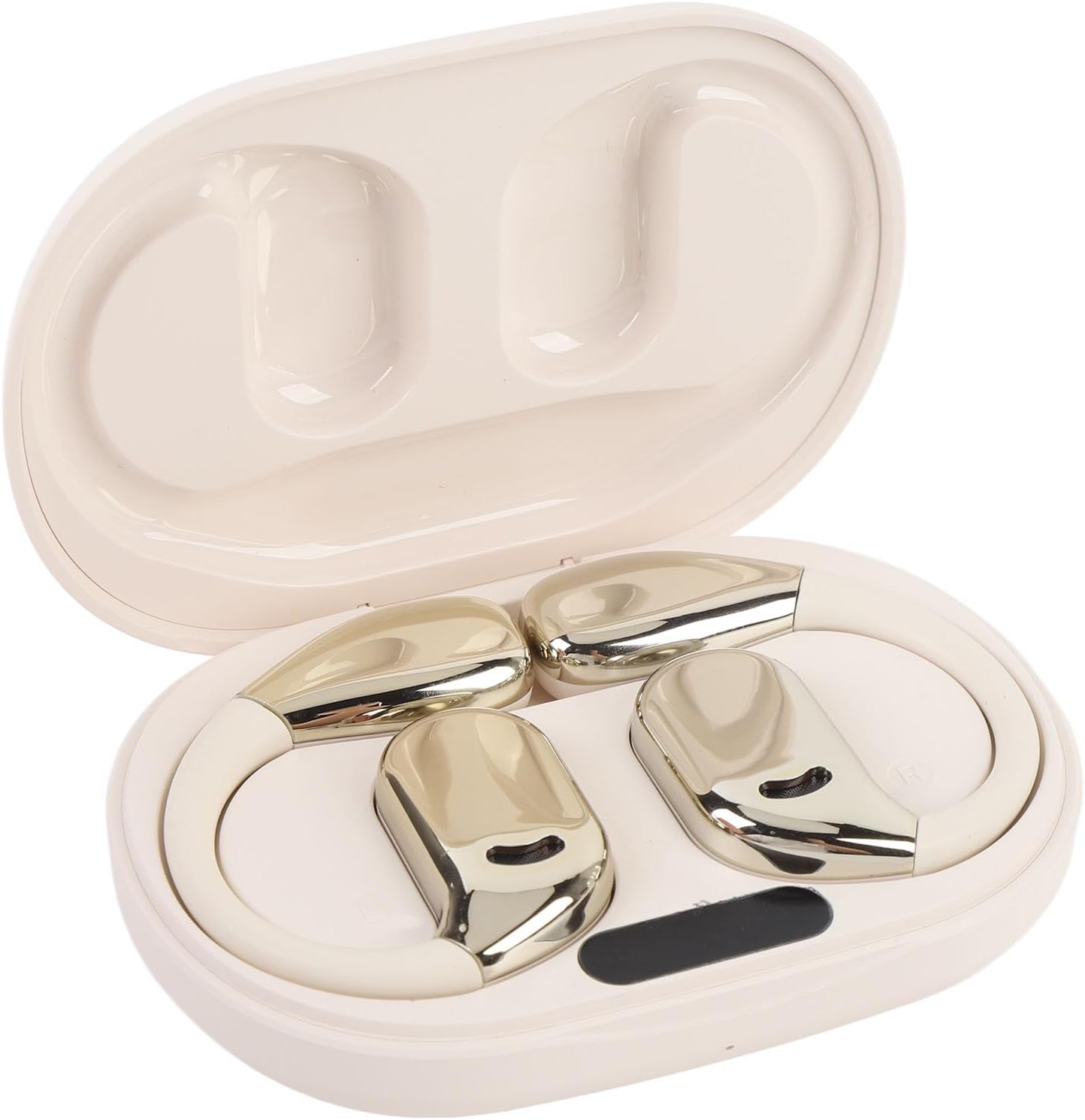
Figure 3: Earbuds securely placed in the charging case.
The earbuds are shown nestled within their compact charging case, ready for storage or charging. The case is designed to protect the earbuds and keep them powered.
Setup
1. Charging the Device
Before first use, fully charge the earbuds and the charging case.
- Connect the charging cable (USB-C) to the charging port on the case.
- Plug the other end into a USB power source.
- The charging case has a built-in 300 mAh battery. Earbuds have 50 mAh batteries each.
- Charging time is approximately 1-2 hours for a full charge.

Figure 4: Charging Case and Cable.
This image shows the compact charging case along with its USB-C charging cable, illustrating the method for recharging the device.
2. Bluetooth Pairing
The M75 earbuds feature one-step auto pairing for convenience.
- Ensure the earbuds are charged and removed from the case.
- Turn on Bluetooth on your mobile device (e.g., Android phone).
- Search for "M75" or a similar device name in your Bluetooth settings and select it to pair.
- The earbuds use Bluetooth Version 5.49 and have a connection distance of up to 10 meters.

Figure 5: One-Step Auto Pairing.
This visual demonstrates the simple one-step auto pairing process between the M75 earbuds and a smartphone, indicating quick and effortless connection.
3. App Installation
To utilize the full translation capabilities, download the dedicated application on your smartphone. The earbuds are fully compatible with Android devices.
- Search for the "MENDUNER Translation" app (or similar, check product packaging for exact name) on the Google Play Store.
- Install the application and follow the on-screen instructions to set up your profile and language preferences.
Operating Instructions
1. Touch Control Functions
The M75 earbuds feature intuitive touch controls for various functions:
- Music Playback: Easily change songs by a simple touch on the earbud.
- Call Management: Answer or end calls with a simple touch.
- Specific gestures (single tap, double tap, long press) for volume, play/pause, next/previous track, and call management will be detailed within the companion app.
2. Translation Modes
The M75 earbuds offer three powerful translation modes to suit different communication scenarios:
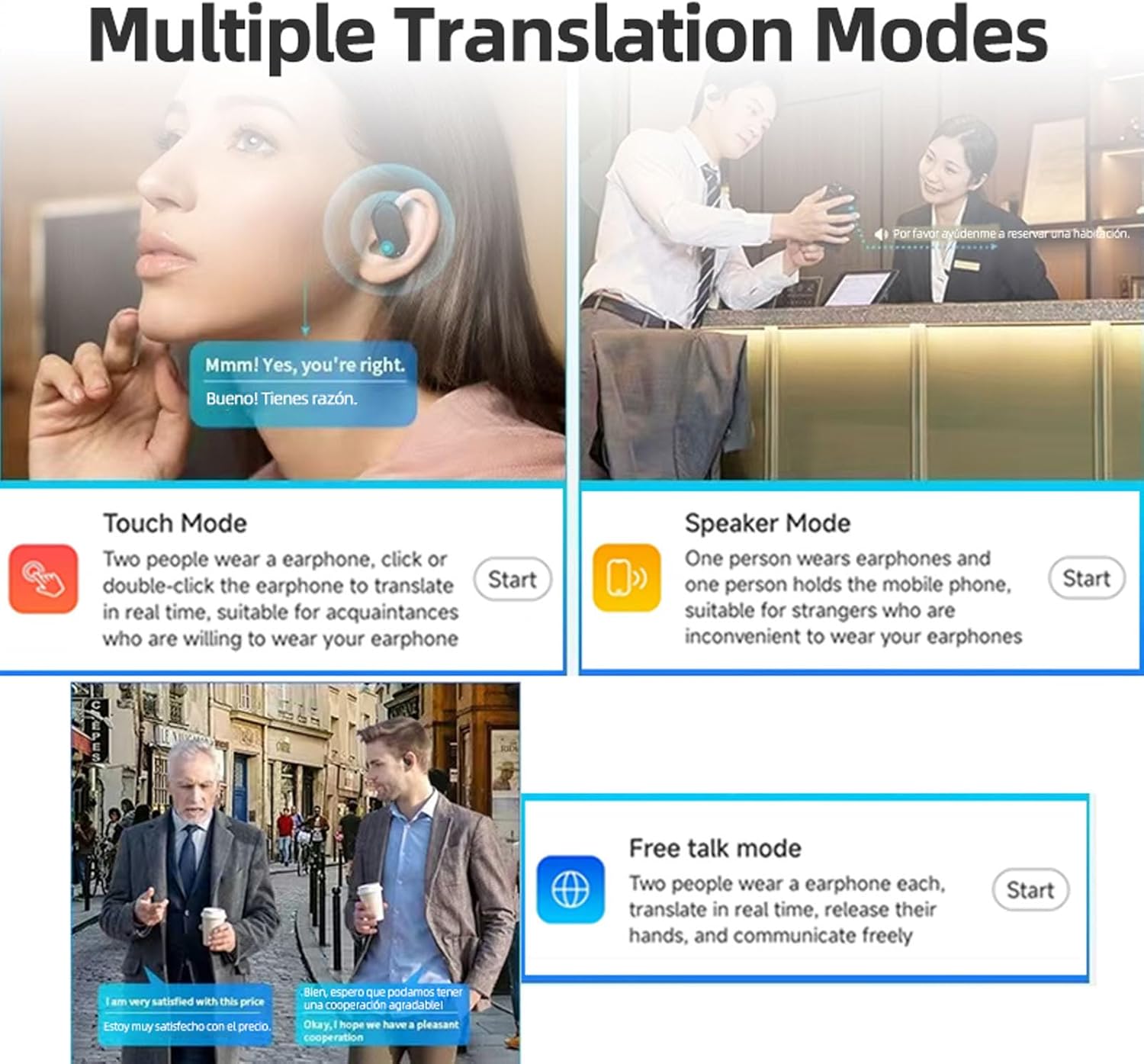
Figure 6: Multiple Translation Modes.
This diagram illustrates the three distinct translation modes: Touch Mode for real-time translation with shared earbuds, Speaker Mode for one-way translation using a phone, and Free Talk Mode for hands-free, real-time conversation between two earbud wearers.
- Touch Mode:
Ideal for close acquaintances. Both individuals wear an earbud. A simple or double click on the earbud initiates real-time translation. This mode ensures direct and immediate communication.
- Speaker Mode:
Suitable for interactions with strangers or when sharing earbuds is inconvenient. One person wears an earbud, and the other holds the mobile phone. The phone's speaker will output the translated speech.
- Free Talk Mode:
Designed for flexible, hands-free conversations. Both participants wear an earbud, allowing for real-time, continuous translation without manual input. This mode facilitates natural communication flow.

Figure 7: Multi-Language Real-Time Translation in action.
This image depicts two individuals engaged in a conversation, with the M75 earbuds facilitating real-time, multi-language translation, demonstrating seamless cross-cultural communication.
3. Language Support
The M75 earbuds support an extensive range of languages for translation:
- Online Translation: Supports over 144 languages and various accents for online translation.
- System Languages: The device system supports 11 languages: Chinese, Traditional Chinese, English, French, Russian, Thai, Japanese, Korean, German, Spanish, Arabic.
- The translation engine is continuously updated to include more minority languages.
The earbuds also feature high-definition sound and Active Noise Cancellation (ANC) technology for clear calls and translation experiences.
Maintenance
- Cleaning: Use a soft, dry cloth to clean the earbuds and charging case. Do not use liquids or abrasive cleaners.
- Storage: Store the earbuds in their charging case when not in use to protect them and keep them charged. Store in a cool, dry place away from direct sunlight and extreme temperatures.
- Battery Care: To prolong battery life, avoid fully discharging the batteries frequently. Charge them regularly, even if not used for extended periods.
Troubleshooting
If you encounter any issues with your M75 Translation Earbuds, please refer to the following common solutions:
| Problem | Possible Solution |
|---|---|
| Earbuds not charging | Ensure the charging cable is securely connected to both the case and the power source. Check if the power source is active. Clean the charging contacts on the earbuds and inside the case. |
| Cannot pair with device | Ensure Bluetooth is enabled on your device and the earbuds are in pairing mode (usually by opening the case or removing them). Forget the device in your phone's Bluetooth settings and try pairing again. Ensure earbuds are charged. |
| Translation not working | Check your internet connection, as online translation requires it. Ensure the companion app is open and correctly configured. Verify language settings in the app. |
| Poor audio quality / Noise | Ensure earbuds are properly seated in your ears. Check for obstructions in the earbud speakers. Move closer to your paired device to avoid signal interference. |
Specifications
| Feature | Detail |
|---|---|
| Item Type | Bluetooth Translation Earbuds |
| Material | Plastic, Electronics |
| Bluetooth Version | 5.49 |
| Playback Formats | Single ear / Dual ear |
| Operation Method | Touch Control |
| Bluetooth Connection Distance | 10 meters (approx. 33 feet) |
| Playback Time | 3-4 hours |
| Charging Time | 1-2 hours |
| Earbud Battery | Built-in 50 mAh x 2 |
| Charging Case Battery | Built-in 300 mAh |
| Supported System Languages | Chinese, Traditional Chinese, English, French, Russian, Thai, Japanese, Korean, German, Spanish, Arabic |
| Supported Translation Languages | Over 144 languages (e.g., Albanian, Amharic, Arabic, etc.) |
Warranty and Support
For warranty information and technical support, please refer to the product packaging or contact the manufacturer directly. Keep your purchase receipt as proof of purchase.
For further assistance, please visit the MENDUNER official website or contact their customer service.
Ask a question about this manual
Ask about setup, troubleshooting, compatibility, parts, safety, or missing instructions. Manuals+ will review the question and use this page’s manual context to help answer it.