
1. Introduction
The GetD Bluetooth Smart Sunglasses, Model GG13, integrate advanced audio technology with AI translation capabilities into a stylish eyewear design. These smart glasses feature Bluetooth 5.4 for stable connectivity, open-ear audio, a noise-canceling microphone, and polarized lenses with UV400 protection. They are designed to enhance daily activities, travel, and communication through hands-free operation and intelligent features.
2. What's in the Box
- GetD Bluetooth Smart Sunglasses (Model GG13)
- Charging Cable
- Cleaning Cloth
- User Manual
3. Product Overview
The GetD Smart Sunglasses combine audio and smart features within a sleek frame. Key components include integrated speakers in the temples, a microphone for calls and voice commands, and a multi-function button for control.

Figure 3.1: GetD Smart Sunglasses and companion app interface.

Figure 3.2: Overview of Smart Sunglasses features.
3.1 Controls and Indicators
The sunglasses feature intuitive touch controls located on the temples for managing calls, music playback, volume, and activating the voice assistant.

Figure 3.3: Intelligent Touch Control Guide.
- Answer/End Call: Tap L/R temple once.
- Play/Pause: Tap L/R temple once.
- Decline Phone Call: Tap L/R temple twice.
- Previous Song: Tap L temple twice.
- Next Song: Tap R temple twice.
- Increase Volume: Tap L temple once.
- Reduce Volume: Tap R temple once.
- Voice Assistant: Tap L/R temple twice.
4. Setup
4.1 App Download
To unlock the full functionality of your GetD Smart Sunglasses, download the companion GetD Smart App. The app is compatible with Android 8.1 and above, and iOS 15.6 and above.

Figure 4.1: GetD App Download Instructions. You can also visit download.igetd.com.
4.2 Bluetooth Pairing
Follow these steps to connect your GetD Smart Sunglasses to your smartphone via Bluetooth:
- Turn on your glasses: Ensure the sunglasses are powered on.
- Enable Bluetooth on your phone: Go to your phone's settings and activate Bluetooth.
- Select the correct Bluetooth device: In your phone's Bluetooth device list, look for "GetD Eyewear" and select it to pair.
- Choose your model in the GetD app: Open the GetD Smart App and select your specific glasses model (e.g., GG13) to complete the connection.
- Connected: Your glasses are now ready for use.

Figure 4.2: Bluetooth Connection Steps.
5. Operating Instructions
5.1 Music Playback
The GetD Smart Sunglasses feature Bluetooth 5.4 technology for high-quality audio streaming. Enjoy music with enhanced stereo effects through dual sound outlets in each temple. Use the touch controls (Figure 3.3) to play/pause, skip tracks, and adjust volume.

Figure 5.1: Audio Features and Sound Leakage Levels.
5.2 Phone Calls
Equipped with an ENC noise reduction microphone, the sunglasses ensure clear call quality by filtering out background noise. The built-in HiFi speakers provide immersive stereo sound for hands-free communication. Refer to Figure 3.3 for call management controls.
5.3 AI Translation
The GetD Smart App offers four translation modes:
- AI Dialogue (with ChatGPT): For interactive conversations.
- Multi-language: Supports 17 languages for broad communication.
- Voice-to-text: Transcribes spoken words.
- Face-to-face translation: Facilitates direct communication with individuals speaking different languages.

Figure 5.2: Overview of 4 AI Translation Modes.

Figure 5.3: AI Interpreter Functionality.
5.4 Voice Control
The smart glasses support voice-activated wake-up control, allowing wireless phone management within a 10-meter range. Activate your phone's voice assistant using the touch controls (Figure 3.3) for hands-free commands.
5.5 Health Assistant
The GetD Smart App includes a health assistant feature, offering functionalities such as sedentary reminders, meditation music, and water drinking reminders. Access these features through the app to support your well-being.

Figure 5.4: GetD Smart App Health Assistant.
6. Charging and Battery
The GetD Smart Sunglasses are equipped with a 260mAh high-capacity battery, providing up to 11 hours of continuous use at 60% volume or 15 days of standby time. Charging is facilitated by advanced magnetic technology.
- Charging Time: Approximately 2 hours for a full charge.
- Charging Indicator: Red light indicates charging; light turns off when fully charged.
- Magnetic Charging: Connect the magnetic charging cable to the designated ports on the temples.

Figure 6.1: Battery Life and Charging Information.

Figure 6.2: Streamlined Design and Battery Life.
7. Maintenance
- Cleaning Lenses: Use the provided cleaning cloth or a soft, lint-free cloth with a specialized lens cleaner. Avoid abrasive materials or harsh chemicals.
- Cleaning Frame: Wipe the frame with a soft, damp cloth. Do not submerge the glasses in water.
- Storage: Store the sunglasses in their protective case when not in use to prevent scratches and damage.
- Avoid Extreme Temperatures: Do not expose the sunglasses to extreme heat or cold, as this can damage the battery and electronic components.
- Water Resistance: The glasses have an IPX4 waterproof rating, meaning they are resistant to splashing water. They are not designed for swimming or submersion.
8. Troubleshooting
8.1 Connectivity Issues
- Glasses not pairing: Ensure Bluetooth is enabled on your phone and the glasses are powered on. Try restarting both devices. Verify you are selecting "GetD Eyewear" in your Bluetooth settings.
- Frequent disconnections: Ensure your phone is within the 10-meter Bluetooth range. Check for interference from other wireless devices.
- App not connecting: Ensure the GetD Smart App is updated to the latest version. Close and reopen the app. Re-pair the glasses through the app if necessary.
8.2 Audio Problems
- No sound: Check the volume level on both the glasses and your connected device. Ensure the glasses are properly paired.
- Poor sound quality: Ensure the glasses are positioned correctly on your head. Check for any obstructions to the speakers.
- Microphone not working: Ensure the microphone is not blocked. Check privacy settings on your phone to ensure the GetD app has microphone access.
8.3 Translation Functionality
- Translation not working: Ensure you have an active internet connection for AI translation features. Verify the correct languages are selected in the GetD Smart App.
- Inaccurate translation: Speak clearly and at a moderate pace. Ensure minimal background noise for optimal microphone performance.
8.4 Battery and Charging
- Glasses not charging: Ensure the magnetic charging cable is securely connected to both the glasses and a power source. Check if the charging indicator light is red.
- Short battery life: Ensure the glasses are fully charged before use. High volume usage or continuous AI translation can reduce battery life.
9. Specifications
| Feature | Specification |
|---|---|
| Model Number | GG13 (a69a6e90-5332-447b-abe9-b7344ab52a35) |
| Connectivity | Bluetooth 5.4 |
| Battery Capacity | 260mAh Lithium Ion |
| Battery Life (Music) | Up to 11 hours (at 60% volume) |
| Battery Life (Talk) | Up to 9 hours |
| Standby Time | Up to 15 days |
| Charging Time | Approx. 2 hours |
| Water Resistance | IPX4 |
| Lens Type | Polarized, UV400 Protection |
| Microphone | ENC Noise Reduction |
| Operating System (Internal) | AsteroidOS |
| Item Weight | 5 ounces |
| Dimensions | 6.42 x 2.68 x 2.01 inches (Package) |
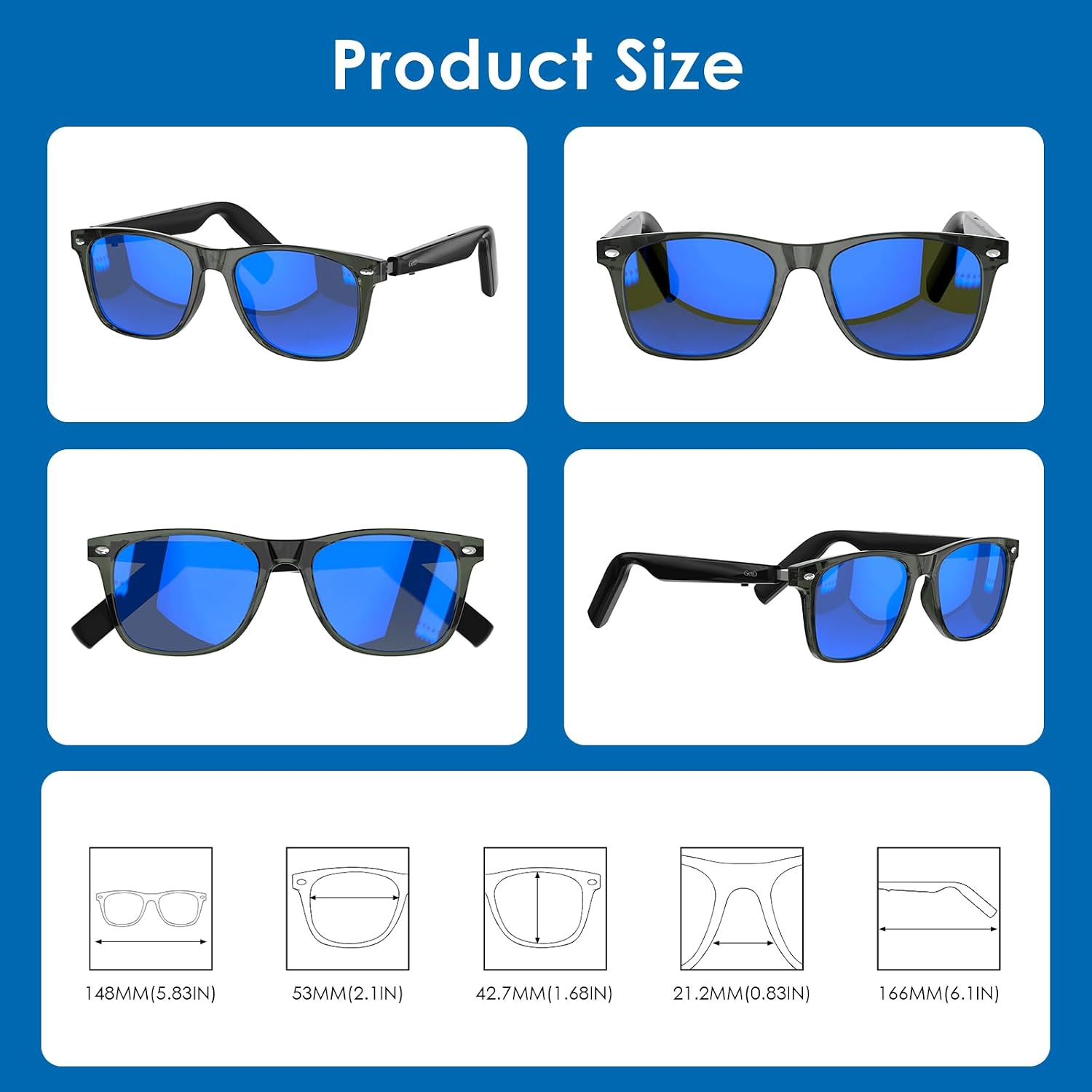
Figure 9.1: Product Size Dimensions.
10. Warranty and Support
10.1 Warranty Information
GetD products are covered by a limited warranty against defects in materials and workmanship. Please refer to the warranty card included with your product for specific terms and conditions, or visit the official GetD website for detailed information.
10.2 Customer Support
For technical assistance, troubleshooting, or any inquiries regarding your GetD Smart Sunglasses, please contact GetD customer support through the following channels:
- Online Support: Visit the official GetD website or the GetD Brand Store on Amazon: GetD Brand Store
- Email Support: Refer to your product packaging or the GetD website for the customer service email address.