Important Safety Instructions
When using electrical appliances, basic safety precautions should be followed, including the following:
- Read all instructions before using the appliance.
- Do not operate any appliance with a damaged cord or plug, or after the appliance malfunctions or has been damaged in any manner.
- Do not use outdoors.
- Do not let cord hang over edge of table or counter.
- To reduce the risk of fire in the oven cavity:
- Do not overcook food.
- Remove wire twist-ties from paper or plastic bags before placing bags in oven.
- If materials inside the oven should ignite, keep oven door closed, turn oven off, and disconnect the power cord, or shut off power at the fuse or circuit breaker panel.
- This appliance must be grounded. Connect only to properly grounded outlet.
- Use this appliance only for its intended use as described in this manual. Do not use corrosive chemicals or vapors in this appliance.
- Do not store this appliance outdoors. Do not use this product near water.
- Do not immerse cord or plug in water.
- Keep the appliance clean. Refer to the "Maintenance" section for cleaning instructions.
- The microwave oven is intended for heating food and beverages. Drying of clothing and heating of warming pads, slippers, sponges, damp cloth and similar may lead to risk of injury, ignition or fire.
- This appliance is not intended for use by persons (including children) with reduced physical, sensory or mental capabilities, or lack of experience and knowledge, unless they have been given supervision or instruction concerning use of the appliance by a person responsible for their safety.
- Children should be supervised to ensure that they do not play with the appliance.
- Only use utensils that are suitable for use in microwave ovens.
- When heating food in plastic or paper containers, keep a close eye on the oven due to the possibility of ignition.
- If smoke is observed, switch off or unplug the appliance and keep the door closed in order to stifle any flames.
- Microwave heating of beverages can result in delayed eruptive boiling, therefore care must be taken when handling the container.
- The contents of feeding bottles and baby food jars shall be stirred or shaken and the temperature checked before consumption, in order to avoid burns.
- Eggs in their shell and whole hard-boiled eggs should not be heated in microwave ovens as they may explode, even after microwave heating has ended.
- The oven should be cleaned regularly and any food deposits removed.
- Failure to maintain the oven in a clean condition could lead to deterioration of the surface that could adversely affect the life of the appliance and possibly result in a hazardous situation.
Product Overview
The COMFEE' Retro Microwave Oven combines classic design with modern functionality, offering efficient and convenient cooking.

Front view of the COMFEE' Retro Microwave Oven in apricot, showing its compact design and digital display.
Key Features:
- 9 Preset Programs: For common foods like popcorn, beverage, vegetable, meat, pizza, potato, pasta, soup, and reheat.
- 0.9 cu.ft Capacity: Compact yet spacious enough to accommodate a 10-inch pizza.
- 900W Power Output: Efficient heating and cooking.
- Multi-Stage Cooking: Allows for sequential cooking steps (e.g., defrost then cook).
- Mute Function: Silence operation sounds for quiet environments.
- LED Digital Display: Clear and easy-to-read interface.
- Easy Defrosting: Defrost by time or weight for even results.
- Express Cooking: Quick start options for 30 seconds at full power.
- Position Memory Turntable: Ensures the turntable returns to its original position after cooking.
- Energy-Saving Eco Mode: Reduces power consumption in standby.
- 2-Step Child Lock: Enhanced safety feature to prevent accidental operation.
Setup and Installation
Follow these steps for proper setup of your microwave oven.
- Unpacking: Carefully remove the microwave oven and all packing materials from the carton. Check the oven for any damage, such as dents or a broken door. Do not install if the oven is damaged.
- Placement:
- Place the oven on a flat, stable surface that can support its weight and the heaviest food likely to be cooked in the oven.
- Ensure adequate ventilation. Leave a minimum of 3 inches (7.5 cm) of space on the top, sides, and back for proper airflow.
- Do not block air vents.
- Do not place the oven near heat sources or in a damp environment.
- Electrical Connection:
- Ensure the voltage and frequency of your power outlet match the specifications on the oven's rating label.
- Plug the oven into a properly grounded 3-prong outlet. Do not use an adapter or extension cord.
- Turntable Installation:
- Place the roller ring in the center of the oven cavity.
- Place the glass turntable on top of the roller ring, ensuring it sits securely in the center hub.
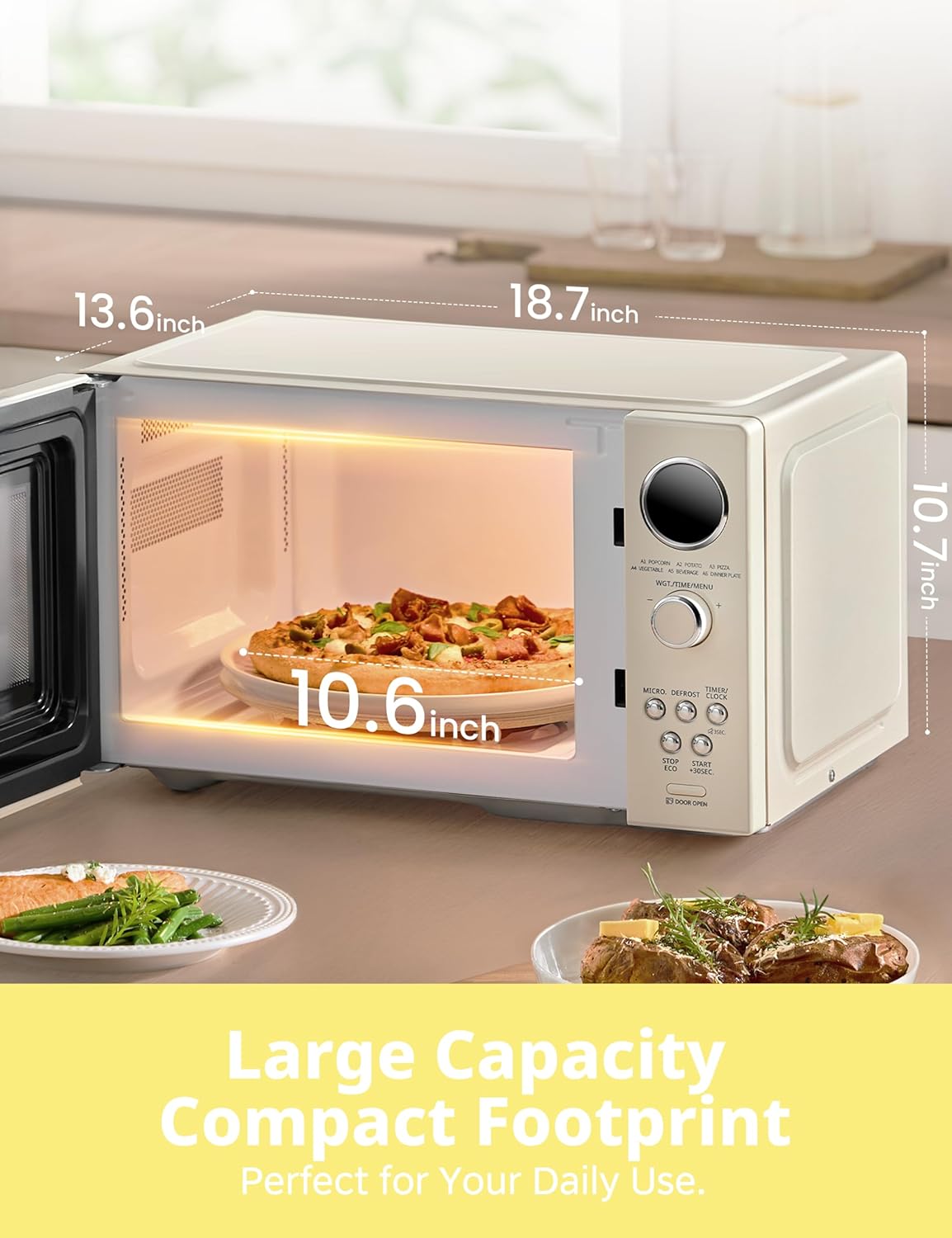
The compact footprint of the microwave oven, showing its external dimensions and internal capacity for a 10.6-inch plate.
Operating Instructions
This section details how to use the various functions of your COMFEE' microwave oven.
Control Panel Overview:
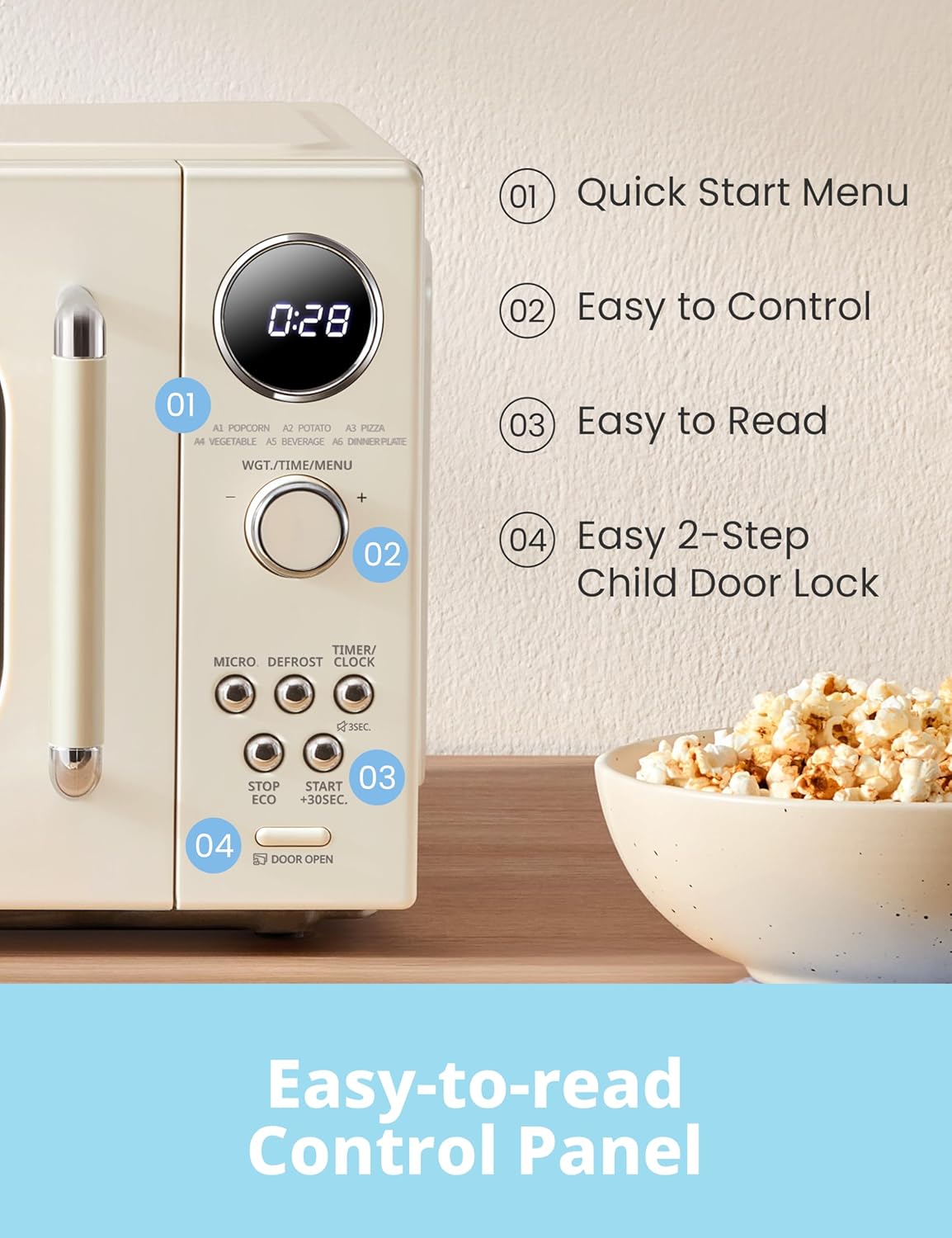
Detailed view of the user-friendly control panel, highlighting the digital display, rotary dial, and function buttons.
- Digital Display: Shows time, cooking settings, and indicators.
- Rotary Dial (WGT./TIME/MENU): Used to adjust time, weight, and select menu options.
- MICRO Button: Selects microwave power level.
- DEFROST Button: Initiates defrosting by time or weight.
- TIMER/CLOCK Button: Sets kitchen timer or clock. Press and hold for 3 seconds to activate/deactivate mute function.
- STOP/ECO Button: Stops cooking, clears settings, or activates Eco mode.
- START/+30SEC. Button: Starts cooking or adds 30 seconds to cooking time.
- DOOR OPEN Button: Opens the microwave door.
Setting the Clock:
- In standby mode, press the "TIMER/CLOCK" button once.
- Turn the rotary dial to set the hour.
- Press "TIMER/CLOCK" again.
- Turn the rotary dial to set the minutes.
- Press "TIMER/CLOCK" to confirm.
Microwave Cooking:
- Place food in a microwave-safe container.
- Press the "MICRO" button repeatedly to select the desired power level (P100, P90, P80...P10).
- Turn the rotary dial to set the cooking time.
- Press "START/+30SEC." to begin cooking.
Auto Menus (9 Preset Programs):
The microwave features 9 auto menus for convenient cooking of popular items.

Visual representation of some of the 6 auto menu quick start options available on the microwave.
- In standby mode, turn the rotary dial to select the desired auto menu (e.g., A1 Popcorn, A2 Potato, A3 Pizza, A4 Vegetable, A5 Beverage, A6 Dinner Plate).
- Press "START/+30SEC." to confirm and start cooking.
- For some menus, you may need to turn the dial to select the weight/quantity before pressing start.
Defrost Function:
Defrost food by weight or time for optimal results.
- Defrost by Weight:
- Press the "DEFROST" button once.
- Turn the rotary dial to select the weight of the food.
- Press "START/+30SEC." to begin defrosting.
- Defrost by Time:
- Press the "DEFROST" button twice.
- Turn the rotary dial to set the defrosting time.
- Press "START/+30SEC." to begin defrosting.
Multi-Stage Cooking:
This feature allows you to program two consecutive cooking stages, for example, defrosting followed by cooking.
- Set the first stage (e.g., defrost by weight or time). Do NOT press "START/+30SEC." yet.
- Set the second stage (e.g., microwave cooking with desired power level and time).
- Press "START/+30SEC." to begin the multi-stage cooking process. The oven will automatically switch from the first stage to the second.
Mute Function:
To silence the microwave's beeps and sounds, activate the mute function.

To activate or deactivate the mute function, press and hold the "TIMER/CLOCK" button for 3 seconds.
- To activate mute: Press and hold the "TIMER/CLOCK" button for 3 seconds. The display will show "OFF" or a mute icon.
- To deactivate mute: Press and hold the "TIMER/CLOCK" button for 3 seconds again. The display will show "ON" or the mute icon will disappear.
2-Step Child Lock Feature:
This safety feature prevents unintended operation, especially by children.

Instructions for managing the 2-step child safety lock, including unlocking the door after cooking, deactivating, and reactivating the lock.
- To Activate the Child Lock:
- Ensure the microwave is in standby mode.
- Press "MICRO" once.
- Press "DEFROST" once.
- Press and hold the "DOOR OPEN" button for 3 seconds. The display will show "Loc".
- To Deactivate the Child Lock:
- Press "MICRO" once.
- Press "DEFROST" once.
- Press and hold the "DOOR OPEN" button for 3 seconds. The display will show "ULoc".
- Unlocking the Door After Cooking (when locked):
- Press "DOOR OPEN".
- Hold the handle and open the door.
- If the screen shows "Loc", press "DOOR OPEN" again.
- Hold the handle and open the door.
Eco Mode:
To save energy, the microwave can enter Eco mode.
- In standby mode, close the door and press the "STOP/ECO" button once. The display will turn off.
- To exit Eco mode, press any button or open the door.
Turntable Reset Function:
This feature ensures the turntable returns to its starting position after cooking, making it easier to remove items with handles.

Illustration of the turntable reset function, which ensures the turntable always stops in the same orientation for easy access to food.
The turntable will automatically rotate back to its initial position after the cooking cycle is complete.
Maintenance and Cleaning
Regular cleaning and proper maintenance will ensure the longevity and optimal performance of your microwave oven.
- Cleaning the Oven Cavity:
- Wipe the inside of the oven with a damp cloth after each use. For stubborn stains, use a mild detergent.
- Do not use abrasive cleaners or harsh chemicals.
- To remove odors, combine a cup of water with the juice of one lemon in a microwave-safe bowl and microwave for 5-7 minutes.
- Cleaning the Turntable and Roller Ring:
- The glass turntable and roller ring can be removed and washed in warm soapy water or in a dishwasher.
- Ensure they are completely dry before placing them back in the oven.
- Cleaning the Exterior:
- Wipe the exterior surfaces with a soft, damp cloth.
- Avoid getting water into the ventilation openings.
- Door and Door Seals:
- Clean the door and door seals regularly to ensure proper closure and prevent microwave leakage.
- Use a soft cloth and mild detergent.
- Power Cord:
- Periodically check the power cord for any damage. If damaged, it must be replaced by the manufacturer or a qualified service agent.
Troubleshooting
If you encounter issues with your microwave oven, refer to the following table for common problems and solutions.
| Problem | Possible Cause | Solution |
|---|---|---|
| Oven will not start |
|
|
| Food not heating |
|
|
| Turntable not rotating |
|
|
| Oven light not working |
|
|
| Excessive steam or condensation |
|
|
Specifications
| Model Number | CMO-MMP02AA(AT) |
| Capacity | 0.9 Cubic Feet |
| Wattage | 900 watts |
| Voltage | 230 Volts (AC) |
| Product Dimensions (D x W x H) | 13.6"D x 18.7"W x 10.7"H |
| Item Weight | 24.7 Pounds |
| Color | Apricot |
| Material | Plastic/Painted Metal |
| Installation Type | Countertop |
| Included Components | Glass Turntable, Manual Instruction, Microwave Oven |
Warranty and Support
COMFEE' products are designed for reliability and performance. For warranty information and customer support, please refer to the details below.
Warranty Information:
Please refer to the warranty card included with your product for specific terms and conditions. Typically, COMFEE' offers a limited warranty covering defects in materials and workmanship for a specified period from the date of purchase.
Customer Support:
If you have any questions, require technical assistance, or need to report an issue, please contact COMFEE' customer service. Have your model number (CMO-MMP02AA(AT)) and purchase date ready when contacting support.
For the most up-to-date contact information, please visit the official COMFEE' website or refer to the contact details provided in your product packaging.
You can also find additional resources and FAQs on the COMFEE' Store on Amazon.