
1. Introduction
The GetD AI Glasses Model GG14 combine advanced audio technology with smart features, offering a versatile experience for daily use. These glasses integrate an AI assistant, real-time translation capabilities, and open-ear audio, all within a stylish and protective eyewear design.

Image: GetD AI Glasses Model GG14 shown alongside a smartphone displaying the GetD companion application interface.

Image: A man wearing GetD AI Glasses, with graphical overlays highlighting key features such as magnetic charging, open-ear audio, stereo sound, ENC noise-canceling microphone, Bluetooth 5.4, IP54 rating, UV400 resistance, and auto-connect functionality.
Video: An overview of the GetD Smart Glasses, showcasing their design and various smart functionalities.
2. What's in the Box
Upon unboxing your GetD AI Glasses, you should find the following items:
- GetD AI Glasses (Model GG14)
- Charging Cable
- Cleaning Cloth
- Soft Pouch
- User Manual

Image: A visual representation of the product packaging contents, including the GetD AI Glasses, charging cable, cleaning cloth, soft pouch, and user manual.
3. Setup
3.1 Physical Overview

Image: A detailed diagram illustrating the key components of the GetD AI Glasses, including the charging interface, control button, LED indicator, microphone, and open-ear speakers.
3.2 Charging the Glasses
Before initial use, fully charge your GetD AI Glasses. The glasses feature a magnetic charging interface for convenience.
- Connect the magnetic charging cable to the charging ports on both temples of the glasses.
- Plug the USB end of the cable into a compatible power source (e.g., computer USB port, wall adapter).
- A full charge typically takes approximately 2 hours.
- A 10-minute charge provides approximately 1 hour of use.
Video: A tutorial demonstrating how to properly turn on and charge the smart glasses using the magnetic charging cable.
3.3 App Download and Installation
To unlock the full potential of your GetD AI Glasses, download the companion GetD app on your smartphone.
- Scan the QR code provided in the manual or on the packaging, or visit download.igetd.com.
- Alternatively, search for "GetD" in the Apple App Store or "GetD AI" in the Google Play Store.
- The app supports Android 8.1 and above, and iOS 15.6 and above.

Image: Visual guide for downloading the GetD app, showing QR codes and app store search options for both iOS and Android devices.
3.4 Bluetooth Pairing
Follow these steps to connect your GetD AI Glasses to your smartphone via Bluetooth:
- Turn on your glasses.
- Enable Bluetooth on your phone.
- Open the GetD app and select the correct Bluetooth device (e.g., "GetD GG14").
- Confirm pairing.
- Once connected, the glasses are ready for use.

Image: A five-step visual guide detailing the process of connecting the GetD AI Glasses to a smartphone, from turning on the glasses to successful app connection.
4. Operating Instructions
4.1 AI Assistant (ChatGPT Integration)
Your GetD AI Glasses are integrated with an AI assistant powered by ChatGPT and other models, accessible through the GetD app. This allows for intelligent conversations, information retrieval, and various smart functions.
- Open the GetD app on your paired smartphone.
- Activate the AI assistant feature within the app.
- Speak your queries or commands directly to the glasses' microphone.
- The AI assistant will process your request and provide responses audibly through the open-ear speakers.

Image: A woman wearing GetD AI Glasses, interacting with an AI assistant displayed on her smartphone, demonstrating the conversational capabilities.
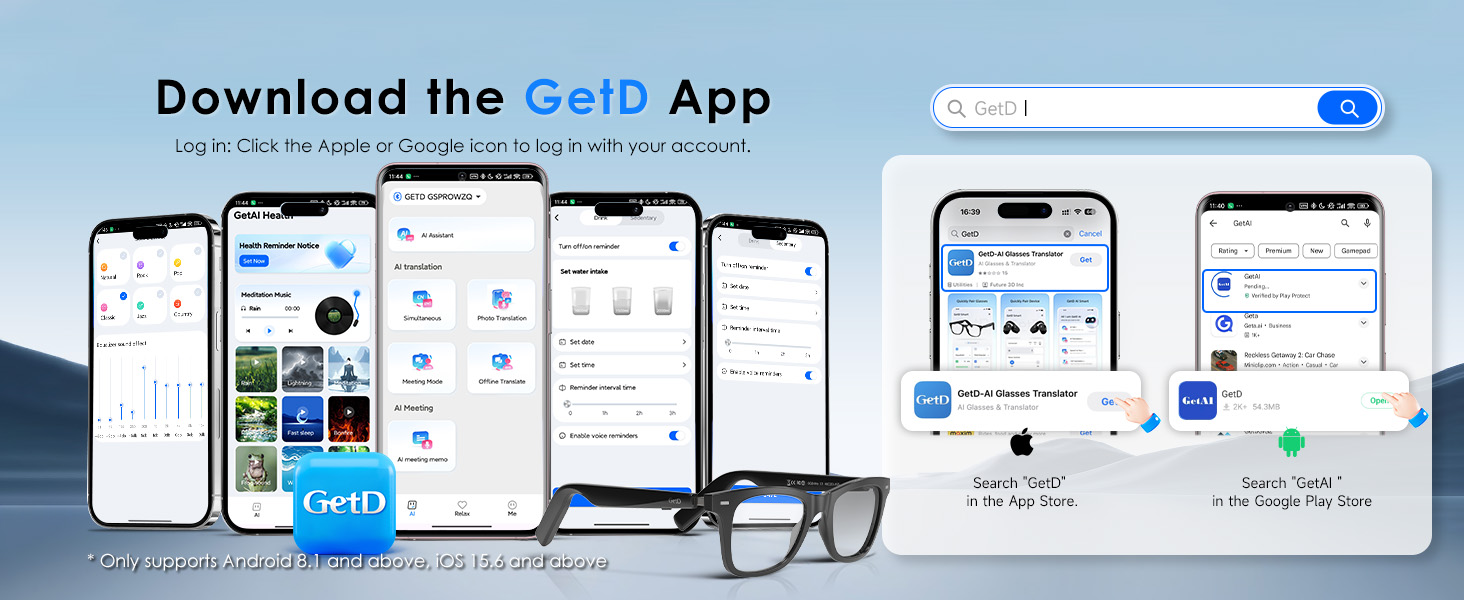
Image: A smartphone screen displaying an AI conversation interface, highlighting support for multiple AI models like DeepSeek, ChatGPT-4o, Gemini 3, and Doubao.
4.2 Real-time Translation and Voice Recorder
The glasses offer high-precision bi-directional simultaneous translation for 147 languages across over 170 countries, along with a voice recorder function.
- Translation: Use the GetD app to select source and target languages. Speak into the glasses, and the translation will be provided audibly and displayed in the app.
- Voice Recorder: Activate the voice recorder in the app to convert spoken words to text with high accuracy, useful for meeting notes or quick memos.

Image: Two individuals engaged in a conversation, with speech bubbles indicating real-time translation, demonstrating the AI interpreter functionality of the glasses.
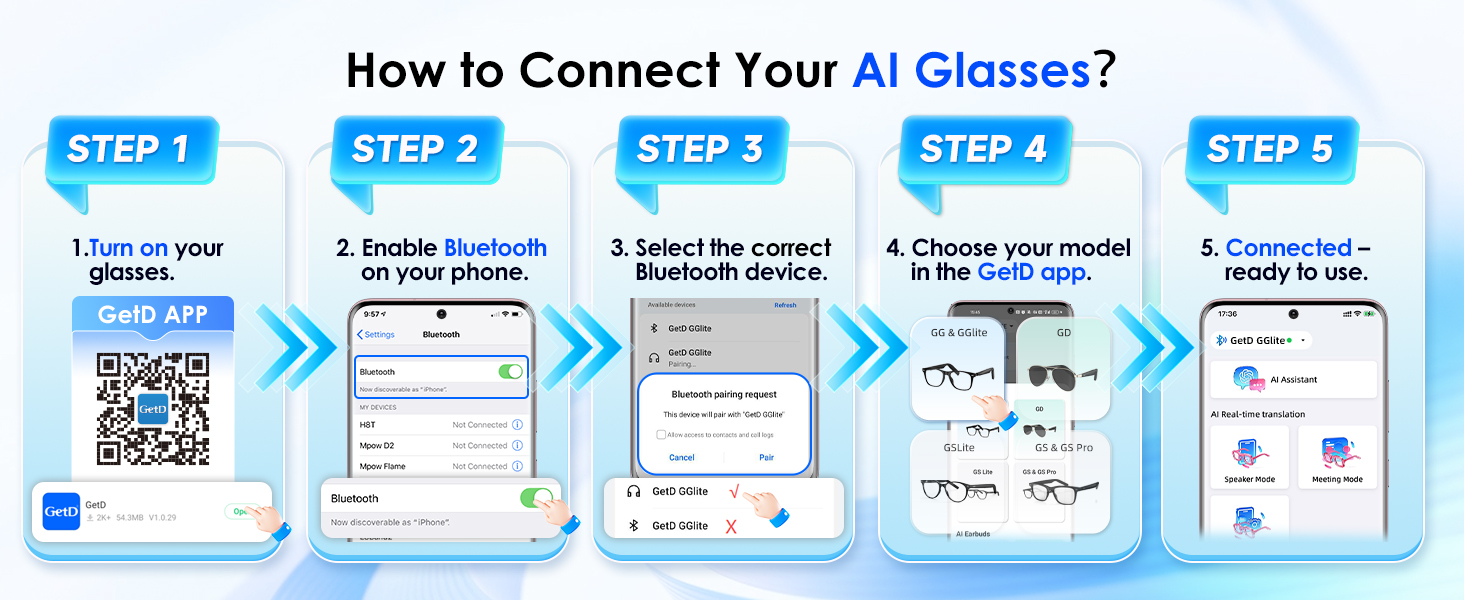
Image: A smartphone screen showcasing the AI Real-Time Translation feature, with flags representing 17 major languages supported for international travel.

Image: A scene depicting individuals in a meeting, with graphical elements illustrating the AI Meeting Memo function, which enables listening to live translations and taking notes.
Video: A short preview demonstrating the Bluetooth Sunglasses with AI Translator functionality for men and women.
4.3 Music Playback and Calls
Enjoy high-definition audio for music and crystal-clear calls with the open-ear design and noise-reduction microphones.
- Music: Stream audio from your paired device. The open-ear design directs sound towards your ears while allowing you to remain aware of your surroundings.
- Calls: Answer or make calls hands-free. The dual beam-forming environment noise reduction microphones ensure clear communication.
- Controls: Use the integrated buttons on the temples for playback control (play/pause, skip tracks) and call management (answer/end calls).

Image: A woman wearing GetD AI Glasses, with visual cues indicating 360-degree stereo sound and the integration of Bluetooth 5.4 technology for stable audio transmission and clear calls.

Image: GetD AI Glasses shown connected to a smartphone, emphasizing Bluetooth 5.4 connection technology for stable audio and AAC support for both iOS and Android devices.

Image: A man wearing GetD AI Glasses, with a graphical representation of the OWS Call Noise Reduction technology, showing sound reduction before and after processing.
5. Features
5.1 Design and Comfort
The GetD AI Glasses feature a lightweight TR90 frame for comfortable daily wear. The design is unisex, suitable for both men and women.

Image: An internal view of the GetD AI Glasses temples, highlighting the streamlined design, integrated high-performance chip, and all-day battery life.

Image: A man and a woman wearing GetD AI Glasses, showcasing the unisex design suitable for various users.
5.2 Polarized Lenses with UV Protection
The AI sunglasses are equipped with high-quality polarized lenses that offer 100% UV protection. These lenses provide excellent light transmission, anti-glare properties, and accurate color representation.
- High-quality TAC material lenses.
- Excellent light transmittance and refractive index.
- Good polarization effect for reduced glare.
- High color accuracy.
- Oil and impact resistance.
- All frames can be fitted with prescription (Rx) lenses.
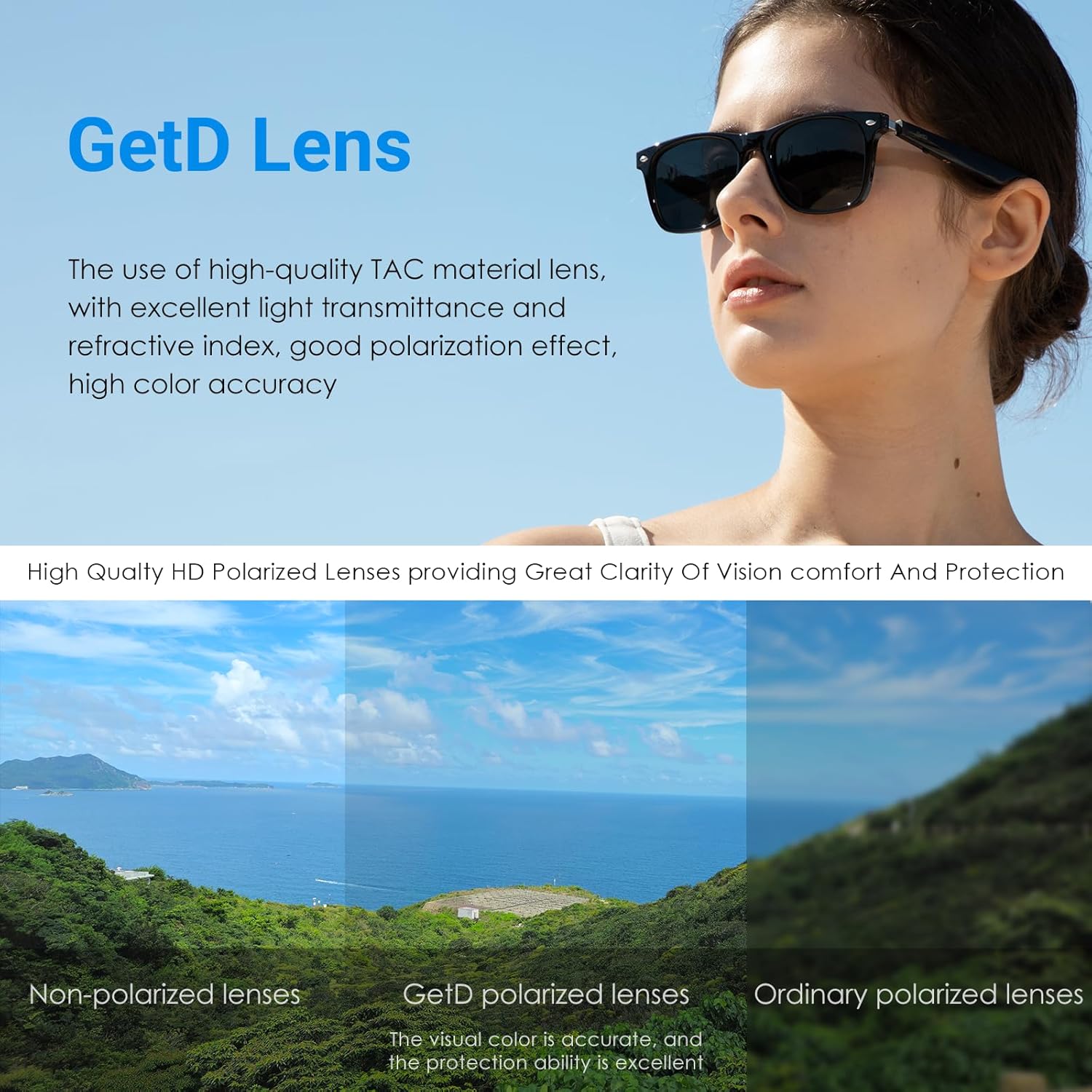
Image: A visual comparison demonstrating the superior clarity and glare reduction of GetD polarized lenses compared to non-polarized and ordinary polarized lenses.

Image: A woman wearing GetD AI Sunglasses in an outdoor setting, emphasizing the features of 100% UV400 polarized lenses, including lightweight TR90 frame, anti-glare, and color accuracy.
5.3 Battery Life and Water Resistance
The glasses are equipped with two 115mAh batteries, providing extended usage times and featuring IP54 water resistance.
- Up to 15 days of standby time.
- Up to 11 hours of music playback (at 50% volume).
- Up to 9 hours of calling time.
- IP54 water resistant, protecting against splashes and dust.
- Over-voltage and overload protection for safe charging.

Image: A woman wearing GetD AI Glasses, with graphical indicators showing ultra-long battery life of 11 hours for music playback and 9 hours for calls.

Image: GetD AI Glasses with icons representing long-lasting battery life, quick charge advantage, and safety & durability features, indicating 11 max hours music playback, 9 max hours voice calls, and 2 hours for a full charge.
6. Specifications
| Feature | Detail |
|---|---|
| Model Number | GG14 |
| Bluetooth Version | 5.4 |
| Battery Capacity | 2 x 115mAh |
| Music Playback Time | Up to 11 hours (at 50% volume) |
| Call Time | Up to 9 hours |
| Standby Time | Up to 15 days |
| Charging Time | Approx. 2 hours (10 mins charge for 1 hour use) |
| Water Resistance | IP54 |
| Frame Material | Lightweight TR90 |
| Lens Type | Polarized, 100% UV protection (UV400) |
| AI Assistant | Powered by ChatGPT, DeepSeek, etc. |
| Translation Languages | 147 languages bi-directional simultaneous translation |
| Microphones | 2 Beam-forming Environment Noise Reduction microphones |
| Item Weight | 5 ounces |
| Package Dimensions | 6.42 x 2.68 x 1.93 inches |
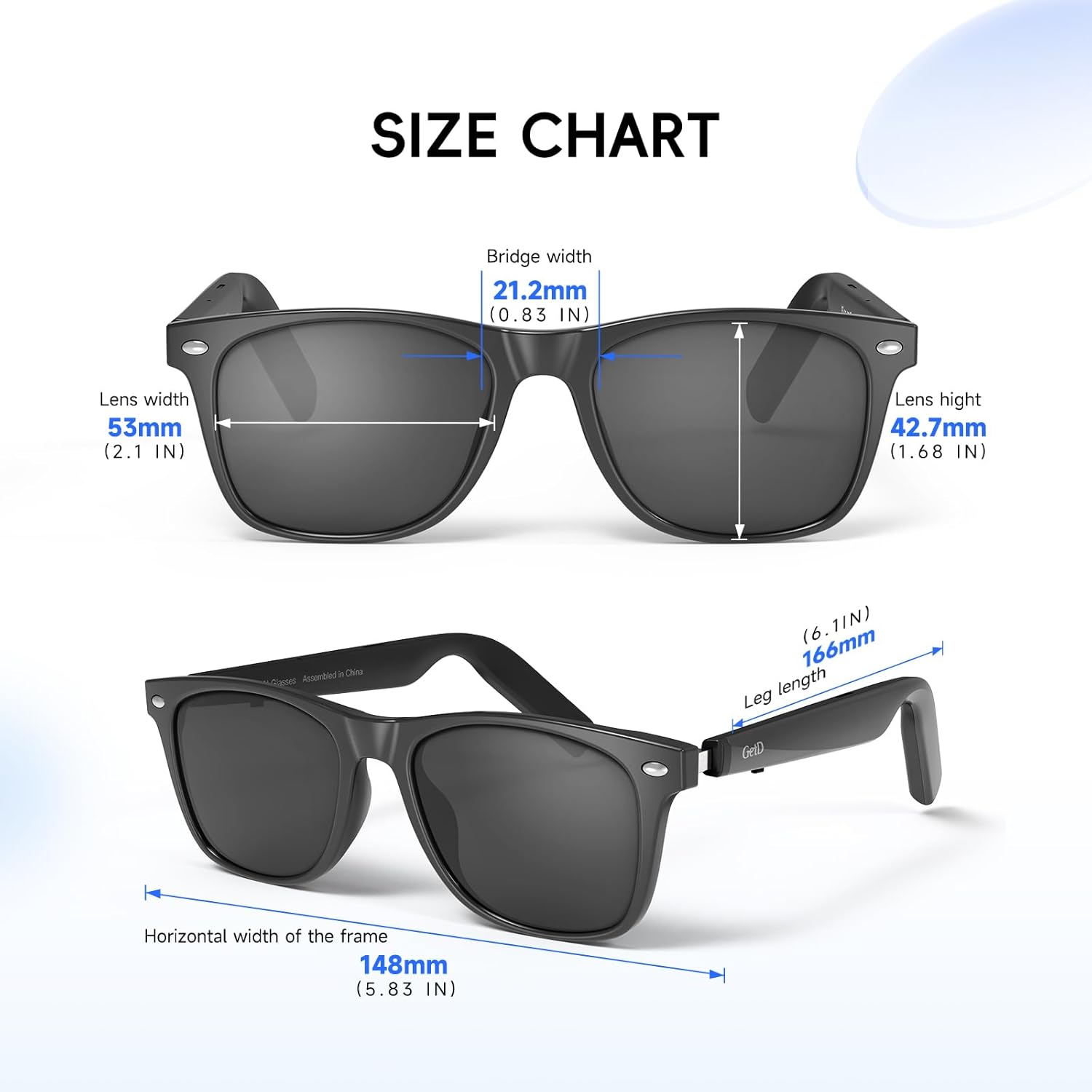
Image: A detailed size chart providing specific measurements for the GetD AI Glasses, including bridge width (21.2mm), lens width (53mm), lens height (42.7mm), horizontal width of the frame (148mm), and leg length (166mm).
7. Maintenance
To ensure the longevity and optimal performance of your GetD AI Glasses, follow these maintenance guidelines:
- Cleaning: Use the provided cleaning cloth to gently wipe the lenses and frame. Avoid using abrasive materials or harsh chemicals.
- Storage: When not in use, store the glasses in the provided soft pouch or a hard case to protect them from scratches and impacts.
- Water Exposure: While the glasses are IP54 water resistant, avoid submerging them in water or exposing them to heavy rain. Dry them thoroughly if they get wet.
- Temperature: Avoid exposing the glasses to extreme temperatures, both hot and cold, as this can affect battery life and electronic components.
8. Troubleshooting
If you encounter any issues with your GetD AI Glasses, refer to the following common troubleshooting steps:
- No Power: Ensure the glasses are fully charged using the magnetic charging cable. Check the charging indicator light.
- Bluetooth Connection Issues:
- Ensure Bluetooth is enabled on your smartphone.
- Make sure the glasses are within the 10-meter working range of your device.
- Forget the device in your phone's Bluetooth settings and re-pair.
- Restart both your glasses and your smartphone.
- No Audio/Poor Audio Quality:
- Check the volume levels on both the glasses and your smartphone.
- Ensure the glasses are properly positioned on your head for optimal open-ear audio.
- Verify that the glasses are connected to the correct audio output on your phone.
- AI Assistant/Translation Not Responding:
- Ensure the GetD app is open and actively running on your smartphone.
- Check your internet connection, as AI features require online access.
- Verify microphone functionality by testing with other voice commands.
For further assistance, please contact GetD customer support.
9. Warranty and Support
GetD products are designed for quality and reliability. For information regarding warranty coverage, returns, or technical support, please refer to the warranty card included in your product packaging or visit the official GetD website.
For direct support, you may contact the seller, FUTURE 3D GROUP INC, through the platform where the product was purchased.