BMJX US Medium 4 MPH(2-Layer Running Deck)-Without Handle Bar
BMJX US Walking Pad Treadmill User Manual
Model: Medium 4 MPH (2-Layer Running Deck) - Without Handle Bar
Introduction
Thank you for choosing the BMJX US Walking Pad Treadmill. This manual provides essential information for the safe and efficient operation, maintenance, and troubleshooting of your new fitness equipment. Please read this manual thoroughly before use and retain it for future reference.
Important Safety Instructions
Always place the walking pad on a flat, stable surface.
Ensure adequate clearance around the treadmill during operation.
Do not allow children or pets near the treadmill while it is in use.
Keep hands and feet clear of the moving belt.
Unplug the treadmill from the power outlet when not in use or before cleaning/maintenance.
Do not operate the treadmill if it has a damaged cord or plug, or if it is not working properly.
Maximum user weight capacity: 300 lbs.
Setup
Your BMJX US Walking Pad Treadmill comes largely pre-assembled for convenience. Follow these steps to set it up:
Unpack: Carefully remove the walking pad from its packaging.
Placement: Place the walking pad on a firm, level surface. Ensure there is enough space around the unit for safe operation. Its compact design allows it to fit under desks or beds.
Power Connection: Locate the power input port at the front of the unit. Connect the power cord securely to the walking pad and then plug it into a grounded electrical outlet. Turn on the main power switch located near the power cord input.
Image: The BMJX US Walking Pad Treadmill, showcasing its compact design and readiness for use.
Operating Instructions
LED Display
The integrated LED display provides real-time workout data. It cycles through various metrics to keep you informed about your progress:
Speed: Displays your current walking speed in miles per hour (MPH).
Time: Shows the duration of your workout.
Calories: Estimates the calories burned during your session.
Distance: Tracks the total distance covered.
Image: Close-up of the LED display, indicating various workout metrics.
Remote Control
The walking pad is operated via a convenient remote control. Ensure the remote has working batteries before use.
Power Button: Press to turn the walking pad on or off. A countdown will initiate before the belt starts moving.
Speed Adjustment (+/-): Use the plus and minus buttons to increase or decrease the walking speed. The speed range is 0.6 to 4 MPH.
Mode Button: Cycle through different display modes or set workout goals (time, calorie, distance).
Image: The remote control, used for power and speed adjustments.
App Connectivity
Enhance your workout experience by connecting the walking pad to compatible fitness applications. The walking pad supports connection with apps like Kinomap and Zwift, allowing you to track your workout data, set customized goals, and participate in virtual activities. You can also sync data to your phone's health apps, such as Apple Health.
Image: Visual representation of the walking pad's app connectivity features.
Manual Incline Adjustment
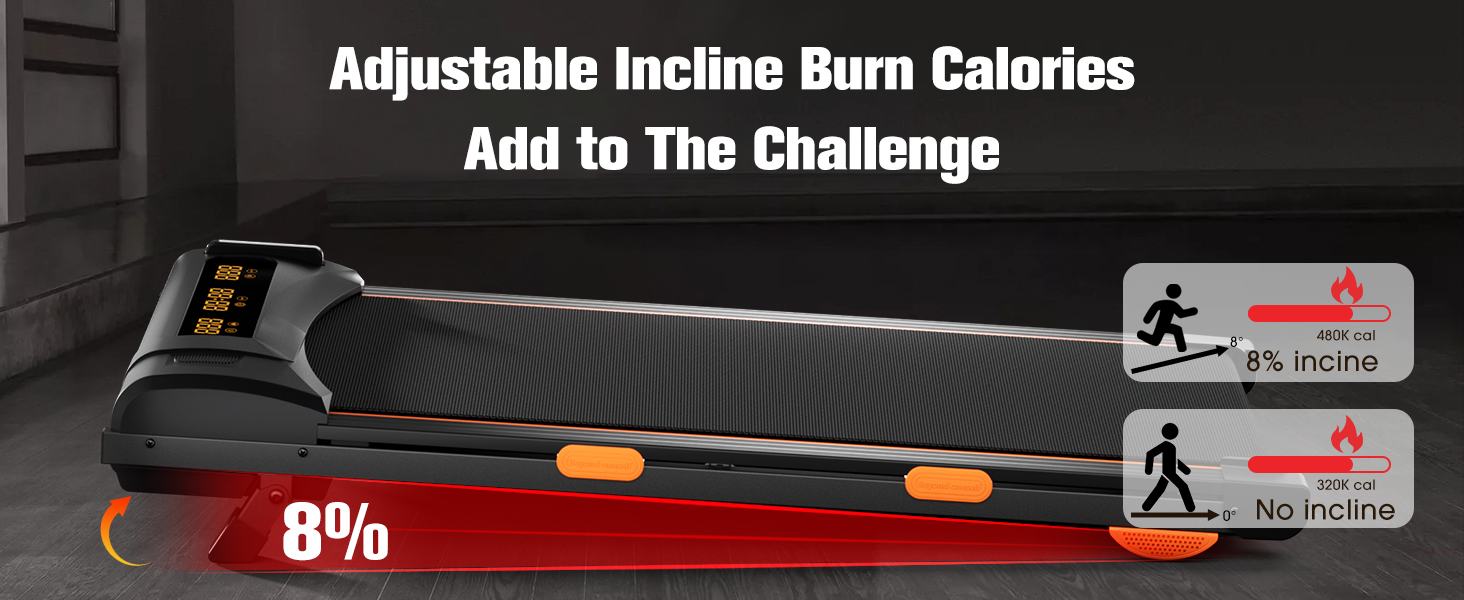
The walking pad features a manual incline adjustment of 8%. To engage the incline, locate the kickstand at the front of the unit and flip it up. This provides an added challenge to your workout, helping to burn more calories and engage different muscle groups.
Image: The walking pad with its manual incline feature activated.
Maintenance
Regular maintenance ensures the longevity and optimal performance of your walking pad:
Cleaning: Wipe down the walking pad with a damp cloth after each use to remove sweat and dust. Avoid using abrasive cleaners.
Lubrication: The running belt requires periodic lubrication to reduce friction and extend its lifespan. Refer to the included lubricant and user manual for specific instructions on how often and where to apply.
Belt Adjustment: If the running belt feels loose or off-center, consult the detailed instructions in the full user manual for proper adjustment procedures.
Troubleshooting
If you encounter any issues with your walking pad, try the following common troubleshooting steps:
No Power: Ensure the power cord is securely plugged into both the walking pad and a working electrical outlet. Check if the main power switch is in the 'ON' position.
Belt Not Moving: Verify the power is on and the remote control is functioning. Press the start button on the remote.
Unusual Noise: Check for any foreign objects under the belt. Ensure the belt is properly lubricated and aligned. If the noise persists, discontinue use and contact customer support.
App Connectivity Issues: Ensure Bluetooth is enabled on your device and the walking pad is powered on. Try restarting both the app and the walking pad.
For more complex issues or persistent problems, please refer to the comprehensive troubleshooting guide in the full user manual or contact BMJX US customer support.
Product Specifications
Feature
Specification
Brand
BMJX US
Model
Medium 4 MPH (2-Layer Running Deck) - Without Handle Bar
Image: Key specifications and features of the walking pad.
Warranty and Support
BMJX US is committed to providing first-class, comfortable, and affordable fitness equipment. We have a professional R&D team and factory, and we are dedicated to offering perfect support service to our customers. For any warranty claims, technical assistance, or support inquiries, please refer to the contact information provided in your product packaging or visit the official BMJX US store on Amazon.