
Introduction
This user manual provides detailed instructions for the assembly, operation, and maintenance of your Tangkula Rolling Podium Stand. Designed for versatility and ergonomic comfort, this podium is suitable for various environments including home offices, classrooms, churches, and professional events. Please read this manual thoroughly before use to ensure proper setup and safe operation.

Image: Front view of the Tangkula Rolling Podium Stand with a laptop on the top surface, showcasing its sleek design and mobile capabilities.
Features
- 3-Position Height Adjustment: The podium offers three distinct height options (43", 45.5", 48") to accommodate different user statures and preferences, ensuring ergonomic comfort during use.
- Ergonomic Tilted Tabletop: Features an 11° tilted tabletop designed to provide an optimal viewing angle, reducing strain on the neck and eyes during presentations or work.
- Integrated Edge Stopper: A thoughtful edge stopper is included on the tabletop to prevent items such as notebooks, laptops, or documents from sliding off.
- Additional Storage Shelf: Equipped with a convenient extra storage shelf (22" L x 8" W) to keep essential items like markers, cups, remotes, and notebooks within easy reach.
- Built-in Cable Hole: A dedicated cable management hole is integrated into the tabletop to help keep wires organized and maintain a clutter-free workspace.
- Mobile Design with Lockable Casters: Built on a robust heavy-duty metal base with four 360° universal casters. Two of these casters are lockable, providing both effortless mobility and stable positioning when needed.
- Durable Construction: Constructed from high-quality MDF, metal, and PP materials, ensuring reliable support and long-lasting durability.
- Round Corners: Designed with user safety in mind, featuring round corners to prevent accidental bumps or injuries.
- Wide Application: Versatile design makes it ideal for use in various settings including churches, classrooms, offices, and events.

Image: Detailed view highlighting key user-friendly features including the built-in cable hole, ergonomic tilted tabletop, edge stopper, and safe round corners.

Image: The podium's additional storage shelf, shown with various items such as headphones, books, and a coffee cup, demonstrating its utility for keeping essentials within reach.
Specifications
| Attribute | Value |
|---|---|
| Color | Black |
| Material | MDF, Metal, PP |
| Overall Dimensions (L x W x H) | 23.5" x 16" x 43"/45.5"/48" |
| Dimensions of Shelf (L x W) | 22" x 8" |
| Shelf Height from Ground | 28.5"/31"/33.5" |
| Base Dimensions (L x W x H) | 22" x 13" x 3" |
| Weight Capacity of Tabletop | 45 lbs |
| Weight Capacity of Shelf | 45 lbs |
| Net Weight | 23 lbs |
| Model Number | 11967-JV-TA |
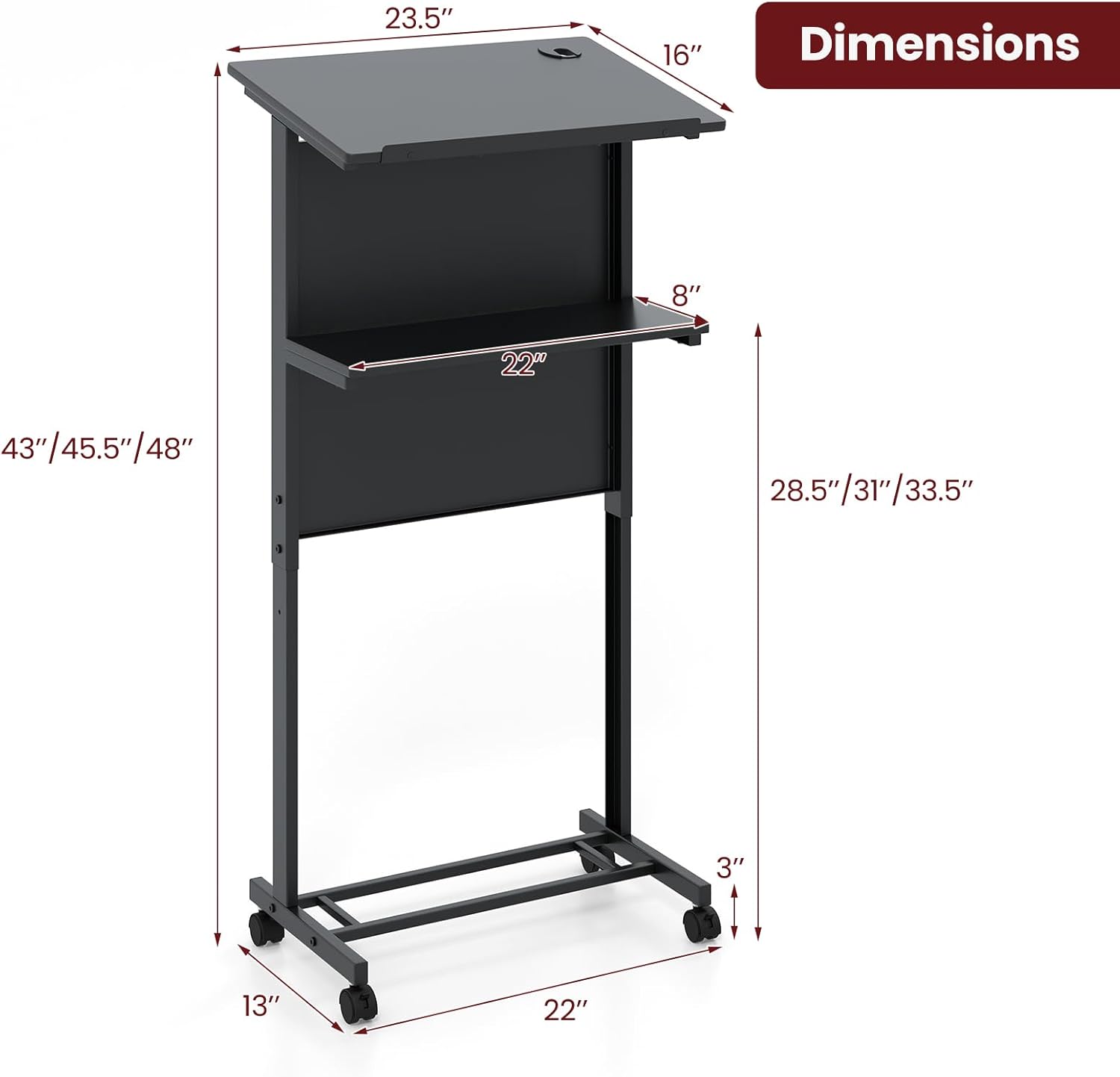
Image: A detailed diagram illustrating the overall dimensions of the podium stand, including height, width, and depth measurements for all key components.
Setup and Assembly
Your Tangkula Rolling Podium Stand requires assembly. Please ensure all components listed in the packaging are present before beginning. A detailed user manual with assembly instructions is included in the package. Follow the step-by-step guide provided in the physical manual for proper and safe assembly.
Key Assembly Considerations:
- Component Identification: Familiarize yourself with all parts and hardware by referring to the parts list in the included manual.
- Tool Requirements: Ensure you have any necessary tools as specified in the assembly instructions (e.g., screwdriver, wrench).
- Height Adjustment Mechanism: Pay close attention to the instructions for setting the 3-position height. This typically involves adjusting screw positions on the main frame.
- Caster Installation: Ensure all four casters are securely attached to the base. Verify that the two lockable casters function correctly after installation.

Image: Illustration demonstrating the three adjustable height options of the podium and a close-up view of the screw positions used to set the desired table height.
Operating Instructions
Adjusting Height:
- Identify the height adjustment screws on the main vertical support frame.
- Loosen the screws that secure the upper section of the podium to the desired height setting (43", 45.5", or 48").
- Carefully slide the upper section to align with the pre-drilled holes for your chosen height.
- Securely tighten the screws to lock the podium at the new height. Ensure all screws are fully tightened before placing items on the podium.
Using the Casters:
- Mobility: To move the podium, ensure both lockable casters are in the unlocked position. The 360° universal casters allow for easy movement in any direction.
- Stability: To secure the podium in place, push down the locking levers on the two lockable casters until they click into position. This will prevent the podium from rolling.
- Unlocking: To unlock the casters, lift the locking levers until they release.

Image: A detailed view of the heavy-duty metal base and the casters, illustrating how the 360° universal casters provide mobility and how the two lockable casters ensure stability.
Utilizing the Tilted Tabletop and Storage Shelf:
- The tabletop is fixed at an 11° tilt for optimal viewing. Use the integrated edge stopper to prevent items from sliding off the tilted surface.
- The additional storage shelf provides convenient access to presentation materials, personal items, or beverages. Ensure items placed on the shelf do not exceed the 45 lbs weight capacity.
Maintenance
Regular maintenance will help prolong the life and appearance of your Tangkula Rolling Podium Stand.
- Cleaning: Wipe surfaces with a soft, damp cloth. Avoid using harsh chemicals or abrasive cleaners, as these may damage the finish. For stubborn marks, a mild soap solution can be used, followed by drying with a clean cloth.
- Hardware Check: Periodically check all screws and fasteners to ensure they remain tight. Re-tighten if necessary to maintain structural integrity and stability.
- Caster Care: Keep the casters free of debris (hair, dust, etc.) that could impede their movement. If casters become stiff, a small amount of silicone spray can be applied to the axle.
- Weight Limits: Do not exceed the stated weight capacities for the tabletop (45 lbs) and storage shelf (45 lbs) to prevent damage or instability.
- Storage: Store the podium in a dry environment, away from extreme temperatures or direct sunlight, which could affect the material integrity.
Troubleshooting
If you encounter any issues with your Tangkula Rolling Podium Stand, refer to the following common problems and solutions:
| Problem | Possible Cause | Solution |
|---|---|---|
| Podium feels wobbly or unstable. | Loose screws or uneven floor. | Check and tighten all assembly screws. Ensure the podium is on a flat, level surface. If casters are locked, ensure they are fully engaged. |
| Casters are difficult to roll or lock. | Debris in casters or mechanism. | Clean any hair, dust, or debris from the caster wheels and axles. Apply a small amount of silicone lubricant if necessary. Ensure locking levers are fully engaged/disengaged. |
| Height adjustment is stiff or difficult. | Screws are too tight or misalignment. | Ensure the adjustment screws are sufficiently loosened before attempting to change height. Check for any obstructions or misalignment in the vertical tracks. |
| Items slide off the tilted tabletop. | Edge stopper not utilized or overloaded. | Ensure items are placed against the edge stopper. Do not overload the tabletop beyond its weight capacity. |
Warranty and Support
For information regarding product warranty, returns, or technical support, please refer to the documentation included with your purchase or contact Tangkula customer service directly. You can often find contact information on the manufacturer's official website or through the retailer where the product was purchased.
Visit the official Tangkula store for more information: Tangkula Store on Amazon


