1. Introduction
This manual provides essential information for the safe and efficient operation of your TESSAN Magnetic Portable Charger, Model JP336. This Qi2 certified 10,000mAh wireless power bank offers fast charging capabilities for compatible devices, featuring both magnetic wireless and wired USB-C outputs. Please read this manual thoroughly before use and retain it for future reference.

Figure 1: TESSAN Magnetic Portable Charger (Model JP336)
2. Package Contents
Verify that all items are present in your product package:
- TESSAN Magnetic Portable Charger (Model JP336)
- USB-C to USB-C Charging Cable
- User Manual
Video 1: Overview of the TESSAN 10000mAh Magnetic Charger, demonstrating its features and contents.
3. Product Features
- Qi2 Certified 15W Wireless Charging: Provides fast and efficient magnetic wireless charging for compatible devices, ensuring optimal alignment and reduced charging interruptions.
- PD22.5W Wired Output: Supports Power Delivery (PD) for rapid wired charging via the USB-C port.
- 10,000mAh High Capacity: Offers multiple charges for smartphones and other small electronic devices.
- Integrated Foldable Kickstand: Allows for convenient hands-free viewing while charging.
- Universal Compatibility: Works with iPhone 17/16/15/14 series, Qi-enabled devices, Mag-Safe cases, AirPods, and Samsung Galaxy phones.
- Travel-Friendly Design: Compact and airline-approved for carry-on luggage.
- Advanced Safety Protections: Built-in safeguards against overheating, short circuits, over-discharge, and overcurrent.

Figure 2: Qi2 15W Wireless Charging Capability

Figure 3: Built-in Stand Design for versatile use
4. Setup
4.1 Initial Charging of the Power Bank
Before first use, fully charge your TESSAN Magnetic Portable Charger. Connect the provided USB-C cable to the power bank's USB-C input port and plug the other end into a compatible USB power adapter (not included). The LED indicator lights will show the charging status and battery level.
4.2 Power Bank Indicator Lights
The power bank features LED indicator lights to display the remaining battery capacity:
- Four solid blue lights: 75%-100% charged
- Three solid blue lights: 50%-75% charged
- Two solid blue lights: 25%-50% charged
- One solid blue light: 0%-25% charged
A separate wireless charging indicator light will illuminate when wireless charging is active.

Figure 4: Power Bank Capacity Indicators
5. Operating Instructions
5.1 Wireless Charging
- Ensure your device is Qi-enabled and supports magnetic wireless charging.
- Align your device's charging coil with the magnetic charging area on the power bank. The magnets will automatically snap into place for optimal alignment.
- The wireless charging indicator light on the power bank will illuminate, and your device should display a charging icon.
Note: For best magnetic attachment and charging efficiency, use a Mag-Safe compatible phone case. Non-magnetic cases may hinder the magnetic connection or charging performance.

Figure 5: Wide Compatibility for Wireless Charging
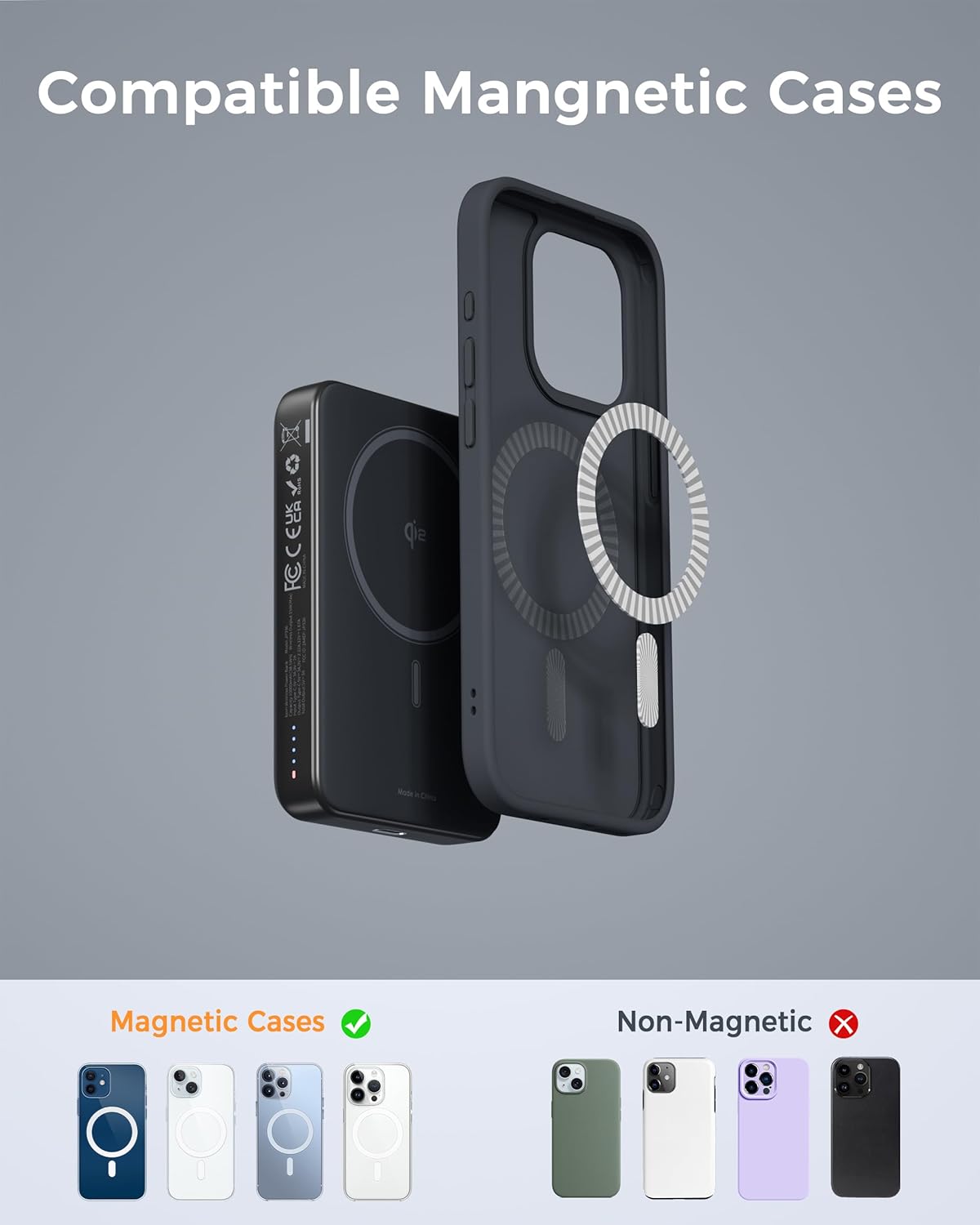
Figure 6: Magnetic Case Compatibility
5.2 Wired Charging
- Connect one end of your device's charging cable to the USB-C output port on the power bank.
- Connect the other end of the cable to your device.
- The power bank will automatically begin charging your device.
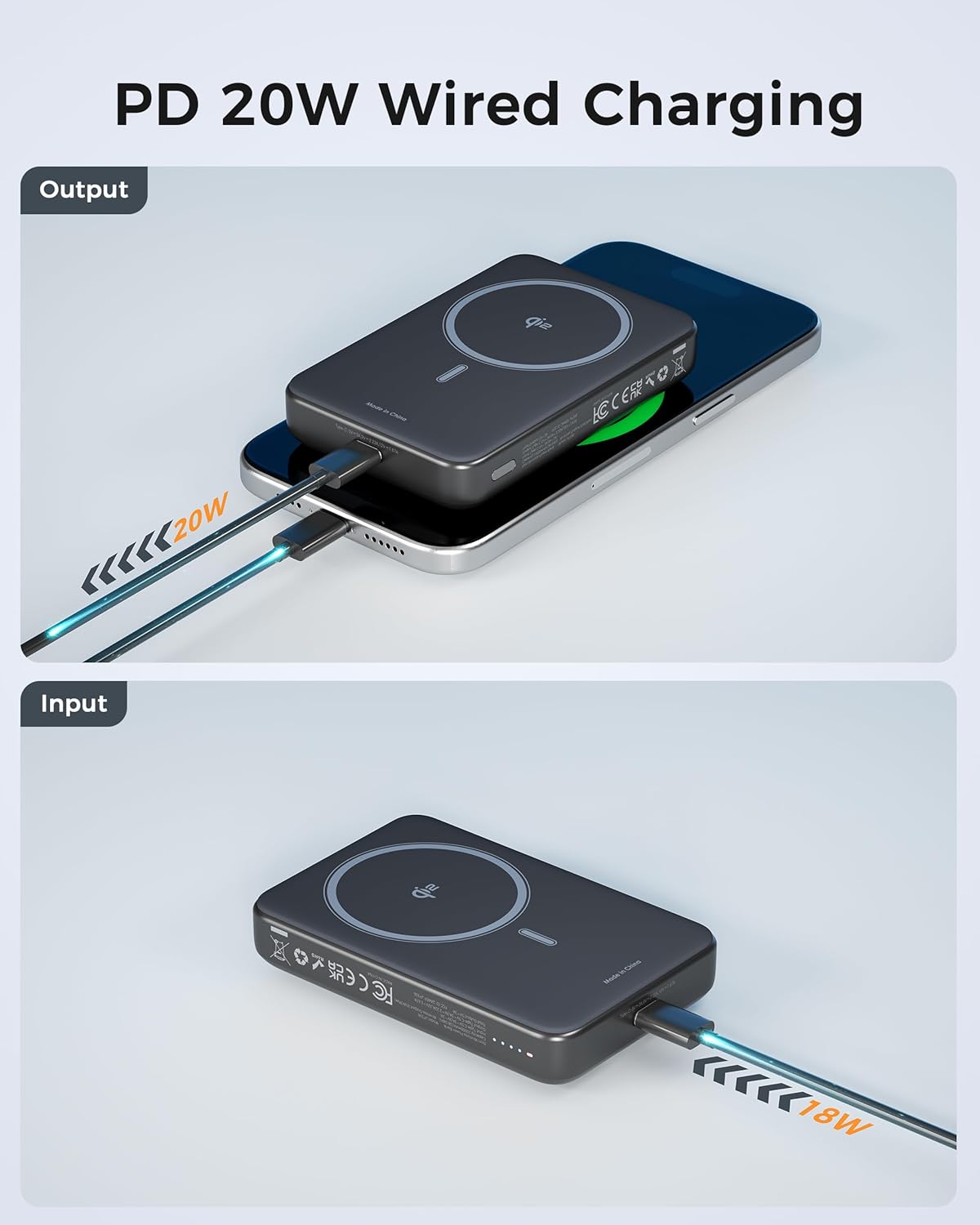
Figure 7: PD 20W Wired Charging Output
5.3 Using the Foldable Kickstand
The integrated kickstand can be unfolded from the back of the power bank to prop up your phone for hands-free viewing. This is ideal for watching videos, video calls, or simply keeping your screen visible while charging.
Figure 8: Built-in Stand Design in various usage scenarios
6. Charging the Power Bank
To recharge your TESSAN Magnetic Portable Charger, connect the provided USB-C cable to the power bank's USB-C input port. Plug the other end of the cable into a compatible USB power adapter (e.g., wall charger, computer USB port). The LED indicator lights will show the charging progress.

Figure 9: USB-C Wired Charging and Recharging
7. Maintenance
- Keep the power bank away from water, moisture, and extreme temperatures.
- Avoid dropping or subjecting the device to strong impacts.
- Clean the surface with a soft, dry cloth. Do not use harsh chemicals or abrasive materials.
- Store in a cool, dry place when not in use.
8. Safety Information
- Do not disassemble, modify, or repair the device yourself.
- Avoid exposing the power bank to direct sunlight or high temperatures for extended periods.
- Keep out of reach of children.
- Dispose of the power bank according to local regulations for electronic waste.
- The foldable design meets airline regulations for carry-on luggage. Always check with your airline for specific battery regulations before traveling.

Figure 10: Multi-Protect Safety Features
9. Troubleshooting
- Device not charging wirelessly: Ensure your device is Qi-compatible and properly aligned with the magnetic charging area. Remove any non-Mag-Safe cases that may interfere with the connection.
- Slow charging: Verify that you are using the provided USB-C cable and a compatible power adapter for optimal wired charging speeds. For wireless charging, ensure proper alignment and that your device supports 15W Qi2 charging.
- Power bank getting hot: It is normal for the power bank to warm up during fast charging. The device has built-in temperature control to prevent overheating. If it becomes excessively hot, disconnect it and allow it to cool down.
- Power bank not charging: Check the USB-C cable and power adapter for damage. Ensure the cable is securely connected to both the power bank's input port and the power source.
10. Specifications
| Model Number | JP336 |
| Battery Capacity | 10,000mAh |
| Wireless Charging Output | Qi2 Certified 15W |
| Wired Output | PD22.5W (USB Type C) |
| Wired Input | 18W (USB Type C) |
| Product Dimensions | 4.7 x 2.98 x 1.16 inches |
| Item Weight | 8 ounces |
| Special Features | Foldable, Type C Charging, Wireless Charging |
| Color | Black |
| Manufacturer | Zhuhai Tessan Power Technology Co., Ltd. |
| Date First Available | November 20, 2024 |
11. Warranty and Support
TESSAN products are designed for reliability and performance. For any questions, technical support, or warranty claims, please refer to the contact information provided with your purchase documentation or visit the official TESSAN website. Customer service is available to assist you with any product-related inquiries.


