Introduction
The Franklin Sensors ProSensor M90 is an advanced stud finder designed for accurately locating wood and metal studs behind various wall materials such as drywall. Featuring 9 precision sensors, it provides a clear indication of the full width and edges of studs, enhancing accuracy and ease of use for home improvement and construction projects. This manual provides essential information for the proper setup, operation, and maintenance of your ProSensor M90.
Package Contents
- Franklin Sensors ProSensor M90 Stud Finder
- Instruction Manual (this document)
- Thank You Card

Image: The ProSensor M90 stud finder, its retail box, and accompanying documentation.
Setup
Battery Installation
The ProSensor M90 requires two AAA batteries (not included). It is important to use non-rechargeable batteries for optimal performance. Rechargeable batteries are not compatible with this device.
- Locate the battery lid on the back of the unit. You will see lines indicating the release points.
- To remove the lid, gently squeeze both ends of the battery lid together and lift it off.
- Insert two AAA batteries into the battery compartment, ensuring correct polarity (+/-) as indicated inside the compartment.
- Replace the battery lid by inserting one of the clips into the battery cavity first, then gently depress the other side of the battery cover to secure the second clip.
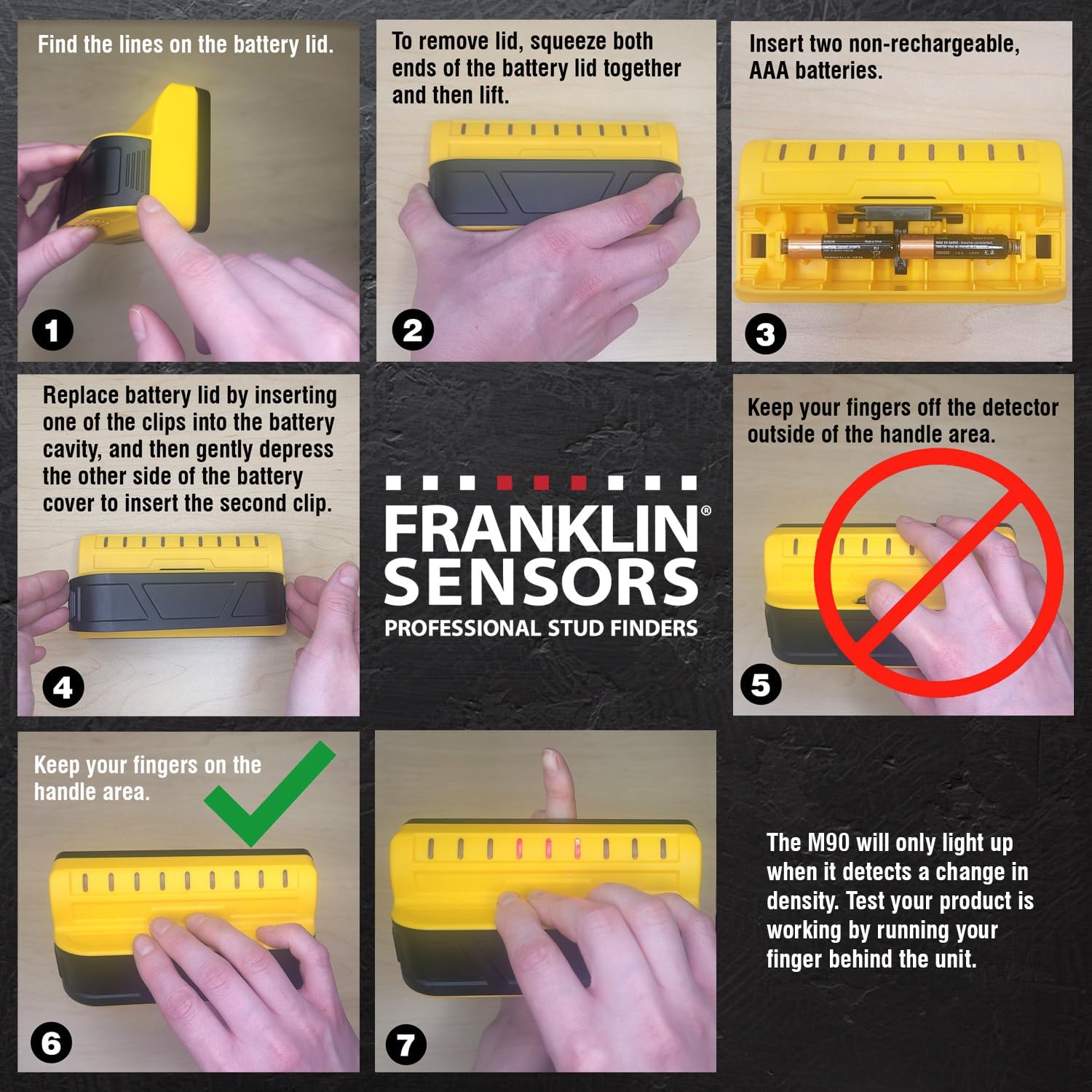
Image: Visual instructions for opening the battery compartment, inserting batteries, and closing the lid.
Initial Test
After installing batteries, perform a quick test to ensure the device is functioning correctly. The M90 will only light up when it detects a change in density. You can test this by running your finger behind the unit while holding the button. The LEDs should illuminate.
Operating Instructions
General Operation
The ProSensor M90 is designed for simple, one-mode operation. No calibration is required before use.
- Hold the Device: Grip the stud finder firmly with your fingers on the handle area, ensuring no fingers are over the sensor area.
- Activate Scanning: Press and hold the button located on the top of the unit. The device will instantly begin scanning.
- Scan the Wall: Place the stud finder flat against the wall and slowly slide it horizontally across the surface.
- Identify Studs: As the device moves over a stud, the LED lights will illuminate, indicating the full width of the stud. The middle LED will turn green to indicate the stud's center.
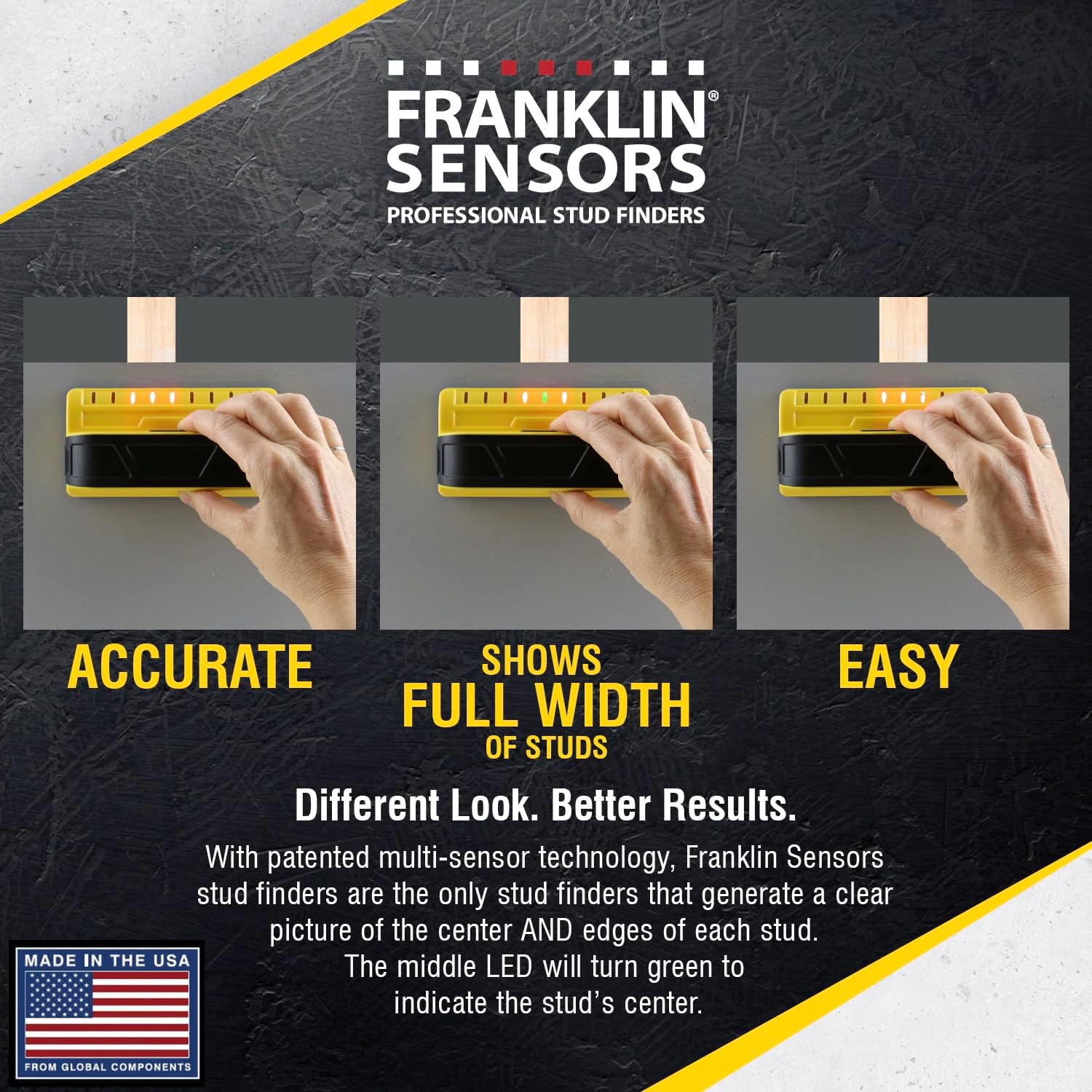
Image: The stud finder in use, demonstrating its ability to show the full width of a stud with illuminated LEDs.
Key Features and Benefits
- 9-Sensor Accuracy: Equipped with 9 precision sensors, the M90 provides highly accurate detection of studs. This multi-sensor technology allows for a broader scanning area and more reliable results compared to conventional stud finders.
- Full Width Detection: Unlike single-sensor devices that only indicate the edge or center, the ProSensor M90 illuminates multiple LEDs to show the entire width of the stud, including its edges and center simultaneously. This reduces guesswork and improves marking precision.
- Deep Scan Capability: The device offers a 1 1/2-inch deep scan capability, allowing it to detect studs through various wall materials and textures, including sheetrock and drywall.
- Wood and Metal Stud Detection: The M90 identifies changes in density, enabling it to detect both wood and metal studs without requiring different modes or settings.
- No Calibration Required: The device automatically adjusts to different wall conditions, eliminating the need for manual calibration. Simply press and hold the button to begin scanning.

Image: An X-ray style view showing the 9 sensor fields of the ProSensor M90 detecting a stud behind drywall.

Image: Detailed view of the ProSensor M90, pointing out its 9 LEDs for visibility, durable plastic shell, and battery compartment.
Maintenance
- Cleaning: Wipe the device with a soft, dry cloth. Do not use abrasive cleaners or solvents.
- Storage: Store the ProSensor M90 in a cool, dry place away from direct sunlight and extreme temperatures. Remove batteries if the device will not be used for an extended period to prevent leakage.
- Battery Replacement: Replace batteries when the device's performance diminishes or the LEDs do not illuminate as expected.
Troubleshooting
| Problem | Possible Cause | Solution |
|---|---|---|
| Device does not turn on or LEDs do not light up. |
|
|
| Inaccurate readings or inconsistent stud detection. |
|
|
| Device lights up randomly or all LEDs illuminate. |
|
|
Specifications
| Model Number | M90 (FSM9002) |
| Dimensions | 5.38 x 2.75 x 2 inches |
| Item Weight | 7 ounces |
| Power Source | 2 x AAA Batteries (not included, non-rechargeable recommended) |
| Detection Depth | Up to 1 1/2 inches |
| Stud Types Detected | Wood and Metal |
| Sensors | 9 Precision Sensors |
| LED Indicators | Multiple LEDs for full stud width, Green LED for center |
| Manufacturer | Franklin Sensors |
| Date First Available | June 13, 2018 |
Warranty and Support
For information regarding product warranty, please refer to the documentation included with your purchase or visit the official Franklin Sensors website. If you encounter any issues or have questions about your ProSensor M90, please contact Franklin Sensors customer support for assistance.
You can find more information and support resources on the Franklin Sensors official store page: Franklin Sensors Store.