
Introduction
This manual provides essential information for the safe and efficient use of your Itel A50 Dual SIM smartphone. Please read this manual carefully before using the device to ensure optimal performance and to prevent damage.

Figure 1: Itel A50 Dual SIM Smartphone (Cyan Blue)
The image displays the Itel A50 smartphone in cyan blue, showcasing both its front screen and the textured back panel with the triple camera module and flash. The phone has a sleek design with rounded corners.
Setup
1. Inserting SIM Cards and Memory Card
The Itel A50 supports dual SIM cards and an external memory card (up to 2TB). Ensure the device is powered off before inserting or removing cards.
- Locate the SIM card tray on the side of the device.
- Use the provided SIM ejector tool to open the tray.
- Carefully place your Nano-SIM cards and microSD card into the designated slots on the tray. Ensure the gold contacts face downwards.
- Gently push the tray back into the device until it clicks into place.
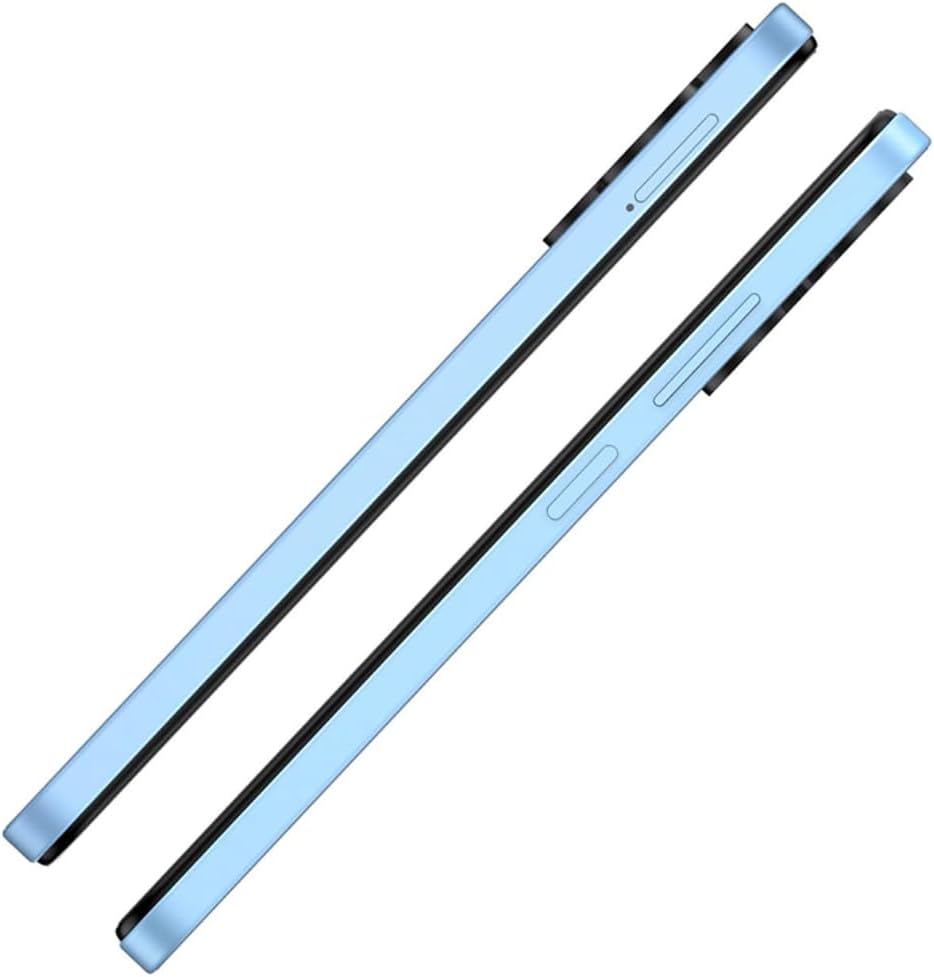
Figure 2: Side View with SIM Tray
This image shows the right side of the Itel A50 smartphone, highlighting the elongated volume rocker and the power button below it. The SIM card tray slot is visible above the volume buttons.
2. Charging the Battery
Before first use, fully charge the device battery. The Itel A50 comes with a 5000mAh battery.
- Connect the USB Type-C cable to the charging port at the bottom of the phone.
- Connect the other end of the cable to a power adapter and plug it into a wall outlet.
- The charging indicator will appear on the screen.

Figure 3: Charging Port
The image shows the bottom edge of the Itel A50 smartphone with a white USB-C charging cable plugged into the central port. To the left of the charging port, a 3.5mm headphone jack is visible, and to the right, a speaker grille.
Operating Instructions
1. Power On/Off
- To Power On: Press and hold the Power button (located on the right side) until the Itel logo appears.
- To Power Off: Press and hold the Power button until the power options menu appears, then select "Power off".
- To Restart: Press and hold the Power button until the power options menu appears, then select "Restart".

Figure 4: Front Display
This image displays the front of the Itel A50 smartphone, showing its large screen with a waterdrop notch at the top for the front camera. The display shows a vibrant, abstract wallpaper.
2. Basic Navigation
- Touch Screen: Tap, swipe, pinch-to-zoom to interact with the interface.
- Home Screen: The main screen where you can access apps and widgets.
- Notifications: Swipe down from the top of the screen to view notifications and quick settings. The integrated Dynamic Bar provides essential notifications more seamlessly.
3. Camera Usage
The Itel A50 features a rear camera system for capturing photos and videos.
- Open the Camera app from your home screen or app drawer.
- Select your desired mode (Photo, Video, Portrait, etc.).
- Tap the shutter button to take a photo or start/stop recording a video.

Figure 5: Rear Camera Module
This image shows the back of the Itel A50 smartphone, highlighting the prominent camera island in the upper left corner. The island contains three circular lenses and a flash, with "AI CAMERA" text visible. The back panel has a subtle textured pattern.
Maintenance and Care
- Cleaning: Use a soft, lint-free cloth to clean the screen and body. Avoid abrasive cleaners or solvents.
- Temperature: Do not expose the device to extreme temperatures (hot or cold).
- Water Resistance: The Itel A50 is not water-resistant. Avoid contact with liquids.
- Battery Life: To prolong battery life, avoid fully discharging the battery frequently. Optimize power consumption using the built-in power-saving solutions.
- Software Updates: Keep your device's software updated to ensure optimal performance and security.
Troubleshooting
| Problem | Possible Solution |
|---|---|
| Device does not power on. | Ensure the battery is charged. Connect to a charger and wait a few minutes before attempting to power on again. |
| Screen is unresponsive. | Perform a forced restart by pressing and holding the Power button for about 10-15 seconds. |
| Poor network signal. | Check SIM card insertion. Move to an area with better network coverage. Restart the device. |
| Apps are slow or crashing. | Close background apps. Clear app cache. Ensure sufficient storage space. Restart the device. The device is designed for smooth and efficient operations, optimizing performance for specific scenarios. |
| Battery drains quickly. | Reduce screen brightness. Disable unnecessary features (Wi-Fi, Bluetooth, GPS) when not in use. Use power-saving modes. |
Specifications
| Feature | Detail |
|---|---|
| Model Name | T603 (Item model number: A667LP) |
| Brand | Itel |
| Operating System | OS 14 |
| Installed RAM Memory Size | 8 GB (3+5GB RAM) |
| Memory Storage Capacity | 128 GB (Supports up to 2TB external memory) |
| CPU Model | 1.2GHz Cortex A8 Processor |
| CPU Speed | 2 GHz |
| Screen Size | 6.6 Inches (Visible screen diagonal: 7" / 17 cm) |
| Wireless Carrier | Unlocked |
| Cellular Technology | 4G |
| Batteries | 1 Lithium Ion battery required (included), 5000mAh |
| Package Dimensions | 18 x 9 x 4.5 cm; 187 g |
| Date First Available | 25 September 2024 |
| Manufacturer | itel |
Warranty and Support
For warranty information and technical support, please refer to the warranty card included in your product packaging or visit the official Itel website. Keep your proof of purchase for warranty claims.
For further assistance, you may contact Itel customer service through their official channels.


