1. Product Overview
The JALUZELE DC8811 is an advanced wireless sensor designed to automate the operation of retractable outdoor awnings and shutters. It continuously monitors wind speed, sun light intensity, and rain, providing real-time data to automatically adjust your awning for optimal protection and comfort. This sensor is specifically designed to work with Dooya motors and compatible Dooya DC series remotes.

Figure 1: JALUZELE DC8811 Wireless Weather Sensor
2. Safety Information
Please read and understand all safety warnings before installation and operation to prevent injury or damage.
- This sensor is designed to automatically open and close awnings based on weather conditions. Ensure the awning is properly installed and anchored to withstand high winds.
- Keep children and pets away from moving parts of the awning to prevent injury during automatic operation.
- Do not use the sensor or awning in extreme weather conditions outside the specified working temperature range of -10°C to +60°C.
- Regularly inspect the sensor and awning for any signs of wear or damage. Discontinue use if damage is found and contact support.
3. Product Features
- Real-time Weather Monitoring: Captures subtle changes in wind speed, sun light intensity, and rain in real-time.
- Automatic Operation: Provides accurate environmental data to automatically open and close outdoor curtains and sunshades.
- Adjustable Settings: Settable wind range (0~180 Km/h) and light range (0~100 Klux). Rain function can be set to ON/OFF.
- Priority Logic: Wind speed detection takes priority. If wind speed exceeds the set level, light intensity will not be detected. Light detection resumes if wind speed drops below the set level for 1 minute.
- Compatibility: Works with DM45R motors and Dooya DC series remotes (DC90, DC92, DC1600, DC2700).
4. Specifications
| Attribute | Value |
|---|---|
| Input Voltage | DC 3.7V |
| Working Current | <20mA |
| Wireless Transmission Range (Outdoor) | >100 meters |
| Wireless Transmission Range (Indoor) | >40 meters |
| Transmission Frequency | 433.05~434.79MHz |
| Working Temperature | -10°C ~+60°C |
| Material | Plastic |
| Color | White |
| Product Dimensions (D x W x H) | 10.63" x 3" x 4.72" |
| Operation Mode | Automatic |
| Assembly Required | No |

Figure 2: Sensor Dimensions (27cm / 10.63 inches length, 12cm / 4.72 inches height)
5. Setup and Installation
This section guides you through the initial setup and pairing of your DC8811 sensor with your Dooya motor and remote control.
5.1 Sensor Buttons Overview
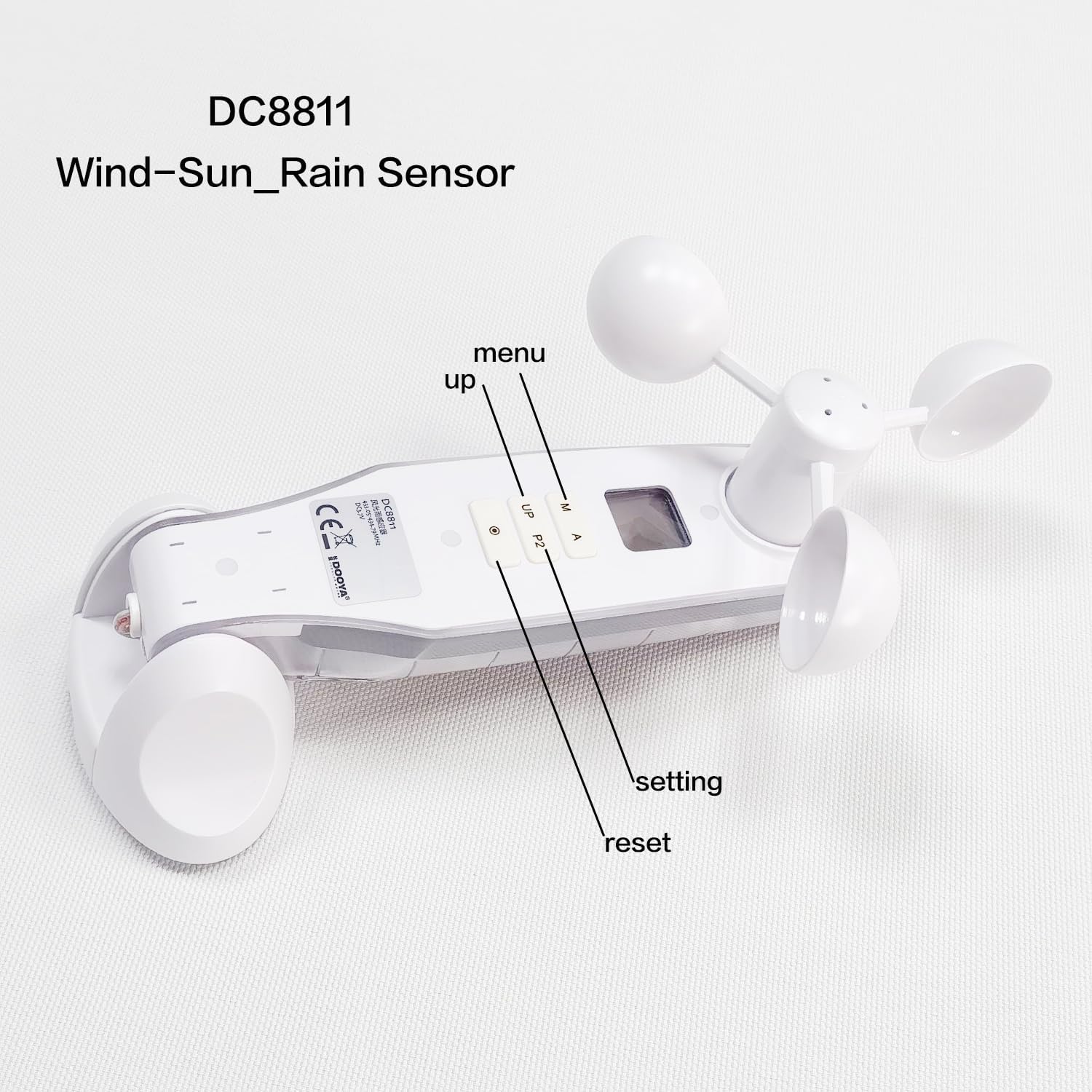
Figure 3: Sensor Button Functions (M: Menu, A: Up, P2: Setting, Dot: Reset)
5.2 Pairing the Sensor with Your Motor and Remote
Follow these steps to pair the DC8811 sensor with your Dooya motor and remote control. Ensure your motor can be operated normally by the remote before starting this process.
- Test Motor Operation: First, ensure your motor works normally with your remote control.
- Enter Pairing State (Remote): Press the P2 button on the back of your remote control twice. The motor will jog slightly, indicating it has entered the pairing state.
- Activate Sensor Pairing: Press the P2 button on the sensor once until it emits a sound. This links the sensor to the motor.
- Display Wind Logo: Press the M button on the sensor three times. The wind logo will appear on the sensor's display.
- Initiate Wind Setting: Press the setting button (dot) on the sensor once until the wind logo on the display flashes, indicating it's ready for setting.
- Set Wind Level: Press the UP button (A) on the sensor to adjust the desired wind level.
- Confirm Setting: Press the setting button (dot) on the sensor again until the wind logo on the display stops flashing. The setting is now complete.
Video 1: Wind and rain sensor settings and usage effects. This video demonstrates the pairing process and setting of the wind level on the DC8811 sensor.
5.3 Wind and Rain Sensor Function Test
After pairing, you can test the wind and rain sensing capabilities to ensure proper functionality.
- Wind Induction Test: When wind blows the impeller of the sensor, causing it to rotate, the connected motor should start working (e.g., retracting the awning if wind speed exceeds the set threshold).
- Rain Sensor Test: When rain falls on the designated sensor location (the metallic grid) of the sensor, the motor should start working (e.g., retracting the awning).
Video 2: Wind and rain sensor test. This video demonstrates how the sensor reacts to simulated wind and rain, triggering the motor.

Figure 4: Wind Cups for Wind Speed Detection
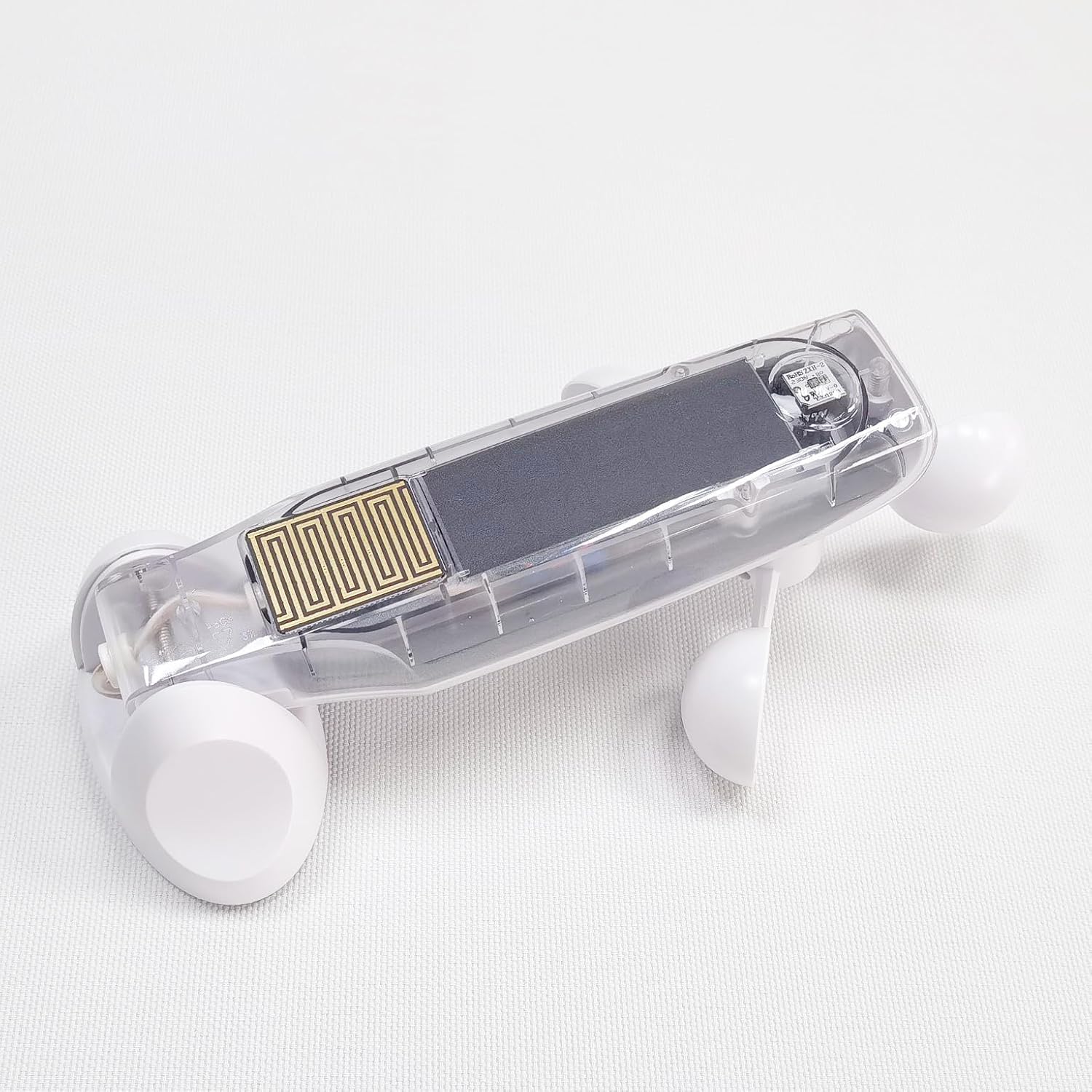
Figure 5: Rain Sensor Grid
6. Operation
Once installed and configured, the JALUZELE DC8811 sensor operates automatically based on the detected weather conditions and your set parameters.
- The sensor continuously monitors wind speed, light intensity, and rain.
- If the detected wind speed exceeds your preset threshold, the awning will automatically retract to prevent damage.
- If rain is detected (and the rain function is ON), the awning will automatically retract.
- The sensor recognizes when the sun is out and will extend the awning accordingly, and retract it when light intensity drops or other conditions are met.
7. Compatibility
The DC8811 sensor is designed for specific Dooya products:
- Motors: Compatible with Dooya DM45R motors (RF433MHZ).
- Remotes: Compatible with Dooya DC series remotes, including DC90, DC92, DC1600, and DC2700.
- System Type: Only suitable for Dooya built-in receiver motors.
- Application: Primarily designed for closing roller blinds and retractable outdoor awnings.

Figure 6: Sensor Compatibility with Dooya Motors and Remotes

Figure 7: Compatible (DC series) vs. Incompatible (DD series) Remotes

Figure 8: Specific Compatibility Requirements
8. Maintenance
To ensure optimal performance and longevity of your DC8811 sensor, follow these maintenance guidelines:
- Cleaning: Periodically clean the sensor's exterior, especially the wind cups and the rain sensor grid, to remove dust, dirt, and debris that may affect its accuracy. Use a soft, damp cloth. Do not use abrasive cleaners.
- Battery Check: While specific battery information is not provided, ensure the sensor has adequate power. If the display is dim or the sensor is unresponsive, check and replace batteries as needed according to the product's internal battery compartment instructions.
- Inspection: Regularly inspect the sensor for any physical damage, loose connections, or signs of wear. Address any issues promptly.
9. Troubleshooting
If you encounter issues with your DC8811 sensor, refer to the following common troubleshooting steps:
- Sensor Not Responding:
- Check the sensor's power supply/battery.
- Ensure the sensor is within the wireless transmission range of the motor (Outdoor >100m, Indoor >40m).
- Re-attempt the pairing process as described in Section 5.2.
- Awning Not Reacting to Wind/Rain:
- Verify that the wind speed or rain function settings are correctly configured on the sensor.
- Ensure the wind cups are spinning freely and the rain sensor grid is clean and unobstructed.
- Perform the wind and rain sensor tests (Section 5.3) to confirm the sensor is detecting conditions.
- Incorrect Readings:
- Clean the sensor's components, especially the wind cups and rain sensor grid.
- Ensure the sensor is installed in a location free from obstructions that might interfere with accurate wind or light detection.
- Interference: If experiencing intermittent operation, check for other 433MHz devices nearby that might cause interference.
If the issue persists after following these steps, please contact customer support.
10. Warranty and Support
For warranty information, technical support, or service inquiries, please refer to the contact details provided with your purchase or visit the official JALUZELE website. Keep your proof of purchase for warranty claims.


