1. Introduction
This user manual provides detailed instructions for the safe and efficient operation of your Decapower ULTRAMIG 230 Multi-Function Welding Machine. The ULTRAMIG 230 is a versatile welding solution offering Double Pulse MIG, Single Pulse MIG, Synergistic MIG, Manual MIG, MMA (Stick), and Lift TIG welding capabilities. It is designed to weld various metals including aluminum, stainless steel, copper, iron, and carbon steel.
2. Product Overview and Components
The ULTRAMIG 230 comes equipped with a comprehensive set of accessories to facilitate various welding tasks. Familiarize yourself with the main unit and its accompanying components.

Figure 2.1: Decapower ULTRAMIG 230 welding machine and its standard accessories, including the MIG torch, ground clamp, electrode holder, and various consumables.
Key Features:
- Multi-functionality: Supports Double Pulse MIG, Single Pulse MIG, Synergistic MIG, Manual MIG, MMA, and Lift TIG welding.
- Four-wheel Wire Feeder: Ensures stable wire feeding, crucial for consistent welds, especially with aluminum.
- Powerful Parameters: Maximum current of MIG 230A, MMA 200A, and TIG 230A.
- Memory Function: Ability to save and recall up to 10 sets of welding parameters.
- Premium Accessories: Includes a durable 25AK MIG torch designed for enhanced heat resistance.
3. Setup and Installation
Proper setup is essential for safe and effective operation. Follow these steps carefully:
- Unpacking: Carefully remove the welding machine and all accessories from the packaging. Inspect for any shipping damage.
- Power Connection: The ULTRAMIG 230 operates on 220V. Ensure the power source matches the machine's requirements. Note: The machine is supplied without a plug, requiring professional installation of an appropriate plug for your region.
- Ground Clamp Connection: Connect the ground clamp cable securely to the appropriate terminal on the welding machine. Attach the clamp to the workpiece to ensure a good electrical connection.
- MIG Torch/Electrode Holder/TIG Torch Connection:
- For MIG welding, connect the 25AK MIG torch to the front panel.
- For MMA (Stick) welding, connect the electrode holder.
- For Lift TIG welding, connect the TIG torch.
- Wire Feeder Setup (MIG):
Open the wire feeder compartment. Install the welding wire spool, ensuring it is correctly seated. Thread the wire through the four-wheel wire feeder mechanism, adjusting tension as needed. The four-wheel system provides enhanced stability for wire feeding.

Figure 3.2: The robust four-wheel wire feeder system, designed for stable wire delivery.
- Gas Connection (MIG/TIG): For gas-shielded welding processes (MIG, TIG), connect the gas hose from your gas cylinder (e.g., CO2, Argon, or mixed gas) to the machine's gas inlet. Ensure all connections are leak-free.

Figure 3.1: Rear panel of the ULTRAMIG 230, highlighting the power input area. A suitable plug must be installed by a qualified electrician.
4. Operating Instructions
The ULTRAMIG 230 features an intuitive control panel with a clear LCD display for easy parameter adjustment and mode selection.

Figure 4.1: The ULTRAMIG 230 control panel, showing the main display and adjustment knobs.
4.1 Control Panel Overview

Figure 4.2: Detailed breakdown of the control panel functions, including mode selection, metal and gas selection, wire diameter, workpiece thickness, current/wire feed speed, voltage, and parameter storage/export.
4.2 Welding Modes
Select the desired welding mode using the function selection buttons on the control panel. Each mode offers specific advantages for different applications and materials.
- Double Pulse MIG: Provides enhanced control over heat input and bead appearance, ideal for thin materials and achieving a TIG-like finish.
- Single Pulse MIG: Offers good control for various materials, reducing spatter and improving bead quality.
- Synergistic MIG: Simplifies parameter setting by automatically adjusting wire feed speed based on voltage and current, making it user-friendly.
- Manual MIG: Allows for full manual control over all welding parameters for experienced welders.
- MMA (Stick) Welding: For welding with coated electrodes, suitable for outdoor use and thicker materials.
- Lift TIG Welding: Provides precise control for high-quality welds on thinner materials, requiring a separate TIG torch and argon gas.

Figure 4.3: Examples of the display interface for various welding modes, showing adjustable parameters.
4.3 Parameter Adjustment
Use the rotary knobs and buttons to adjust parameters such as current, voltage, wire feed speed, and other specific settings for each mode. The machine can save up to 10 groups of customized parameters for quick recall.
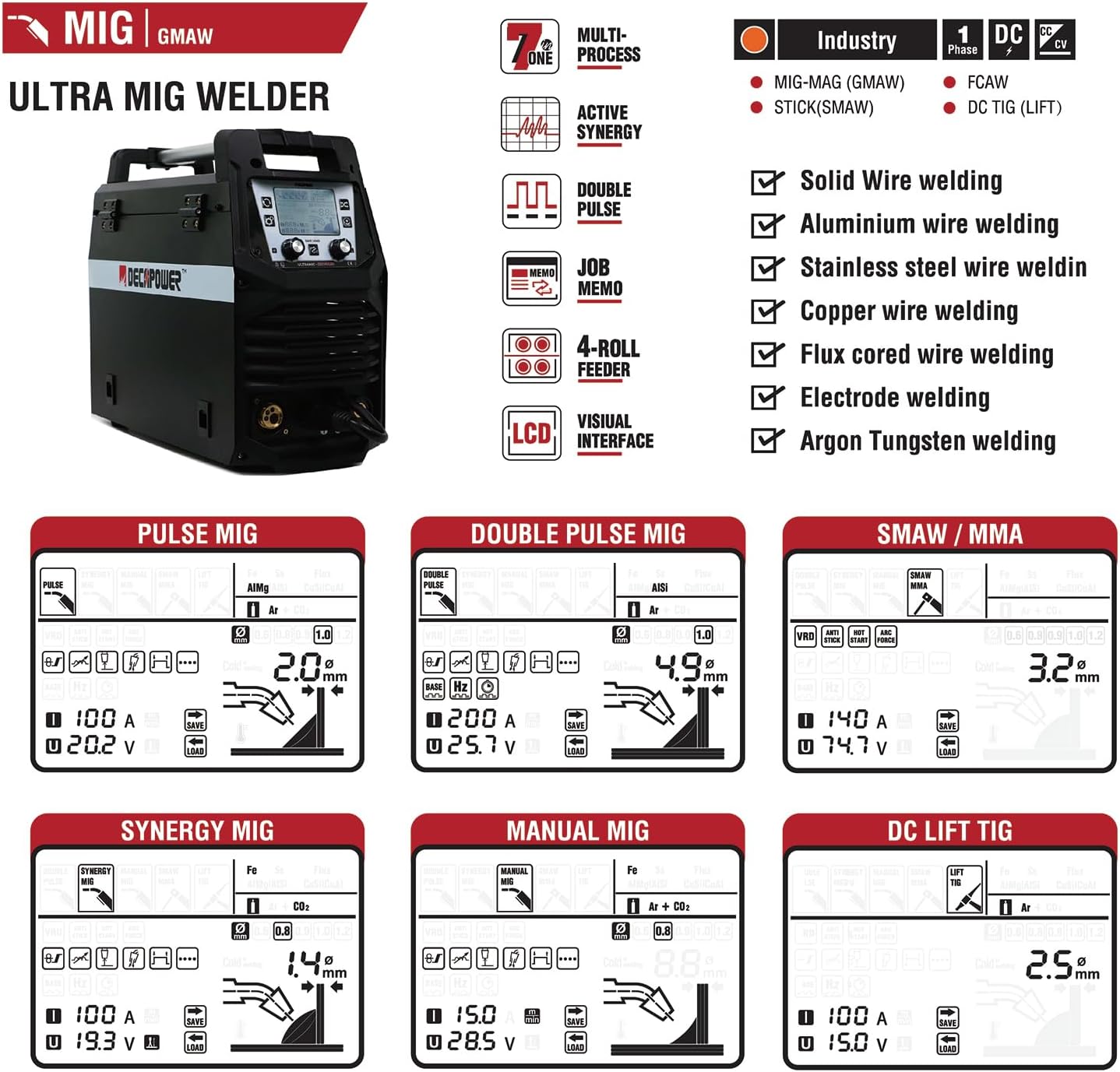
Figure 4.4: Detailed welding parameter chart for various materials and modes.
4.4 Welding Test and Performance
The ULTRAMIG 230 is capable of producing high-quality welds across different materials and thicknesses. Below is a demonstration of its welding capabilities.
Video 4.1: Demonstration of the Decapower ULTRAMIG 230 performing various welding tests on different materials and thicknesses, showcasing its versatility and weld quality.

Figure 4.5: Examples of finished welds on various materials, illustrating the machine's performance across different modes.
5. Maintenance
Regular maintenance ensures the longevity and optimal performance of your welding machine.
- Cleaning: Periodically clean the machine's exterior and ventilation openings to prevent dust and debris buildup. Use compressed air to clear internal components if necessary, ensuring the machine is unplugged.
- Torch and Cable Inspection: Regularly inspect the MIG torch, ground clamp, and all cables for wear, damage, or loose connections. Replace worn parts immediately.
- Wire Feeder Maintenance: Keep the wire feeder rollers clean and free of debris. Ensure proper tension for consistent wire feeding.
- Consumables: Replace contact tips, nozzles, and electrodes as they wear out to maintain weld quality.
- Storage: Store the machine in a dry, clean environment away from excessive dust and moisture when not in use.
6. Troubleshooting
This section addresses common issues you might encounter during operation.
| Problem | Possible Cause | Solution |
|---|---|---|
| No Arc/Poor Arc Start | Improper ground connection, incorrect parameters, worn contact tip, no wire feed (MIG). | Check ground clamp connection. Verify welding parameters. Replace contact tip. Check wire spool and feeder. |
| Excessive Spatter (MIG) | Incorrect voltage/wire feed speed, insufficient gas flow, dirty workpiece. | Adjust parameters. Check gas cylinder and flow rate. Clean workpiece thoroughly. |
| Overheating Protection Activated | Exceeded duty cycle, blocked ventilation. | Allow machine to cool down. Ensure clear airflow around the machine. |
| Inconsistent Wire Feed (MIG) | Incorrect wire tension, dirty liner, wrong drive roller size. | Adjust wire tension. Clean or replace liner. Ensure correct drive roller for wire diameter. |
If problems persist, contact Decapower customer support for assistance.
7. Specifications
Detailed technical specifications for the Decapower ULTRAMIG 230.
- Model Number: ULTRAMIG-230
- Manufacturer: Tai Zhou Lemin Welding Equipment Co Ltd
- Power Source: DC
- Maximum Current (MIG): 230A
- Maximum Current (MMA): 200A
- Maximum Current (TIG): 230A
- Included Components: As photos (MIG torch, ground clamp, etc.)
- ASIN: B0DNJPWSJ8
- Date First Available: November 19, 2024
8. Warranty and Support
Decapower stands behind the quality of its products.
- Warranty: The ULTRAMIG 230 comes with a 2-year warranty.
- Professional Advice: Decapower offers professional advice and support.
- Parts Availability: Parts are readily available to ensure continuous operation.
For warranty claims or technical support, please refer to the contact information provided with your purchase or visit the official Decapower website.