Introduction
This manual provides comprehensive instructions for the installation, features, and care of your Futanwei Screen Protector designed specifically for the OUKITEL BT103 Smartwatch. Our screen protectors are crafted from Thermoplastic Polyurethane (TPU) to offer high-definition clarity, touch sensitivity, and protection against scratches and fingerprints.
Package Contents
Each package contains the following items:
- 5 x Smartwatch Screen Protectors (compatible with OUKITEL BT103)
Setup: Installation Guide
Follow these steps carefully to ensure a bubble-free and secure application of your screen protector.
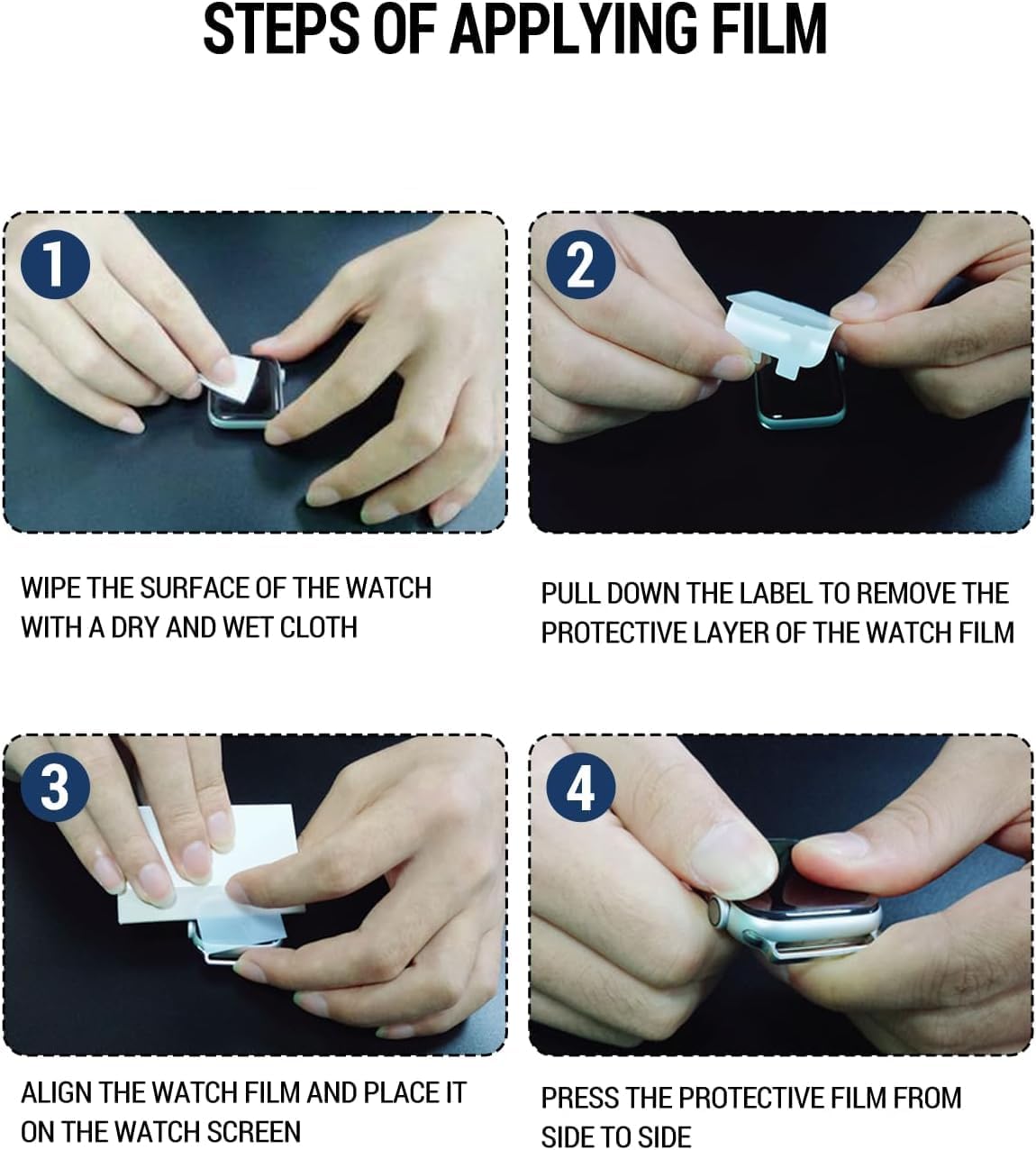
Image: Visual guide for screen protector application steps.
- Step 1: Clean the Watch Surface. Wipe the surface of your OUKITEL BT103 Smartwatch with a dry and wet cloth to remove any dust, smudges, or fingerprints. Ensure the screen is completely clean and dry before proceeding.
- Step 2: Remove Protective Layer. Gently pull down the label or tab on the screen protector to remove the first protective layer. Be careful not to touch the adhesive side.
- Step 3: Align and Place. Carefully align the screen protector with the smartwatch screen. Once aligned, gently place it onto the watch screen, starting from one edge and slowly lowering it.
- Step 4: Press and Secure. Press the protective film from side to side, gently pushing out any air bubbles towards the edges. A squeegee (not included) or a soft cloth can be used for this.
Note: Immediately after application, you might observe some wavy patterns or small residual air bubbles. These are normal and will naturally disappear within a few hours as the film self-heals and adheres completely.
Operating: Key Features
Your Futanwei screen protector enhances your smartwatch experience with several key features:

Image: Icons representing key features like touch sensitivity and anti-fingerprint properties.
- High Touch Sensitivity: The ultra-thin design ensures highly sensitive touch response, allowing you to slide comfortably and enjoy the original touch experience of your smartwatch screen.
- Crystal Clear Picture Quality: With 99% high transparency, the protector maintains the bright and colorful image quality of your OUKITEL BT103, preserving its original visual experience.
- Oleophobic & Hydrophobic Coating: This specialized coating protects against sweat and oil residue, significantly reducing fingerprints and smudges on your smartwatch screen.
- Anti-Scratch Protection: The durable PET film provides robust protection against daily scratches, scuffs, and minor impacts, keeping your smartwatch screen pristine.
- Bubble Self-Healing: Designed to be hassle-free and bubble-free, the film has self-healing properties that help small air bubbles disappear naturally over time.
Maintenance and Care
To ensure the longevity and clarity of your screen protector, follow these simple maintenance tips:
- Cleaning: Use a soft, lint-free cloth to gently wipe the screen protector. For stubborn smudges, slightly dampen the cloth with water or a screen cleaner designed for electronics. Avoid harsh chemicals or abrasive materials.
- Avoid Sharp Objects: While the protector is anti-scratch, extreme pressure or sharp objects can still damage it. Avoid placing your smartwatch with keys or other sharp items.
- Reapplication: If the screen protector becomes severely damaged or starts peeling, it is recommended to replace it with a new one from the pack to maintain optimal protection and clarity.
Troubleshooting
Here are solutions to common issues you might encounter:
- Bubbles After Installation: Small bubbles or wavy patterns are common immediately after application. These are typically due to the self-healing properties of the film and will naturally disappear within a few hours (up to 24-48 hours). Do not attempt to forcefully remove them with sharp objects.
- Dust Under the Protector: If you notice dust particles under the protector, it indicates the screen was not thoroughly cleaned before application. Carefully peel back the protector slightly, use a dust-absorber sticker (not included) to remove the dust, and reapply.
- Protector Not Sticking Properly: Ensure the screen surface is completely clean and dry. If the edges are lifting, gently press them down. If the issue persists, the protector might be damaged or misaligned, and a new one should be used.
- Reduced Touch Sensitivity: While rare, if touch sensitivity is significantly reduced, ensure the protector is correctly aligned and free of large air pockets. If the issue persists, consider reapplying a new protector.
Specifications
| Attribute | Detail |
|---|---|
| Compatible Model | OUKITEL BT103 Smartwatch (1.91 Inches) |
| Material | Thermoplastic Polyurethane (TPU) |
| Finish Type | Glossy |
| Product Dimensions | 3 x 2 x 0.5 inches |
| Item Weight | 0.32 ounces |
| Special Features | HD Clear, Soft PET Film, Case Friendly, Anti-Scratch, Bubble Free, Oleophobic & Hydrophobic, High Touch Sensitivity |
Warranty and Support
While specific warranty details are not provided, Futanwei is committed to customer satisfaction. If you encounter any issues with your screen protectors or have questions regarding their use, please do not hesitate to contact us. We are dedicated to resolving your concerns quickly and efficiently.
For support, please refer to the contact information provided with your purchase or through the retailer's platform where the product was acquired.


