1. Introduction
Welcome to the user manual for your new Hobsir 4-zone built-in induction hob. This appliance is designed to provide efficient and precise cooking with its advanced features, including a flexible cooking zone and intuitive slider touch controls. Please read this manual thoroughly before using the appliance to ensure safe and optimal operation.
2. Safety Information
Your safety is paramount. This induction hob is equipped with several safety features to protect you and your household.
- Automatic Shutdown Protection: The hob will automatically turn off if left unattended for an extended period or if a cooking zone overheats.
- Residual Heat Indicator: 'H' will be displayed on the control panel to indicate that a cooking zone is still hot after use, preventing accidental burns.
- Child Lock: This feature prevents accidental operation or changes to settings by children.
- Timer: Allows for precise control of cooking duration, automatically turning off the zone when the set time expires.
- Overheating Protection: The hob will reduce power or shut down if it detects excessive temperatures.
- Detection of Small Parts: The hob will not activate if small, non-magnetic objects are placed on the cooking zone.

Image: Overview of the safety functions including automatic shutdown, residual heat indicator, child lock, timer, overheating protection, and detection of small parts.

Image: A child near the hob, illustrating the child lock feature which prevents unintended operation.
3. Product Overview
The Hobsir induction hob features a sleek glass surface with four cooking zones, including a versatile Flex-Zone, designed for seamless integration into your kitchen countertop.

Image: Top view of the Hobsir 4-zone induction hob, highlighting the Flex-Zone and individual cooking areas.
3.1 Built-in Design and Dimensions
This hob is designed for built-in installation, offering a clean and integrated look. Ensure your countertop cutout matches the specified dimensions for proper fitting.

Image: Diagram showing the built-in dimensions of the hob: 590mm (length) x 520mm (width) x 56mm (height).
3.2 Cookware Compatibility
Induction hobs require specific types of cookware. This hob is compatible with magnetic cookwares ranging from 12cm to 26cm in diameter. Compatible materials include stainless steel with a magnetic bottom, magnetic pots, cast iron pans, and cast iron woks. Non-compatible materials include enamel, copper/aluminum, ceramics, and glass.

Image: Visual guide to cookware compatibility, showing suitable and unsuitable types of pots and pans for induction cooking.
4. Setup and Installation
Installation of the Hobsir induction hob should be performed by a qualified electrician or technician in accordance with local regulations and the provided installation instructions. The appliance is designed for built-in use and does not come with a plug, requiring direct wiring.
- Ensure the cutout dimensions in your countertop match the product specifications (590mm x 520mm).
- Provide adequate ventilation space around and beneath the hob as per installation guidelines.
- Connect the hob to a suitable electrical supply (7200W total power).
5. Operating Instructions
5.1 Powering On/Off
To turn on the hob, touch the power symbol (O) on the control panel. To turn off, touch the power symbol again.
5.2 Setting Power Levels
Each cooking zone has 9 power levels, allowing for precise heat control from gentle simmering to rapid boiling. Use the slider touch control to adjust the power level for the selected zone.

Image: Illustration of the 9 power levels (P1-P9) and their typical uses, from steak (P1) to boiling (P9).
5.3 Using the Timer
The hob features a timer function that can be set from 0 to 99 minutes. To set the timer, select the desired cooking zone, then touch the timer symbol and adjust the time using the +/- controls or the slider. The zone will automatically turn off when the timer expires.

Image: Close-up of a hand setting the timer on the hob's control panel, showing the digital display.
5.4 Flex-Zone Function
The Flex-Zone allows you to combine two cooking zones into one large area, ideal for oversized pots, grill pans, or multiple smaller dishes. To activate the Flex-Zone, touch the dedicated Flex-Zone symbol. The two zones will then operate as a single unit.

Image: The Flex-Zone in use with a large rectangular grill pan, demonstrating its ability to accommodate larger cookware.
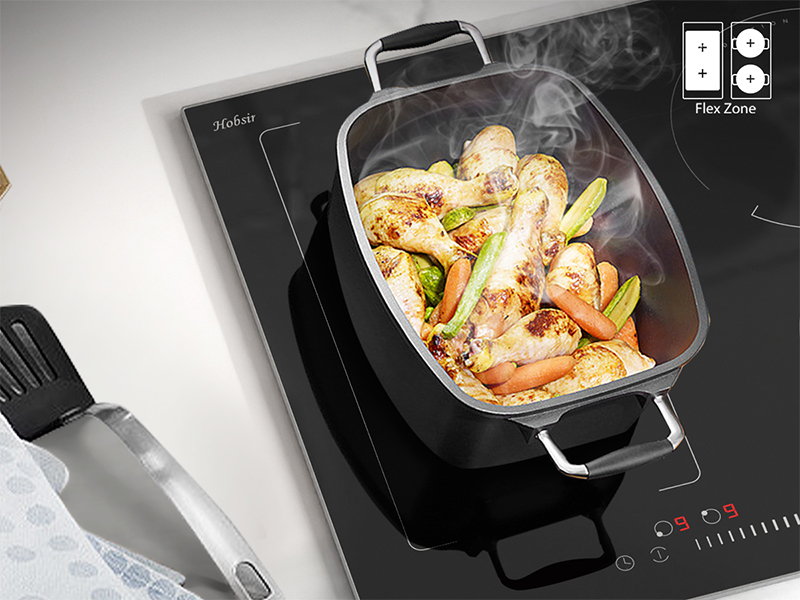
Image: A large rectangular pot placed on the Flex-Zone, showing how the two zones combine to heat the entire base of the cookware.
5.5 Slider Touch Control
The hob features a responsive slider touch control panel. Simply swipe your finger along the slider to quickly and precisely adjust the power level for any selected cooking zone.

Image: A hand demonstrating the use of the slider touch control to adjust the heat setting on the hob.
5.6 Boost Function
For rapid heating, the hob includes a boost function. This temporarily increases the power to a selected zone, allowing for faster boiling or searing. Activate by touching the boost symbol (often indicated by 'B' or a similar icon) after selecting a zone.

Image: Close-up of the control panel showing the boost function activated for a cooking zone, indicated by 'B' on the display.
6. Maintenance and Cleaning
The glass surface of the Hobsir induction hob is designed for easy cleaning and durability. Regular cleaning will maintain its appearance and performance.
- Always ensure the hob is cool before cleaning.
- Wipe spills immediately with a damp cloth.
- For stubborn stains, use a ceramic hob cleaner.
- The hob comes with a scraper for removing burnt-on food residues. Use it carefully at an angle to avoid scratching the surface.
- The glass surface is resistant to temperatures up to 800°C and offers strong impact resistance.

Image: A hand cleaning the hob surface with a sponge, demonstrating its easy-to-clean properties and the included scraper.

Image: Illustration of the hob's durability, showing its resistance to impact and high temperatures.
7. Troubleshooting
If you encounter any issues with your Hobsir induction hob, please refer to the following common troubleshooting tips before contacting customer support.
- Hob not turning on: Check if the hob is properly connected to the power supply. Ensure the child lock is not activated.
- Cooking zone not heating: Verify that the cookware is compatible with induction hobs and is correctly centered on the zone.
- Error codes displayed: Consult the specific error code in the full product manual (if available) or contact customer support for guidance.
- Unusual noises: A slight buzzing or humming sound is normal during induction cooking, especially at higher power settings, due to the magnetic field.
8. Specifications
| Feature | Specification |
|---|---|
| Brand | Hobsir |
| Model Number | HSI-B47221-F1-BB-1 |
| Product Dimensions | 59 x 52 x 5.6 cm |
| Weight | 10 kg |
| Heating Elements | 4 |
| Energy Source | Electric |
| Special Features | Dual Induction, Flex-Zone |
| Material | Glass |
| Control Type | Touch (Slider) |
9. Warranty and Support
For warranty information and customer support, please refer to the documentation provided with your purchase or contact the seller directly. Keep your proof of purchase for any warranty claims.
For further assistance, you may contact Hobsir customer service through their official channels, typically found on their website or the product packaging.


