
EZVALO Wireless LED Spotlights Indoor User Manual
Model: EZL2407A | Brand: EZVALO
1. Introduction
Thank you for choosing the EZVALO Wireless LED Spotlights. This manual provides detailed instructions for the setup, operation, maintenance, and troubleshooting of your new spotlight. Please read this manual thoroughly before use to ensure proper functionality and longevity of the product.
2. Product Overview and Components
The EZVALO Wireless LED Spotlight is a versatile lighting solution designed for accentuating indoor spaces, artwork, plants, and more. It features a rechargeable battery, dimmable light, adjustable color temperature, and a convenient remote control.

Figure 2.1: EZVALO Wireless LED Spotlight with included remote control and USB charging cables.
Package Contents:
- 1 x EZVALO Wireless LED Spotlight
- 1 x Remote Control
- 1 x USB-C Charging Cable
- Mounting Accessories (Magnetic base, adhesive tape, screws)
- User Manual (This document)

Figure 2.2: Remote Control Functions.
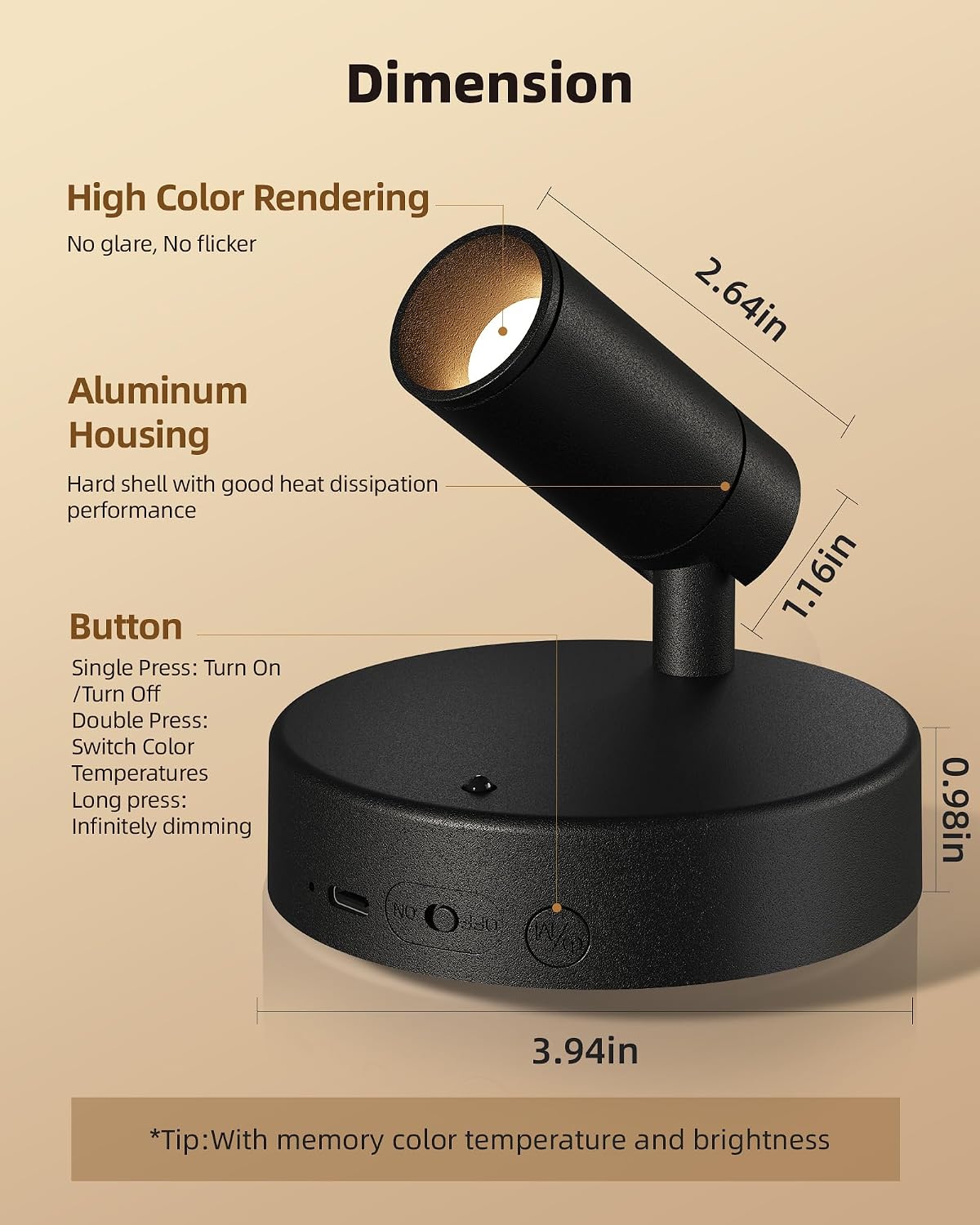
Figure 2.3: Typical application scenarios for the EZVALO spotlight.
3. Setup
3.1 Charging the Spotlight
The EZVALO spotlight is equipped with a built-in 5500mAh rechargeable battery. Before first use, it is recommended to fully charge the device.
- Connect the provided USB-C charging cable to the charging port on the spotlight.
- Connect the other end of the cable to a standard USB power adapter (not included) or a computer USB port.
- The charging indicator light will show the charging status. A full charge typically takes 3-4 hours.

Figure 3.1: Spotlight with 5500mAh rechargeable battery and USB-C charging port.
3.2 Installation
The spotlight offers flexible installation options to suit various surfaces and preferences.

Figure 3.2: Various installation methods.
- Magnetic Mounting: The spotlight base has a strong magnetic attraction. Attach it directly to any metallic surface.
- Adhesive Tape Mounting: For non-metallic surfaces, use the provided adhesive tape.
- Clean the desired surface thoroughly to ensure it is dry and free of dust.
- Peel off the protective film from one side of the adhesive tape and apply it to the back of the magnetic mounting plate.
- Peel off the other side of the film and firmly press the mounting plate onto the desired surface.
- Attach the spotlight magnetically to the mounted plate.
- Screw Mounting: For a more permanent installation, use the provided screws.
- Mark the desired installation spot.
- Drill pilot holes if necessary.
- Secure the magnetic mounting plate to the surface using the screws.
- Attach the spotlight magnetically to the mounted plate.
The spotlight head can be rotated 350 degrees horizontally and tilted 90 degrees vertically to direct light precisely.
4. Operating Instructions
4.1 Power On/Off
- Using the Remote: Press the ON button to turn on the light, and the OFF button to turn off.
- Using the Spotlight Button: Single press the button on the spotlight base to turn it On or Off.
4.2 Brightness Adjustment (Dimming)
The spotlight features stepless dimming, allowing for precise control over brightness levels.
- Using the Remote: Use the + button to increase brightness and the - button to decrease brightness.
- Using the Spotlight Button: Long press the button on the spotlight base to infinitely dim the light. Release to set the desired brightness.

Figure 4.1: Stepless Dimming and Color Temperature Options.
4.3 Color Temperature Adjustment
The spotlight offers three color temperature options to suit different moods and environments.
- Using the Remote: Press the sun icon buttons to cycle through 3000K (Warm White), 4200K (Neutral White), and 6500K (Cool White).
- Using the Spotlight Button: Double press the button on the spotlight base to switch between color temperatures.
4.4 Timer Function
Set the spotlight to automatically turn off after a specified duration.
- Using the Remote: Press the desired timer button: 15Min, 30Min, 45Min, 60Min, or 120Min.
- To cancel the timer, press the "Cancel" button on the remote.

Figure 4.2: Spotlight Button Functions and Dimensions.
Note: The spotlight has a memory function that recalls the last used color temperature and brightness settings.
5. Battery and Runtime
The EZVALO spotlight is designed for long-lasting performance with its 5500mAh rechargeable battery.
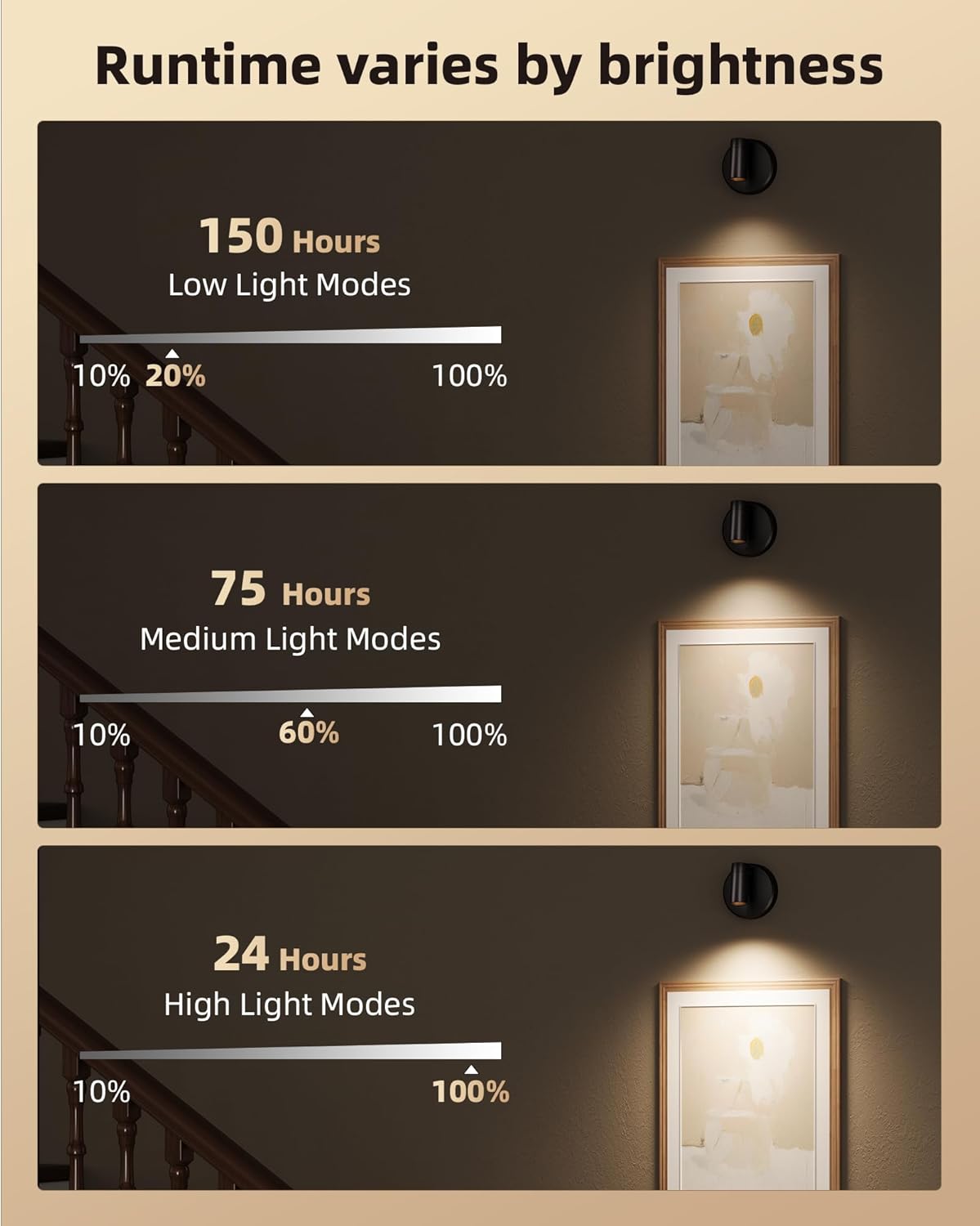
Figure 5.1: Estimated Battery Runtime based on Brightness.
Actual runtime may vary based on usage patterns, brightness level, and environmental factors.
6. Maintenance
- Cleaning: Use a soft, dry cloth to wipe the surface of the spotlight. Do not use abrasive cleaners or solvents.
- Battery Care: To prolong battery life, avoid fully discharging the battery frequently. Recharge the spotlight when the light output becomes noticeably dim. If storing for an extended period, charge the battery every 3-6 months.
- Storage: Store the spotlight in a cool, dry place away from direct sunlight and extreme temperatures.
7. Troubleshooting
| Problem | Possible Cause | Solution |
|---|---|---|
| Spotlight does not turn on. | Battery is depleted. | Charge the spotlight fully. |
| Spotlight does not turn on. | Remote control battery is low or dead. | Replace the remote control battery (if applicable, or ensure line of sight). |
| Remote control not responding. | Obstruction between remote and spotlight. | Ensure clear line of sight between remote and spotlight. Remote range is approximately 10 feet. |
| Light output is dim. | Battery is low. | Recharge the spotlight. |
| Light output is dim. | Brightness setting is too low. | Increase brightness using the remote or spotlight button. |
8. Specifications
| Model Number | EZL2407A |
| Product Dimensions | 9.91 x 9.91 x 7.62 cm (3.94 x 3.94 x 3.0 inches) |
| Weight | 226.8 g (0.5 lbs) |
| Battery Capacity | 5500mAh (1 x 9V battery included) |
| Power Source | Battery Powered (USB-C Rechargeable) |
| Light Source Type | LED |
| Color Temperatures | 3000K, 4200K, 6500K |
| Special Features | Adjustable Color Temperature, Dimmable, Timer, Remote Control, Magnetic Base |
| Material | Acrylonitrile Butadiene Styrene (ABS) |
| Voltage | 5 Volts |
| Remote Control Range | Up to 10 feet (approx. 3 meters) |
9. Warranty and Support
EZVALO products are manufactured with high-quality standards. This product comes with a standard manufacturer's warranty against defects in materials and workmanship. Please refer to the product packaging or the EZVALO official website for specific warranty terms and conditions.
For technical support, troubleshooting assistance, or warranty claims, please contact EZVALO customer service through the retailer's platform or the official EZVALO support channels. When contacting support, please have your product model number (EZL2407A) and purchase information ready.