Introduction
The BOSGAME E4 Mini PC is a compact and powerful desktop computer designed for a variety of tasks, from office productivity and home entertainment to 4K video streaming. Equipped with an AMD Ryzen 5 3550H processor, ample memory, and fast storage, it offers reliable performance in a small form factor. This manual provides detailed instructions for setting up, operating, maintaining, and troubleshooting your E4 Mini PC.
Product Overview
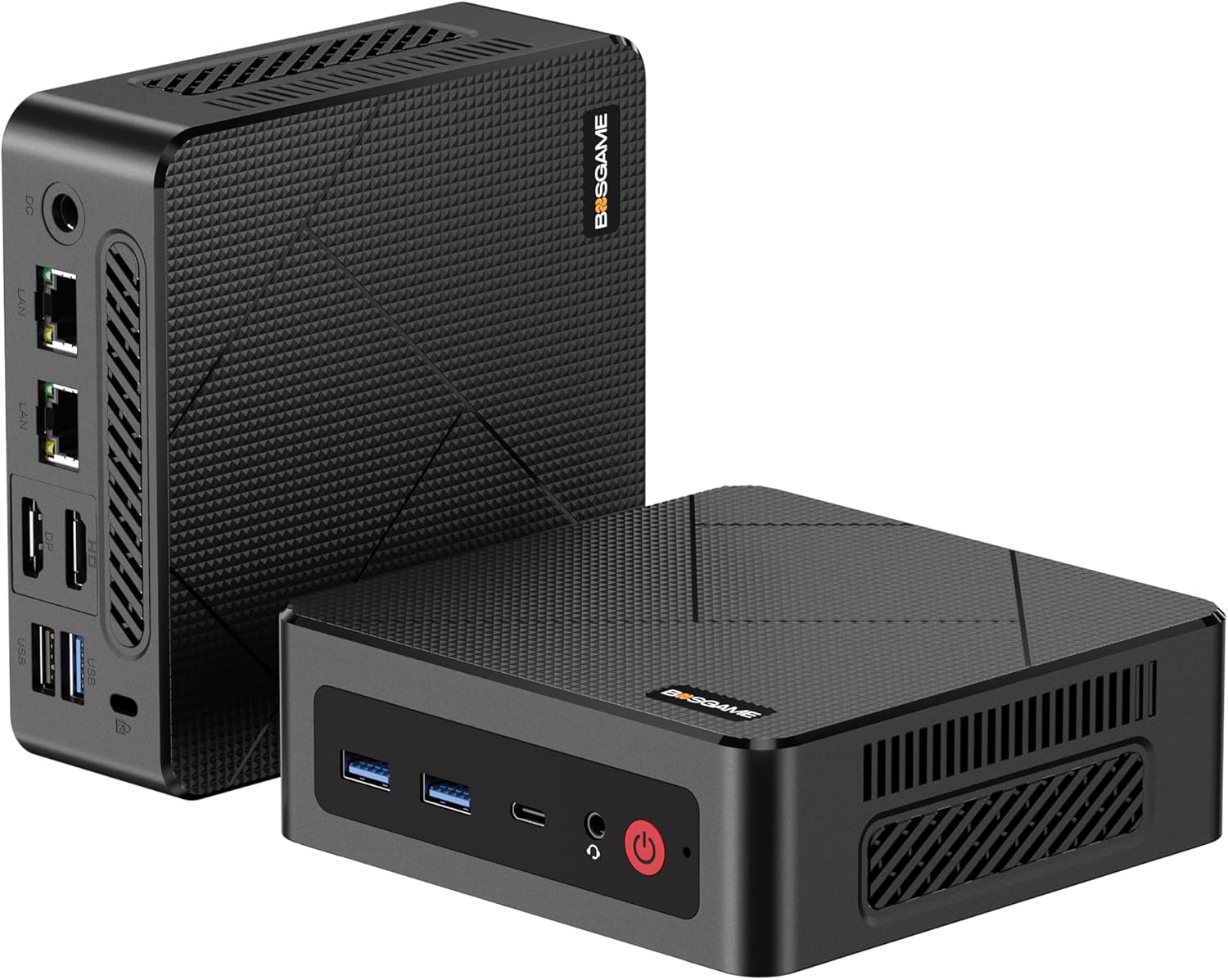
The BOSGAME E4 Mini PC, showcasing its compact design and various ports on the front and rear panels.
What's in the Box
Upon opening the package, please verify that all the following items are included:
- 1x E4 Mini PC
- 1x HDMI Cable
- 1x Power Adapter
- 1x User Guide
- 1x VESA Mount with Screws

An illustration of all components included in the BOSGAME E4 Mini PC package, including the mini PC, power adapter, HDMI cable, VESA mount, and user manual.
Setup Guide
Initial Connection
Follow these steps to connect your Mini PC for the first time:
- Connect Display: Use the provided HDMI cable to connect your monitor or TV to the HDMI port on the Mini PC. The E4 also supports DisplayPort and USB-C for video output.
- Connect Peripherals: Plug in your USB keyboard and mouse into the available USB 3.2 or USB 2.0 ports.
- Connect Power: Connect the power adapter to the DC-in port on the Mini PC, then plug the adapter into a power outlet.
- Network Connection (Optional): For a wired connection, connect an Ethernet cable to one of the RJ45 LAN ports. For wireless, ensure your Wi-Fi network is available.
Power On
Press the power button located on the front panel of the Mini PC. The power indicator light will illuminate, and the system will begin to boot up.
Operating Instructions
Basic Operation
Once powered on, the Mini PC will load its operating system. You can then interact with it using your connected keyboard and mouse. To shut down the system, use the standard shutdown procedure within your operating system (e.g., Start Menu > Power > Shut down in Windows).
Display Configuration
The E4 Mini PC supports triple 4K display output, allowing you to connect up to three monitors simultaneously for enhanced productivity or immersive entertainment.

The BOSGAME E4 Mini PC connected to three external monitors, demonstrating its triple display capability for multitasking and expanded workspace.
You can configure display settings (resolution, orientation, extended/duplicate mode) within your operating system's display settings.
Connectivity
Port Overview

Detailed view of the BOSGAME E4 Mini PC's front and rear ports, including power, audio jack, USB-C, USB 3.2, USB 2.0, DisplayPort, HDMI, Dual RJ45 LAN, and DC input.
Wired Network (LAN)
The E4 Mini PC features dual Gigabit Ethernet (RJ45) ports, allowing for stable and high-speed wired network connections. These can be used for redundancy or to connect to different networks simultaneously.

Close-up of the BOSGAME E4 Mini PC's dual RJ45 LAN ports with Ethernet cables connected, highlighting its robust wired networking capabilities.
Wireless Connectivity (Wi-Fi & Bluetooth)
The Mini PC is equipped with Wi-Fi 5 (802.11ac) for fast wireless internet access and Bluetooth 5.0 for connecting wireless peripherals such as keyboards, mice, headphones, and speakers.

An illustrative diagram showing the BOSGAME E4 Mini PC providing powerful wireless connectivity (Wi-Fi 5 and Bluetooth 5.0) throughout a home environment.
Performance and Features
Processor and Graphics
The BOSGAME E4 is powered by an AMD Ryzen 5 3550H processor (4 Cores/8 Threads, up to 3.7GHz) with integrated Radeon Vega 8 Graphics. This combination delivers robust performance for daily computing tasks, multimedia, and light gaming.

A graphic detailing the AMD Ryzen 5 3550H processor, its integrated Radeon Vega 8 Graphics, memory, storage, display support, and connectivity features.
Memory and Storage
The Mini PC comes with 16GB of DDR4 RAM and a 512GB PCIe 3.0 SSD. This configuration ensures quick application loading, smooth multitasking, and rapid file transfers.

An image illustrating the 16GB DDR4 RAM and 512GB M.2 NVMe PCIe 3.0 SSD, emphasizing high capacity and performance.
Internal Structure and Heat Dissipation
The E4 Mini PC is designed with an efficient cooling system, including a cooling fan and heat sink fins, to ensure stable and quiet operation even under load.

An exploded view diagram showing the internal components of the BOSGAME E4 Mini PC, including the plastic body, cooling bracket, heat sink, CPU, motherboard, SSD, and SO-DIMM DDR4.

A visual representation highlighting the cooling fan and heat sink fins, demonstrating the highly efficient heat dissipation system of the Mini PC.
Installation (VESA Mount)
The BOSGAME E4 Mini PC can be easily mounted to the back of a VESA-compatible monitor or TV, saving desk space and creating a cleaner setup.

An image demonstrating the easy installation process of the BOSGAME E4 Mini PC using the included VESA mount, showing it attached to the back of a monitor.
- Attach Bracket to Mini PC: Fix the VESA mount bracket to the Mini PC using the provided screws.
- Attach to Display: Fix the bracket with the attached Mini PC to the VESA mounting holes on the back of your display using screws.
Maintenance
Regular maintenance helps ensure the longevity and optimal performance of your Mini PC:
- Cleaning: Periodically clean the exterior of the Mini PC with a soft, dry cloth. Use compressed air to gently clear dust from ventilation openings to prevent overheating. Ensure the device is powered off and unplugged before cleaning.
- Software Updates: Keep your operating system and drivers updated to the latest versions to ensure security, stability, and performance.
- Storage Management: Regularly free up disk space by deleting unnecessary files and uninstalling unused programs.
- Environmental Conditions: Operate the Mini PC in a well-ventilated area, away from direct sunlight, excessive heat, humidity, or dust.
Troubleshooting
If you encounter issues with your BOSGAME E4 Mini PC, refer to the table below for common problems and their solutions:
| Problem | Possible Cause | Solution |
|---|---|---|
| No display on monitor | Loose cable connection, incorrect input source, monitor off | Check HDMI/DP/USB-C cable connections. Ensure monitor is on and set to correct input. Try a different cable or monitor. |
| Mini PC does not power on | Power adapter not connected, faulty power outlet | Ensure power adapter is securely connected to both the PC and a working power outlet. Try a different outlet. |
| No internet connection (wired) | Ethernet cable loose, router issue, driver issue | Check Ethernet cable connection. Restart router/modem. Check network adapter drivers in OS. |
| No internet connection (wireless) | Wi-Fi disabled, incorrect password, signal interference | Ensure Wi-Fi is enabled in OS. Re-enter Wi-Fi password. Move closer to router or reduce interference. |
| System runs slowly | Too many applications open, low disk space, overheating | Close unnecessary applications. Free up disk space. Ensure proper ventilation and clean dust from vents. |
Technical Specifications
Detailed specifications for the BOSGAME E4 Mini PC:
| Feature | Specification |
|---|---|
| Processor | AMD Ryzen 5 3550H (4C/8T, 2.1 GHz base, up to 3.7 GHz boost) |
| Graphics | Integrated Radeon Vega 8 Graphics (1200MHz) |
| RAM | 16GB DDR4 (SODIMM, 3200 MHz) |
| Storage | 512GB M.2 2280 NVME PCIe 3.0 SSD |
| Display Output | HDMI 2.0 (4K@60Hz), DisplayPort (4K@60Hz), USB-C (1080P@60Hz) - Triple Display Support |
| USB Ports | 3x USB 3.2 Gen2, 1x USB 2.0, 1x USB-C |
| Network | Dual RJ45 Gigabit LAN, Wi-Fi 5 (802.11ac), Bluetooth 5.0 |
| Audio | Audio Jack |
| Operating System | 11OS (Pre-installed) |
| Dimensions | 5.1 x 5 x 1.8 inches (128 x 127.1 x 42.8 mm) |
| Weight | 1.19 pounds |
Warranty and Support
BOSGAME is committed to providing excellent after-sales service for your E4 Mini PC.
- Lifetime After-Sales Service: We offer free and reliable lifetime after-sales support.
- Certifications: The BOSGAME Mini PC has FCC, ROHS, and CE certifications, ensuring compliance with safety and environmental standards.
- Professional Support: We provide 1 year of professional factory support.
- Customer Service: Our 24/7 online customer service is available to assist you with any inquiries or issues.
For further assistance, please refer to the contact information provided in your user guide or visit the official BOSGAME website.


