
Introduction
Thank you for choosing the DXZtoz AGC900D Dual-Lens Articulating Borescope. This industrial endoscope is designed for detailed inspection in hard-to-reach areas, featuring a 0.25-inch ultra-thin probe, a 5-inch IPS display, and a unique two-way 210° articulating camera head. This manual provides essential information for setup, operation, maintenance, and troubleshooting to ensure optimal performance and longevity of your device.
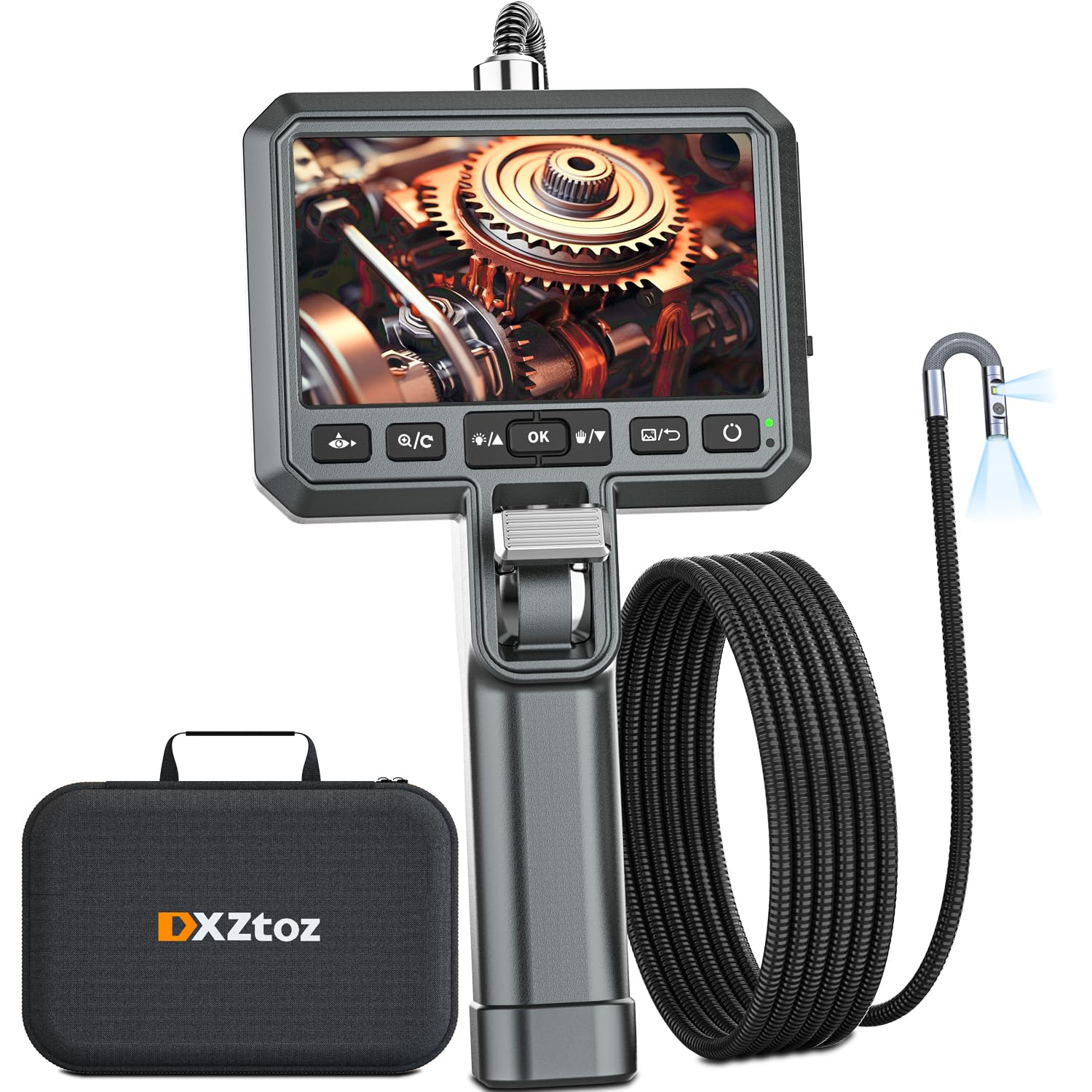
Figure 1: DXZtoz AGC900D Dual-Lens Articulating Borescope.
Product Overview & Key Features
The DXZtoz AGC900D is engineered for precision and ease of use in various professional and DIY applications, including engine inspection, aircraft maintenance, plumbing, and wall inspections.
- Articulated Camera Head: Effortlessly navigate tight spaces with the two-way 210° articulating probe, controlled by an intuitive thumb stick. This feature allows for comprehensive inspection without needing to rotate the entire cable.
- Dual-Lens Ultra-Slim Probe: The 0.25-inch (6.5mm) probe integrates both front-facing and 90-degree side cameras. Easily switch between views or utilize a dual-view mode on the large 5-inch HD IPS screen for enhanced visibility in complex environments.
- Patented Dual-Path Thumb Stick Control: Inspired by aircraft flap control levers, this aluminum alloy mechanism provides durable and stable articulation, allowing precise locking at any desired angle.
- Front-Exit Ergonomic Design: The innovative front-exit cable design offers smoother and more convenient operation compared to traditional rear-exit models, especially when inspecting upwards or forwards. A hands-free bracket is included for added convenience.
- Adjustable LED Illumination: Equipped with multiple LEDs, the probe provides adjustable brightness levels to ensure clear visibility in dimly lit areas.
- High-Resolution Display: The 5-inch HD IPS screen delivers clear and bright images, supporting 1080p video capture and still images.
- Digital Zoom: Utilize the digital zoom function to magnify details up to 8x for closer examination.
- Built-in Media Storage: Comes with a 32GB micro SD card for storing photos and videos.
- Waterproof Probe: The probe is waterproof, allowing for inspections in wet or submerged conditions.

Figure 2: Articulating probe demonstrating 210° movement.

Figure 3: The 5-inch HD IPS display and thumb stick control.

Figure 4: Illustration of the dual-lens functionality, showing both front and side camera views.
What's in the Box
Your DXZtoz AGC900D package includes the following items:
- DXZtoz AGC900D Dual-Lens Articulating Borescope Unit
- 0.25in (6.5mm) Ultra-Thin Probe (5FT length)
- Portable Carrying Case
- 32GB Micro SD Card (pre-installed or included separately)
- USB-C Data/Charging Cable
- Hook/Magnet Bonus Accessories (for retrieving small items)
- Comprehensive Lens Clean Kit (wipes, swabs, brush)
- User Manual

Figure 5: All items included in the DXZtoz AGC900D package.
Setup
- Charge the Device: Connect the borescope to a power source using the provided USB-C cable. The battery indicator on the screen will show charging status. A full charge provides approximately 4 hours of continuous use.
- Insert Micro SD Card: Ensure the 32GB Micro SD card is properly inserted into the designated slot on the side of the device. This is essential for saving photos and videos.
- Attach Probe: Securely connect the ultra-thin probe to the main unit.
Operating Instructions
- Power On/Off:
- To power on, press and hold the Power button (usually located on the right side of the display unit) for a few seconds until the screen illuminates.
- To power off, press and hold the Power button again until the device shuts down.
- Articulating Probe Control:
- Use the patented Dual-Path Thumb Stick Control on the handle to articulate the probe tip. Pushing the thumb stick up or down will bend the probe tip up to 210° in the corresponding direction.
- Release the thumb stick to lock the probe tip in position.
- Dual-Lens Switching:
- Press the camera view switch button (often labeled with an eye icon or 'Q/C') to cycle through different camera views: front camera, side camera, and dual-view mode (displaying both cameras simultaneously).
- LED Brightness Adjustment:
- Press the LED brightness adjustment button (often labeled with a light bulb icon) to increase or decrease the intensity of the LED lights on the probe tip. There are typically multiple brightness levels.
- Zoom Function:
- Use the zoom buttons (often labeled with '+' and '-' or arrows) to digitally zoom in or out on the live image. The device supports up to 8x digital zoom.
- Capturing Photos/Videos:
- To take a photo, briefly press the Photo/Video capture button (often located on the handle or near the display).
- To start recording a video, press and hold the Photo/Video capture button until a recording indicator appears on the screen. Press and hold again to stop recording.
- Viewing Media:
- Press the Playback/Gallery button (often labeled with a play icon or folder) to access stored photos and videos.
- Use the navigation buttons (up/down arrows) to browse through your media files.
Video 1: Official DXZtoz Borescope Overview. This video demonstrates the key features and functionality of the DXZtoz AGC900D borescope, including the articulating probe, dual-lens switching, and overall design.
Maintenance
- Cleaning the Lens: Use the provided lens clean kit (wipes, swabs, brush) to gently clean the camera lenses after each use, especially after inspecting dirty or oily environments. Ensure the lenses are free of debris for clear imaging.
- Storage: Store the borescope and its accessories in the portable carrying case when not in use to protect it from dust, moisture, and physical damage.
- Battery Care: To prolong battery life, avoid fully discharging the device frequently. Charge the battery regularly, even if not in active use for extended periods.
Troubleshooting
- No Image on Screen: Ensure the device is fully charged and powered on. Check that the probe is securely connected to the main unit.
- Blurred Image: Clean the camera lenses using the provided cleaning kit. Adjust the LED brightness to optimize lighting conditions.
- Probe Not Articulating: Check for any obstructions preventing the probe tip from moving. Ensure the thumb stick control is functioning correctly.
- Cannot Save Photos/Videos: Verify that the Micro SD card is correctly inserted and has sufficient free space. Ensure you are using a compatible Class 10 Micro SD card.
- Device Not Responding: Try performing a soft reset by powering off and then powering on the device. If the issue persists, allow the battery to fully discharge and then recharge it.
Specifications
| Feature | Specification |
|---|---|
| Model Number | AGC900D |
| Probe Diameter | 0.25 inches (6.5mm) |
| Articulating Angle | Two-way 210° |
| Display Screen | 5-inch IPS HD LCD |
| Video Capture Resolution | 1080p |
| Effective Still Resolution | 1080 Pixels |
| Digital Zoom | 8x |
| Camera Type | Dual-Lens (Front & Side) |
| Sensor Type | CMOS |
| Light Source | Adjustable LED |
| Water Resistance Level | Waterproof (Probe) |
| Media Type | Micro SD Card (32GB included) |
| Battery Average Life | 4 Hours |
| Hardware Interface | USB Type C |
| Best Focal Length | 2-15cm |
| Real Angle of View | 90 Degrees |
Warranty and Support
For warranty information, technical support, or service inquiries, please refer to the contact details provided in your product packaging or visit the official DXZtoz website. Keep your purchase receipt for warranty claims.
