
1. Overview
The Fanvil V61W is a professional IP phone designed for modern business communication. It features an elegant design with a 2.4-inch HD color screen, offering a clear and intuitive user interface. This device supports 4 SIP lines, 6-way audio conferencing, and HD audio for superior call quality. With dual Gigabit Ethernet ports, Wi-Fi 6 (2.4G/5G), and Bluetooth 5.4 connectivity, the V61W provides versatile and reliable communication options for various professional application scenarios and instant communication services.
2. Setup Guide
Follow these steps to set up your Fanvil V61W IP Phone:
- Unpack the Phone: Carefully remove all components from the packaging, including the phone unit, handset, handset cord, Ethernet cable, and power adapter.
- Connect the Handset: Plug one end of the coiled handset cord into the handset and the other end into the handset port on the phone base.
- Connect to Network:
- Wired Connection: Connect one end of the Ethernet cable to the LAN port on the phone and the other end to your network switch or router.
- Wi-Fi Connection: If using Wi-Fi, you will configure this after powering on the device.
- Connect Power: Plug the power adapter into the power port on the phone and then into a power outlet. The phone will automatically power on.
- Initial Configuration: Once powered on, the phone will boot up. Follow the on-screen prompts to configure network settings (if using Wi-Fi) and SIP account details provided by your service provider.

Figure 2.1: Front view of the Fanvil V61W IP Phone, illustrating the main components including the HD color screen, numeric keypad, and handset cradle.
3. Operating Instructions
3.1 Basic Call Functions
- Making a Call:
- Pick up the handset or press the Speaker button.
- Dial the desired number using the keypad.
- Press the Dial/Send button (usually a green phone icon).
- Answering a Call: When the phone rings, pick up the handset or press the Speaker button.
- Ending a Call: Hang up the handset or press the End Call button (usually a red phone icon).
- Hold: During a call, press the Hold button to place the call on hold. Press it again to resume.
- Transfer: During a call, press the Transfer button, dial the new number, and then press Transfer again (consult your system administrator for specific transfer types).
3.2 SIP Line Management
The V61W supports up to 4 SIP lines. You can switch between lines using the dedicated line keys on the screen or physical buttons (if available). Each line can be configured independently through the phone's web interface or menu.
3.3 Audio Conferencing
The phone supports 6-way audio conferencing:
- Initiate a call with the first participant.
- Press the Conference button (or equivalent soft key). The first call will be put on hold.
- Dial the second participant's number and establish the call.
- Press the Conference button again to join all participants into a conference call.
- Repeat steps 2-4 for additional participants up to 6.
3.4 Network Connectivity (Wi-Fi 6, Bluetooth 5.4, Gigabit)
- Wi-Fi Configuration:
- Navigate to the phone's menu: Settings > Network > Wi-Fi.
- Enable Wi-Fi and select your desired network from the list.
- Enter the Wi-Fi password if prompted.
- Bluetooth Pairing:
- Navigate to the phone's menu: Settings > Bluetooth.
- Enable Bluetooth and put your Bluetooth device (e.g., headset) into pairing mode.
- Select your device from the list of available devices on the phone's screen and confirm pairing.
- Gigabit Ethernet: The phone is equipped with two Gigabit Ethernet ports (LAN and PC). The LAN port connects to your network, and the PC port allows you to connect a computer through the phone, acting as a pass-through switch.
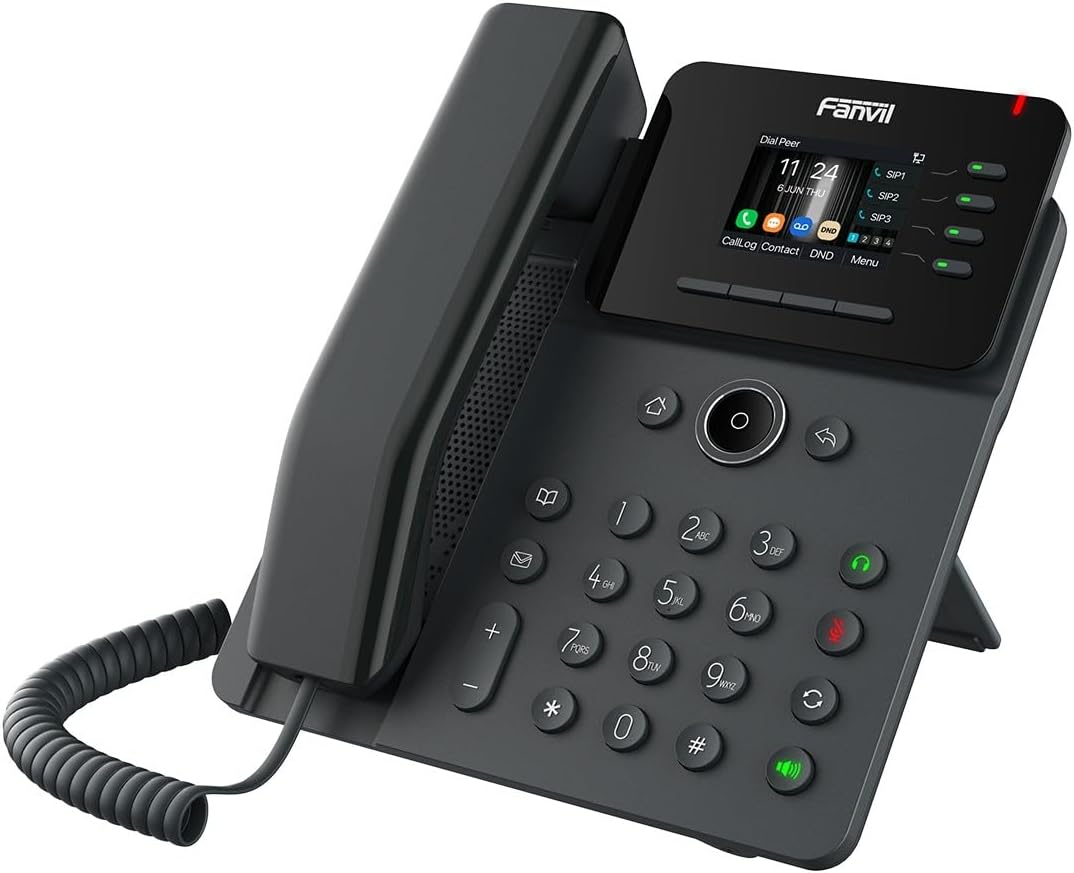
Figure 3.1: Angled view of the Fanvil V61W IP Phone, highlighting its ergonomic design and connectivity ports on the rear (not visible in this view).
4. Maintenance and Care
To ensure the longevity and optimal performance of your Fanvil V61W IP Phone, follow these maintenance guidelines:
- Cleaning: Use a soft, dry, lint-free cloth to clean the phone's surface and screen. For stubborn marks, slightly dampen the cloth with water. Avoid using harsh chemicals, abrasive cleaners, or aerosol sprays.
- Environment: Keep the phone in a cool, dry place, away from direct sunlight, excessive heat, humidity, and dust. Do not expose it to liquids.
- Cables: Periodically check all connected cables (handset, Ethernet, power) for any signs of wear or damage. Replace them if necessary.
- Software Updates: Regularly check for and install firmware updates provided by Fanvil or your service provider. Updates often include performance improvements and security patches.
5. Troubleshooting
This section addresses common issues you might encounter with your Fanvil V61W IP Phone.
| Problem | Possible Cause | Solution |
|---|---|---|
| Phone does not power on. | Power adapter not connected or faulty; power outlet issue. | Ensure power adapter is securely connected to the phone and a working power outlet. Try a different outlet. |
| No dial tone. | Network cable loose; SIP account not registered; network issue. | Check Ethernet cable connection. Verify SIP account registration status on the phone's screen. Restart the phone and network equipment. |
| Cannot make or receive calls. | SIP account not registered; incorrect network settings; firewall blocking VoIP traffic. | Confirm SIP account status. Check IP address and network settings. Contact your network administrator or VoIP service provider. |
| Poor call quality (echo, static). | Network congestion; faulty handset/headset; acoustic echo cancellation (AEC) issues. | Check network bandwidth. Try a different handset or headset. Adjust AEC settings if available, or consult your service provider. |
| Wi-Fi connection unstable. | Weak signal; interference; incorrect Wi-Fi settings. | Move the phone closer to the Wi-Fi router. Check for interference from other devices. Re-enter Wi-Fi password. Ensure router firmware is updated. |

Figure 5.1: Angled view of the Fanvil V61W IP Phone, demonstrating its compact form factor suitable for various desk setups.
6. Technical Specifications
| Feature | Specification |
|---|---|
| Brand | Fanvil |
| Model Number | V61W |
| Display | 2.4-inch HD Color Screen (320 x 240) |
| SIP Lines | 4 |
| Audio Conferencing | 6-way |
| Audio Features | HD Audio |
| Ethernet Ports | 2 x Gigabit Ethernet |
| Wi-Fi | Wi-Fi 6 (2.4G/5G) |
| Bluetooth | Bluetooth 5.4 |
| Manufacturer | Fanvil |
| ASIN | B0DNFKQMX4 |
7. Warranty and Support
For information regarding the product warranty, please refer to the warranty card included with your purchase or visit the official Fanvil website. Warranty terms and conditions may vary by region.
For technical support, troubleshooting assistance beyond this manual, or service inquiries, please contact your authorized Fanvil dealer or your VoIP service provider. You may also find additional resources and FAQs on the official Fanvil support portal.
Note: Spare parts availability and software update guarantees are subject to manufacturer policies and may not be available indefinitely. Please check the latest information from Fanvil.


