
1. Safety Information
Read and understand all safety instructions before operating this fan. Failure to follow these instructions may result in electric shock, fire, or serious injury.
- Always unplug the fan from the power outlet before cleaning, servicing, or moving.
- Do not operate any fan with a damaged cord or plug. Discard the fan or return to an authorized service facility for examination and/or repair.
- Do not run cord under carpeting. Do not cover cord with throw rugs, runners, or similar coverings. Arrange cord away from traffic area where it will not be tripped over.
- Do not insert or allow fingers or foreign objects to enter any ventilation or exhaust opening as it may cause an electric shock or fire, or damage the fan.
- Do not block air intakes or exhaust in any manner. Do not use on any soft surface, like a bed, where openings may become blocked.
- This fan is suitable for commercial use only.
- Ensure the fan is placed on a stable, level surface to prevent tipping.
- Keep children and pets away from the fan during operation.
2. Product Overview
The VEVOR 24-inch Industrial Drum Fan is designed for high-velocity airflow in large spaces such as warehouses, workshops, and garages. It features a powerful EC motor, stepless speed control, and a 360° adjustable tilt for versatile air circulation.
Key Features:
- High-Power, Lower Noise: Equipped with a high-quality EC motor and wheeled blades for powerful airflow with minimal vibration and noise.
- Powerful EC Motor: Delivers up to 8900 CFM at turbo speeds, with near-silent operation at lower settings.
- Versatile Stepless Speed Adjustment: A knob allows for precise customization of airflow intensity.
- 360° Rotation: The fan head can be tilted 360 degrees to direct airflow exactly where needed.
- Easy Mobility: Features a wide handle and smooth-rolling casters for convenient transport across various surfaces.
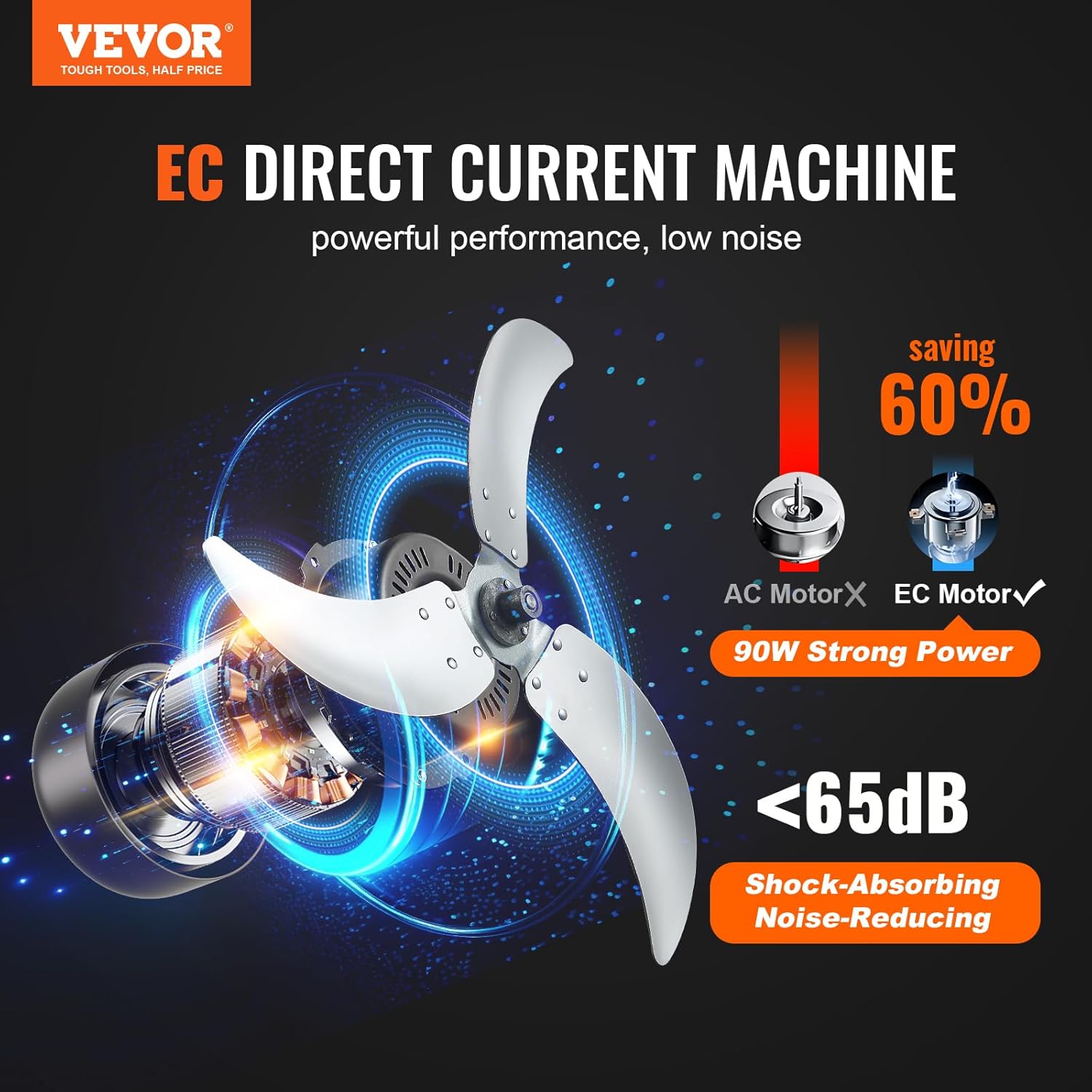
Figure 2.1: The VEVOR fan's EC direct current machine provides powerful performance with reduced noise, saving up to 60% energy compared to AC motors.

Figure 2.2: The fan adjusts speed based on demand, offering a wide range of airflow up to 8700 CFM.
3. Setup and Assembly
The VEVOR Industrial Drum Fan requires minor assembly before first use. Please follow these steps carefully.
Included Components:
- 1 x Fan Body
- 2 x Brackets
- 2 x Wheels
- 1 x Straight Pipe
- 1 x Support Leg
- 4 x Short Screws
- 2 x Long Screws
- 2 x Washers
- 4 x Retaining Clips
Assembly Steps:
- Attach the Support Leg to the fan body using the appropriate screws and washers. Ensure it is securely fastened.
- Insert the Straight Pipe into the designated slots on the Support Leg.
- Attach the two Brackets to the fan body, aligning them with the mounting points.
- Secure the Wheels to the ends of the Support Leg using the Retaining Clips. Ensure wheels spin freely.
- Verify all connections are tight and the fan is stable on its stand.

Figure 3.1: Product dimensions and a detailed list of accessories required for assembly.
4. Operating Instructions
Follow these steps to operate your VEVOR Industrial Drum Fan.
- Placement: Position the fan on a firm, level surface in the desired area. Ensure there are no obstructions to the airflow.
- Power Connection: Plug the 5ft power cord into a standard 120V AC electrical outlet.
- Adjust Speed: Locate the stepless speed control knob on the fan. Turn the knob clockwise to increase the fan speed and counter-clockwise to decrease it. Turn to the 'OFF' position to power down.
- Adjust Tilt: The fan head can be rotated 360 degrees. Loosen the adjustment knobs on the sides of the fan frame, tilt the fan to the desired angle, and then tighten the knobs to secure its position.

Figure 4.1: The stepless knob allows for precise speed regulation from minimum to maximum airflow.
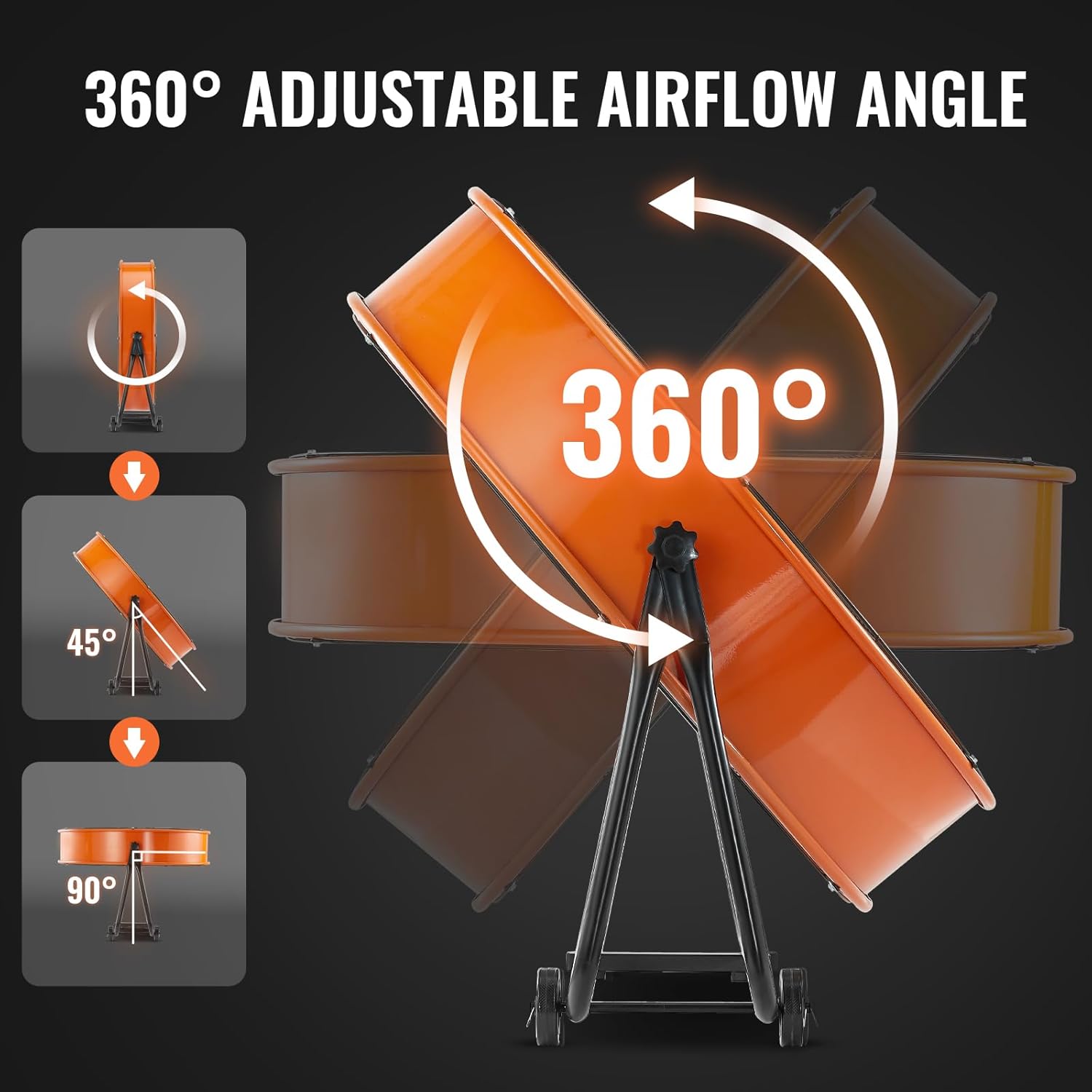
Figure 4.2: The fan head can be adjusted 360 degrees to direct air in any direction.
5. Maintenance
Regular maintenance ensures optimal performance and extends the lifespan of your fan.
Cleaning:
- Always unplug the fan before cleaning.
- Use a soft, damp cloth to clean the exterior surfaces of the fan. Do not use abrasive cleaners or solvents.
- To clean the fan blades and grille, you may need to remove the front grille. Refer to the assembly instructions for reverse steps. Carefully wipe the blades and grille to remove dust and debris.
- Ensure all parts are completely dry before reassembling and plugging in the fan.
Storage:
- Store the fan in a cool, dry place when not in use.
- Cover the fan to protect it from dust and moisture.
6. Troubleshooting
If you encounter issues with your fan, refer to the following common problems and solutions.
| Problem | Possible Cause | Solution |
|---|---|---|
| Fan does not turn on | No power supply Damaged power cord/plug Speed control knob in 'OFF' position | Check power outlet and circuit breaker Inspect cord and plug for damage; do not use if damaged Turn speed control knob to a desired speed setting |
| Reduced airflow | Blocked air intake/exhaust Dust buildup on blades/grille | Ensure clear path for airflow Clean fan blades and grille (refer to Maintenance section) |
| Unusual noise or rattling | Loose components Fan not on a stable surface Debris inside fan housing | Check and tighten all screws and fasteners Place fan on a stable, level surface Unplug and inspect for debris; carefully remove if found |
7. Specifications
Detailed technical specifications for the VEVOR 24-Inch Industrial Drum Fan.
| Specification | Value |
|---|---|
| Brand | VEVOR |
| Model Number | HIFANXDRUM2401 |
| Electric Fan Design | Floor Fan |
| Power Source | EC Motor |
| Product Dimensions (D x W x H) | 12.6" x 27.95" x 30.71" (320 x 710 x 780 mm) |
| Room Type | Basement, Factory, Warehouse, Workshop |
| Special Feature | 360° Rotation, Portable, Variable Speed Control |
| Recommended Uses | Air Circulation, Cooling |
| Mounting Type | Floor Mount |
| Controller Type | Button Control (Stepless Knob) |
| Wattage | 90 watts |
| Air Flow Capacity | 8900 Cubic Feet Per Minute (CFM) |
| Voltage | 120.0 V |
| Indoor/Outdoor Usage | Indoor |
| Material | Metal |
| Item Weight | 21.38 Pounds (9.7 kg) |
8. Warranty and Support
For warranty information, technical support, or service inquiries regarding your VEVOR Industrial Drum Fan, please contact VEVOR customer service directly. Refer to the official VEVOR website or your purchase documentation for contact details and specific warranty terms.
You can visit the VEVOR store online for more information: VEVOR Official Store