
Introduction
Thank you for choosing the siaviala 15.6-inch Dual Portable Monitor Extender. This device is designed to enhance your productivity by providing an additional display for your laptop. Please read this manual carefully to ensure proper setup, operation, and maintenance.
Product Overview
The siaviala P5 is a 15.6-inch Full HD (1920x1080) IPS portable monitor extender, offering a vibrant display with 300cd/m² brightness and 85% NTSC color gamut. Its detachable design and multiple display modes make it a versatile tool for various applications, from business meetings to gaming. It is compatible with laptops ranging from 13 to 17.3 inches.

Image: The siaviala 15.6-inch Dual Portable Monitor Extender, showcasing its sleek design and integration with a laptop.

Image: A user demonstrating enhanced work efficiency with the siaviala dual portable monitor extender, displaying multiple applications across screens, leading to a 200% increase in work efficiency.
Package Contents
Please verify that all items listed below are included in your package:
- 1 x Portable Monitor
- 1 x USB-A to USB-C Cable
- 1 x USB-C to USB-C Cable
- 1 x HDMI to Type-C Cable
- 1 x Single Screen Stand

Image: Visual representation of the complete package contents for the siaviala P5 monitor extender, including the monitor, various cables, and stand.
Setup and Connectivity
The siaviala P5 monitor extender offers flexible connectivity options. Ensure your laptop is compatible with the chosen connection method.
1. Single Cable Type-C Connection (Plug & Play)
If your laptop has a full-featured USB-C port (which supports both video signal and power delivery), you only need one USB-C to USB-C cable for both power and display.
- Connect one end of the USB-C to USB-C cable to your laptop's full-featured USB-C port.
- Connect the other end of the USB-C to USB-C cable to the monitor extender's USB-C port (labeled "TYPE-C1" or similar, typically for power and display).

Image: Detailed diagram showing how to connect the monitor extender using a single USB-C to USB-C cable for both power and video, ideal for full-featured USB-C ports.
2. Two Cable Connection (HDMI + USB-A)
If your laptop does not have a full-featured USB-C port, you will need two cables: one HDMI cable for video transmission and one USB-A to USB-C cable for power.
- Connect one end of the HDMI to Type-C cable to your laptop's HDMI port.
- Connect the Type-C end of the HDMI to Type-C cable to the monitor extender's USB-C port (labeled "USB C with DP" or similar, typically for video input).
- Connect one end of the USB-A to USB-C cable to your laptop's USB-A port.
- Connect the other end of the USB-A to USB-C cable to the monitor extender's USB-C port (typically for power).

Image: Illustration demonstrating the two-cable connection method, utilizing an HDMI cable for video and a USB-A to USB-C cable for power, suitable for laptops without full-featured USB-C ports.
Note: The monitor extender is designed to fit laptops ranging from 13 to 17.3 inches. It features a stretchable design to accommodate various laptop sizes securely.

Image: The monitor extender's adjustable design, demonstrating its compatibility and secure fit for laptops between 13 and 17.3 inches.
Operating Modes
The siaviala P5 supports multiple display modes to suit your workflow and enhance productivity:
1. Extended Mode
In Extended Mode, the monitor extender acts as a separate display, expanding your desktop workspace. This allows you to view different applications or content on each screen, significantly boosting productivity.

Image: A visual example of the monitor extender operating in Extended Mode, providing an expanded desktop for multitasking.
2. Mirror Mode (Duplicated Mode)
Mirror Mode duplicates your laptop's display onto the monitor extender. This is useful for presentations or sharing your screen with others, ensuring everyone sees the same content.

Image: The monitor extender in Mirror Mode, duplicating the laptop's display, ideal for presentations or collaborative viewing.
3. Second Screen Mode
In Second Screen Mode, you can use the monitor extender as the primary display while the laptop screen is off or closed. This is ideal for using the extender as a standalone portable monitor with its included stand.
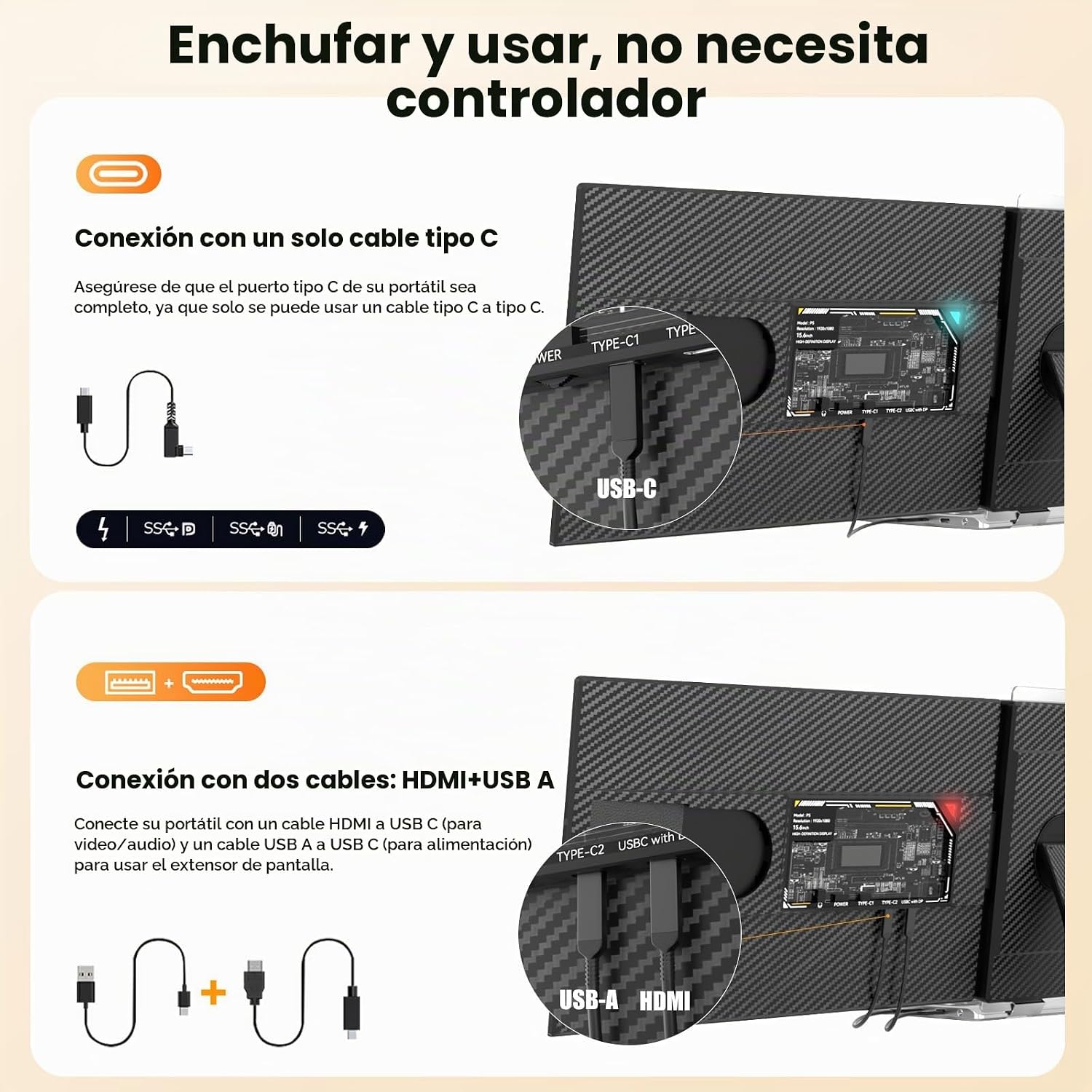
Image: The monitor extender configured as a standalone second screen using its integrated stand, shown in portrait orientation for document viewing or coding.
Rotation and Orientation
The monitor extender can be rotated up to 180 degrees for optimal viewing angles. It also supports both landscape and portrait orientations when used with its stand, offering flexibility for different tasks like coding or document review.

Image: An image highlighting the monitor extender's 180-degree swivel capability and the robust design of its integrated stand for flexible positioning.
Compatibility
The siaviala P5 monitor extender is widely compatible with various operating systems and devices:
- Operating Systems: Windows, macOS, Chrome OS, Android, Linux, Dex, Switch.
- Devices: Laptops (13-17.3 inches), desktop computers, mini PCs, gaming consoles, and some smartphones (with full-featured Type-C port supporting desktop mode).
Maintenance
To ensure the longevity and optimal performance of your siaviala P5 monitor extender, follow these maintenance guidelines:
- Cleaning: Use a soft, lint-free cloth to gently wipe the screen and exterior surfaces. For stubborn marks, slightly dampen the cloth with water or a screen-safe cleaning solution. Avoid harsh chemicals or abrasive materials.
- Storage: When not in use, store the monitor extender in a cool, dry place, away from direct sunlight and extreme temperatures. Use the provided packaging or a protective case to prevent scratches and damage.
- Handling: Handle the device with care. Avoid dropping it or subjecting it to strong impacts. Do not place heavy objects on top of the monitor.
- Cable Management: Ensure cables are not bent sharply or tangled, which can cause damage over time.
Troubleshooting
If you encounter issues with your siaviala P5 monitor extender, please refer to the following common solutions:
- No Display/Black Screen:
- Ensure all cables are securely connected to both the laptop and the monitor extender.
- If using a single USB-C cable, confirm your laptop's USB-C port is full-featured (supports video output and power delivery).
- If using HDMI+USB-A, ensure both cables are connected and the USB-C port on the extender is correctly identified for video input (e.g., "USB C with DP").
- Check your laptop's display settings to ensure the external monitor is detected and configured (e.g., Extended, Duplicate).
- Try connecting the monitor extender to a different laptop or device to rule out a laptop-specific issue.
- Flickering Screen:
- Ensure cables are not loose or damaged.
- Reduce the screen brightness if it's set too high.
- Update your laptop's graphics drivers.
- No Sound (if applicable):
- Check your laptop's sound output settings to ensure the monitor extender is selected as the audio device.
- Adjust the volume on both your laptop and the monitor extender (if it has volume controls).
- Monitor Not Fitting Laptop:
- Ensure your laptop size is within the supported range of 13 to 17.3 inches.
- Adjust the sliding mechanism of the extender to fit your laptop's dimensions.
If these steps do not resolve the issue, please contact siaviala customer support for further assistance.
Specifications
| Feature | Detail |
|---|---|
| Brand | siaviala |
| Model Number | P5 |
| Screen Size | 15.6 inches |
| Resolution | FHD 1080p (1920 x 1080) |
| Display Technology | IPS LCD |
| Aspect Ratio | 16:9 |
| Refresh Rate | 60 Hz |
| Response Time | 3 Milliseconds |
| Brightness | 300 cd/m² |
| Contrast Ratio | 2000:1 |
| Viewing Angle | 178 Degrees |
| Screen Surface | Matte |
| Connectivity | HDMI, USB-C |
| Adaptive Sync | FreeSync |
| Product Dimensions | 36.5 x 20.98 x 2.46 cm |
| Weight | 2.17 kg |
| Color | Black |
| Origin | China |
| UPC | 721713735729 |
| GTIN | 721713735729 |
For detailed energy efficiency information, please refer to the official EPREL product information sheet: EPREL Product Sheet

Image: The energy label for the siaviala P5 monitor extender, indicating its energy efficiency class and power consumption details.
Warranty and Support
siaviala provides customer support for any inquiries or issues you may have with your product.
- Customer Service Email: marinoecmack@outlook.com
- Website: https://eprel.ec.europa.eu/qr/2189408 (This link is from the product information sheet, which also contains contact details for the authorized representative).
- Phone: 004076851176
- Manufacturer: Shenzhen Baijiayoupu Technology Co., Ltd
- Guaranteed Product Support: 1 Year
- Guaranteed Software Updates: Unknown
For quick resolution of any product-related questions, please click on "siaviala official" on the product page or use the contact information provided above.