1. Safety Information
Please read and understand all instructions before use. Keep this manual for future reference. Failure to follow safety instructions may result in serious injury or death.
- Age and Weight Limits: Suitable for children aged 3-8 years old. Maximum weight capacity is 150 lbs.
- Adult Supervision: Constant adult supervision is required during operation.
- Seat Belts: Always ensure children are securely fastened with the 3-point seat belts.
- Operating Environment: Use on flat, dry surfaces away from roads, pools, or steep inclines. Avoid operating in wet conditions.
- Soft Start System: The vehicle is equipped with a soft-start system for gradual acceleration, enhancing safety.
- Parental Remote Control: Adults can override manual controls using the remote control for added safety.
2. What's in the Box
Carefully unpack all components and ensure all items are present:
- Car body
- Battery
- Lights
- Motors
- Steering wheel
- Wheels
- Axles
- Seats with 3-point seat belts
- Parental remote control
- Charger
- Assembly hardware and tools
- Instruction manual
3. Assembly Instructions
Follow these steps to assemble your Outfunny Ride on Car. Refer to the installation video for visual guidance.
Official Outfunny 24V Ride on Car Toy Installation Video. This video provides a step-by-step guide for assembling the vehicle.
3.1 Initial Unpacking and Component Identification
Carefully remove all parts from the packaging. Identify the main car body, wheels, steering wheel, seats, and various smaller components. Ensure all parts listed in Section 2 are present.
3.2 Attaching the Front Bumper and Side Panels
Securely attach the front bumper to the main car body using the provided screws. Then, attach the side panels, ensuring they click firmly into place along the chassis.
3.3 Installing the Wheels and Axles
Insert the rear axle through the designated slots in the car body. Attach the motors to the rear wheels and then slide the wheels onto the axle, securing them with washers and nuts. Repeat for the front wheels, ensuring all components are tightly fastened.
3.4 Connecting the Battery
Locate the battery compartment, typically under the hood. Connect the battery terminals (red to red, black to black) as indicated. Ensure a secure connection before closing the compartment.
3.5 Attaching the Windshield and Mirrors
Carefully snap the windshield into its designated slots on the car body. Attach the side mirrors by pushing them firmly into their respective sockets.
3.6 Installing the Seats and Seatbelts
Place the seats into the car body and secure them with screws. Ensure the 3-point seat belts are properly routed and functional.
3.7 Attaching the Roll Bar and Lights
Assemble the roll bar and attach the overhead lights. Insert batteries into the light unit if required. Secure the assembled roll bar to the car body using screws.
3.8 Steering Wheel Installation
Connect the steering wheel's electrical connector to the corresponding port on the dashboard. Slide the steering wheel onto the steering column and secure it with a screw.
4. Operating Instructions
Familiarize yourself with the vehicle's controls before operation.

The dashboard features controls for music, lights, and drive modes, including Bluetooth connectivity.
4.1 Starting the Vehicle
- Power Button: Press the 'Start/Stop' button on the dashboard to turn the vehicle on.
- Accelerator Pedal: Press the foot pedal to move forward. Release to brake.
4.2 Driving Modes
- Forward/Reverse: Use the gear selector switch on the dashboard to choose between Forward (D) and Reverse (R).
- Speed Selection: Select between High and Low speed using the dedicated switch.
- 2WD/4WD Switch: This electric car is equipped with a 4X200W motor and supports easy switching between 2WD and 4WD for varied terrain.
4.3 Multimedia Features
- Built-in Music: The vehicle has pre-loaded music. Use the control buttons to play/pause, skip tracks, and adjust volume.
- Bluetooth Connection: Connect your mobile device via Bluetooth to play your own music.
- Headlights & Rear Searchlights: Turn on/off the working LED headlights and rear searchlights using the dashboard controls.
Official Outfunny 24V 2 Seater Ride on Car demonstration video, showcasing various features and operation.
5. Remote Control Operation
The parental remote control allows adults to safely supervise and control the vehicle, especially for younger children.

A parent uses the remote control to guide the ride-on car, ensuring a safe and joyful shared driving experience.
- Pairing: Follow the instructions in the remote control's separate manual to pair it with the vehicle.
- Forward/Reverse: Use the directional buttons to move the vehicle forward or backward.
- Steering: Use the directional buttons to steer the vehicle left or right.
- Speed Control: Adjust the speed settings (low, medium, high) directly from the remote.
- Brake/Park: The remote control typically has a dedicated button to stop the vehicle immediately or engage a park mode.
6. Charging Instructions
Proper charging ensures optimal battery life and performance.
- First Charge: Charge the battery for 8-12 hours before the first use.
- Regular Charging: Subsequent charges should be 6-8 hours. Do not overcharge the battery.
- Charger Connection: Plug the charger into the designated input port on the vehicle, then into a standard wall outlet.
- Indicator Light: The charger will typically have an indicator light to show charging status (e.g., red for charging, green for fully charged).
7. Maintenance
Regular maintenance helps prolong the life of your ride-on car.
- Cleaning: Wipe the vehicle with a soft, damp cloth. Do not use abrasive cleaners or submerge the vehicle in water.
- Storage: Store the vehicle in a dry, cool place away from direct sunlight when not in use.
- Battery Care: Charge the battery at least once a month, even if the vehicle is not being used, to maintain battery health.
- Inspection: Periodically check all screws, nuts, and electrical connections to ensure they are secure.
8. Troubleshooting
If you encounter issues, refer to these common solutions:
- Vehicle Not Moving: Check battery connection, ensure battery is charged, verify forward/reverse switch is engaged, and check if parental remote control is in park mode.
- Low Power/Slow Speed: Fully charge the battery. Check for excessive weight on the vehicle.
- Remote Control Not Working: Ensure batteries are installed correctly in the remote. Re-pair the remote with the vehicle according to its manual.
- Lights Not Working: Check if the light switch is on. Ensure battery is charged.
9. Specifications
- Product Dimensions: 47.2 x 31.5 x 32.3 inches
- Item Weight: 60.4 pounds
- Item Model Number: JC308
- Motor: 4x200W
- Battery: 24V
- Max Speed: 3.1 - 4.5 MPH (3-speed settings)
- Weight Capacity: 150 lbs
- Recommended Age: 3-8 Years old
- Features: 2WD/4WD switch, 20" 2-seater design, Parental remote control, 3-point seat belts, Soft-start system, Working LED headlights & rear searchlights, Built-in music player, Bluetooth connection, Battery level display.
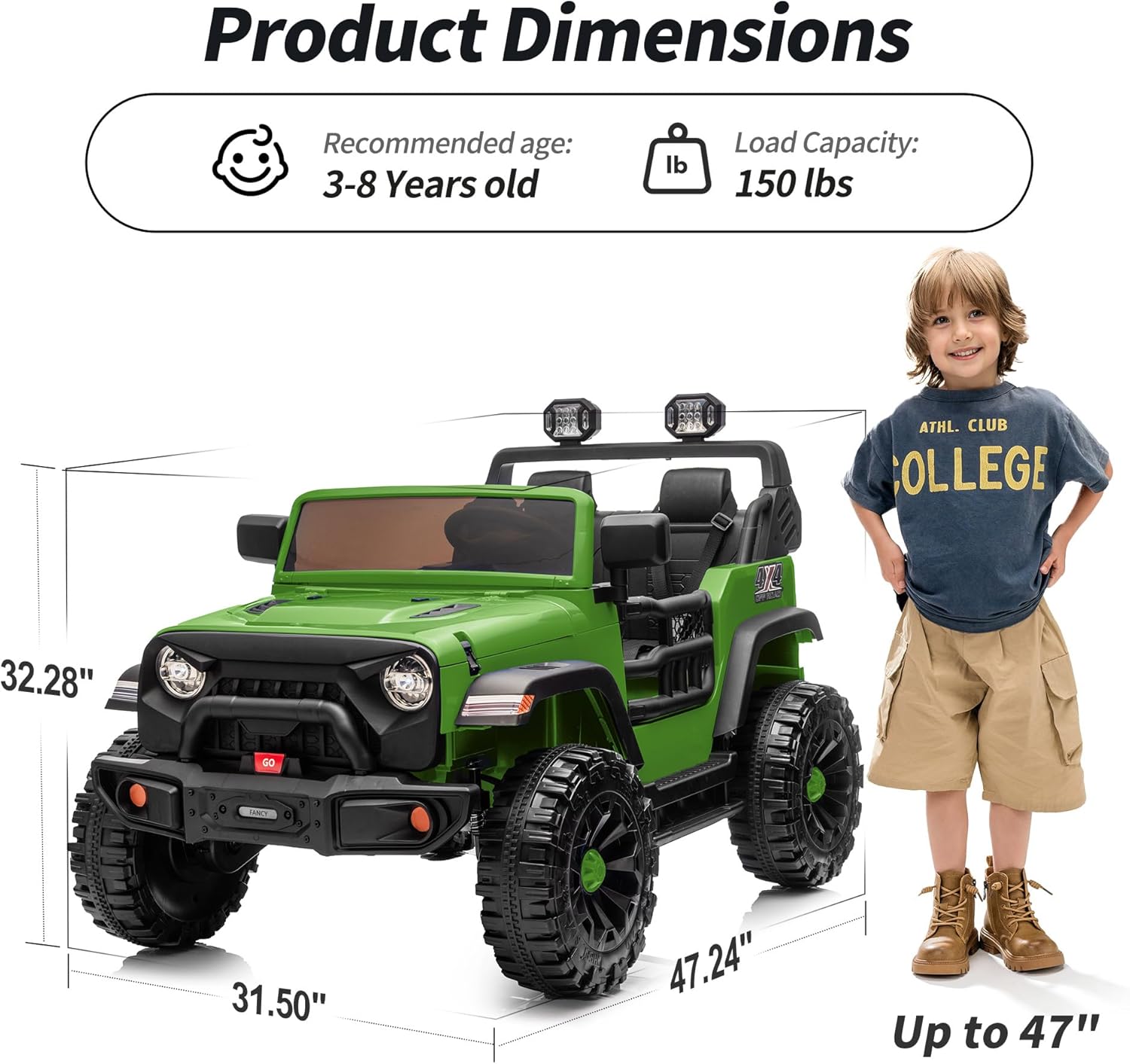
Visual representation of the product dimensions and recommended user specifications.
10. Warranty and Support
For warranty information, technical support, or replacement parts, please contact Outfunny customer service. Refer to the product packaging or the official Outfunny website for contact details.

