
GRIFEMA GB1050-1
GRIFEMA GB1050-1 Laptop Stand User Manual
Model: GB1050-1
1. Introduction
Thank you for choosing the GRIFEMA GB1050-1 Laptop Stand. This foldable, adjustable laptop riser is designed to enhance your ergonomic workspace by providing optimal height and angle adjustments for your laptop. Its 360° swivel base facilitates screen sharing, while the ventilated design helps prevent overheating. This manual provides essential information for setup, operation, and maintenance to ensure optimal performance and longevity of your product.

Figure 1: GRIFEMA GB1050-1 Laptop Stand in use.
This image displays the GRIFEMA GB1050-1 Laptop Stand in its elevated position, supporting a laptop. The stand is silver, with a sturdy base and adjustable arms, demonstrating its ergonomic design for improved viewing angles.
2. Package Contents
Please verify that all items are present in your package:
- GRIFEMA GB1050-1 Laptop Stand × 1
- Tension Adjustment Wrench × 1 (Included for easy adjustment of the stand's joints)
3. Product Features
3.1. 360° Rotating Base
The stand features a 360° rotating base, allowing you to effortlessly share your screen during meetings, presentations, or collaborative projects. This functionality is ideal for office, home, or hybrid working environments.

Figure 2: Demonstrating 360° Rotation.
This image shows two individuals collaborating, with one person rotating the laptop stand to share the screen with the other, highlighting the 360° swivel feature.
3.2. Foldable & Adjustable Design
Easily adjust the height and angle of your laptop for an ergonomic and comfortable viewing experience. When not in use, this adjustable laptop stand folds down to a compact 4.5 cm (approximately 1.77 inches) thickness, helping to keep your desk organized.
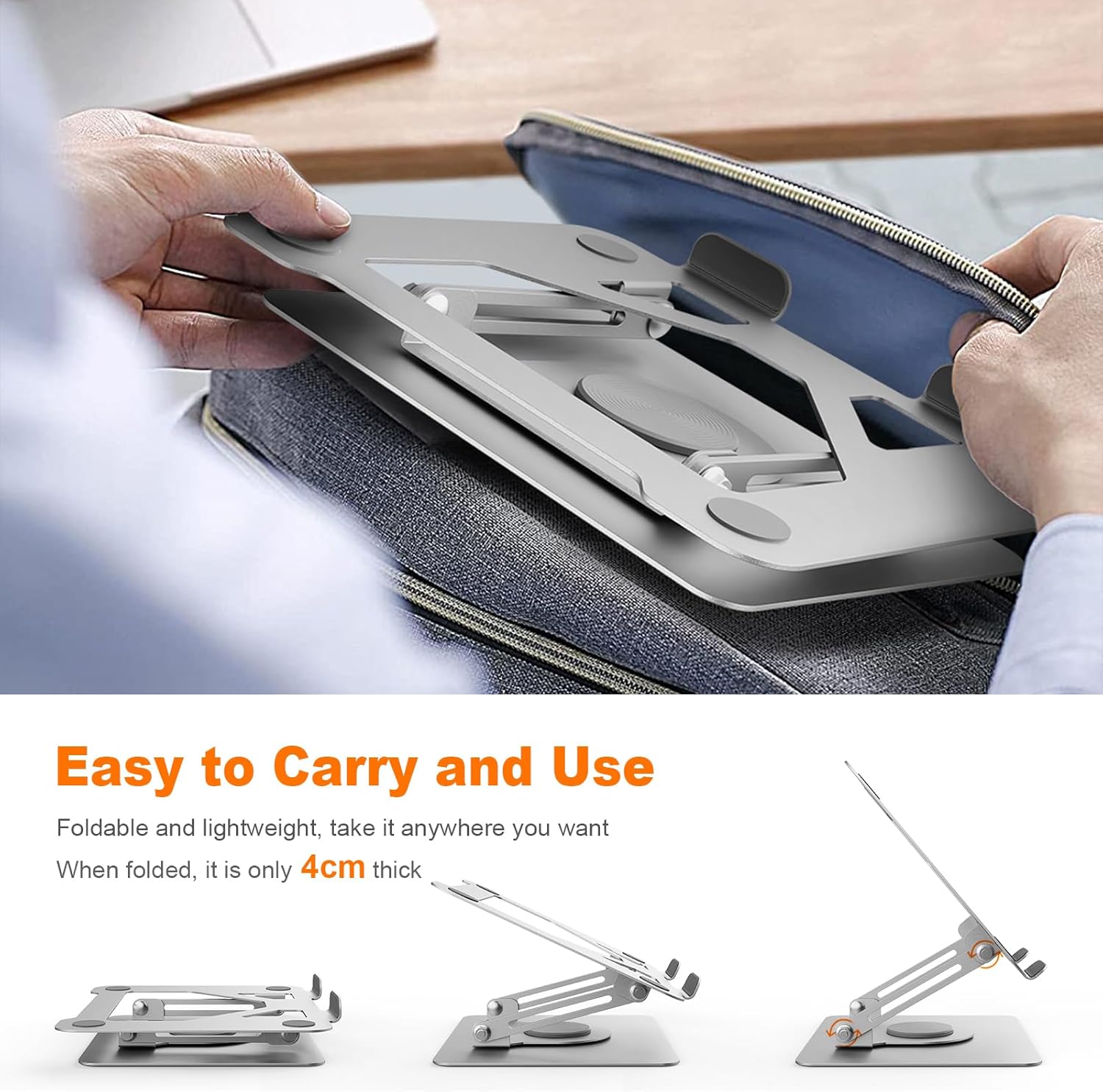
Figure 3: Foldable Design for Portability.
This image illustrates the stand's foldable nature, showing it transitioning from an open, elevated position to a compact, flat form, suitable for storage or transport.

Figure 4: Ergonomic Benefits of Adjustable Height.
This image presents a comparison between incorrect and correct ergonomic postures when using a laptop, demonstrating how the adjustable height of the stand helps in achieving a comfortable and healthy viewing angle, reducing neck and back strain.
3.3. Stable & Sturdy Construction
Constructed from premium alloy metal, this laptop riser supports laptops weighing up to 6 kg (approximately 13 lbs). Non-slip rubber pads are integrated to ensure your laptop remains secure and stable on various surfaces.
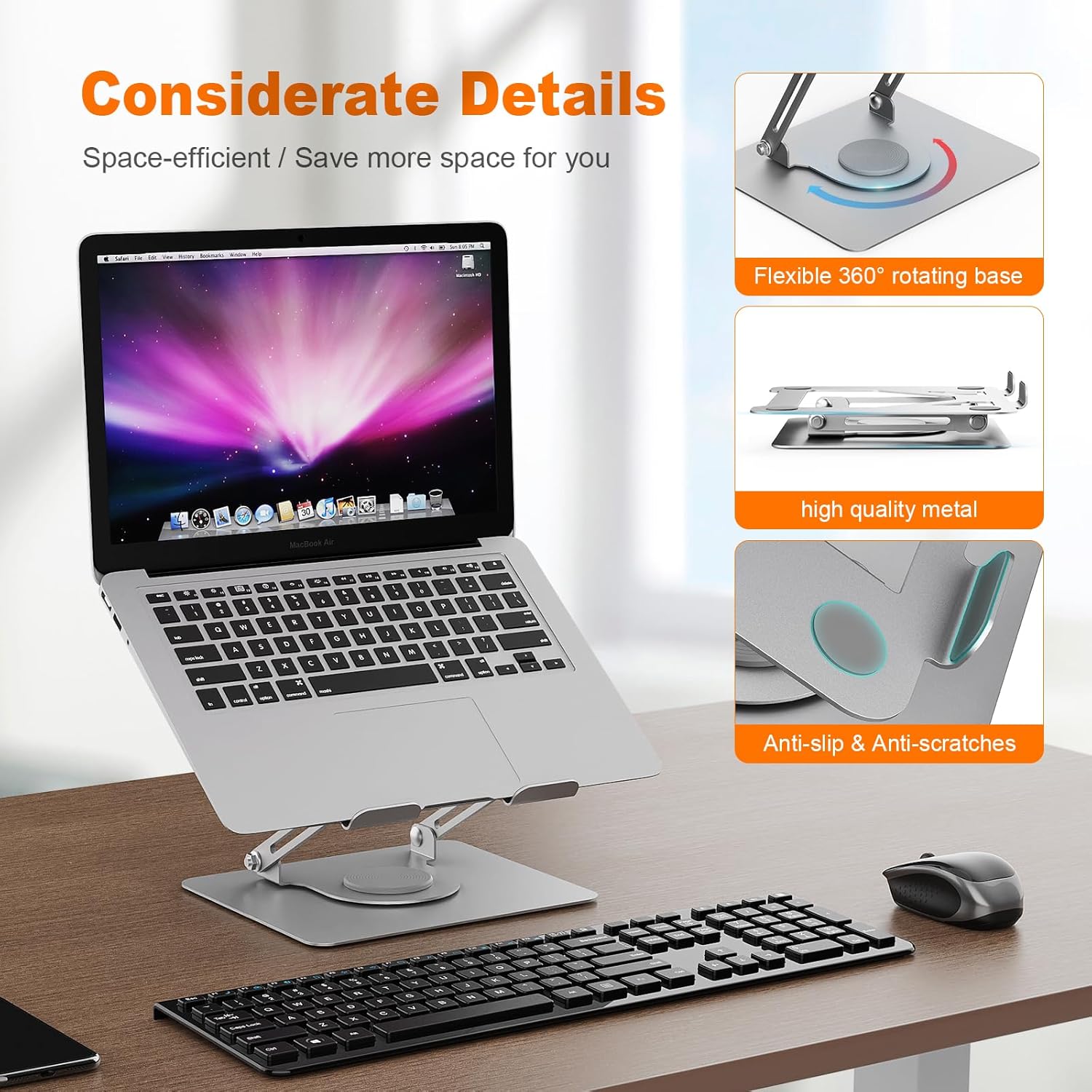
Figure 5: Stable Design Details.
This image provides a detailed view of the stand's construction, emphasizing the flexible 360° rotating base, high-quality metal material, and anti-slip and anti-scratch features designed for stability and protection.
3.4. Ventilated & Cooling Design
The stand features a hollow design that promotes optimal airflow around your laptop. This ventilation helps to prevent overheating, which can improve laptop performance and extend its lifespan.

Figure 6: Heat Dissipation Feature.
This image visually represents the heat dissipation capability of the stand, with blue lines indicating airflow beneath the laptop, demonstrating how the open design helps keep the device cool.
3.5. Wide Compatibility
The GRIFEMA GB1050-1 is compatible with a broad range of laptops and tablets, specifically those measuring between 11 and 17.3 inches. This includes models such as MacBook Air/Pro, Microsoft Surface, Dell XPS, ASUS, Lenovo, Acer, and Chromebooks.
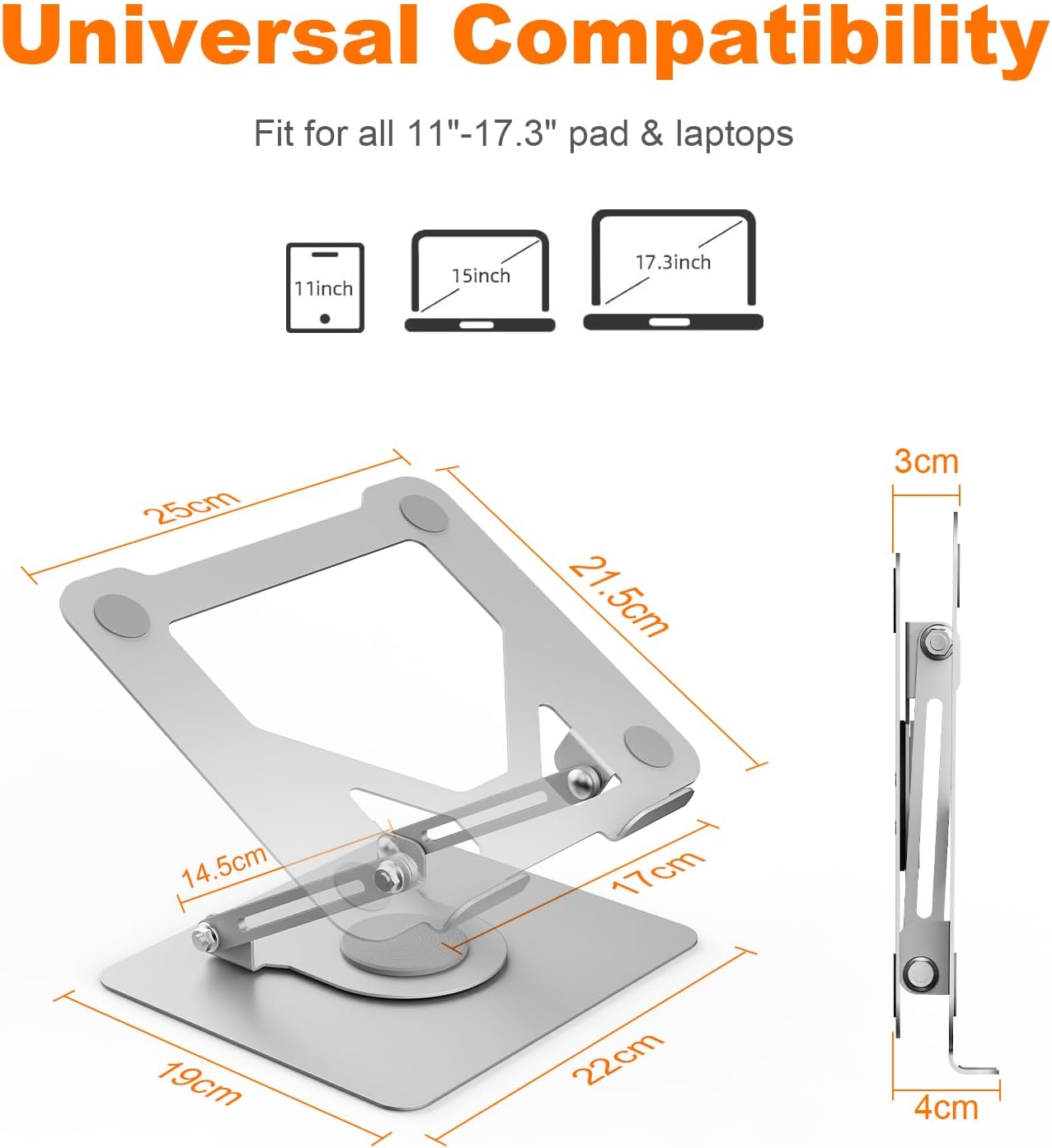
Figure 7: Universal Compatibility and Dimensions.
This image illustrates the stand's universal compatibility with various laptop sizes (11-17.3 inches) and provides key dimensions of the stand itself, including its length, width, and folded height.
4. Setup Instructions
- Unfold the Stand: Carefully unfold the laptop stand from its compact position. The arms will extend, and the base will become stable.
- Place on a Stable Surface: Position the stand on a flat, stable desk or table.
- Adjust Initial Height and Angle: Gently adjust the arms to your desired height and viewing angle. The joints are designed to hold their position once set.
- Place Your Laptop: Carefully place your laptop onto the top platform of the stand, ensuring it rests securely on the non-slip pads.
- Tension Adjustment (Optional): If the stand's joints feel too loose or too stiff, use the included wrench to adjust the tension screws located at the pivot points. Turn clockwise to tighten and counter-clockwise to loosen. Adjust gradually until the desired resistance is achieved.
5. Operating Instructions
5.1. Adjusting Height and Angle
To adjust the height and angle, hold the base of the stand firmly with one hand and gently lift or lower the top platform with the other. Adjust the two main arms simultaneously to achieve your preferred ergonomic position. Ensure your laptop is removed before making significant adjustments to prevent accidental drops.
5.2. Using the 360° Swivel Base
The stand's base allows for full 360° rotation. To swivel your laptop, simply rotate the entire stand from its base. This is particularly useful for sharing your screen with others without needing to reposition the entire setup.
6. Maintenance
- Cleaning: Wipe the stand with a soft, damp cloth. Avoid using abrasive cleaners or solvents, as these may damage the finish.
- Inspection: Periodically check all screws and joints to ensure they are secure. If any joint feels loose, use the provided wrench to tighten it.
- Storage: When not in use for extended periods, fold the stand to its compact form and store it in a dry, safe place.
7. Troubleshooting
| Problem | Possible Cause | Solution |
|---|---|---|
| Stand feels loose or wobbly. | Joints may require tightening. | Use the included wrench to tighten the tension screws at the pivot points. |
| Difficulty adjusting height/angle. | Joints may be too tight. | Use the included wrench to slightly loosen the tension screws at the pivot points. |
| Laptop slides on the stand. | Laptop not properly seated or non-slip pads are dirty. | Ensure the laptop is centered and fully resting on the non-slip pads. Clean the pads if necessary. |
8. Specifications
| Feature | Detail |
|---|---|
| Model Number | GB1050-1 |
| Product Dimensions (Folded) | 9.84 x 8.27 x 1.77 inches (25 x 21 x 4.5 cm) |
| Item Weight | 3.52 pounds (1.6 kg) |
| Material | Premium Alloy Metal |
| Color | Silver |
| Compatibility | 11-17.3 inch Laptops/Tablets (e.g., MacBook Air/Pro, Dell, HP, ASUS, Lenovo, Chromebook) |
| Weight Capacity | Up to 6 kg (13 lbs) |
| Special Features | 360° Swivel Base, Adjustable Height & Angle, Foldable, Ventilated Design, Non-slip Pads |
9. Warranty and Support
Specific warranty details for the GRIFEMA GB1050-1 Laptop Stand are not provided in this manual. For warranty information, technical support, or any inquiries regarding your product, please contact GRIFEMA customer service through their official website or the retailer from whom you purchased the product.
Please retain your proof of purchase for any warranty claims.
Ask a question about this manual
Ask about setup, troubleshooting, compatibility, parts, safety, or missing instructions. Manuals+ will review the question and use this page’s manual context to help answer it.