
Inateck BCST-75S-BK
Contents
Inateck Industrial Barcode Scanner BCST-75S User Manual
Model: BCST-75S-BK
Brand: Inateck
1. Introduction
Thank you for choosing the Inateck Industrial Barcode Scanner BCST-75S. This wireless 2D QR code scanner is designed for demanding environments, featuring IP67 waterproof and dustproof capabilities, and a robust 3.6-meter drop-resistant design. Equipped with a 2600mAh battery and a smart charging stand, it offers superior decoding for various barcode types, including damaged or dirty codes. This manual provides detailed instructions for setup, operation, maintenance, and troubleshooting to ensure optimal performance of your device.
2. Package Contents
Please verify that all items are present and in good condition:
- Inateck BCST-75S Barcode Scanner
- Smart Charging Stand
- USB Cable
- 2.4G Wireless Dongle
- User Manual (this document)
3. Product Overview

Figure 3.1: Inateck BCST-75S Barcode Scanner with Smart Charging Stand.
This image displays the Inateck BCST-75S barcode scanner docked in its smart charging stand. The scanner is black and yellow, designed for industrial use, and features a prominent scanning head and ergonomic grip.
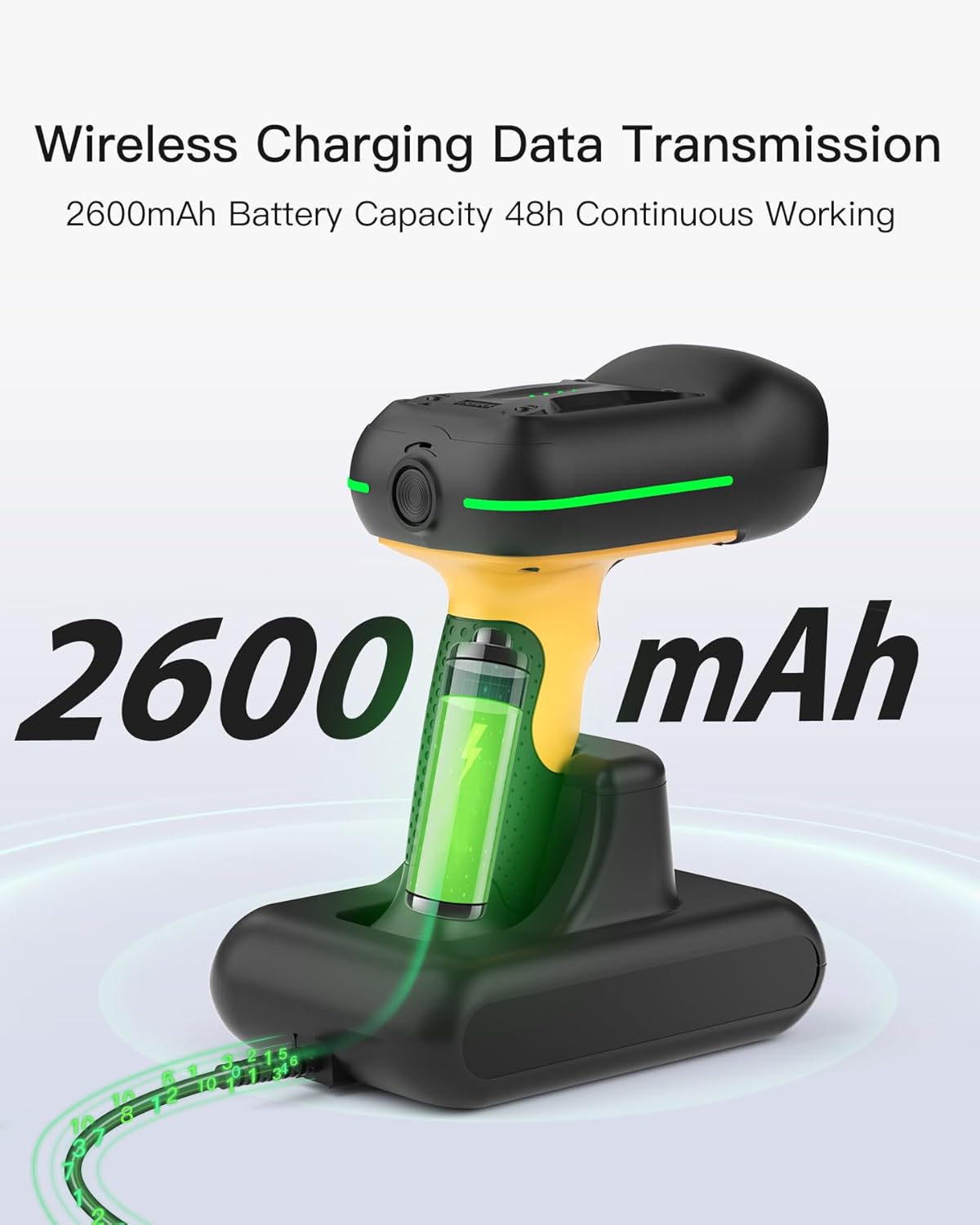
Figure 3.2: Ergonomic Grip of the BCST-75S Scanner.
A hand holds the Inateck BCST-75S scanner, highlighting its comfortable and textured ergonomic grip, designed for extended use.
Scanner Components:
- Scanning Head: Contains the imaging sensor for reading 1D, 2D, and QR codes.
- Trigger Button: Activates the scanning function.
- Ergonomic Grip: Designed for comfortable and secure handling.
- Battery Indicator Lights: Located on the scanner head, showing real-time battery levels.
- USB-C Port: For wired connection and direct charging.
Smart Charging Stand Components:
- Charging Contacts: For wireless charging of the scanner.
- USB Port: For connecting to a host device (PC, POS system) and data transfer.
- 2.4G Wireless Dongle Slot: For secure storage and connection of the wireless dongle.
4. Setup
4.1 Charging the Scanner
Before first use, fully charge the scanner. The 2600mAh battery provides extended operation.
- Connect the USB cable to the Smart Charging Stand and then to a power source (e.g., computer USB port or USB wall adapter).
- Place the BCST-75S scanner onto the charging stand. Ensure the charging contacts align.
- The battery indicator lights on the scanner will illuminate to show charging status. A full charge allows for up to 180,000 scans or 180 days standby.

Figure 4.1: Wireless Charging and Data Transfer via Smart Base.
This image illustrates the BCST-75S scanner charging wirelessly on its base, which is connected to a laptop via a USB cable, enabling both power and data transfer.
4.2 Connecting the Scanner
The BCST-75S supports three connection modes: 2.4G Wireless, Bluetooth, and Wired USB.

Figure 4.2: Three Connection Modes.
This diagram visually explains the three ways to connect the Inateck BCST-75S scanner: via a 2.4G wireless dongle to a desktop PC, via Bluetooth to a tablet, or directly via a USB cable to a laptop.
2.4G Wireless Mode:
- Insert the 2.4G wireless dongle into a USB port on your computer or the Smart Charging Stand.
- The scanner will automatically connect to the dongle. A successful connection is indicated by a specific sound or light pattern (refer to scanner's LED indicators).
- Transmission range can reach up to 100 meters in open environments.
Bluetooth Mode:
- Turn on the scanner.
- Enable Bluetooth on your host device (smartphone, tablet, laptop).
- Search for available Bluetooth devices and select "Inateck BCST-75S" (or similar name).
- Pair the devices. The scanner will confirm successful pairing.
- Transmission range can reach up to 60 meters in indoor settings.
Wired USB Mode:
- Connect the scanner directly to your computer using the provided USB cable.
- The scanner will function as a USB HID keyboard device, and scanned data will be input directly into any active text field.
4.3 Inateck APP & SDK
The Inateck APP (available for Android and iOS) provides advanced configuration options and AI functions for effortless setup and rapid data processing. An SDK is also available for seamless integration with your existing systems.
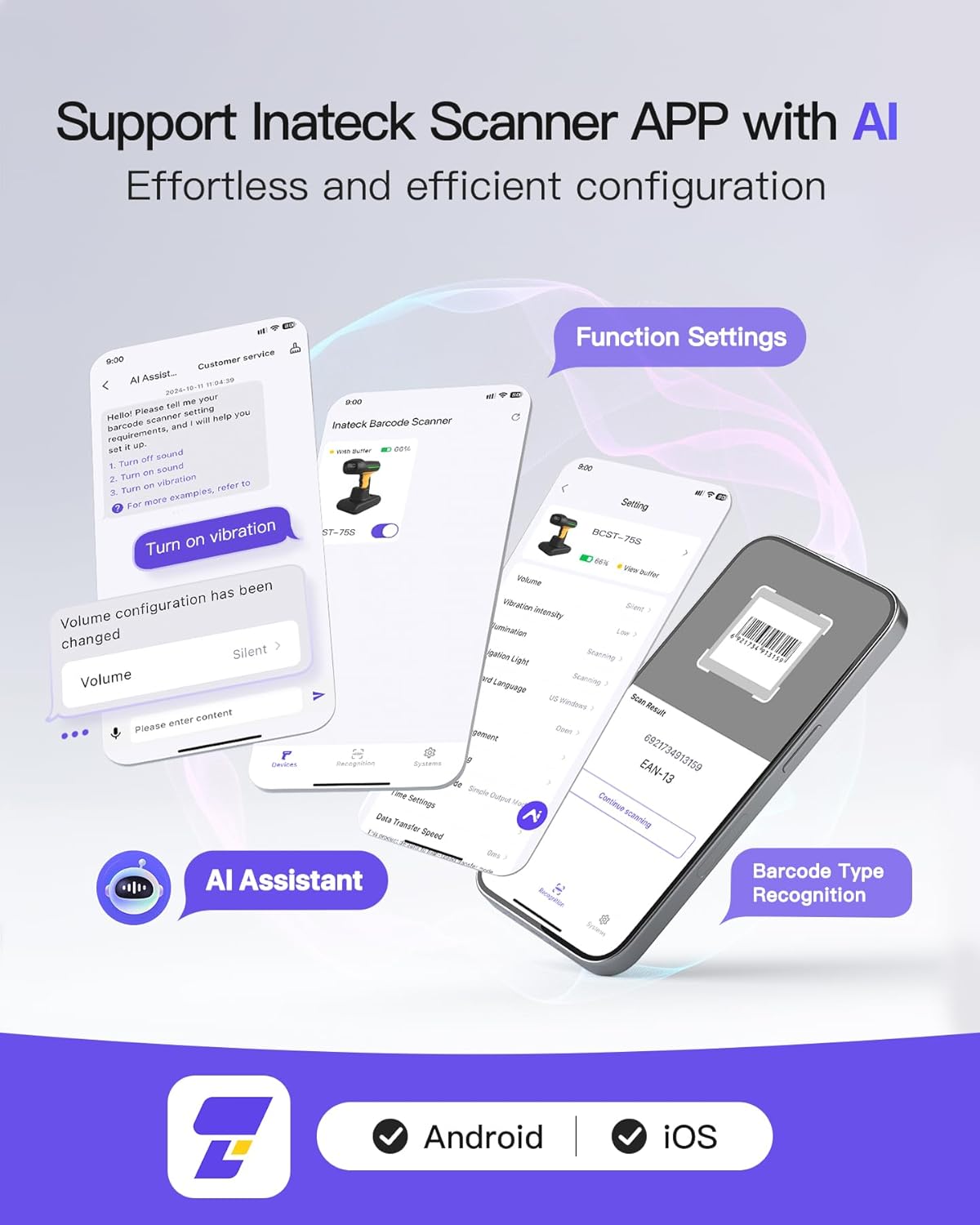
Figure 4.3: Inateck Scanner APP Interface.
This image displays the user interface of the Inateck Scanner APP, showing various settings like volume, vibration intensity, and barcode type recognition, along with an AI Assistant feature.
5. Operating Instructions
5.1 Scanning Barcodes
The BCST-75S offers superior decoding capability, accurately scanning almost all 1D, 2D, and QR codes on paper and screens, including blurry, damaged, or dirty barcodes.
- Ensure the scanner is powered on and connected to your host device.
- Point the scanning window at the barcode you wish to scan.
- Press the trigger button. A successful scan will be indicated by a beep, vibration, or LED flash (configurable via the Inateck APP).
- The scanned data will appear in the active application on your connected device.

Figure 5.1: 1D & 2D Barcode Decoding.
This image illustrates the scanner's ability to read various 1D and 2D barcode formats, including QR codes, DataMatrix, and PDF-417, from both physical labels and digital screens.
5.2 Data Transmission Range
The scanner offers impressive transmission ranges depending on the connection mode:
- 2.4G Wireless Mode: Up to 100 meters in open environments.
- Bluetooth Mode: Up to 60 meters in indoor settings.

Figure 5.2: Hyper Long Transmission Range.
This image shows the extended transmission capabilities of the scanner, with Bluetooth mode reaching 40 meters and 2.4G Wireless Adapter mode reaching 100 meters, demonstrating its suitability for large workspaces.
6. Maintenance
6.1 Cleaning and Care
- Use a soft, damp cloth to clean the scanner's exterior. Avoid abrasive cleaners or solvents.
- Keep the scanning window clean and free of dust or smudges to ensure optimal scanning performance.
- Do not immerse the scanner in liquids beyond its specified IP67 rating.
6.2 Battery Care
- To prolong battery life, avoid fully discharging the battery frequently.
- Store the scanner in a cool, dry place when not in use for extended periods.
- The 2600mAh high-capacity battery is designed for long-lasting performance.
6.3 Durability Features
The Inateck BCST-75S is built for industrial environments:
- IP67 Waterproof and Dustproof: Passed tests for 1-meter underwater immersion for 30 minutes, ensuring performance in damp or dusty conditions.
- 3.6M Drop-resistant: Constructed from sturdy ABS and thickened soft TPU material (over 50% coverage) to withstand falls from up to 11.8 feet (3.6 meters).

Figure 6.1: IP67 Waterproof Test.
This image shows the Inateck BCST-75S scanner partially submerged in water, highlighting its IP67 waterproof and dustproof capabilities.
Video 6.1: Inateck Industrial Barcode Scanner Durability Overview.
This video demonstrates the robust features of the Inateck BCST-75S scanner, including its IP67 waterproof and dustproof rating, 3.6-meter drop resistance, ergonomic design, long battery life, smart charging base, powerful scanning function, exclusive app, and superb compatibility with various devices.
7. Troubleshooting
If you encounter issues with your Inateck BCST-75S scanner, please refer to the following common problems and solutions:
| Problem | Possible Cause | Solution |
|---|---|---|
| Scanner not turning on. | Low battery. | Charge the scanner using the charging stand or USB cable. |
| Cannot scan barcodes. | Scanner not connected; barcode damaged/unreadable; incorrect scanning mode. | Ensure proper connection (2.4G, Bluetooth, or wired). Try scanning a different barcode. Check scanner settings via Inateck APP. |
| Connection issues (Bluetooth/2.4G). | Out of range; interference; pairing error. | Move closer to the host device. Re-pair the scanner. Ensure no strong interference sources are nearby. |
| Scanned data not appearing correctly. | Incorrect keyboard language setting; data format issue. | Adjust keyboard language settings on your host device or via the Inateck APP. Consult the APP for data processing options. |
For further assistance, please contact Inateck customer support.
8. Specifications
| Model Number | BCST-75S-BK |
| Product Dimensions | 4.7 x 3.11 x 7.3 inches |
| Item Weight | 1.35 pounds |
| Battery Capacity | 2600mAh Lithium Ion (included) |
| Connectivity Technology | Bluetooth, 2.4G Wireless, USB Cable |
| Compatible Devices | Tablet, Smartphone, Desktop, Laptop, POS |
| Operating Systems | Windows, Mac, iOS, Android, iPad OS, Linux |
| Waterproof/Dustproof Rating | IP67 |
| Drop Resistance | Up to 3.6 meters (11.8 feet) |
| Manufacturer | Inateck |
| Country of Origin | China |
9. Warranty and Support
Inateck products come with a standard manufacturer's warranty. For detailed warranty information, product registration, or technical support, please visit the official Inateck website or contact their customer service team. Please have your product model number (BCST-75S-BK) and purchase information ready when seeking support.
Official Inateck Website: www.inateck.com
Ask a question about this manual
Ask about setup, troubleshooting, compatibility, parts, safety, or missing instructions. Manuals+ will review the question and use this page’s manual context to help answer it.