1. Introduction
Thank you for choosing the Merax Full Size Daybed. This platform bed frame is designed with an upholstered headboard, multiple storage shelves, and convenient drawers, offering both style and functionality. It also includes a built-in USB charging station for your electronic devices. This manual provides essential information for assembly, operation, maintenance, and troubleshooting to ensure safe and proper use of your new daybed.

Figure 1: Overall view of the Merax Full Size Daybed.
2. Safety Information
Please read and understand all instructions before beginning assembly and use. Failure to follow these instructions may result in injury or damage to the product.
- Keep all small parts away from children during assembly.
- Ensure all connectors are securely tightened before use. Periodically check and re-tighten as necessary.
- Do not stand or jump on the bed frame.
- Do not exceed the recommended weight capacity of 400 lbs.
- Use only the recommended mattress thickness of 8 inches.
- Place the bed on a level and stable surface.
- Exercise caution when using the charging station. Do not overload the outlets.
3. Setup & Assembly
The Merax Full Size Daybed requires assembly. All necessary parts are clearly labeled, and a step-by-step installation manual is included in the packaging. Pre-drilled holes facilitate easy assembly.
3.1 Package Contents
Before starting assembly, verify that all components listed in the included installation manual are present and undamaged. If any parts are missing or damaged, please contact customer support.
3.2 Assembly Steps
- Refer to the detailed step-by-step installation manual provided with your product.
- Lay out all components on a clean, soft surface to prevent scratches.
- Follow the diagrams and instructions carefully, ensuring all screws and fasteners are tightened appropriately. Do not overtighten.
- Assemble the main bed frame, then integrate the storage shelves and drawers.
- Install the upholstered headboard and bed slats.
- Connect the charging station power cable to a suitable wall outlet after assembly is complete.

Figure 2: View of the daybed frame structure with integrated drawers and bed slats.
4. Operating Instructions
4.1 Storage Drawers
The daybed features two spacious drawers located beneath the platform. These drawers are designed for convenient storage of bedding, clothing, toys, or other personal items. Gently pull the handles to open and push to close. Avoid placing excessively heavy items in the drawers to ensure smooth operation and prevent damage.
4.2 Storage Shelves
Built-in storage shelves are integrated into the daybed's design, providing accessible space for books, decorative items, or personal essentials. Ensure items placed on shelves do not obstruct the charging station or fall onto the bed.
4.3 Charging Station
The daybed is equipped with a charging station featuring two standard outlets and two USB ports. To use, ensure the daybed is properly assembled and the power cable is plugged into a functional wall outlet. Connect your devices to the USB ports or standard outlets for convenient charging directly from your bed.

Figure 3: Detail of the integrated charging station with USB ports and power outlets, alongside storage shelves.
4.4 Upholstered Headboard
The linen-upholstered headboard provides comfortable back support for reading or relaxing. It is padded with high-density foam for enhanced comfort.
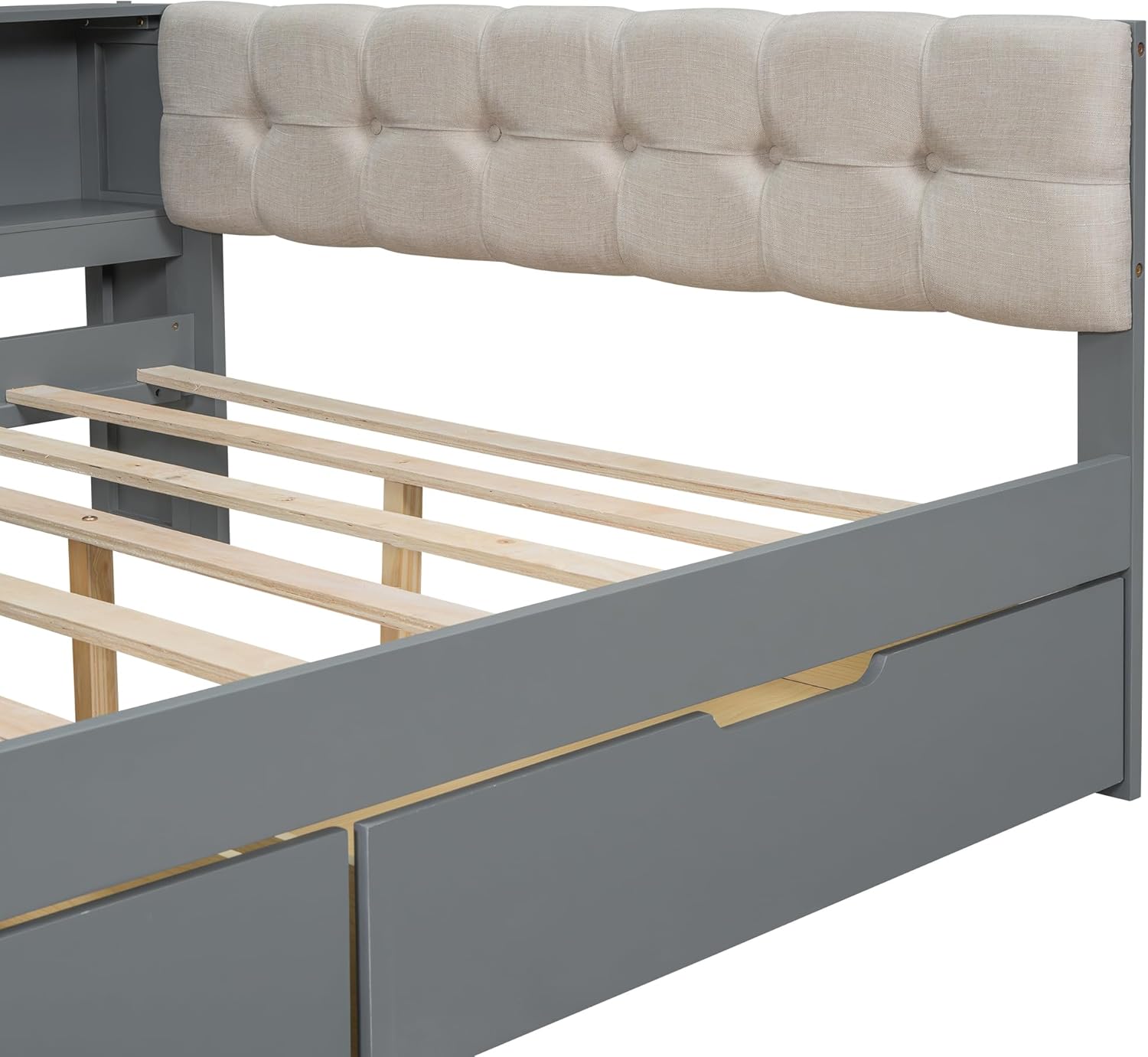
Figure 4: Close-up view of the tufted upholstered headboard.
5. Maintenance
Proper care will extend the life and appearance of your Merax Daybed.
- Cleaning the Frame: Wipe the wood and MDF surfaces with a soft, damp cloth. Avoid harsh chemicals or abrasive cleaners.
- Cleaning the Upholstery: For the linen upholstered headboard, spot clean with a mild detergent and a damp cloth. Blot dry. Do not saturate the fabric.
- Hardware Check: Periodically check all screws and bolts to ensure they remain tight. Re-tighten as needed to maintain stability.
- Charging Station: Keep the charging ports free of dust and debris. Do not attempt to disassemble the charging unit.
6. Troubleshooting
If you encounter issues with your daybed, refer to the following common solutions:
- Bed feels wobbly: Check all assembly hardware. Ensure all screws and bolts are securely tightened.
- Drawers stick or do not slide smoothly: Ensure the drawers are properly aligned on their tracks. Check for any obstructions within the drawer slides.
- Charging station not working: Verify that the daybed's power cable is securely plugged into a functional wall outlet. Test the outlet with another device. Ensure your device's charging cable is not faulty.
- Missing parts during assembly: Refer to the package contents list in your installation manual. Contact customer support if parts are genuinely missing.
For issues not covered here, please contact Merax customer support.
7. Specifications
| Feature | Detail |
|---|---|
| Overall Product Dimensions | 88.3"L x 65.1"W x 29.5"H |
| Full Bed Dimensions | 75.2" x 54.6" |
| Total Height | 29.5" |
| Number of Bed Slats | 10 pcs |
| Recommended Mattress Thickness | 8" |
| Bed Weight Capacity | 400 lbs |
| Material | Pine Wood, MDF, Linen |
| Color | Grey |
| Assembly Required | Yes |
| ASIN | B0DNDNWCYK |
| GTIN/UPC | 196986877672 |
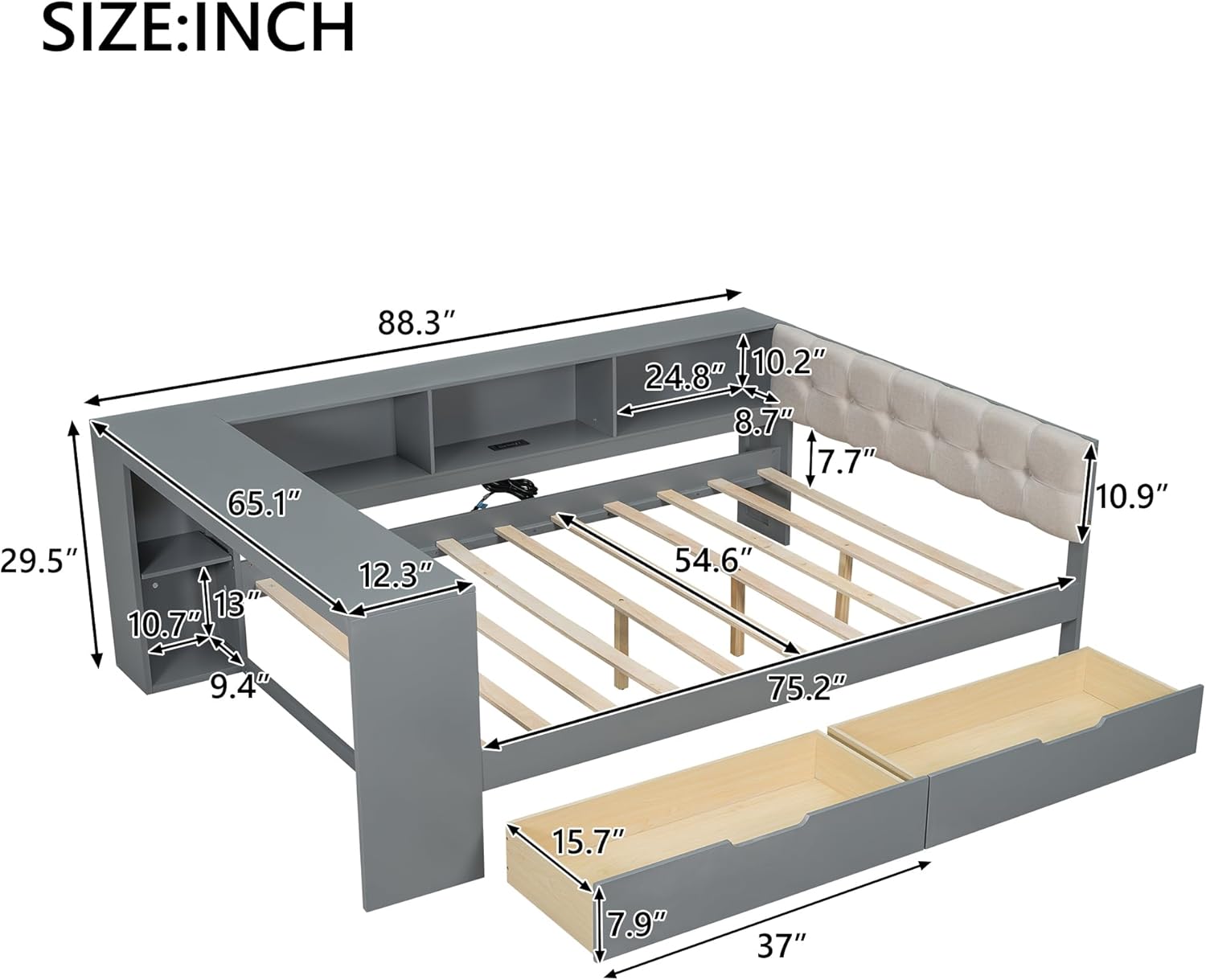
Figure 5: Detailed dimensions of the Merax Full Size Daybed. All measurements are in inches.
8. Warranty & Support
Merax products are manufactured with quality and care. For specific warranty information regarding your Full Size Daybed, please refer to the warranty card included in your product packaging or visit the official Merax website.
If you require assistance with assembly, have questions about product features, or need to report a missing/damaged part, please contact Merax customer support through their official channels. Please have your model number (B0DNDNWCYK) and purchase date ready when contacting support.
9. Product Videos
9.1 Product Overview Video
Video 1: A brief overview of the Merax Full Size Daybed, showcasing its features and design.
9.2 Feature Highlight Video
Video 2: This video highlights key features of the daybed, including the storage drawers, shelves, and charging station.


