1. Introduction
The BAOFENG 5RH PRO is an advanced tri-band handheld radio designed for reliable communication across multiple frequency ranges. Featuring GPS and APRS capabilities, NOAA weather alerts, and flexible charging options, this device is suitable for various outdoor activities, emergency preparedness, and amateur radio use. This manual provides detailed instructions to help you understand and utilize all functions of your new radio.

Image 1.1: BAOFENG 5RH PRO Ham Radio and included accessories.
2. What's in the Box
Verify that all items are present in your package:
- 1 x BAOFENG 5RH PRO Radio Body
- 1 x Standard Antenna
- 1 x 2500mAh Lithium-Ion Battery
- 1 x Headset
- 1 x 15.12" 771 High Gain Antenna
- 1 x 15.12" Aviation Antenna
- 1 x Type-C Charger with Cable
- 1 x Belt Clip
- 1 x Hand Strap
- 1 x Base Charger (Desktop Cradle)
- 1 x User Manual (this document)

Image 2.1: Included antennas for various applications.
3. Product Features Overview
The BAOFENG 5RH PRO offers a range of features for enhanced communication and safety:
- GPS & APRS Functions: For location sharing and acquisition.
- 10W Max Output: Provides extended communication range.
- Tri-Band Frequency: Covers FM, AM, VHF, 1.25M, and UHF bands.
- 640 Customizable Channels: Organized into 10 zones for efficient management.
- NOAA Weather Alerts: Real-time warnings for severe weather conditions.
- 1.77-inch Color Screen: Clear display of frequency, status, and menu options.
- Type-C Charging: Convenient and versatile charging options.
- Fall-down Alarm: An automatic alert system for user safety.
- High Gain Antennas: Includes both 771 and Aviation antennas for optimized performance.
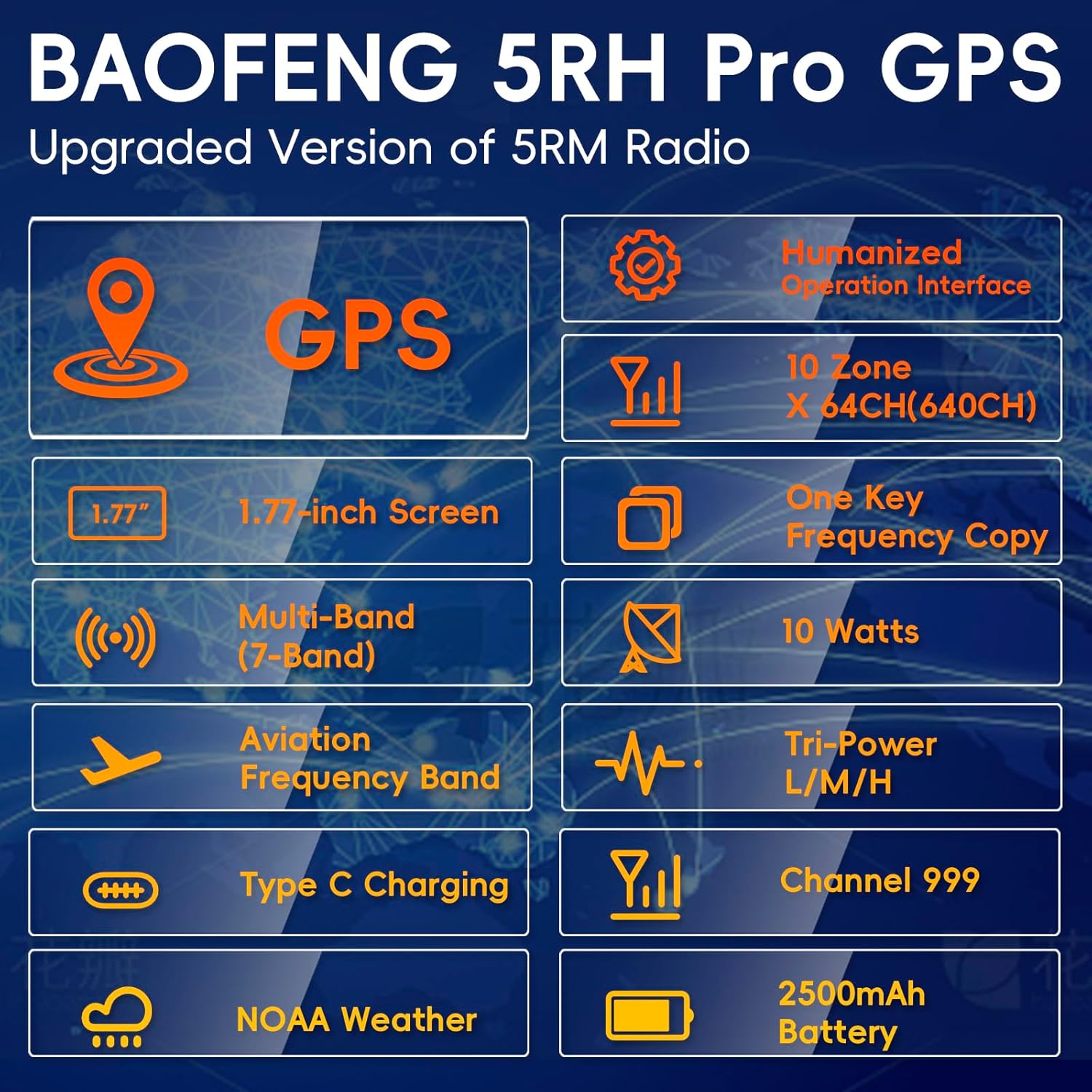
Image 3.1: Overview of BAOFENG 5RH PRO key features.
4. Setup
4.1 Battery Installation and Charging
To install the battery, align the battery pack with the grooves on the back of the radio and slide it upwards until it clicks into place. To remove, press the release latch and slide the battery downwards.
The 5RH PRO battery can be charged using the included desktop base charger or directly via the Type-C port on the battery itself. The Type-C charging offers flexibility, allowing you to charge from a laptop, power bank, or car adapter.

Image 4.1: Battery with Type-C charging and multiple charging methods.
4.2 Antenna Attachment
Screw the desired antenna (standard, 771 high gain, or aviation) clockwise onto the antenna connector on top of the radio until it is finger-tight. Do not overtighten.
5. Operating Instructions
5.1 Power On/Off and Volume
Rotate the power/volume knob clockwise to turn on the radio and adjust the volume. Rotate counter-clockwise until a click is heard to turn off the radio.
5.2 Display and Menu Navigation
The 1.77-inch color screen displays essential information such as frequency, battery level, signal strength, and various status icons. Use the menu button and arrow keys to navigate through settings and options.
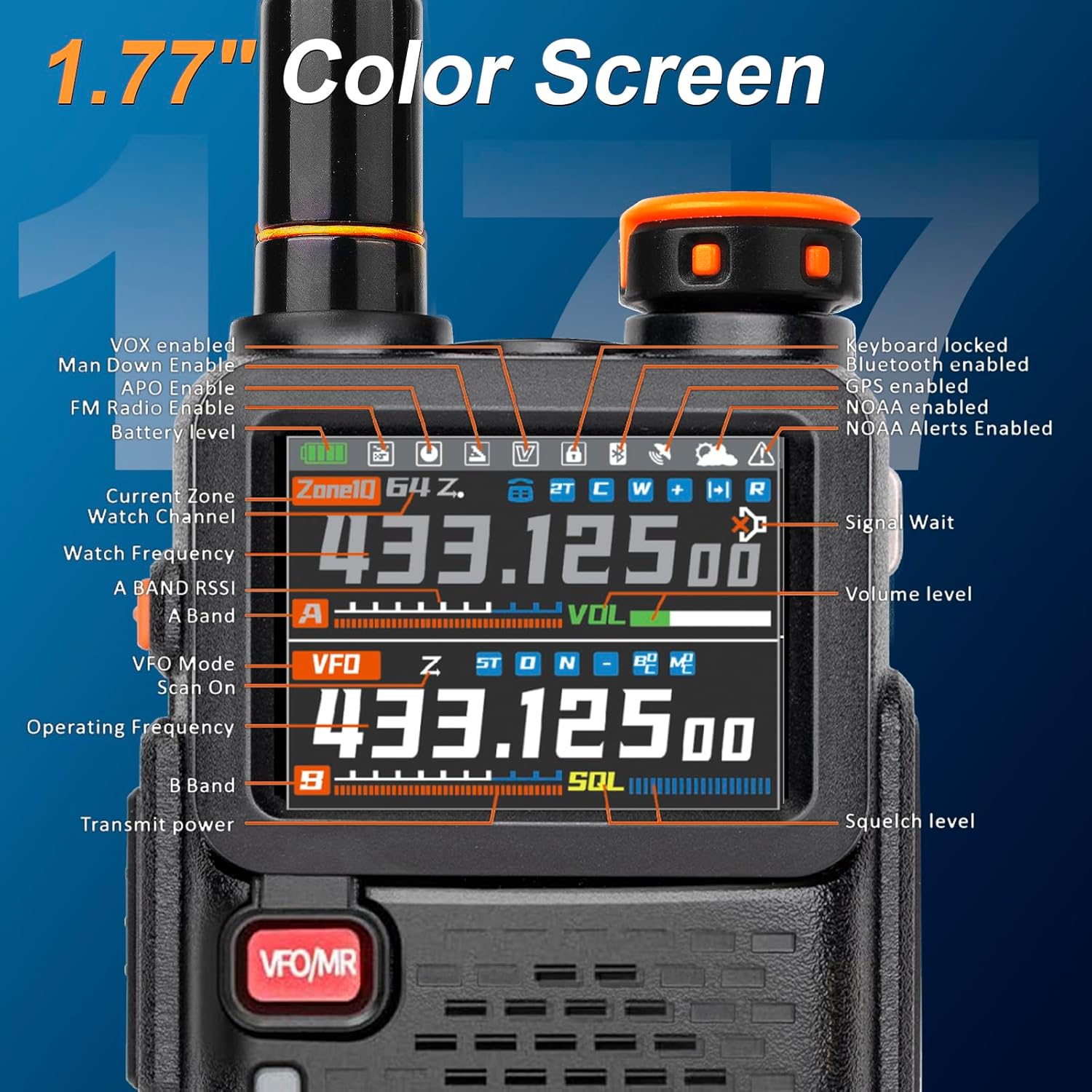
Image 5.1: 1.77-inch Color Screen details.

Image 5.2: Example of customized display options.
5.3 GPS and APRS Functionality
The BAOFENG 5RH PRO integrates GPS for location tracking and APRS for location sharing. To activate GPS, long-press the orange button on the side of the radio. To view your current location information (longitude, latitude, altitude, satellites), long-press the green 'Return' button. For optimal GPS signal acquisition, use this function in open areas or on rooftops.
Video 5.3.1: Demonstrates how to access GPS information on the BAOFENG 5RH PRO.

Image 5.3.2: Step-by-step guide for using the GPS function.
APRS (Automatic Packet Reporting System) allows for real-time location sharing. Ensure your radio is configured correctly for APRS operation. The radio supports up to 80 GPS contacts.

Image 5.3.3: GPS and APRS capabilities for location tracking and sharing.
5.4 Multi-Band Frequency and Channel Management
The 5RH PRO supports a wide range of frequencies, including UHF (400-520MHz, 350-390MHz), VHF (136-174MHz), 1.25M (220-260MHz), FM (76-108MHz), and AM (108-136MHz). It features 640 customizable channels organized into 10 zones, allowing for efficient group communication.

Image 5.4.1: Transmit and Receive frequency ranges.

Image 5.4.2: Channel organization into 10 groups for diverse uses.
5.5 NOAA Weather Alerts
The integrated NOAA receiver provides early warnings for severe weather conditions. Enable this feature to receive real-time alerts for storms, floods, and other extreme weather events, enhancing your safety.

Image 5.5.1: NOAA Weather Radio for hazard alerts.
5.6 Power Output Settings
The radio offers a maximum output of 10 watts, with Tri-Power settings (Low, Medium, High) to conserve battery life or extend range as needed. Adjust power output through the radio's menu.

Image 5.6.1: Tri-Power settings and approximate range.
5.7 Fall-down Alarm
This safety feature can detect if the radio user has fallen and automatically trigger an alarm or send a distress signal. Refer to the menu settings to enable and configure this function.

Image 5.7.1: Fall-down alarm feature for user safety.
5.8 Programming Software (CPS)
While basic settings can be adjusted directly on the radio, advanced programming and channel management are best done using dedicated Computer Programming Software (CPS). This allows for efficient configuration of multiple channels, tones, and other parameters. The 5RH PRO does not support CHIRP software; please use the official CPS provided by BAOFENG/TIDRADIO. The software can typically be downloaded from the manufacturer's website or a link provided in the included documentation.
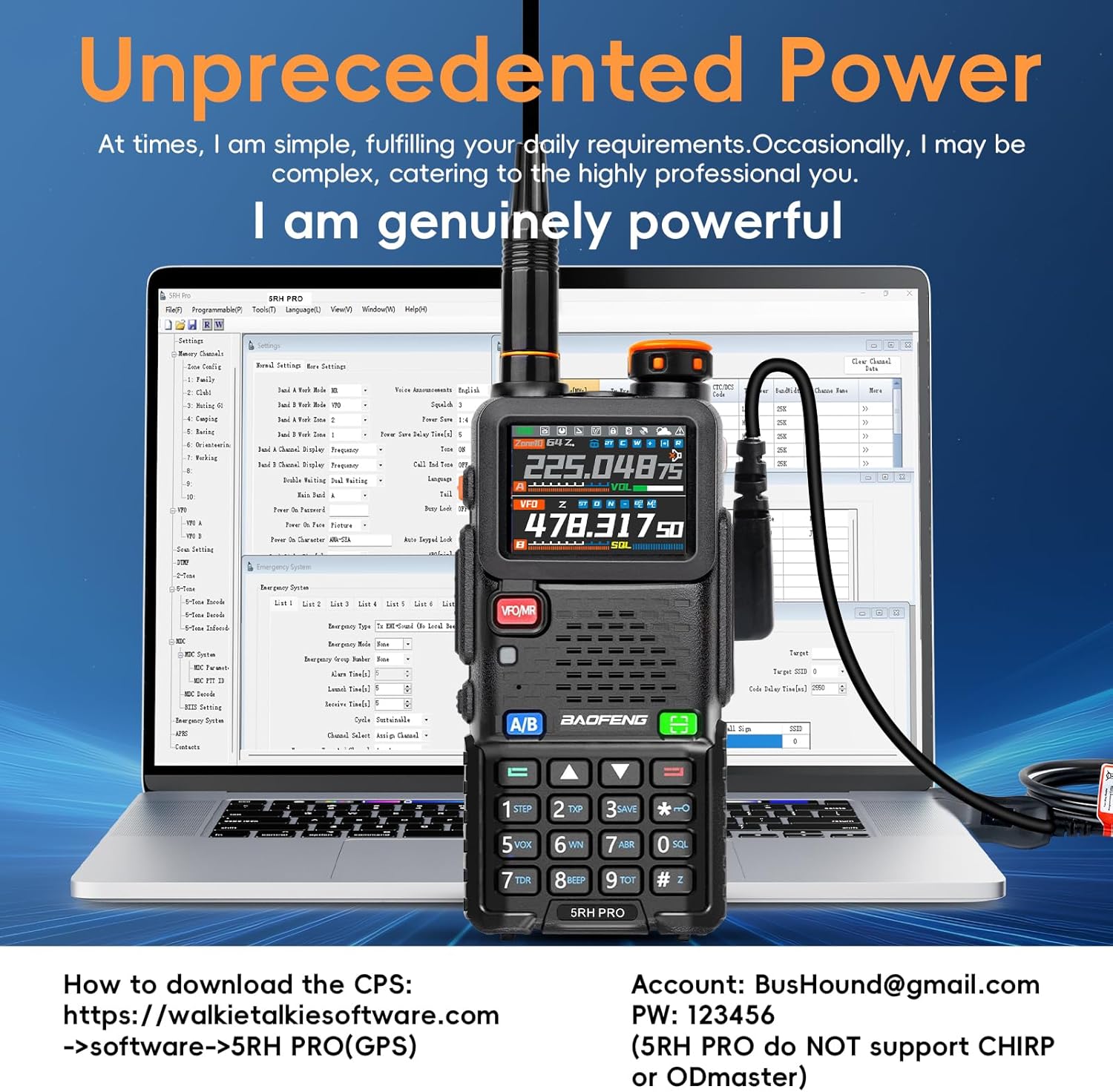
Image 5.8.1: Radio connected to a computer for programming via CPS.
Video 5.8.2: Overview of the BAOFENG 5RH PRO's features, including GPS and APRS.
6. Maintenance
To ensure the longevity and optimal performance of your BAOFENG 5RH PRO, follow these maintenance guidelines:
- Cleaning: Wipe the radio with a soft, damp cloth. Do not use harsh chemicals or abrasive cleaners.
- Battery Care: Avoid fully discharging the battery frequently. Store the radio and battery in a cool, dry place when not in use for extended periods.
- Antenna Care: Ensure antennas are securely attached but not overtightened. Avoid bending or stressing the antenna connection.
- Water Resistance: This radio is not water resistant. Protect it from rain, splashes, and immersion in water.
7. Troubleshooting
If you encounter issues with your radio, consider the following common solutions:
- No Power: Check battery charge level. Ensure the battery is correctly installed.
- No Reception/Transmission: Verify antenna is securely attached. Check frequency settings and ensure you are on an active channel. Confirm power output setting is appropriate for your range.
- Poor Audio Quality: Check volume level. Ensure the headset or speaker mic is properly connected.
- GPS Not Acquiring Signal: Move to an open area with a clear view of the sky. Ensure GPS function is enabled.
- Radio Not Responding: Try turning the radio off and on again. If unresponsive, remove and reinsert the battery.
For persistent issues, consult the manufacturer's support resources or contact customer service.
8. Specifications
| Feature | Specification |
|---|---|
| Model Number | 5RH Pro |
| Item Weight | 1.52 pounds |
| Package Dimensions | 8.03 x 4.72 x 4.29 inches |
| Battery Type | 1 Lithium Ion battery (included) |
| Battery Capacity | 2500mAh |
| Battery Life | Up to 52 Hours |
| Number of Channels | 999 |
| Frequency Range | UHF/VHF (Multi-Band) |
| Talking Range Maximum | 10 Kilometers |
| Water Resistance Level | Not Water Resistant |
| Special Features | One Key Frequency Copy, Multi-Band Frequency, NOAA Weather Mode, GPS Function, USB-C Charging |
9. Warranty and Support
For warranty information and technical support, please refer to the official documentation included with your product or visit the BAOFENG website. You may also contact the seller, TIDRADIO Direct, for assistance.


