
1. Introduction
This manual provides essential information for the safe and efficient use of the OMRON R88D-1SN04H-ECT AC Servo Drive. It covers installation, operation, maintenance, and troubleshooting procedures. Please read this manual thoroughly before attempting to install, operate, or maintain the device to ensure proper functionality and prevent potential hazards.
2. Safety Information
Always observe the following safety precautions to prevent injury to personnel and damage to the equipment.
- Electrical Safety: Ensure power is disconnected before performing any wiring or maintenance. Only qualified personnel should handle electrical connections.
- Grounding: Properly ground the servo drive to prevent electric shock and ensure stable operation.
- Environment: Install the device in an environment free from excessive dust, moisture, corrosive gases, and extreme temperatures.
- Handling: The unit has a mass of 1.5 kg. Handle with care to avoid dropping or impact.
- Modifications: Do not modify the servo drive. Unauthorized modifications can lead to malfunction and void the warranty.
3. Product Overview
The OMRON R88D-1SN04H-ECT is an advanced AC Servo Drive designed for precise motion control applications. It is engineered to provide reliable performance and integration within industrial automation systems.
Product Identification
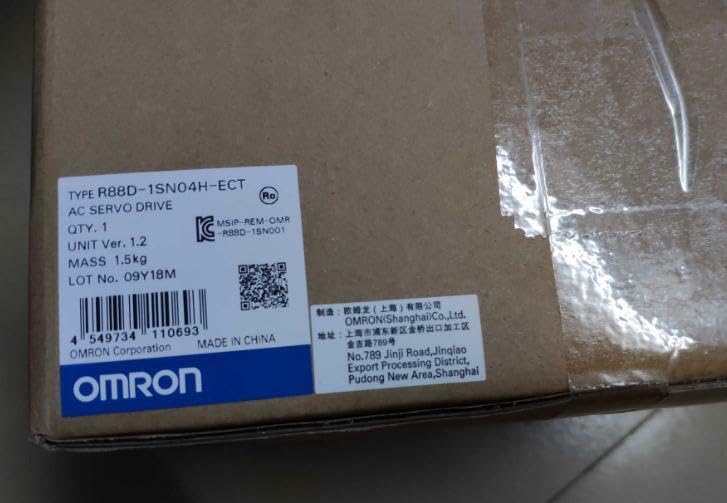
The servo drive is identified by its model number R88D-1SN04H-ECT. Key details such as mass, lot number, and manufacturing origin are typically found on the product packaging label.
4. Setup
Proper setup is crucial for the optimal performance and longevity of the AC Servo Drive.
4.1. Mounting
- Mount the servo drive vertically in a control panel to ensure adequate heat dissipation.
- Allow sufficient clearance around the unit for ventilation.
- Secure the unit using appropriate fasteners to prevent vibration.
4.2. Wiring
- Connect the main power supply according to local electrical codes and the drive's specifications.
- Connect the motor power and encoder cables to their respective terminals.
- Ensure all connections are secure and properly insulated.
- Verify correct grounding of the unit and associated components.
4.3. Initial Power-Up
- Before applying power, double-check all wiring connections.
- Apply power and observe the status indicators on the drive.
- Refer to the detailed wiring diagrams and power-up sequence in the comprehensive technical manual for specific instructions.
5. Operating Instructions
Once the servo drive is properly installed and powered, it can be operated through its control interface or via a connected controller.
5.1. Basic Operation
- Power On: Turn on the main power supply to the servo drive.
- Status Check: Verify that the status indicators show normal operation (e.g., no error codes).
- Enable Servo: Send an enable command from the host controller to activate the servo motor.
- Motion Control: Issue motion commands (e.g., position, velocity, torque) from the controller to the servo drive.
- Power Off: Disable the servo and then turn off the main power supply.
5.2. Parameter Settings
The servo drive's behavior can be customized through various parameters. These parameters are typically set using a dedicated software tool or a programming device connected to the drive. Refer to the detailed programming manual for a complete list of parameters and their functions.
6. Maintenance
Regular maintenance helps ensure the long-term reliability and performance of the OMRON R88D-1SN04H-ECT AC Servo Drive.
6.1. Routine Inspection
- Visual Check: Periodically inspect the unit for any signs of damage, discoloration, or loose connections.
- Dust Removal: Keep the unit and its ventilation openings free from dust and debris. Use compressed air or a soft brush.
- Cable Integrity: Check all cables for wear, fraying, or damage. Replace damaged cables immediately.
- Tightness: Verify that all terminal screws and mounting bolts are securely tightened.
6.2. Cleaning
Use a soft, dry cloth for cleaning the exterior of the servo drive. Do not use solvents or abrasive cleaners, as they may damage the casing or labels.
7. Troubleshooting
This section provides guidance for resolving common issues. For complex problems, contact technical support.
| Problem | Possible Cause | Solution |
|---|---|---|
| Servo drive does not power on | No power supply; Incorrect wiring | Check power connections and circuit breaker; Verify wiring against diagrams. |
| Motor does not move | Servo not enabled; Incorrect parameters; Motor or encoder wiring issue | Ensure servo enable signal is active; Check parameter settings; Inspect motor and encoder connections. |
| Error code displayed | Specific fault condition | Refer to the detailed error code list in the technical manual for specific remedies. |
| Excessive vibration or noise | Improper tuning; Mechanical issue; Loose mounting | Adjust servo gain parameters; Check mechanical load; Secure mounting. |
8. Specifications
Key technical specifications for the OMRON R88D-1SN04H-ECT AC Servo Drive:
- Model: R88D-1SN04H-ECT
- Type: AC Servo Drive
- Quantity: 1 Unit
- Unit Version: 1.2
- Mass: 1.5 kg
- Lot Number: 09Y18M
- Manufacturer: OMRON (Shanghai) Co., Ltd.
- Manufacturing Origin: Made in China
- ASIN: B0DNDGL56J
- UPC: 4549734110693
- Manufacturer Address: No.789 Jinji Road, Jinqiao Export Processing District, Pudong New Area, Shanghai
9. Warranty and Support
For warranty information, technical support, or service inquiries regarding your OMRON R88D-1SN04H-ECT AC Servo Drive, please contact OMRON Corporation or your local authorized distributor. Ensure you have the product model number and any relevant purchase details available when contacting support.
Manufacturer: OMRON (Shanghai) Co., Ltd.
Address: No.789 Jinji Road, Jinqiao Export Processing District, Pudong New Area, Shanghai


