1. Product Overview
The Orbegozo DH3010 Dehumidifier is an essential device designed to maintain a healthy and comfortable environment in your home or workplace. This model offers advanced features for effective humidity control.
It boasts a dehumidification capacity of 30 liters per day (at 80% relative humidity and 30°C), making it suitable for areas up to 140 m². This makes it ideal for living rooms, bedrooms, basements, offices, garages, and more.
Key Features:
- Dehumidification Capacity: 30 L/Day (80% RH 30°C)
- Power: 490 W
- Refrigerant: R290 (environmentally friendly)
- 24-hour Timer for automatic on/off
- LED Display for easy monitoring
- Maximum Noise Level: 43 dB
- Humidity Adjustment Range: 30% – 90%
- Application Area: Up to 140 m²
- Continuous Drainage Connection
- Operation Indicator Light and Full Tank Indicator
- Anti-freeze System
- Foldable Handle and Wheels for easy transport
- Integrated Cable Organizer
- Reusable and Washable Anti-dust Filter
- Water Tank Capacity: 4.8 L with water level window
2. Safety Information
Before operating the Orbegozo DH3010 Dehumidifier, please read all safety instructions carefully to prevent injury or damage. Keep this manual for future reference.
- Always place the unit on a stable, level surface.
- Ensure proper ventilation around the unit. Do not block air inlets or outlets.
- Do not operate the unit near flammable gases or materials.
- Keep children and pets away from the appliance during operation.
- Unplug the unit before cleaning or maintenance.
- Do not immerse the unit in water or other liquids.
- If the power cord is damaged, it must be replaced by the manufacturer or a qualified service agent.
3. Product Components
Familiarize yourself with the main parts of your Orbegozo DH3010 Dehumidifier.

Image 1: Front view of the Orbegozo DH3010 Dehumidifier, showing the air intake grille and water tank level indicator.

Image 2: Top view of the dehumidifier, highlighting the digital LED control panel with various function buttons.

Image 3: Side view showing the integrated foldable handle for easy portability.
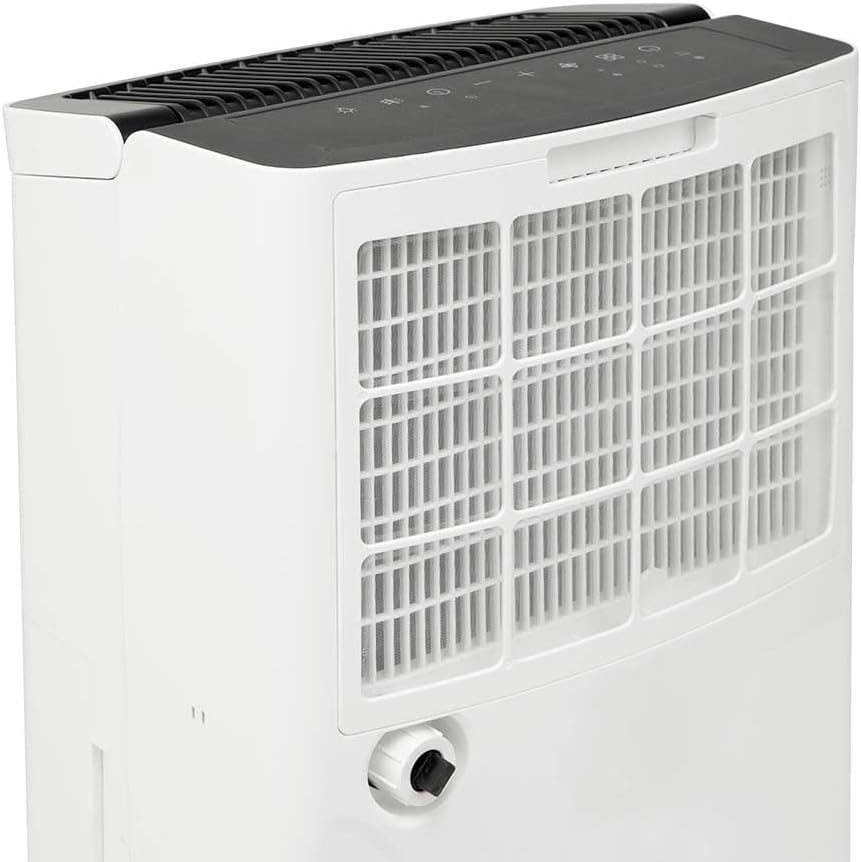
Image 4: Rear-side view illustrating the removable air filter cover and the continuous drainage outlet.
4. Setup
Follow these steps to set up your dehumidifier for first use:
- Unpacking: Carefully remove the dehumidifier from its packaging. Retain all packaging materials for future storage or transport.
- Placement: Place the unit on a firm, level surface in the desired room. Ensure there is at least 20 cm (8 inches) of space around the unit for proper air circulation.
- Power Connection: Plug the power cord into a grounded electrical outlet.
- Water Tank: Ensure the water tank is correctly inserted into the unit.
Continuous Drainage Setup (Optional):
For continuous operation without needing to empty the water tank, you can set up continuous drainage:
- Locate the continuous drainage outlet on the back of the unit (refer to Image 4).
- Connect a suitable drainage hose (not included) to this outlet.
- Ensure the hose is sloped downwards to allow water to drain by gravity into a floor drain or a larger container.
5. Operating Instructions
Your Orbegozo DH3010 Dehumidifier features an intuitive LED control panel for easy operation.
Control Panel Functions (Refer to Image 2):
- Power Button: Turns the unit on or off.
- Mode Button: Cycles through available operating modes (e.g., Auto, Continuous, Laundry).
- Humidity Setting Buttons (Up/Down Arrows): Adjusts the desired humidity level (30% - 90%).
- Fan Speed Button: Selects fan speed (Low/High).
- Timer Button: Sets the 24-hour timer for automatic on/off.
- Display Button: Toggles display information or brightness.
- Child Lock: Activates/deactivates child lock (press and hold).
- Water Full Indicator: Illuminates when the water tank is full, and the unit will automatically shut off.
First Use:
- Press the Power button to turn on the unit.
- Use the Humidity Setting buttons to set your desired humidity level. A common comfortable range is 40-60%.
- Select the desired fan speed.
- The unit will begin to operate, and the LED display will show the current room humidity.
App Control (if applicable):
Some models may offer smart app control for remote operation and monitoring. Refer to the specific app instructions for pairing and usage.
Video 1: This video demonstrates the unboxing, setup, and app control features of a similar dehumidifier. It shows how to connect the continuous drainage hose, remove the filter for cleaning, and adjust settings via a smartphone app, including humidity levels and fan speed. While not the exact Orbegozo DH3010, the general principles of operation and maintenance are applicable.
6. Maintenance
Regular maintenance ensures the longevity and efficient operation of your dehumidifier.
Emptying the Water Tank:
- When the water tank is full, the "Water Full" indicator will light up, and the unit will stop operating.
- Carefully pull out the water tank from the front of the unit.
- Empty the collected water into a sink or drain.
- Reinsert the empty water tank firmly into the unit until it clicks into place. The unit will resume operation.
Cleaning the Air Filter:
The reusable anti-dust filter should be cleaned regularly (every 2-4 weeks, depending on usage) to maintain optimal performance.
- Turn off and unplug the dehumidifier.
- Remove the filter cover from the side/rear of the unit (refer to Image 4).
- Carefully remove the air filter.
- Clean the filter with a vacuum cleaner or wash it gently with warm, soapy water.
- Rinse thoroughly and allow it to air dry completely before reinserting.
- Place the dry filter back into the unit and close the cover.
Cleaning the Unit Exterior:
- Wipe the exterior of the unit with a soft, damp cloth.
- Do not use abrasive cleaners or solvents.
7. Troubleshooting
If you encounter any issues with your dehumidifier, consult the following common problems and solutions:
| Problem | Possible Cause | Solution |
|---|---|---|
| Unit does not turn on. | No power supply; Power button not pressed. | Check power cord connection and outlet; Press the Power button. |
| No dehumidification. | Humidity setting too high; Room temperature too low; Air filter blocked. | Lower the desired humidity setting; Ensure room temperature is above 5°C; Clean the air filter. |
| "Water Full" indicator is on, but tank is not full. | Water tank not correctly inserted. | Remove and reinsert the water tank firmly. |
| Unit is noisy. | Unit not on a level surface; Air filter blocked. | Place the unit on a flat, stable surface; Clean the air filter. |
If the problem persists after trying these solutions, please contact customer support.
8. Specifications
Detailed technical specifications for the Orbegozo DH3010 Dehumidifier:
| Feature | Value |
|---|---|
| Brand | Orbegozo |
| Model | DH3010 |
| Color | White |
| Dehumidification Capacity | 30 L/Day (80% RH 30°C) |
| Power | 490 W |
| Refrigerant | R290 |
| Maximum Noise Level | 43 dB |
| Humidity Adjustment | 30% – 90% |
| Application Area | Up to 140 m² |
| Water Tank Capacity | 4.8 L |
| Dimensions (W x H x D) | 34.5 x 50.4 x 24.3 cm |
| Net Weight | 13.7 kg |
| Voltage/Frequency | 220 – 240 V ~ 50 Hz |
| Special Features | Timer, Continuous Drainage, Anti-freeze System, LED Display, Wheels |
9. Warranty and Support
Your Orbegozo DH3010 Dehumidifier comes with a standard manufacturer's warranty. Please refer to the warranty card included in the product packaging for specific terms and conditions.
For technical support, troubleshooting assistance, or spare parts, please contact Orbegozo customer service through their official website or the contact information provided in your warranty documentation.


